
Introduction
Thank you for choosing the Linsoul Kiwi Ears Ellipse Over-Ear Headphones. These headphones are engineered to deliver studio-grade audio quality with a balanced and natural sound signature, suitable for musicians, audiophiles, gamers, and general music enthusiasts. Featuring a 50mm dynamic driver and an open-back design, the Ellipse provides an immersive listening experience with exceptional clarity and comfort.

Image: Linsoul Kiwi Ears Ellipse headphones showcasing their studio-grade features including 50mm dynamic driver, PU and PEK composite diaphragms, open-back design, vegan-leather padded earmuffs, adjustable headband, and 3.5mm & 6.35mm compatibility.
Package Contents
Please ensure all items are present in your package:
- Kiwi Ears Ellipse Over-Ear Headphones
- Detachable Audio Cable (3 meters) with 3.5mm plug
- 6.35mm Adapter Plug
- User Manual
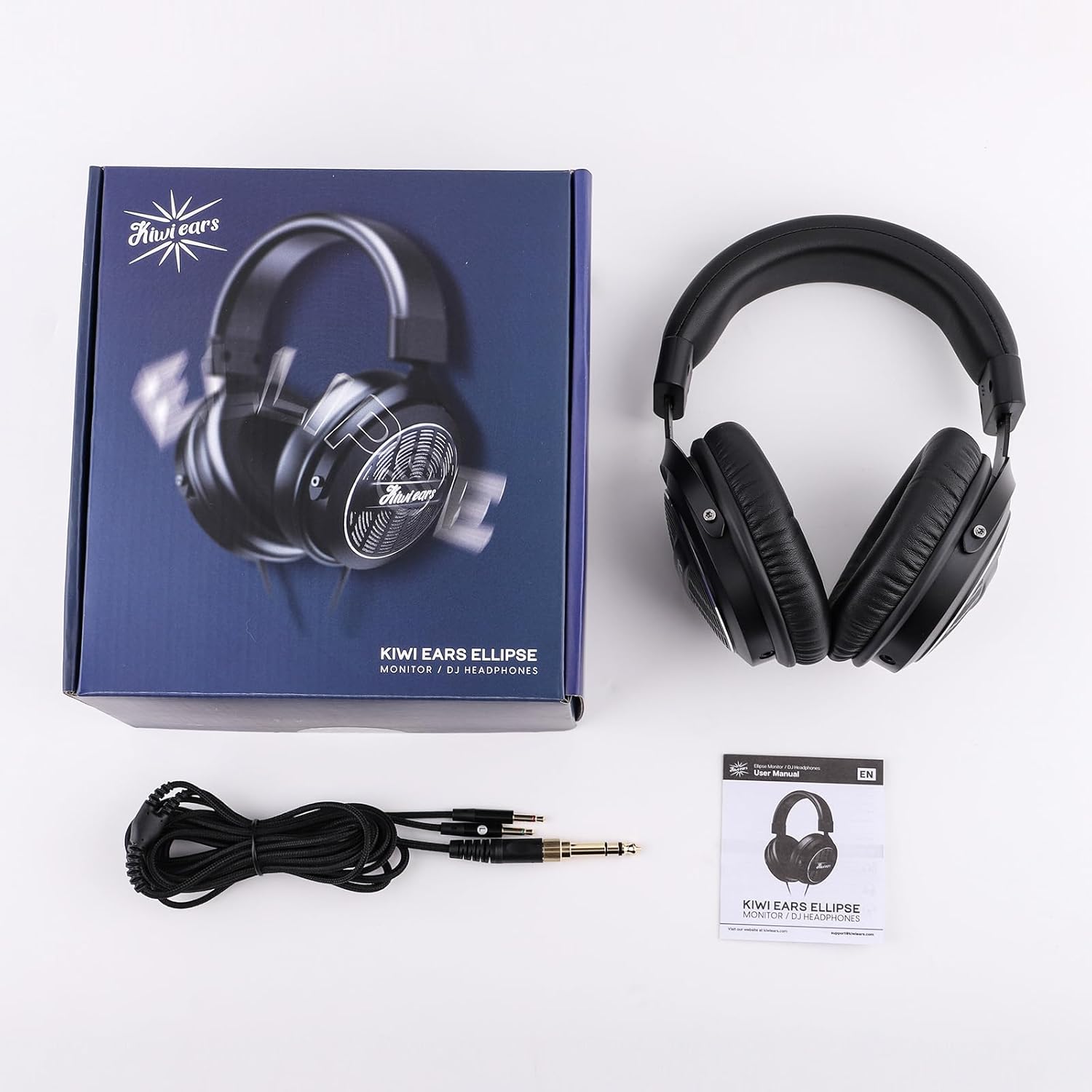
Image: The Kiwi Ears Ellipse headphones, their packaging box, detachable cable, 6.35mm adapter, and user manual laid out on a white surface.
Setup
1. Connecting the Audio Cable
- Locate the 3.5mm input jacks on the bottom of each earcup.
- Insert the dual 3.5mm plugs from the detachable cable firmly into the corresponding jacks on the left and right earcups.
- Connect the single 3.5mm end of the cable to your audio source (e.g., smartphone, computer, gaming console).
- For devices requiring a 6.35mm connection, attach the included 6.35mm adapter to the 3.5mm plug of the cable before connecting to your audio source.

Image: A diagram illustrating the wired connectivity of the Kiwi Ears Ellipse headphones. It shows the 3.5mm unbalanced plug connecting to devices like microphones, computers, Xbox, and cellphones, and the 6.35mm adapter connecting to interfaces, mixers, and instruments.
2. Adjusting for Comfort
- Place the headphones on your head, ensuring the earcups fully cover your ears.
- Adjust the headband by sliding the earcups up or down until they rest comfortably on your head and the earpads create a gentle seal around your ears.
- The vegan-leather padded headband and earpads are designed for extended listening comfort.

Image: A collage showing a person wearing the headphones comfortably, along with close-ups of the vegan-leather earpads and the thick padded headband, highlighting the 'Around-the-Ear, All Day Comfort' design.
Operating the Headphones
Audio Playback
Once connected to your audio source, begin playback. Adjust the volume directly from your source device. The Kiwi Ears Ellipse headphones are designed for a balanced and natural sound, with impactful lows, warm low-mids, and airy trebles, providing a speaker-like listening experience.

Image: Kiwi Ears Ellipse headphones resting on a desk next to a laptop and a smartphone, emphasizing their balanced and natural sound signature.
Open-Back Design Characteristics
The open-back design of these headphones allows for greater airflow to the drivers, contributing to a wider soundstage and more natural audio reproduction. This design inherently offers lower outside-noise isolation compared to closed-back headphones. This is intentional to provide a more immersive and spacious sound, ideal for studio monitoring, critical listening, and gaming where environmental awareness is not a primary concern.

Image: A detailed view of the open-back grille on the earcup of the Kiwi Ears Ellipse headphones, illustrating the design that creates spatial and stereo sound with a wide frequency range and soundstage.
Intended Use Cases
These headphones are versatile and suitable for various applications:
- Studio Monitoring: Accurate sound reproduction for mixing and mastering.
- Live Streaming & Gaming: Immersive audio with a wide soundstage for enhanced experience.
- Music Listening: Enjoy your music with detailed and natural tonality.

Image: A composite image showing individuals using the Kiwi Ears Ellipse headphones for studio monitoring, gaming, and casual music listening, highlighting their versatility.
Maintenance
Cleaning
- Ear Pads & Headband: Gently wipe the vegan-leather ear pads and headband with a soft, damp cloth. Avoid using harsh chemicals or abrasive cleaners.
- Headphone Body: Use a dry, soft cloth to wipe the main body of the headphones.
- Cable: Keep the cable clean and free from dust. If necessary, wipe with a dry cloth.
Storage
When not in use, store your headphones in a clean, dry place away from direct sunlight and extreme temperatures. Avoid placing heavy objects on top of the headphones to prevent damage.
Cable Care
The detachable cable design enhances the longevity of your headphones. Handle the cable by the connectors when plugging or unplugging to avoid strain on the wires. If the cable becomes damaged, it can be replaced.
Troubleshooting
- No Sound or Low Volume:
- Ensure the audio cable is securely connected to both the headphones and the audio source.
- Check the volume level on your audio source device.
- Verify that the correct audio output is selected on your device.
- If using the 6.35mm adapter, ensure it is fully inserted.
- Uncomfortable Fit:
- Adjust the headband sliders to find the optimal fit for your head.
- Ensure the earcups are positioned correctly over your ears.
- Distorted Sound:
- Lower the volume on your audio source.
- Test the headphones with a different audio source or cable to rule out source or cable issues.
- Cable Damage:
- Inspect the cable for any visible damage. As the cable is detachable, a damaged cable can be replaced.
If you encounter issues not covered here, please refer to the support section for assistance.
Specifications
| Model Name | Kiwi Ears Ellipse |
| Driver Unit | 50mm Dynamic Driver |
| Impedance | 32 Ohms |
| Sensitivity | 98 dB +/- 3dB |
| Frequency Response | 20Hz to 20KHz |
| Plug Type | 3.5mm (with 6.35mm adapter) |
| Cable Length | 3 meters |
| Headphone Weight | Approx. 0.280 KG |
| Ear Placement | Over-Ear |
| Noise Control | Passive Noise Cancellation |
| Earpad/Headband Material | Vegan-Leather |

Image: A visual representation of the Kiwi Ears Ellipse headphones and their detailed specifications, including driver unit, impedance, sensitivity, frequency response, plug type, cable length, and weight.
Warranty Information
The Linsoul Kiwi Ears Ellipse headphones come with a 1-year manufacturer's warranty from the date of purchase, covering defects in materials and workmanship. Additionally, a 30-day return/replacement policy is available for eligible purchases.
This warranty does not cover damage caused by misuse, accident, unauthorized modification, or normal wear and tear. Please retain your proof of purchase for warranty claims.
Support & Contact
For technical support, warranty claims, or any inquiries regarding your Linsoul Kiwi Ears Ellipse headphones, please contact Linsoul Audio directly. You can find more information and contact details on the official Linsoul store page:
Product Videos
Kiwi Ears Ellipse Over Ear Headphone Overview
Video: An official overview of the Kiwi Ears Ellipse Over-Ear Headphones, highlighting their design and features. (Source: Linsoul Audio)
Linsoul Kiwi Ears Ellipse Product Showcase
Video: A brief showcase of the Linsoul Kiwi Ears Ellipse headphones, demonstrating their physical attributes and build. (Source: Linsoul Audio)
