
1. Introduction
This manual provides detailed instructions for the installation, operation, and maintenance of your OUTON 20-inch Ceiling Fan with Light. This modern, low-profile fan features integrated lighting with adjustable color temperature and brightness, a quiet DC motor with 6 speeds, and convenient control via remote or a dedicated mobile application. Please read this manual thoroughly before installation and use to ensure safe and optimal performance.

Image: The OUTON 20-inch Ceiling Fan with Light, showcasing its quiet operation and integrated lighting in a bedroom setting.
2. Safety Information
Always adhere to the following safety precautions to prevent injury or damage:
- Ensure the power supply is disconnected before installation, cleaning, or maintenance.
- Installation must be performed by a qualified electrician or in accordance with local electrical codes.
- Mount the fan securely to a ceiling joist or a suitable support structure capable of holding the fan's weight.
- Do not insert objects into the fan blades while the fan is operating.
- Keep children and pets away from the fan during operation.
- The fan is designed for indoor use only. Do not expose to water or high humidity.
- Utilize the provided safety rope during installation to prevent accidental falls, ensuring the fan remains secure even under unexpected conditions.

Image: Illustration highlighting the importance of the professional-grade steel safety cable included with the OUTON fan for enhanced security.
3. Package Contents
Before beginning installation, please verify that all components are present:
- OUTON Ceiling Fan Unit (DC Motor, Fan Blades, Light Ring)
- Remote Control
- Remote Wall Holder
- Mounting Hardware (screws, wire nuts, etc.)
- Safety Rope
- User Manual
4. Installation Guide
4.1 Assembly
The OUTON ceiling fan features a modular design for quick and easy assembly, typically within 5 minutes. Follow the instructions provided in the separate installation guide for detailed steps.

Image: Diagram illustrating the modular design of the fan, highlighting its easy assembly and compact packaging.
4.2 Mounting
This fan is designed for flush mount installation. Ensure the mounting surface is structurally sound and capable of supporting the fan's weight (approximately 6.64 pounds). Refer to the detailed wiring and mounting instructions in the separate installation manual.
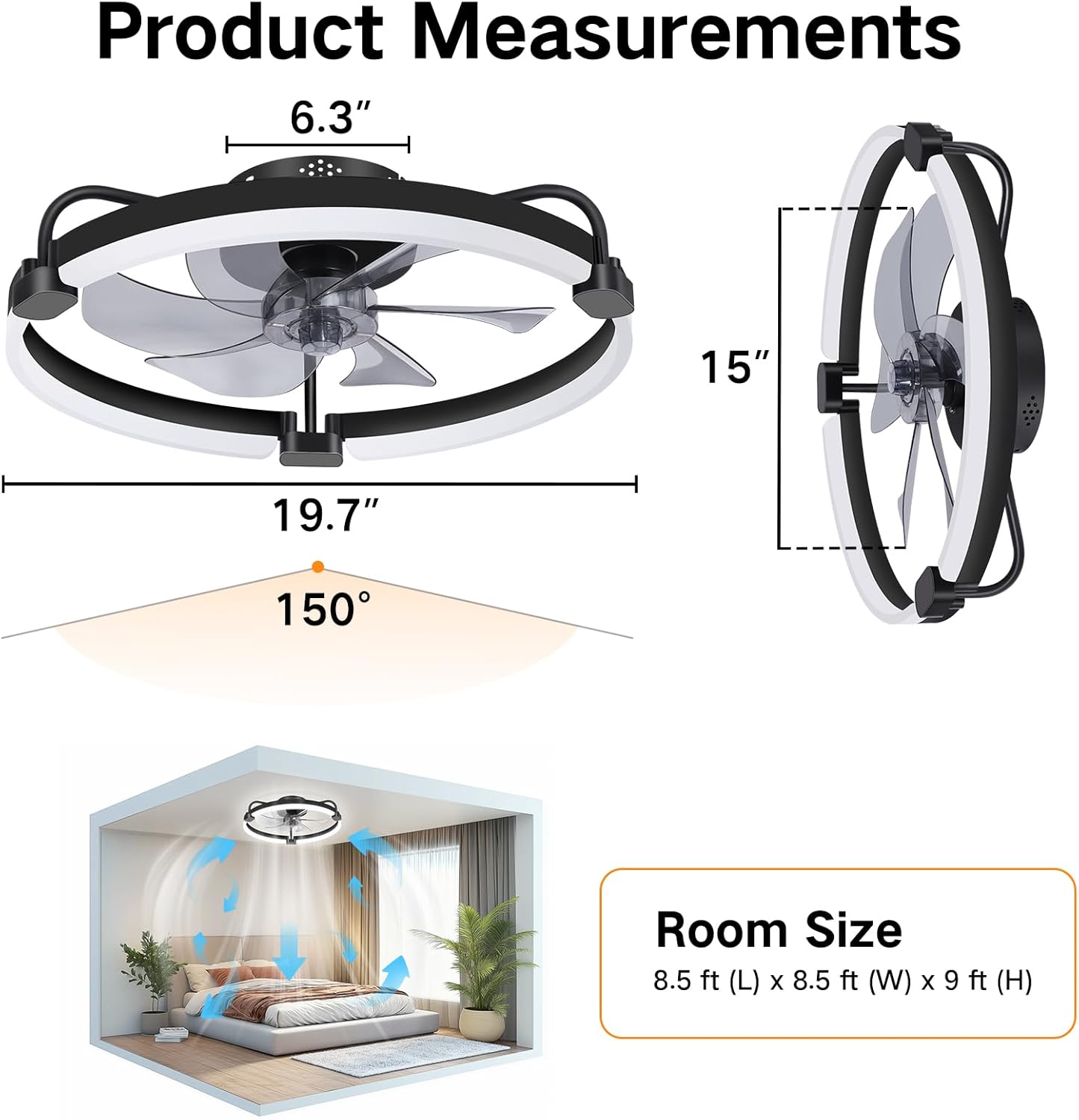
Image: Product measurements and recommended room size for optimal airflow.
5. Operating Instructions
5.1 Control Methods (Remote & App)
Your OUTON ceiling fan can be controlled using the included remote control or via a dedicated mobile application. Both methods allow for comprehensive control over fan speed, light settings, and timer functions. The fan and light can be operated independently.

Image: Overview of the fan's control features and methods.

Image: Multiple control methods available for the fan.
5.2 Lighting Functions
The integrated LED light offers stepless dimming and adjustable color temperatures to suit your preference:
- Color Temperatures: Choose from Warm White (3000K), Neutral White (4500K), and Cool White (6000K).
- Stepless Dimming: Adjust brightness from 5% to 100% (150LM to 3000LM).
- Nightlight Mode: Provides a soft, calming glow, ideal for bedrooms.
- Memory Function: The fan remembers your last lighting settings (color temperature and brightness) when turned off for at least 10 seconds. If turned off for less than 10 seconds, the color temperature may change.
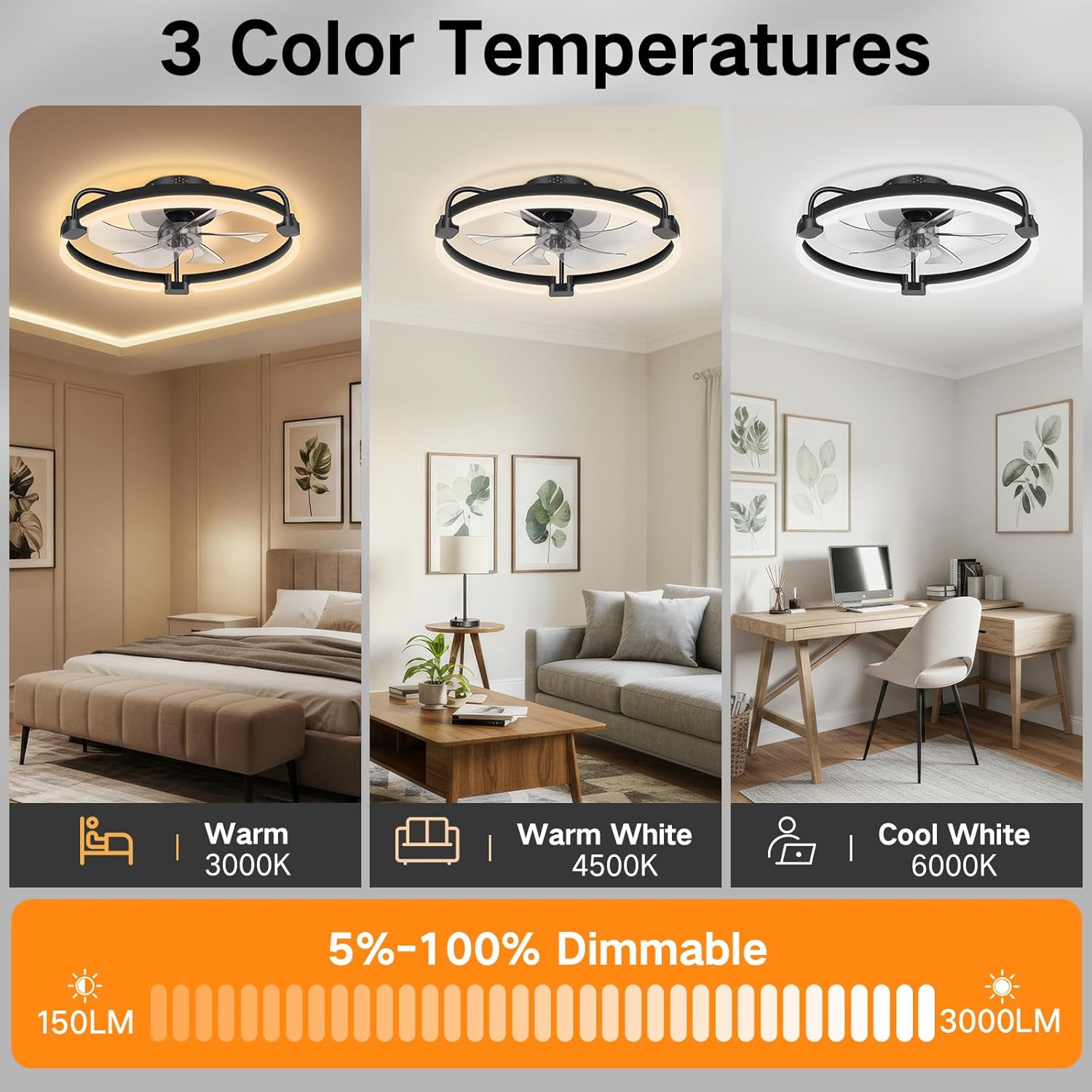
Image: Visual representation of the three adjustable color temperatures and dimming range.

Image: Guide to using the light's memory function.
5.3 Fan Speed Control
The fan features a quiet DC motor with 6 adjustable wind speeds, allowing you to customize airflow from a gentle breeze to a powerful wind, suitable for various scenarios and noise preferences.
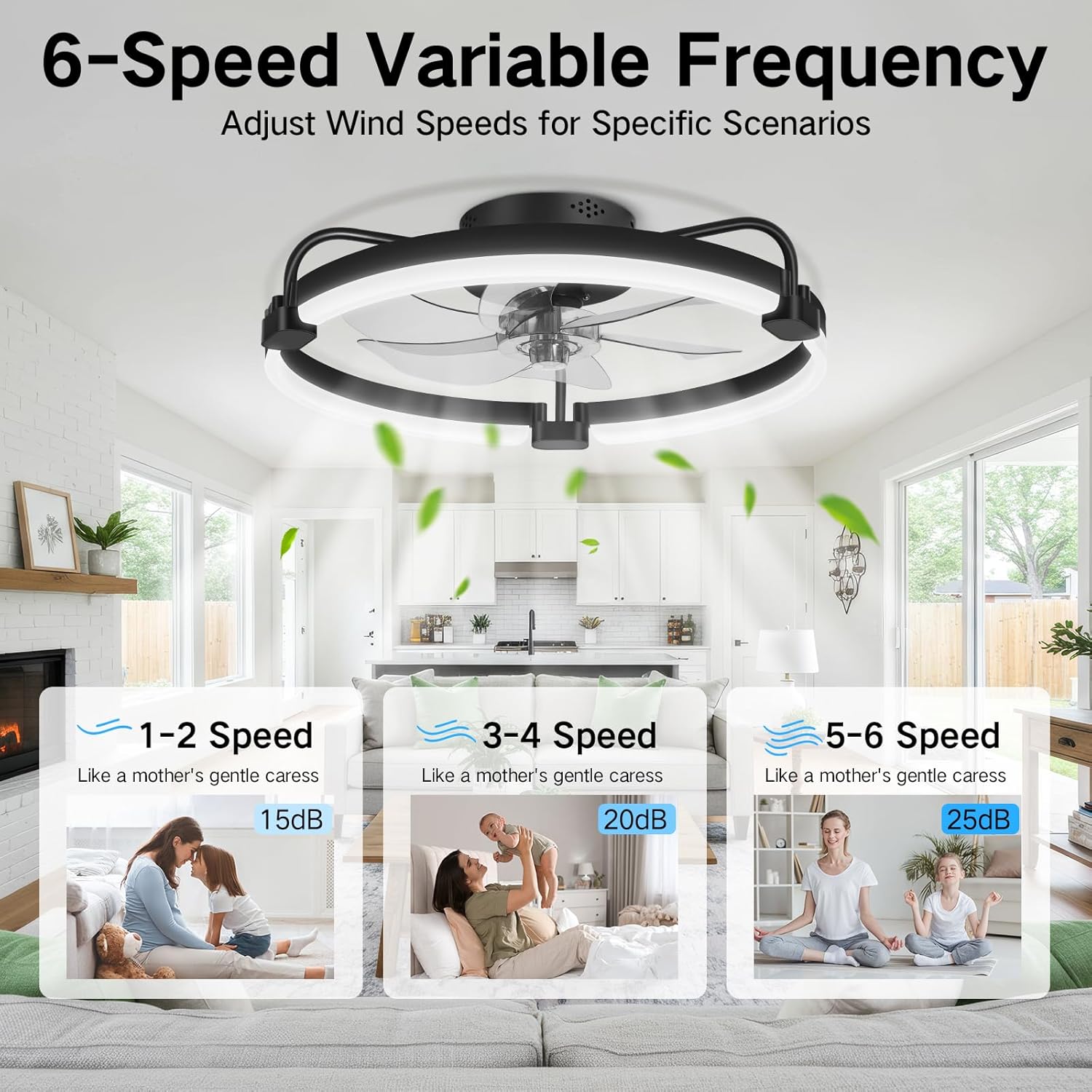
Image: Visual guide to the 6 adjustable fan speeds and their corresponding noise levels.

Image: Comparison of the fan's low noise output to everyday sounds.
5.4 Reversible Air Circulation
The fan's reversible function allows for year-round comfort and energy savings:
- Summer Mode: Downward airflow creates a cooling effect.
- Winter Mode: Upward airflow circulates warm air trapped near the ceiling, reducing humidity and warming the room.

Image: Demonstration of the fan's reversible airflow for seasonal use.
5.5 Timer Function
Set the fan to automatically shut off after a specified period using the timer function:
- Remote Control: Set timers for 1, 2, or 4 hours.
- Mobile App: Set timers for up to 8 hours.

Image: Illustration of the fan's timer function for convenient automatic shutoff.
6. Maintenance
Regular maintenance ensures the longevity and optimal performance of your ceiling fan:
- Cleaning: Dust the fan blades and light fixture regularly with a soft, dry cloth. For stubborn dirt, use a slightly damp cloth and mild detergent, then wipe dry immediately.
- Inspection: Periodically check all mounting screws and connections to ensure they are secure.
- Do Not Lubricate: The DC motor is permanently lubricated and does not require additional oiling.
Always disconnect power to the fan before performing any cleaning or maintenance.
7. Troubleshooting
If you encounter issues with your OUTON ceiling fan, refer to the following common troubleshooting steps:
| Problem | Possible Cause | Solution |
|---|---|---|
| Fan does not operate | No power, loose wiring, remote battery dead | Check circuit breaker, ensure connections are secure, replace remote batteries. |
| Light does not turn on | No power, light setting off, LED board issue | Check power, ensure light is turned on via remote/app, contact support if LED board is suspected. |
| Fan makes unusual noise | Loose screws, unbalanced blades, obstruction | Tighten all screws, check for obstructions, ensure blades are balanced. |
| Remote/App not responding | Batteries dead, pairing issue, signal interference | Replace batteries, re-pair remote/app if necessary, reduce interference. |
If the problem persists after attempting these solutions, please contact OUTON customer support.
8. Specifications
| Brand | OUTON |
| Model Number | OUTON-20L |
| Product Dimensions | 20 x 20 x 6 inches |
| Item Weight | 6.64 pounds |
| Color | Black |
| Control Method | Remote, App |
| Light Source Type | LED |
| Light Color Temperature | 3000K-6500K (Stepless Dimmable) |
| Brightness | 150 - 3000 Lumens |
| Fan Speeds | 6 Adjustable Speeds |
| Motor Type | DC Motor (Quiet, Reversible) |
| Installation Type | Flush Mount |
| Voltage | 120 Volts (AC) |
| Material | Plastic (Shade) |
9. Warranty and Support
OUTON stands behind the quality of its products. Your ceiling fan comes with the following warranty coverage:
- Whole Unit Fan: 2-year warranty
- DC Motor: 10-year warranty
In the event that your LED light board or remote control is damaged or lost, please notify OUTON customer support immediately for assistance.

Image: Summary of warranty terms and support contact information.
For further assistance, technical support, or warranty claims, please visit the official OUTON website or contact their customer service department directly. Contact details are typically found on the product packaging or the brand's official online presence.
10. Important Note on Videos
While this product may have associated videos, no relevant video URLs were provided in the product data to embed directly into this manual. Please refer to the product's online listing or the manufacturer's official channels for any available video demonstrations or guides.

