
1. Introduction
Thank you for choosing the OUTON 20" Ceiling Fan with Light. This modern, low-profile fandelier combines efficient air circulation with versatile lighting, offering convenience through remote and app control. Designed for quiet operation and energy efficiency, it features a reversible DC motor for year-round comfort and stepless dimming with adjustable color temperatures. This manual provides essential information for safe installation, operation, and maintenance of your new ceiling fan.

OUTON 20-inch Ceiling Fan with Light, Remote, and App Control, shown installed above a bed with a child sleeping peacefully, highlighting quiet operation.
2. Safety Information
Please read all safety instructions carefully before installation and use. Retain this manual for future reference.
- Ensure the power supply is disconnected before installation or maintenance.
- Installation should be performed by a qualified electrician or in accordance with local electrical codes.
- Mount the fan securely to a ceiling joist or a suitable support structure capable of holding the fan's weight.
- Keep hands, hair, and clothing clear of the fan blades when the fan is operating.
- Do not insert any objects into the fan blades.
- This ceiling fan light comes with a safety rope that effectively prevents accidental falls. Ensure it is properly installed.

The OUTON ceiling fan includes a professional-grade steel safety cable to prevent accidental falls, ensuring enhanced safety compared to traditional installations.
3. Package Contents
Verify that all components are present and undamaged before beginning installation. If any parts are missing or damaged, contact customer support.
- Ceiling Fan Unit (Fixed Tray, DC Motor, Fan Blade, Core Section)
- Remote Control
- Remote Wall Holder
- Mounting Hardware
- Safety Rope
- User Manual
4. Setup and Installation
The OUTON ceiling fan features a modular design for quick and easy assembly. Installation can typically be completed in approximately 5 minutes.
Installation Steps:
- Prepare for Installation: Ensure power to the installation area is turned off at the circuit breaker.
- Mount the Fixed Tray: Secure the fixed tray to a ceiling joist or approved electrical box using the provided mounting hardware.
- Connect Wiring: Follow the wiring diagram in the included installation guide to connect the fan's electrical wires to your household wiring.
- Attach Safety Rope: Securely attach the safety rope to a structural element in the ceiling as an additional safety measure.
- Assemble Fan Components: Connect the DC motor, fan blade, and core section to the fixed tray. The modular design allows for quick snap-together assembly.
- Secure the Fan: Ensure all connections are tight and the fan unit is securely mounted.
- Restore Power: Turn on the power at the circuit breaker and test the fan and light functions.
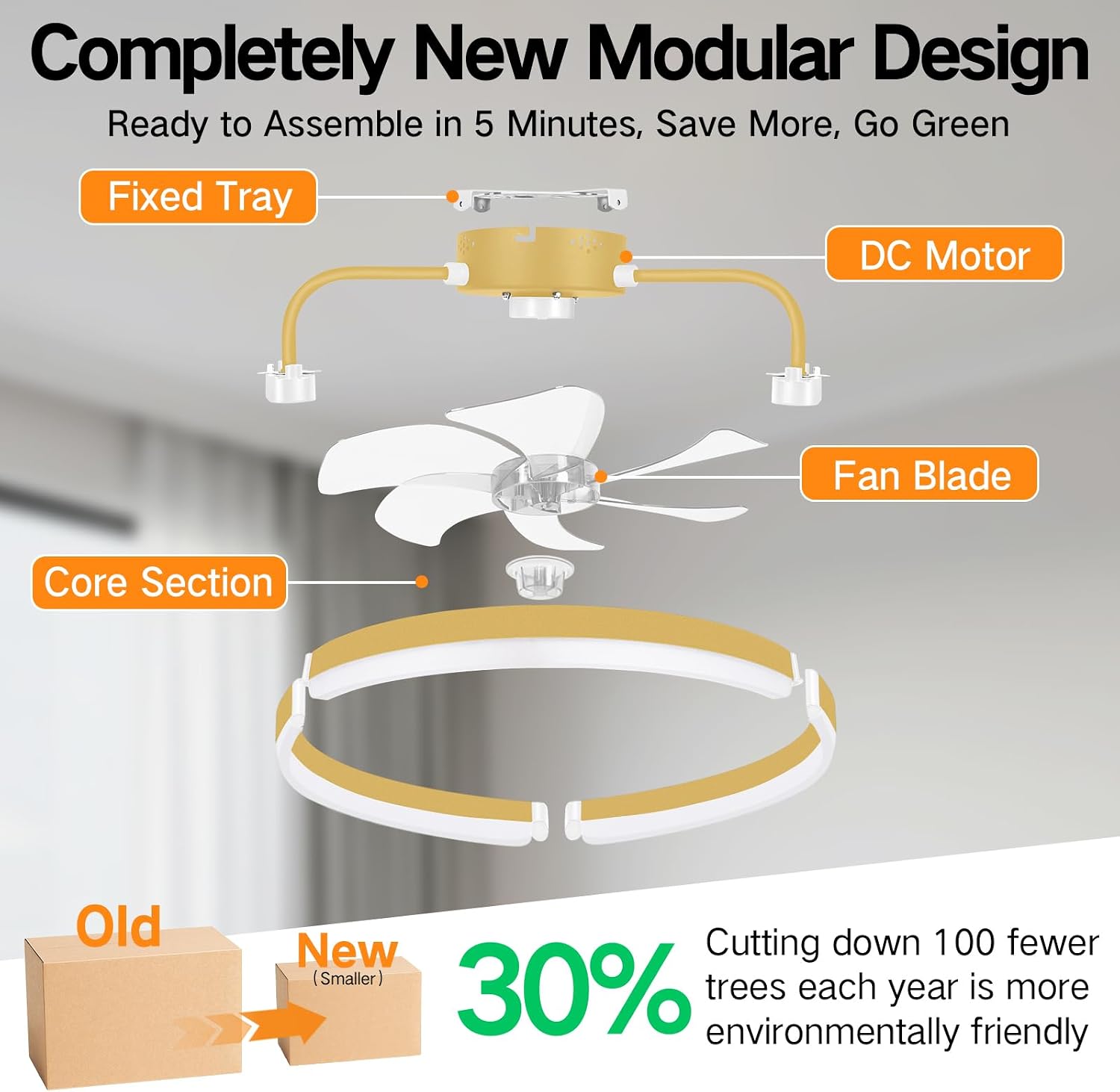
The modular design of the OUTON ceiling fan allows for quick assembly, typically within 5 minutes, and contributes to reduced packaging waste.
5. Operating Instructions
Your OUTON ceiling fan offers multiple control methods for convenience and customization.
Control Methods:
- Remote Control: Use the included remote to adjust fan speed, light brightness, color temperature, and set timers. A remote wall holder is provided for easy access.
- Smartphone App Control: Download the dedicated app to control all fan and light functions from your smartphone.
- Wall Switch: The fan and light can be controlled by a standard wall switch (not included), though full functionality requires the remote or app.

The OUTON ceiling fan offers versatile control options via remote, smartphone app, and compatibility with a wall switch.
Fan Functions:
- 6 Adjustable Speeds: Choose from 6 different wind speeds, from a gentle breeze (1-2 speed, approx. 15dB) to a powerful airflow (5-6 speed, approx. 25dB).
- Reversible DC Motor: The fan features a reversible function for year-round comfort. In summer, blades rotate counter-clockwise for downward airflow to create a cooling effect. In winter, blades rotate clockwise for upward airflow to circulate warm air.
- Quiet Operation: The high-efficiency DC motor ensures whisper-quiet operation, ideal for bedrooms and quiet spaces.

The OUTON ceiling fan provides 6 adjustable speeds with low noise levels, suitable for various activities and preferences.

The reversible DC motor allows for optimal air circulation in both summer (cooling) and winter (warming) seasons.
Lighting Functions:
- 3 Color Temperatures: Easily switch between Warm White (3000K), Neutral White (4500K), and Cool White (6000K) to suit your mood or activity.
- Stepless Dimming: Adjust the brightness from 5% to 100% (150LM to 3000LM) for the perfect ambiance.
- Nightlight Mode: A dedicated nightlight mode provides a soft, calming glow, ideal for bedtime.
- Memory Function: The fan remembers your last lighting settings (brightness and color temperature) when turned off for at least 10 seconds. If turned back on within 10 seconds, the color temperature may change.

Customize your lighting with 3 color temperatures and stepless dimming from 5% to 100% brightness.

The memory function retains your preferred light settings if the light is off for at least 10 seconds.
Timer Function:
- Set the fan to automatically shut off after 1, 2, 4, or 8 hours using the remote or app.

Utilize the timer function for automatic shutoff, with options up to 8 hours via the app or 1/2 hours via remote.
6. Maintenance
Regular maintenance ensures optimal performance and longevity of your ceiling fan.
- Cleaning: Dust the fan blades and light fixture regularly with a soft, damp cloth. Do not use abrasive cleaners or solvents.
- Tighten Screws: Periodically check and tighten all screws on the fan and mounting bracket to ensure secure operation.
- Blade Balance: If the fan wobbles, check that all blades are securely attached and balanced. A balancing kit (not included) may be used if necessary.
7. Troubleshooting
Refer to the table below for common issues and their solutions.
| Problem | Possible Cause | Solution |
|---|---|---|
| Fan does not turn on | No power supply; Loose wiring; Remote control battery low/dead | Check circuit breaker; Verify wiring connections; Replace remote control batteries. |
| Light does not turn on | No power supply; Loose wiring; LED board issue | Check circuit breaker; Verify wiring connections; Contact customer support if LED board is damaged. |
| Fan wobbles | Loose mounting screws; Unbalanced blades | Tighten all mounting screws; Check blade attachment; Use a balancing kit if needed. |
| Remote control not working | Battery issue; Remote not paired; Obstruction | Replace batteries; Refer to pairing instructions in the full manual; Ensure no obstructions between remote and fan. |
| Fan is noisy | Loose screws; Motor issue | Check and tighten all screws; If noise persists, contact customer support. |
8. Specifications
Key technical specifications for the OUTON 20" Ceiling Fan.
| Feature | Detail |
|---|---|
| Brand | OUTON |
| Model | B0DQ1N4FK7 |
| Color | Gold |
| Style | Modern |
| Room Type | Kids Room, Dorm Room, Bedroom, Dining Room |
| Power Source | AC/DC |
| Special Feature | Dimmable, Manual, Timer |
| Mounting Type | Flush Mount |
| Product Dimensions | 19.69 x 19.69 x 5.91 inches |
| Item Weight | 6.78 pounds |
| Light Color Temperature | 3000K-6500K (Stepless Dimmable) |
| Fan Speeds | 6 Speeds |
| Motor Type | Quiet DC Motor |

Product dimensions and recommended room size for optimal performance.
9. Warranty and Support
OUTON is committed to providing high-quality products and excellent customer service.
- Whole Unit Fan: 2-year warranty
- DC Motor: 10-year warranty
In the event that your LED light board or remote control is damaged or lost, please notify us right away for assistance.
For any questions, concerns, or support needs, please contact OUTON customer service through the platform where you purchased the product or visit the official OUTON store page.

OUTON provides a 2-year warranty for the fan unit and a 10-year warranty for the DC motor. Contact support for parts replacement.

