
Kewig M28-R27A
Kewig Motorcycle Fork Stem Phone Mount with Vibration Dampener User Manual
Model: M28-R27A
Introduction
This manual provides detailed instructions for the installation, operation, and maintenance of your Kewig Motorcycle Fork Stem Phone Mount with Vibration Dampener. Please read this manual thoroughly before use to ensure proper function and safety.

Image: Internal structure showing stable and sturdy components, and the vibration dampener.
What's in the Box
Verify that all components are present before beginning installation:
- Motorcycle phone mount main body
- Fork stem ball base
- Spacer (small, for 12-18.5mm holes)
- Spacer (large, for 18.5-25.4mm holes)
- Ball socket nut
- Wrench
- Allen wrench

Image: All components included in the package.
Setup Instructions
- Identify Fork Stem Hole: Locate the central fork stem hole on your motorcycle. Ensure it is within the compatible diameter range of 12mm to 25.4mm.
- Select Correct Spacer: Choose the appropriate spacer based on your fork stem hole diameter. Use the small spacer for 12-18.5mm holes and the large spacer for 18.5-25.4mm holes.
- Insert Ball Base: Insert the fork stem ball base with the selected spacer into the fork stem hole. Ensure the minimum tube depth is 38mm for proper fit.
- Tighten: Use the provided Allen wrench to tighten the ball base securely. The base should be firmly seated and not wobble.
- Attach Phone Mount: Connect the main phone mount body to the ball base using the ball socket nut. Adjust the angle as desired and tighten the nut to secure the mount in position.
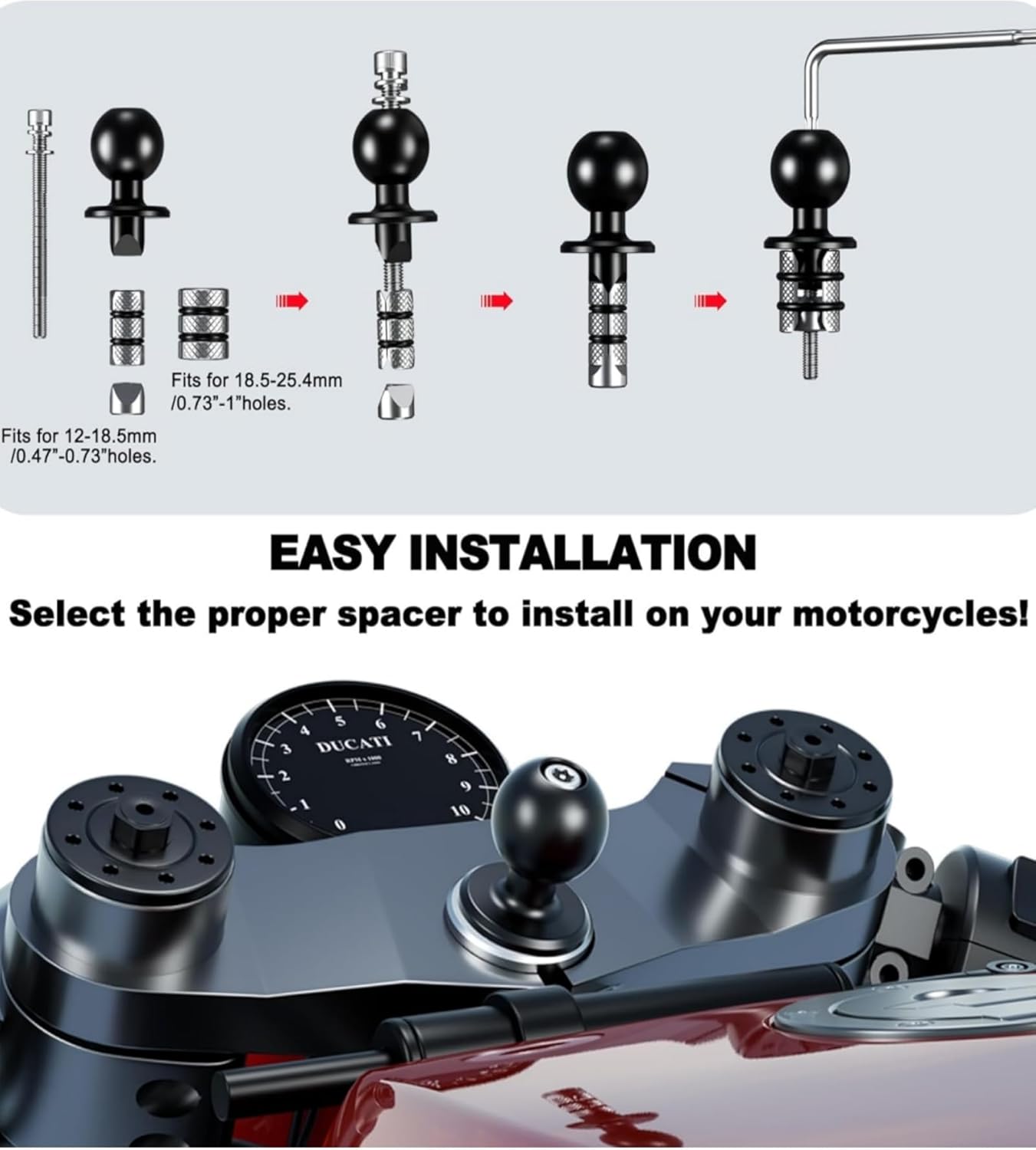
Image: Installation steps for the fork stem mount.

Image: Visual guide for mounting the phone holder.
Operating Instructions
Mounting Your Phone (One-Handed Operation)
- Open Cradle: Gently tilt your phone to push the top arm of the mount. The cradle will automatically expand.
- Insert Phone: Place your phone into the expanded cradle. The arms will automatically close and firmly secure your phone.
- Lock Phone: After placing your phone, press the right lock switch to further secure it. This ensures the phone remains firmly fixed even on bumpy roads.
- Release Phone: To remove your phone, simply press the release mechanism (usually a button or lever) and the cradle will open.

Image: One-handed phone insertion and removal.
Adjusting Viewing Angle
The mount features a 720-degree free rotation design, allowing you to easily adjust your phone to a horizontal or vertical screen orientation. Loosen the ball socket nut slightly, adjust the phone to your desired angle, and then re-tighten the nut to secure it.

Image: Adjusting the phone's viewing angle.
Charging Port Access
The design ensures that the charging port of your phone remains unobstructed, allowing you to charge your device while it is mounted.

Image: Unobstructed charging port access.
Vibration Dampener
This mount is equipped with a vibration dampener designed to minimize the transmission of motorcycle vibrations to your mobile phone. This helps protect your phone's internal components, especially the camera, from potential damage during rides.

Image: Integrated vibration dampener.
Compatibility
The Kewig Motorcycle Fork Stem Phone Mount is designed for wide compatibility:
- Phone Size: Compatible with cell phones ranging from 5.4 to 7.2 inches (screen diagonal).
- Phone Dimensions (with case): Length 5.11'' (130mm) ~ 7.28'' (185mm), Width 2.55'' (65mm) ~ 3.46'' (80mm), Thickness up to 0.669'' (17mm).
- Fork Stem Diameter: Fits fork stem or Triple Tree Stem Yoke Center holes with a diameter of 12mm to 25.4mm.
- Motorcycle Models: Compatible with most BMW, Ducati, Suzuki, Yamaha, Kawasaki, and CBR motorcycles.

Image: Compatibility overview for phones and vehicles.
Maintenance
- Cleaning: Wipe the mount regularly with a soft, damp cloth to remove dust and grime. Avoid harsh chemicals or abrasive cleaners.
- Inspection: Periodically check all screws and connections to ensure they are tight. Re-tighten if necessary to maintain security.
- Storage: If not in use for an extended period, store the mount in a clean, dry place away from direct sunlight.
Troubleshooting
- Issue: Phone mount feels loose or wobbly.
- Solution: Ensure the fork stem ball base is fully inserted and the Allen screw is tightened. Also, check that the ball socket nut connecting the phone mount to the base is securely fastened.
- Issue: Phone does not fit securely in the cradle.
- Solution: Verify your phone's dimensions (including case) are within the specified compatibility range (Length 5.11''-7.28'', Width 2.55''-3.46'', Thickness max 0.669''). Ensure the right lock switch is engaged after placing the phone.
- Issue: Mount does not fit into the fork stem hole.
- Solution: Confirm your fork stem hole diameter is between 12mm and 25.4mm. Ensure you are using the correct spacer (small for 12-18.5mm, large for 18.5-25.4mm). Check for any obstructions in the fork stem hole.
Specifications
| Feature | Detail |
|---|---|
| Model Number | M28-R27A |
| Mounting Type | Fork Stem / Triple Tree Stem |
| Compatible Fork Stem Diameter | 12mm - 25.4mm |
| Compatible Phone Screen Size | 5.4'' - 7.2'' |
| Max Phone Dimensions (L x W x T) | 185mm x 80mm x 17mm (7.28'' x 3.46'' x 0.669'') |
| Special Features | Vibration Dampener, One-handed Operation, 720° Rotation, Unobstructed Charging Port |
| Material | High-strength material, silicone protection, metal pins and gear slides |
| Item Weight | 1.26 pounds (approx. 0.57 kg) |
| Manufacturer | KEWIG |
Safety Information
- Always ensure the mount is securely installed and your phone is firmly locked in place before riding.
- Do not attempt to adjust the mount or operate your phone while riding. Pull over to a safe location if adjustments are needed.
- Regularly inspect the mount for any signs of wear or damage. Replace components if necessary.
- Be aware of your surroundings and ride responsibly.
Warranty and Support
For warranty information or technical support, please contact Kewig customer service or visit the official Kewig brand store.
Kewig Brand Store: https://www.amazon.com/stores/KEWIG/page/7081BC43-1CC6-4990-89CE-F791F946EAB2
Related documentsM28-R27A


Ask a question about this manual
Ask about setup, troubleshooting, compatibility, parts, safety, or missing instructions. Manuals+ will review the question and use this page’s manual context to help answer it.