1. Introduction
This manual provides instructions for the zmart ATORCH DL24 DC Power USB Tester. It covers product features, safety guidelines, setup, operation, and app connectivity. The device supports a test voltage range of 2-200V and an operating current of 0.2-20A, with a maximum discharge power of 150W. Integrated safety features include overcurrent, overheat, and overpower protection. Users are advised to adjust parameters carefully, especially when setting discharge power, to comply with energy conservation principles. App download links for Android and iOS are provided for enhanced functionality.
2. Product Features
- Wide Test Voltage Range: 2V to 200V.
- Adjustable Operating Current: 0.2A to 20A.
- Maximum Discharge Power: Up to 150W (Voltage * Current).
- Built-in Safety Protections: Overcurrent, Overheat, and Overpower.
- Multiple Operating Modes: Constant Current (CC), Constant Resistance (CR), Constant Power (CP), Constant Voltage (CV).
- Data Monitoring: Displays Voltage, Current, Power, Resistance, Energy, Capacity, and Timing.
- App Connectivity: Supports Android and iOS for remote control and data logging.
- External Temperature Probe Support.
3. Safety Precautions
The DL24 features built-in safety protection functions for overcurrent, overheat, and overpower. If a protection interface pops up, please adjust the parameters carefully. Ensure that the discharge power is set within the maximum limit. When starting for the first time, adjust the preset values slowly and smoothly to match the maximum discharge power. The actual operating current is limited by the maximum power; please adjust the current according to the law of energy conservation.
The provided power supply is a DC12V US standard. An EU adapter is also included. If this power supply is not compatible with your country's electrical standards, it is recommended not to purchase the product to avoid potential issues.
3.1 Protection Reminders
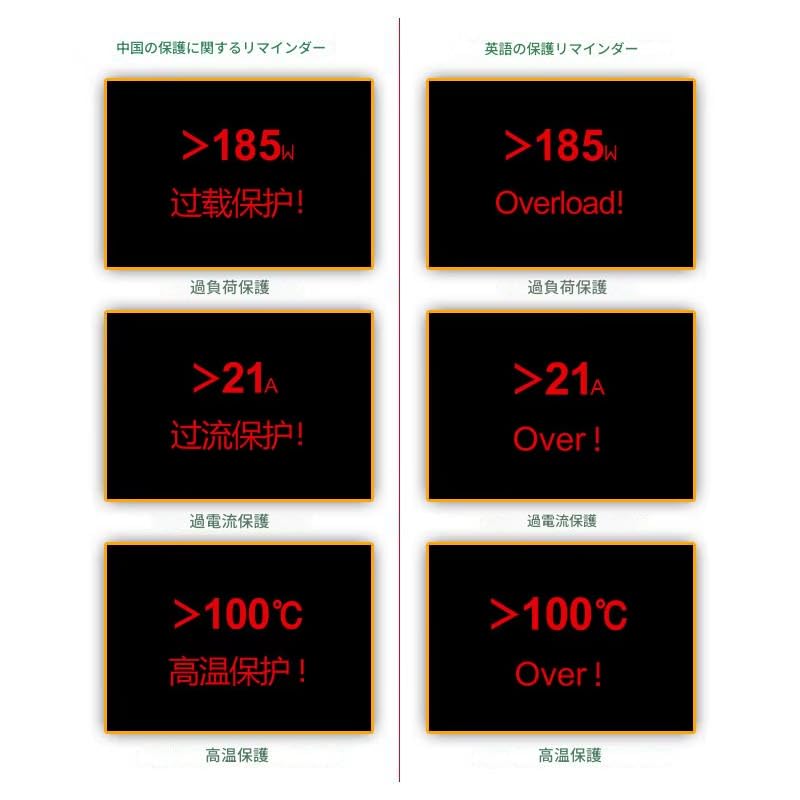
Image: Protection Reminders for ATORCH DL24. This image displays the visual warnings for various protection states:
- Overload Protection: Indicates when power exceeds 185W.
- Overcurrent Protection: Indicates when current exceeds 21A.
- Overheat Protection: Indicates when temperature exceeds 100°C.
4. Product Overview and Components
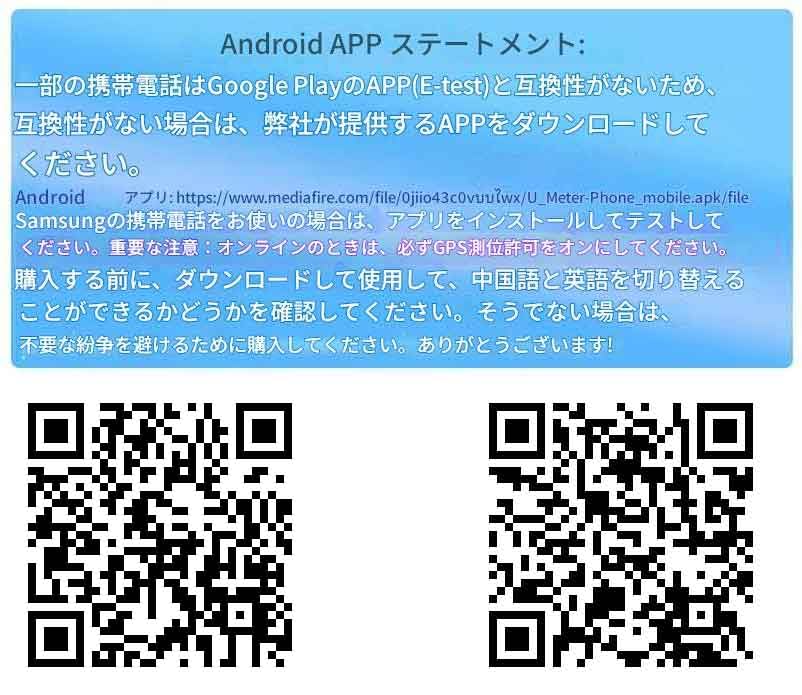
Image: A general view of the ATORCH DL24 DC Power USB Tester, showing its compact design with a fan and display screen.
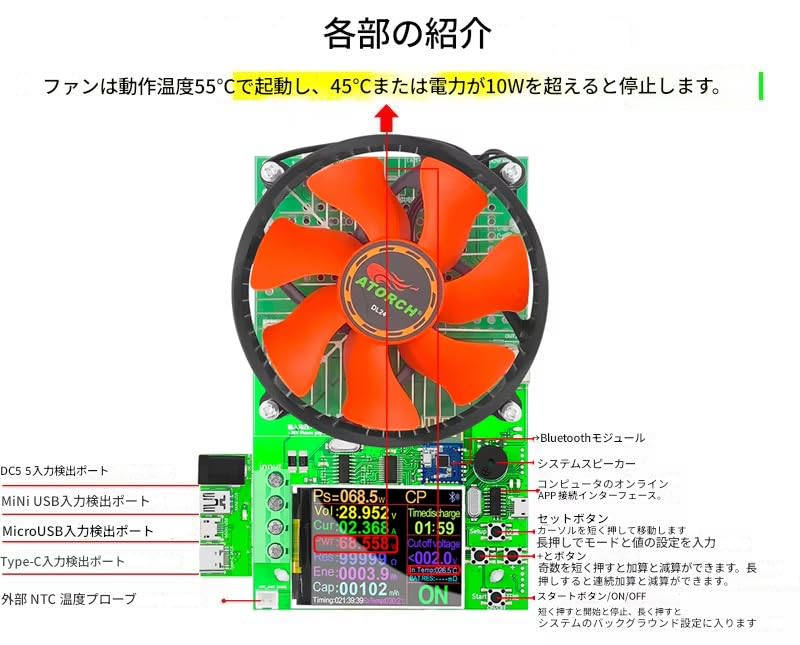
Image: Detailed view of the ATORCH DL24 components and controls.
- Fan: Operates when the temperature reaches 55°C and stops when power exceeds 10W or temperature drops below 45°C.
- Input/Output Ports: Includes DC5, Mini USB, Micro USB, and Type-C ports.
- External NTC Temperature Probe: For accurate temperature monitoring.
- Bluetooth Module: For app connectivity.
- System Speaker: Provides audio feedback.
- Computer Online APP Interface: For PC software connection.
- Set Button: Short press to move the cursor, long press to set values.
- Plus/Minus Buttons: Short press to adjust values, long press for continuous adjustment.
- Start/Stop Button: Short press to start/stop discharge, long press to enter background settings.
5. Setup and Connection
5.1 Power Supply Connection
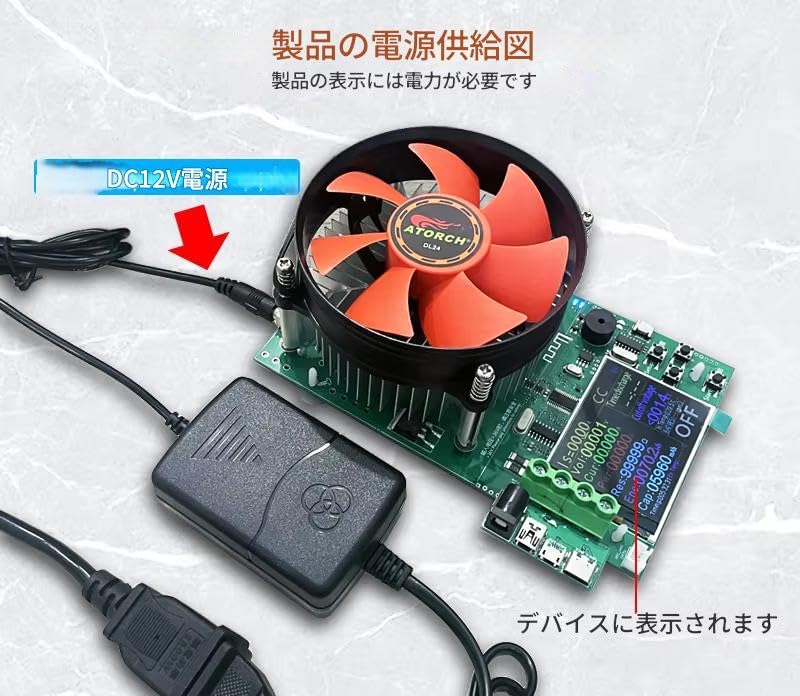
Image: Power Supply Diagram. The device requires a DC12V power input for its display and operation. Connect the DC12V power adapter to the input jack as shown.
5.2 Electronic Load Wiring
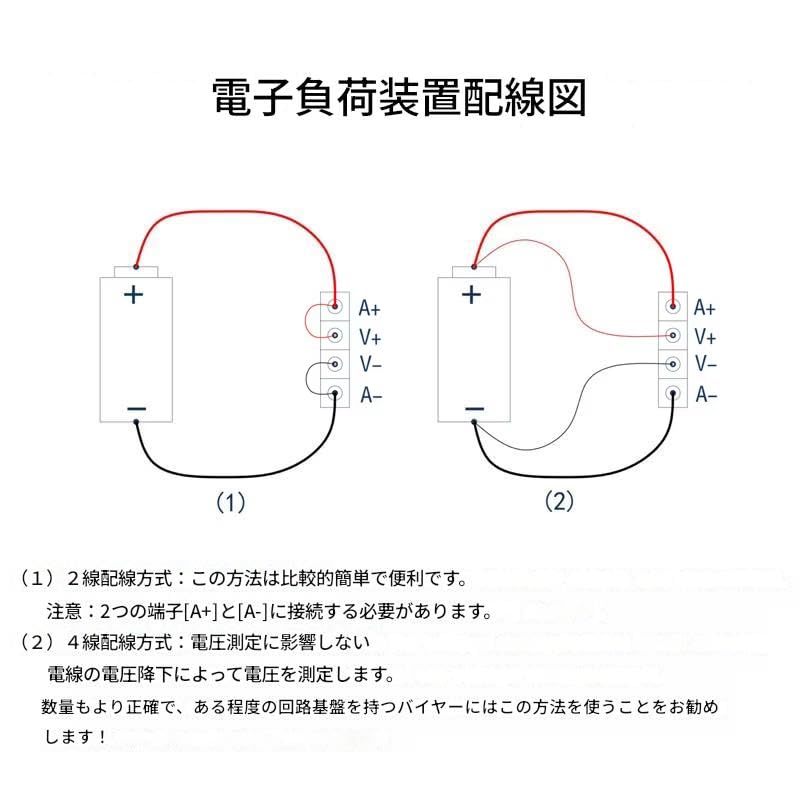
Image: Electronic Load Wiring Diagram. This diagram illustrates two methods for connecting the electronic load:
- 2-Wire Connection Method: This method is simple and convenient. It requires connecting to the two main terminals [A+] and [A-].
- 4-Wire Connection Method: This method measures voltage without being affected by voltage drop in the wiring, providing higher accuracy. It is recommended for users who require precise measurements and have some basic circuit knowledge.
6. Operation
6.1 Screen Modes
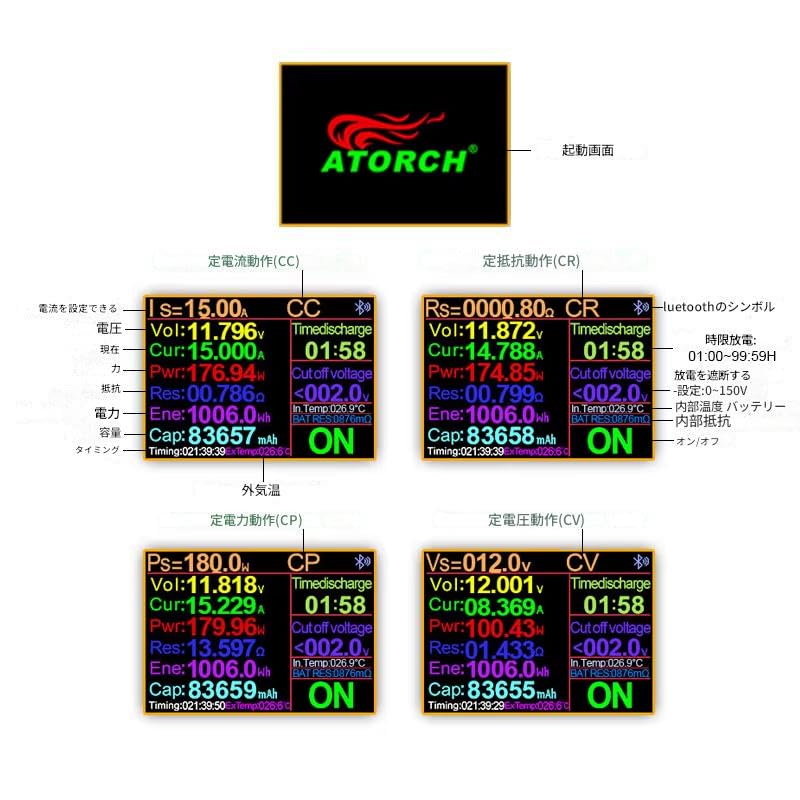
Image: ATORCH DL24 Screen Modes. The device supports various operating modes, including Constant Current (CC), Constant Resistance (CR), Constant Power (CP), and Constant Voltage (CV). The screen displays real-time data such as Voltage (Vol), Current (Cur), Power (Pwr), Resistance (Res), Energy (Ene), Capacity (Cap), and Timing. It also shows cutoff voltage settings, Bluetooth status, external temperature, and battery resistance.
6.2 App Installation and Connection
The ATORCH DL24 can be controlled and monitored via a mobile application. Follow these steps to install and connect the app:
- Download User Manual and PC Software: Access the user manual and PC software installation guide from this link: http://www.mediafire.com/folder/m09i9bjv8703d/DL24-DL24P
- Download Android App:
- Direct download link: https://www.mediafire.com/file/0jiio43c0vuu1wx/U_Meter-Phone_mobile.apk/file
- Search for "E-test" on Google Play Store.
- Download iOS App: Search for "E_test" on the iPhone App Store.

Image: ATORCH DL24 App Connection Method. This image details the steps for connecting the DL24/DL24P to the mobile app:
- Insert the DL24/DL24P into a USB charger; the Bluetooth indicator will light up.
- Download the mobile app software (Android 5.0 and above supported). Install the E-meter app on your mobile phone.
- Turn on Bluetooth on your mobile phone and open the E-test app.
- When the USB tester is powered on, the Bluetooth indicator lights up, and the software app icon shows 'ON'.
- Click the Bluetooth icon in the upper left corner of the app, select 'DL24-BLE', and the app's main interface will appear.
- During measurement, the Bluetooth icon in the upper left corner of the DL24-BLE will turn blue, indicating an active online connection and measurement.
6.3 Granting App Permissions

Image: E-Test App Permissions for Android. This image illustrates how to grant necessary permissions for the E-Test app on an Android device. This method is also applicable to other compatible products from the same company.
To ensure proper functionality, especially for location-based features, you may need to grant specific permissions to the E-Test app. Navigate to your phone's settings and follow these general steps:
- Open Phone Settings.
- Go to Apps (or Applications).
- Select Manage Apps (or App Management).
- Find and select the E-Test app.
- Go to Permissions.
- Enable necessary permissions, such as Location Information, by allowing access.
7. Specifications
| Feature | Value |
|---|---|
| Brand | zmart |
| Color | Red |
| Minimum Operating Voltage | 2 Volts |
| Manufacturer | zmart |
| ASIN | B0DPZWQ4MF |
| Country of Origin | China |


