
1. Introduction
This manual provides detailed instructions for the proper use, setup, and maintenance of your CNBRO TWS Wireless Bluetooth Smart Touch Screen Ultra Open Ear Earbuds with Ear Hooks, Model YJ33. Please read this manual thoroughly before using the product to ensure optimal performance and longevity.
2. Package Contents
Verify that all items are present in the package:
- 1 Pair of Wireless Touch Screen Earbuds with Ear Hooks
- 1 TYPE-C Charging Cable
- 1 User Manual
3. Product Overview
The CNBRO YJ33 earbuds feature an ultra-open ear design with ear hooks for a secure and comfortable fit. The charging case includes a smart touchscreen for convenient control of various functions.

Image 3.1: CNBRO YJ33 Earbuds and Smart Touch Screen Charging Case.
The open-ear design allows for situational awareness, making them suitable for activities like running or cycling. The earbuds are also equipped with ENC Noise Cancellation for clear calls and are IPX5 waterproof.

Image 3.2: Open Ear Design for situational awareness.

Image 3.3: ENC Noise Cancellation for clear calls.
4. Specifications
| Feature | Specification |
|---|---|
| Bluetooth Version | 5.4 |
| Headphone Charging Case Battery Capacity | 600mAh |
| Transmission Distance | Approximately 10 meters |
| Single Playing Time | 6-8 hours |
| Total Playtime (with charging case) | Up to 48 hours |
| Charging Time | 2 hours |
| Waterproof Level | IPX5 |
| Control Method | Touch |
| Compatible Devices | All devices and mobile phones that support Bluetooth |
5. Setup
5.1 Charging the Earbuds and Case
- Place the earbuds into the charging case.
- Connect the TYPE-C cable to the charging port on the case and a power source.
- The smart screen on the case will indicate the charging status. A full charge takes approximately 2 hours.
5.2 Bluetooth Pairing
- Ensure the earbuds are charged and placed in the charging case.
- Open the charging case. The earbuds will automatically enter pairing mode.
- On your device (smartphone, tablet, etc.), enable Bluetooth.
- Search for available Bluetooth devices and select "YJ33" (or similar name) from the list.
- Once connected, the earbuds will indicate successful pairing, and the device will show them as connected.
6. Operating Instructions
6.1 Smart Touch Controls (Earbuds)
The earbuds feature touch-sensitive areas for easy control of various functions:
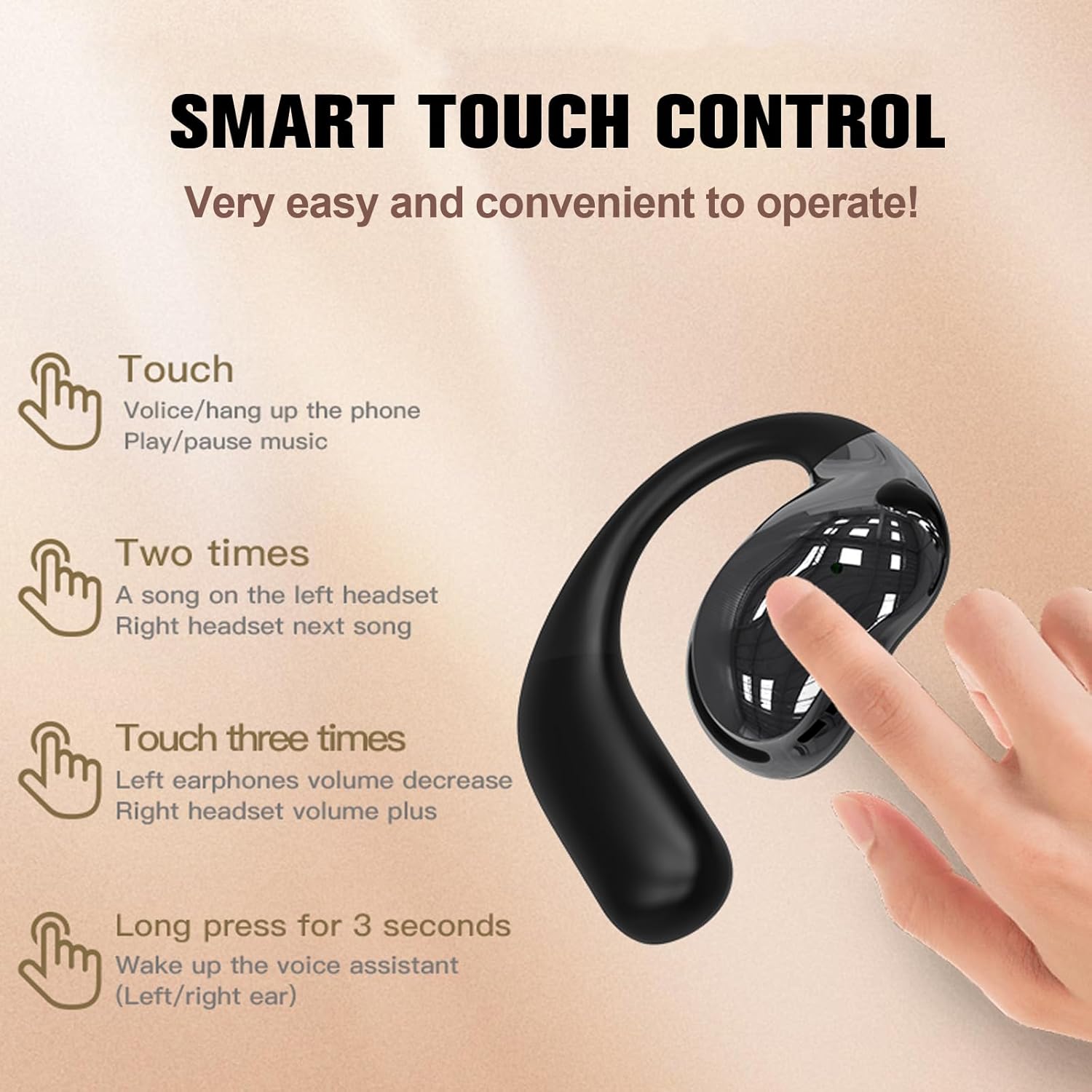
Image 6.1: Earbud Touch Control Gestures.
- Single Touch: Answer/Hang up phone calls, Play/Pause music.
- Double Touch: Left earbud for previous song, Right earbud for next song.
- Triple Touch: Left earbud for volume decrease, Right earbud for volume increase.
- Long Press (3 seconds): Activate voice assistant (Left/Right earbud).
6.2 Smart Touch Screen Functions (Charging Case)
The charging case's touchscreen provides access to multiple functions:

Image 6.2: Smart Touch Screen Interface.
- Main Interface: Displays time, battery level, and quick access icons.
- Music Control: Play, pause, skip tracks, and adjust volume directly from the screen.
- Call Management: Answer or reject calls.
- EQ Modes: Select from various equalizer presets (e.g., Pop, Rock, Classic, Jazz) to customize your audio experience.
- Brightness Adjustment: Control the screen brightness.
- Voice Assistant: Activate your device's voice assistant.
- Photography: Remotely trigger your phone's camera shutter.
- Language Switching: Change the system language of the case.
7. Maintenance
7.1 Cleaning
Regular cleaning helps maintain optimal performance and hygiene:
- Use a soft, dry, lint-free cloth to wipe the earbuds and charging case.
- Do not use abrasive cleaners, solvents, or aerosol sprays.
- Ensure charging contacts are free of dust and debris.
7.2 Water Resistance (IPX5)
The earbuds are rated IPX5 water-resistant, meaning they can withstand splashes and sweat. They are not designed for submersion in water. Ensure the charging port is dry before charging.

Image 7.1: IPX5 Water Resistance.
8. Troubleshooting
- Earbuds not pairing: Ensure earbuds are charged, Bluetooth is enabled on your device, and the earbuds are in pairing mode. Try restarting both the earbuds (by placing them in the case and closing/opening) and your device.
- No sound: Check volume levels on both the earbuds and your connected device. Ensure earbuds are properly paired and selected as the audio output.
- Charging issues: Verify the TYPE-C cable is securely connected to both the case and the power source. Ensure the charging contacts on the earbuds and inside the case are clean.
- Touch controls unresponsive: Ensure your fingers are clean and dry. Try restarting the earbuds.
9. Warranty and Support
If you receive a defective product or have any questions during use, please contact the seller for assistance. Refer to your purchase documentation for specific warranty details.