
Introduction
This manual provides comprehensive instructions for the installation, setup, operation, and maintenance of your Blindsmart Tuya Zigbee Smart Curtain Motor and Track System, Model ZM87EL-ZP. Please read this manual carefully before use to ensure proper functionality and longevity of your product.
Package Contents
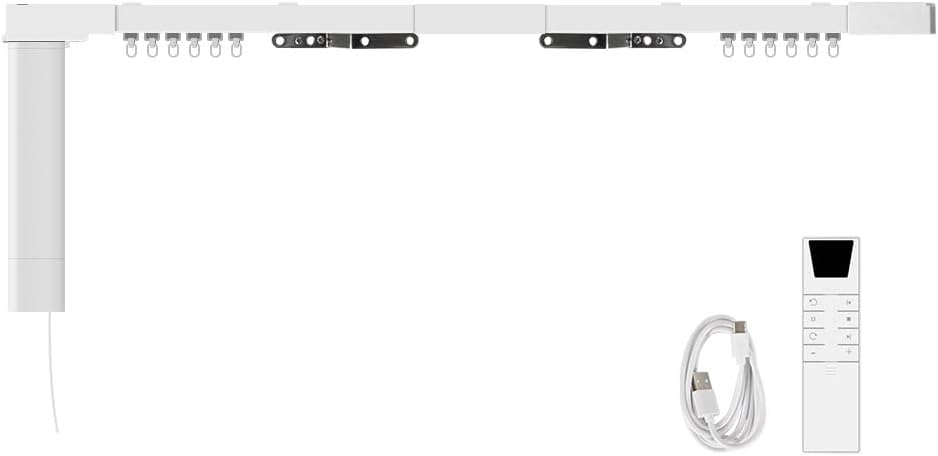
Please verify that all components listed below are included in your package:
- Smart Curtain Motor (ZM87EL-ZP)
- Motorized Curtain Track (8.1m / 318.9 inch variant)
- RF Remote Control
- USB Charging Cable (1M length)
- Master Driver
- Sub Driver
- Connectors
- Carriers
- Wheel Runners
- Belt
- Belt Clamps
- Ceiling Brackets
- Screwdriver
- Scissors
Setup & Installation
1. Track Assembly
Follow these steps to assemble the motorized curtain track:
- Insert the belt into the rails, passing it through the main gearbox and then back through the rail.
- Do not insert the rails fully into the main gearbox at this stage.
- Gently straighten the belt, exposing 4 teeth at each end. Cut the belt.
- Align the ends of the belt and hold the shaft of the main gearbox. Make the first mark on the belt near the edge of the main gearbox (as shown by the red mark in the video).
- On the other side of the rails, buckle one pair of belt clamps onto the end of the belt. Then, attach the subassembly of the runner.
- Slide the runner into the rails.
- Make a second mark on the belt at the position of the 7th tooth apart from the first mark (as shown by the yellow mark in the video). This creates a 6-tooth space.
- At the position of the 7th tooth (marked in yellow), buckle two pairs of belt clamps: one buckle up and one buckle down.
- Put the runner onto the belt clamps and slide it to the rails.
- Pass the belt through the vice gearbox.
- Buckle one pair of belt clamps onto the end of the belt and attach the subassembly of the runner.
- Slide the runner into the rails.
- Throw the wheels into the rails. The standard quantity is 8 pieces per meter.
- Place a clamp into the rail, insert the rail into the main gearbox, and fasten the clamp.
- Follow the same operation for the main gearbox side: install the wheels and clamp.
- Bring out the bolt of the runner, combine two parts of the subassembly of the runner with the bolt.
- Move the runner left and right to check for smooth operation.
- Fix the ceiling brackets on the back of the rails. The standard quantity is 2 pieces per meter.
2. Motor Installation
Once the track is assembled, install the motor:
- Insert the motor into the transmission box on the track.
- Rotate the motor to secure it in place.
3. Powering On and Battery Information
The motor features a built-in 3200mAh/7.4V rechargeable battery. Ensure the battery is charged using the provided USB charging port. Low-battery alerts will indicate when charging is required to prevent damage to the battery.

Operating Instructions
1. Tuya Smart App Control
To enable app and voice control, a Tuya Zigbee Hub (not included) is required. The motor uses the Zigbee wireless protocol and needs to be paired with the hub to function correctly with the Tuya Smart App.

Follow these steps to pair your device with the Tuya Smart App:
- Ensure the blue light on the motor is flashing. If not, press the reset button three times rapidly until it flashes.
- Open the Tuya Smart Life App on your smartphone.
- Navigate to your Smart Gateway (Tuya Zigbee Hub).
- Click on the gateway to search for new devices.
- Once the "Smart Curtain" device is successfully added, you can access its control page.
Through the Tuya Smart App, you can control curtain status, set open/close limits, and manage other functions. The app allows for precise control over your curtains.

2. Voice Control
Once connected to the Tuya Smart App and integrated with Alexa or Google Home, you can control your curtains using simple voice commands. For example, say "Alexa, open the curtains" or "Ok Google, open the curtains."

3. RF Remote Control
The included multi-channel RF remote control provides an alternative method for operating your curtains. It offers various functions:
- Screen: Displays current settings or status.
- Up/Open: Opens the curtains.
- Stop: Halts curtain movement.
- Down/Close: Closes the curtains.
- Channel + / Channel -: Selects different channels for controlling multiple motors.
- Short press (inching reverse): Moves curtains slightly in reverse (20% open).
- Long press (Open 20%): Opens curtains to 20%.
- Short press (Third position limit): Sets a third position limit.
- Long press (Open 50%): Opens curtains to 50%.
- Short press (inching forward): Moves curtains slightly forward (70% open).
- Long press (Open 70%): Opens curtains to 70%.

4. Customizable Curtain Movement
The system supports both center-opening and side-opening curtain configurations, providing flexibility for various window setups.

Maintenance
- Battery Charging: Regularly charge the built-in 3200mAh/7.4V battery using the USB charging port. Pay attention to low-battery alerts to ensure uninterrupted operation and prevent battery damage.
- Track Lubrication: To maintain smooth operation, spray lubricant into the track regularly. This helps reduce friction and extends the lifespan of the system.
- Motor Disassembly (for maintenance or replacement): To remove the motor, hold down the release button on the motor, rotate it to the left, and then pull it out from the transmission box.
Troubleshooting
If you encounter any issues with your Blindsmart Smart Curtain Motor and Track System, please refer to the following common solutions:
- Motor Not Responding: Check if the battery is charged. Ensure the motor is securely installed in the transmission box.
- App Connectivity Issues: Verify that your Tuya Zigbee Hub is powered on and connected to your network. Ensure the motor's blue light is flashing for pairing mode. If not, reset the motor as described in the "Tuya Smart App Control" section.
- Curtains Not Moving Smoothly: Check the track for any obstructions. Apply lubricant to the track as part of regular maintenance.
- Remote Control Not Working: Replace the remote control battery. Ensure the remote is paired with the motor (refer to remote control pairing instructions if available, not detailed in provided data).
For persistent issues or advanced troubleshooting, please contact Blindsmart customer support.
Specifications
| Parameter | Value |
|---|---|
| Product Name | Smart Electric Curtain |
| Torsion | 1.2Nm |
| Running Speed | 128mm/s |
| Rated Voltage | DC5V/2A |
| Rated Current | 2.5A |
| Battery Capacity | 3200mAh/7.4V |
| Max Power | 20W |
| RPM | 100RPM |
| Receive Frequency | 433.92MHz |
| Operating Temperature | -10~65°C, RH<80% |
| Receive Sensitivity | -110dBM |
| IP Class | IP44 |

Warranty and Support
For warranty information, please refer to the product packaging or contact Blindsmart customer service directly. Blindsmart is a child brand of Zemismart, dedicated to providing smart home solutions.
For technical support, troubleshooting assistance, or any inquiries regarding your product, please visit the Blindsmart Store on Amazon or contact their official support channels.