
1. Introduction
This manual provides comprehensive instructions for the installation, operation, and maintenance of your Blindsmart Tuya Zigbee Smart Curtain Motor with Motorized Curtain Track. This system offers advanced control over your curtains through a variety of methods, including app control via the Tuya Smart App, voice commands with Alexa and Google Home, and a multi-channel RF remote control. Featuring a built-in rechargeable battery, this system is designed for convenience and seamless integration into your smart home environment.
2. Safety Information
- Read all instructions carefully before installation and operation.
- Ensure the power supply voltage matches the product's requirements before connecting.
- Do not expose the motor or track to water or excessive humidity.
- Keep children and pets away from the motorized curtain system during operation.
- Do not attempt to disassemble or repair the device yourself. Contact qualified personnel for service.
- Ensure curtains are free from obstructions before operating the motor.
3. Package Contents
Please verify that all components are present in your package:
- Tuya Zigbee Smart Curtain Motor
- Motorized Curtain Track (adjustable length, e.g., 3.1m for this model)
- RF Remote Control
- USB Charging Cable (1 meter)
- Wall-mount Brackets
- Ceiling-mount Brackets
- Installation Accessories (e.g., connectors, carriers, wheel runners, hooks)
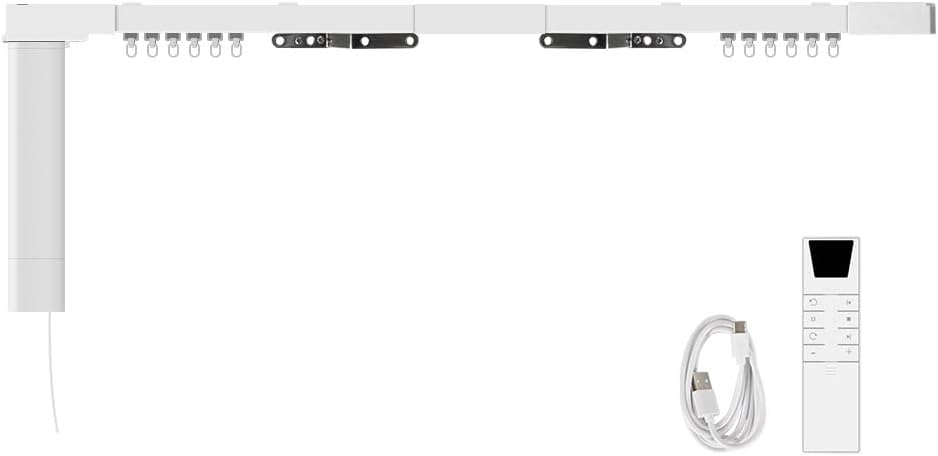
4. Product Overview and Components
Familiarize yourself with the main parts of the smart curtain system:

- Motor: The main driving unit for curtain movement.
- Master Driver & Sub Driver: Components that connect the motor to the track and facilitate curtain movement.
- Track: The rail along which the curtains move. Available in adjustable lengths.
- Connectors: Used to join track segments.
- Carriers & Wheel Runners: Components that attach to the curtain and slide along the track.
- Installation Brackets: For mounting the track to the wall or ceiling.
- Antenna: For wireless communication.
- USB Port: For charging the built-in battery.
- Motor Switch, Set Button, LED: Control and indicator elements on the motor.
5. Setup and Installation
Proper installation is crucial for optimal performance. Please follow these steps carefully.
5.1 Tuya Zigbee Hub Requirement
A Tuya Zigbee Hub (not included) is required for app and voice control functionality. Ensure you have a compatible hub set up before proceeding with smart control features.

5.2 Track Assembly and Mounting
- Measure and Adjust Track: Determine the desired length for your curtain track. The track is adjustable; ensure it is slightly larger than your curtain width for a proper fit. Assemble track segments using the provided connectors.
- Choose Mounting Method: Decide between wall-mount or ceiling-mount installation based on your preference and room structure.
- Install Brackets: Securely attach the wall-mount or ceiling-mount brackets to your desired location using appropriate hardware (not always included). Ensure brackets are level and spaced evenly to support the track.
- Attach Track: Carefully snap or slide the assembled curtain track onto the installed brackets. Ensure it is firmly secured.
5.3 Motor and Curtain Attachment
- Install Motor: Attach the smart curtain motor to the designated end of the track. Ensure it is securely fastened and aligned.
- Attach Curtains: Hook your curtains onto the carriers and wheel runners provided with the track system. The system supports both center-opening and side-opening curtains.

6. Operation
6.1 Powering On and Initial Setup
Once installed, the motor will power on. It is recommended to fully charge the built-in battery before first use.
6.2 Remote Control Operation
The included RF remote control allows for direct operation of your curtains:

- Up/Open Button: Press to open curtains.
- Down/Close Button: Press to close curtains.
- Stop Button: Press to stop curtains at any desired position.
- Channel +/-: Use to switch between multiple channels if controlling more than one curtain system.
- Inching Reverse / Open 20% (Short Press): Moves curtains slightly in reverse or opens to 20%.
- Open 50% (Long Press): Opens curtains to 50%.
- Inching Forward / Open 70% (Short Press): Moves curtains slightly forward or opens to 70%.
- Third Position Limit (Long Press): Sets or moves to a third predefined position.
6.3 App Control (Tuya Smart App)
For advanced control and smart features, use the Tuya Smart App:
- Download App: Download the Tuya Smart App from your device's app store.
- Add Device: Open the app, ensure your Tuya Zigbee Hub is connected, and follow the in-app instructions to add the Smart Curtain Motor.
- Control Curtains: Once added, you can open, close, stop, and set specific percentages for your curtains directly from the app interface.
- Set Limits: Use the app to precisely set the open and closed limits for your curtains.
- Check Status: The app allows you to view the current status and battery percentage of your curtain motor.

6.4 Voice Control (Alexa/Google Home)
Integrate your smart curtain motor with Amazon Alexa or Google Home for convenient voice commands:
- Link Accounts: In the Alexa or Google Home app, enable the Tuya Smart skill/service and link your Tuya account.
- Discover Devices: Ask your voice assistant to discover new devices.
- Voice Commands: Use commands such as:
- "Alexa, open the curtains."
- "Ok Google, close the living room curtains."
- "Alexa, set bedroom curtains to 50%."

6.5 Battery Management
The motor features a built-in 3200mAh/7.4V rechargeable battery. It is equipped with low-battery alerts to ensure uninterrupted operation.
- Charging: When the battery is low, connect the motor to a USB power source using the provided USB charging cable.
- Low Battery Alert: Pay attention to alerts from the app or motor indicators to charge the battery promptly and avoid damage.

7. Maintenance
- Cleaning: Periodically wipe the motor and track with a soft, dry cloth to remove dust. Do not use abrasive cleaners or solvents.
- Track Inspection: Regularly check the curtain track for any obstructions or debris that might hinder smooth operation.
- Battery Care: Avoid completely draining the battery frequently. Charge it when low to prolong its lifespan. If storing for a long period, charge the battery to about 50% and store in a cool, dry place.
8. Troubleshooting
| Problem | Possible Cause | Solution |
|---|---|---|
| Motor not responding to remote/app. | Low battery; remote battery dead; motor not paired; Zigbee hub offline. | Charge motor battery; replace remote battery; re-pair motor with remote/hub; check Zigbee hub connection. |
| Curtains not moving smoothly. | Obstruction in track; track misalignment; damaged carriers/runners. | Clear track; check track alignment and adjust; inspect and replace damaged parts. |
| Voice control not working. | Tuya account not linked; device not discovered; internet connectivity issues. | Ensure Tuya skill/service is enabled and linked; rediscover devices in Alexa/Google Home app; check Wi-Fi connection. |
| Motor makes unusual noise. | Track obstruction; motor malfunction. | Clear track; if noise persists, contact customer support. |
9. Specifications
| Parameter | Value |
|---|---|
| Product Name | Smart Electric Curtain |
| Model Number | ZM87EL-ZP |
| Brand | Blindsmart |
| Item Weight | 9.47 pounds |
| Color | Silver |
| Style (Track Length) | 3.1m (122inch) |
| Batteries | 1 Nonstandard Battery (included) |
| Battery Cell Type | Lithium |
| Battery Capacity | 3200mAh/7.4V |
| Rated Voltage | DC5V/2A |
| Rated Current | 2.5A |
| Max Power | 20W |
| Torsion | 1.2Nm |
| Running Speed | 128mm/s |
| Receive Frequency | 433.92MHz |
| Operating Temperature | -10~65°C, RH<80% |
| Receive Sensitivity | -110dBM |
| IP Class | IP44 |
| Date First Available | December 10, 2024 |
10. Warranty and Support
Blindsmart products are designed for reliability and performance. For warranty information, technical support, or any inquiries regarding your Smart Curtain Motor, please refer to the warranty card included with your product or visit the official Blindsmart website. You may also contact Blindsmart customer service directly for assistance.
For more information, visit the Blindsmart Store on Amazon.


