
Introduction
This manual provides comprehensive instructions for the installation, operation, and maintenance of your Blindsmart Tuya Zigbee Smart Curtain Motor with Motorized Curtain Track. Please read this manual carefully before use to ensure proper functionality and safety.
Key Features
- Smart Control Options: Requires a Tuya Zigbee Hub for app and voice control via Alexa or Google Home. Easily manage curtains through the Tuya Smart App or multi-channel RF remote control for added flexibility.
- Built-in Rechargeable Battery: Features a 3200mAh/7.4V rechargeable battery with a USB charging port and low-battery alerts to ensure uninterrupted operation.
- Convenient Installation: Includes wall-mount and ceiling-mount brackets, along with an adjustable track. Choose a track size slightly larger than your curtain width for a perfect fit.
- Customizable Curtain Movement: Compatible with center-opening and side-opening curtains, offering versatile options for various setups.
- All-in-One Functionality: Use the app to control curtain status, set limits, and more, combining smart features with seamless integration into your smart home ecosystem.
Package Contents
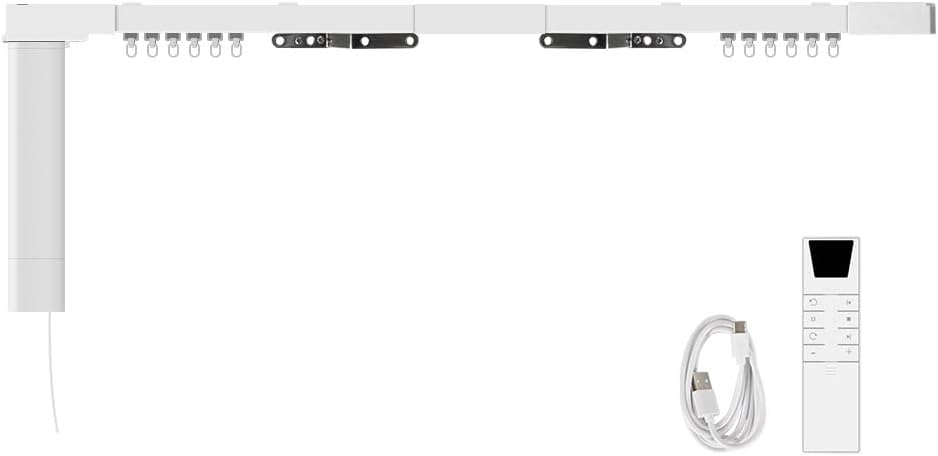
Smart Curtain Motor and Track Kit

RF Remote Control
USB Charging Cable

Wall-mount and Ceiling-mount Brackets
The package includes the motorized curtain track, smart motor, RF remote control, USB charging cable, and necessary installation brackets for wall or ceiling mounting.
Setup and Installation
Follow these steps to set up and install your smart curtain system:
- Track Assembly: Assemble the motorized curtain track according to the desired length. Ensure the track length is slightly larger than your curtain width for optimal fit.
- Motor Attachment: Securely attach the smart motor to the designated end of the track.
- Mounting: Choose between wall-mount or ceiling-mount brackets. Install the brackets firmly in your desired location.
- Track Mounting: Carefully mount the assembled track onto the installed brackets.
- Curtain Attachment: Attach your curtains to the carriers on the track.
- Power On: Ensure the motor's built-in battery is charged or connect it to a power source via the USB charging cable.
- Tuya Zigbee Hub Connection (Required for Smart Features):

A Tuya Zigbee Hub (M6) is required for app and voice control. This hub is not included in the product package.
To enable app and voice control, you must pair the curtain motor with a Tuya Zigbee Hub (not included). Refer to your Tuya Zigbee Hub's manual for pairing instructions. Once paired, you can add the curtain motor to the Tuya Smart App.
Operating Instructions
A. App Control (Requires Tuya Zigbee Hub)

Control your curtains directly from the Tuya Smart App.
After successfully pairing with a Tuya Zigbee Hub and adding the device to the Tuya Smart App:
- Open the Tuya Smart App on your smartphone.
- Select your smart curtain device from the device list.
- Use the on-screen controls to open, close, or stop the curtains at any desired position.
- The app also allows you to check the curtain status, set open/close limits, and configure schedules.
B. Voice Control (Requires Tuya Zigbee Hub)

Control your curtains using voice commands with Alexa or Google Home.
Once integrated with Alexa or Google Home via the Tuya Zigbee Hub:
- Activate your voice assistant (e.g., "Alexa" or "Hey Google").
- Issue commands such as:
- "Open the curtains."
- "Close the curtains."
- "Stop the curtains."
- "Set curtains to 50%."
C. RF Remote Control
The included RF remote control provides direct manual operation.
The multi-channel RF remote control allows direct operation without the need for a smart hub:
| Button/Action | Function |
|---|---|
| Short press: Inching reverse | Moves curtains slightly in reverse direction. |
| Long press: Open 20% | Opens curtains to 20% position. |
| Short press: Third position limit | Activates a pre-set third position limit. |
| Long press: Open 50% | Opens curtains to 50% position. |
| Short press: Inching forward | Moves curtains slightly in forward direction. |
| Long press: Open 70% | Opens curtains to 70% position. |
| Up/Open button | Fully opens the curtains. |
| Stop button | Stops the curtains at their current position. |
| Down/Close button | Fully closes the curtains. |
| Channel +/- | Switches between different channels to control multiple motors. |
Battery Information

The motor features a built-in rechargeable battery with low-battery alerts.
The smart curtain motor is equipped with a built-in 3200mAh/7.4V rechargeable battery. To ensure optimal performance and battery longevity:
- Charge the battery promptly when you receive a low-battery alert.
- Use the provided USB charging cable to connect the motor to a standard USB power adapter (not included).
- Avoid completely draining the battery to prevent potential damage.
Applicable Curtains

Center Open Curtains

Side Open Curtains
This smart curtain system is designed to be compatible with both center-opening and side-opening curtains, providing flexibility for various window treatments.
Product Specifications
Detailed view of the motor components and specifications.
| Specification | Value |
|---|---|
| Product Name | Smart Electric Curtain |
| Torsion | 1.2Nm |
| Running Speed | 128mm/s |
| Rated Voltage | DC5V/2A |
| Rated Current | 2.5A |
| Battery Capacity | 3200mAh/7.4V |
| Max Power | 20W |
| RPM | 100RPM |
| Receive Frequency | 433.92MHz |
| Operating Temperature | -10~65°C, RH<80% |
| Receive Sensitivity | -110dBM |
| IP Class | IP44 |
| Manufacturer | Blindsmart |
| Item Model Number | ZM87EL-ZP |
| Color | Silver |
Troubleshooting
If you encounter issues with your smart curtain motor, consider the following common solutions:
- Motor Not Responding:
- Check if the battery is charged. Recharge if necessary.
- Ensure the remote control has working batteries.
- If using app control, verify the Tuya Zigbee Hub is powered on and connected to your network.
- Confirm the motor is properly paired with the remote or Tuya Zigbee Hub.
- Curtains Not Opening/Closing Fully:
- Check for any obstructions along the track.
- Verify that the track is installed level and smoothly.
- Recalibrate the open/close limits if they have been reset or are incorrect. Refer to the Tuya Smart App for limit setting options.
- Voice Control Not Working:
- Ensure your Tuya Zigbee Hub is connected to the internet and linked to your Alexa or Google Home account.
- Check that the device name in the Tuya Smart App matches the name used in voice commands.
- Try re-syncing devices in your Alexa or Google Home app.
Maintenance
To ensure the longevity and smooth operation of your smart curtain system:
- Regularly inspect the track for any dust or debris and clean as needed with a soft, dry cloth.
- Ensure the curtain carriers move freely along the track.
- Keep the motor unit dry and away from excessive moisture.
- Charge the built-in battery as soon as low-battery alerts are received.
Warranty and Support
For warranty information or technical support, please refer to the Blindsmart official website or contact their customer service directly. Keep your purchase receipt as proof of purchase for any warranty claims.
Blindsmart Customer Support: Visit Blindsmart Store on Amazon