
1. Introduction
This manual provides essential information for the safe and effective installation, operation, and maintenance of your Bietrun MC4 Solar Panel Extension Cables. These 30-foot, 10AWG cables are designed to extend the reach of your solar panels, ensuring flexible placement and optimal energy harvesting for various photovoltaic systems, including those compatible with EcoFlow, Renogy, Jackery, SunPower, Goal Zero, and Harbor Freight systems.

Image 1.1: Bietrun MC4 Solar Panel Extension Cables (30ft, 10AWG).
2. Safety Instructions
- Always disconnect power from solar panels before making or breaking connections to prevent electrical shock.
- Ensure all connections are secure and properly sealed to maintain IP67 waterproof rating.
- Do not exceed the rated current (25A) or voltage (1500V) of the cables.
- Avoid bending cables sharply or placing them under excessive tension to prevent damage to the copper core.
- Wear appropriate personal protective equipment (PPE) when handling electrical components.
- Keep cables away from sharp objects, moving parts, and extreme heat sources.
- If any part of the cable or connector is damaged, do not use it. Replace immediately.
3. Product Features
- Set of 2 Cables: Includes one 30ft black cable and one 30ft red cable.
- High-Quality Conductor: Features 10AWG (6mm²) oxygen-free pure copper core wiring for minimal energy loss and safe operation.
- Durable Insulation: High-strength PVC outer layer is fireproof, corrosion-resistant, and UV-resistant, designed to withstand extreme temperatures from -40℉ to 194℉ (-40°C to 90°C).
- Waterproof Connectors: Pre-installed MC4 male and female connectors with an IP67 waterproof rating ensure reliable outdoor use and a lifespan of 25+ years.
- Secure Connection: Connectors utilize a stable self-locking system for easy and secure locking and unlocking.
- TÜV Certified: Ensures compliance with safety and quality standards.

Image 3.1: Detailed specifications of the solar panel extension cable.
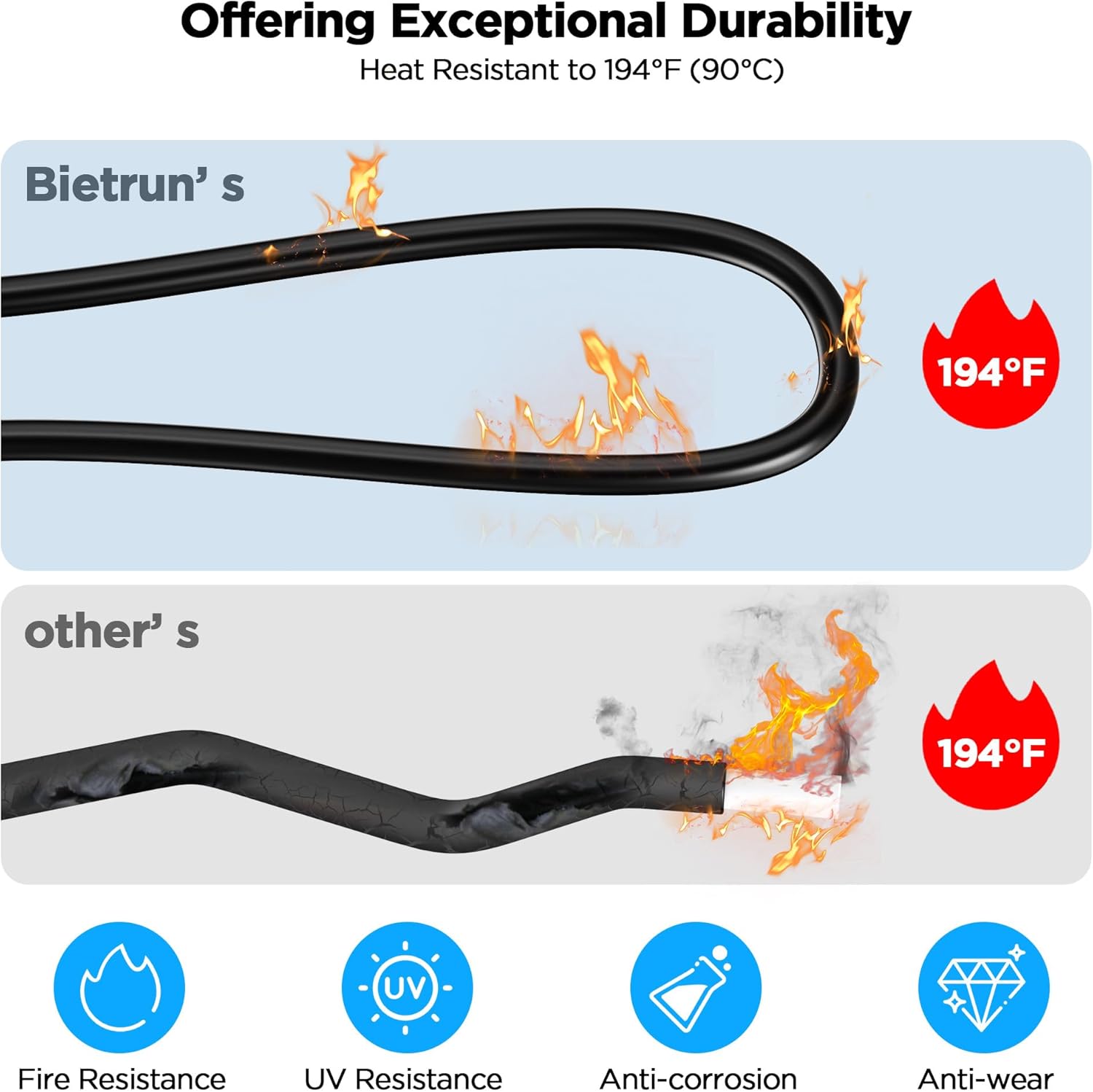
Image 3.2: Illustration of the cable's exceptional durability and heat resistance.
Video 3.2.1: Overview of solar extension cable features including tinned copper, upgraded connection, flexibility, heat resistance, and waterproofing.
Video 3.2.2: Demonstration of solar panel cable features such as UV protection, anti-oxidation tinned copper, PPO flame-retardant insulation, and easy connection/disconnection.
4. Package Contents
- 1 x 30ft Red MC4 Extension Cable (with one male MC4 connector on one end and one female MC4 connector on the other end).
- 1 x 30ft Black MC4 Extension Cable (with one male MC4 connector on one end and one female MC4 connector on the other end).
5. Setup and Installation
The Bietrun MC4 Extension Cables are designed for flexible installation. Each cable comes with pre-installed MC4 male and female connectors on opposite ends, allowing for direct extension of existing MC4-compatible solar setups.
5.1. Understanding MC4 Connectors
MC4 connectors are standard for solar panel connections. The red cable is typically for positive (+) polarity, and the black cable is for negative (-) polarity. The connectors themselves are marked to distinguish male and female plugs, not polarity.

Image 5.1: Standard MC4 Male and Female Connectors with polarity indication.
5.2. Connecting MC4 Extension Cables
To extend your solar panel system:
- Align the male MC4 connector from one cable (or your solar panel) with the female MC4 connector of another cable (or your solar power station).
- Push them together firmly until you hear a click, indicating the self-locking mechanism has engaged.
- Ensure correct polarity: connect red (positive) to red (positive) and black (negative) to black (negative).
- To disconnect, press the release clips on the side of the connector and pull apart.
5.3. Connecting to an MPPT Controller (Optional Modification)
If your MPPT solar charge controller requires direct wire connections rather than MC4 connectors, you will need to modify one end of the extension cable. This involves removing the pre-installed MC4 connector from one end of the cable.
- Using appropriate tools, carefully remove the MC4 connector from the end of the cable you intend to connect to the MPPT controller.
- Strip the insulation from the cable ends to expose the copper core, as required by your MPPT controller's terminals.
- Connect the exposed wire ends to the corresponding terminals on your MPPT controller, ensuring correct polarity (red to positive, black to negative).
Note: Removing pre-installed connectors may void certain warranties. Proceed with caution and ensure you have the necessary tools and expertise.
6. Operating Instructions
Once installed, ensure your solar panels are positioned to receive maximum sunlight. The extension cables facilitate flexible placement, allowing you to optimize solar exposure while keeping your power station in a shaded or secure location.
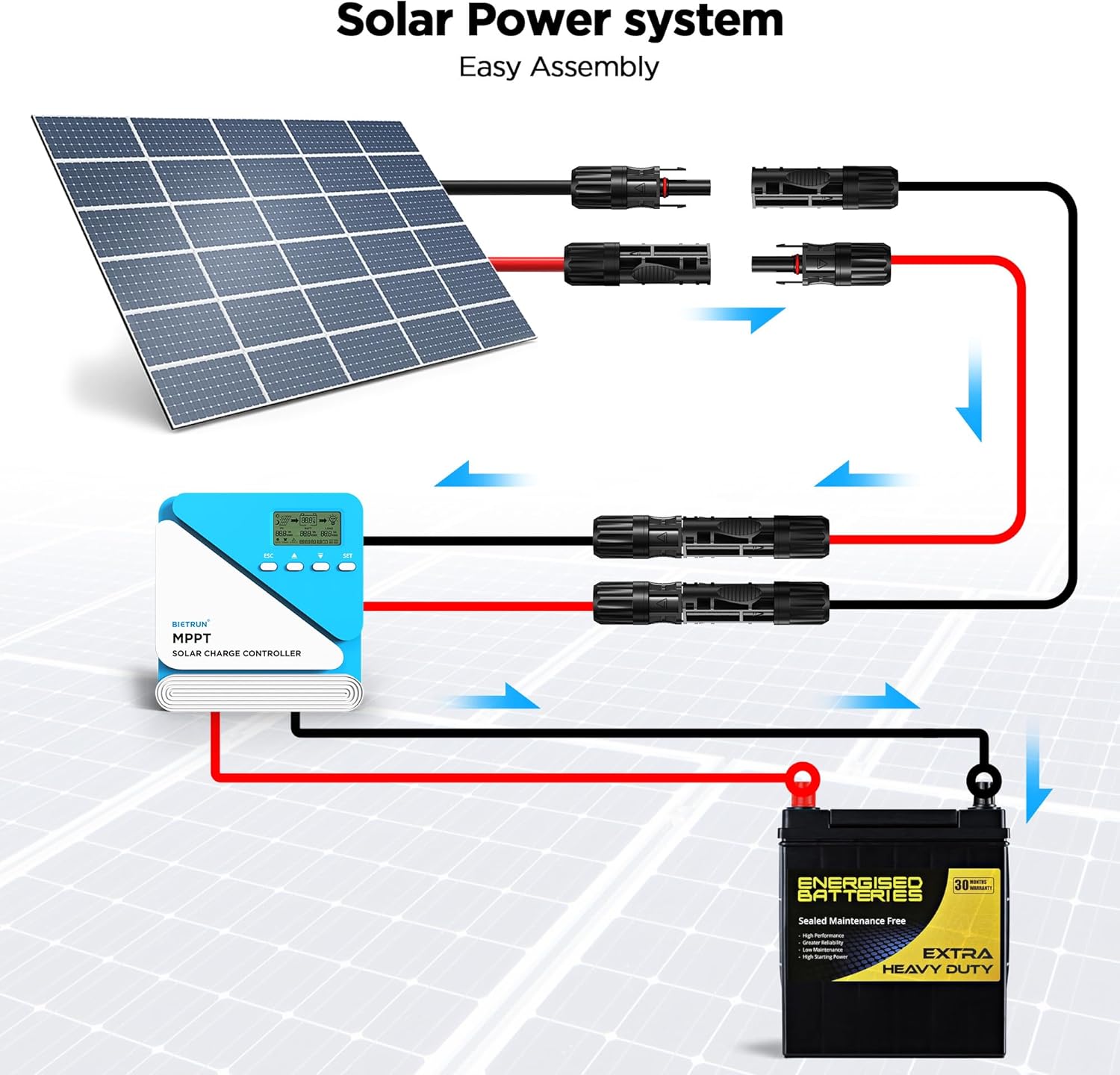
Image 6.1: Example of a solar power system assembly using MC4 extension cables.
These cables are suitable for a wide range of applications:
- Solar power plants
- Photovoltaic connectors
- Marine installations
- Recreational vehicles (RVs)
- Home Solar Systems

Image 6.2: Wide application scenarios for the solar extension cables.
Video 6.2.1: Short demonstration of solar extension cables for RV use, showcasing their flexibility and ease of connection.
7. Maintenance
- Regular Inspection: Periodically inspect the cables and connectors for any signs of wear, damage, or corrosion. Ensure the MC4 connectors remain securely locked.
- Cleaning: If necessary, clean the cables and connectors with a soft, damp cloth. Avoid using harsh chemicals or abrasive materials.
- Storage: When not in use, coil the cables neatly and store them in a dry, protected area to prevent physical damage or exposure to extreme conditions.
8. Troubleshooting
| Problem | Possible Cause | Solution |
|---|---|---|
| No power or low power output from solar panels. | Loose or incorrect MC4 connections. Incorrect polarity. Damaged cable. | Check all MC4 connections for secure engagement. Verify correct positive (red) and negative (black) polarity. Inspect cables for visible damage and replace if necessary. |
| Connectors are difficult to connect/disconnect. | Debris in connectors. Misalignment. | Ensure connectors are clean and free of debris. Align male and female connectors carefully before pushing/pulling. Do not force connections. |
| Cable overheating. | Overcurrent. Damaged insulation. | Ensure the current drawn does not exceed the cable's 25A rating. Inspect insulation for damage. Discontinue use if overheating persists. |
9. Specifications
| Feature | Detail |
|---|---|
| Model Number | SYCX-000 |
| Length | 30 Feet (9.14 meters) per cable (Set of 2) |
| Wire Gauge | 10AWG / 6mm² |
| Conductor Material | Oxygen-Free Pure Copper Core |
| Connectors | MC4 Male and Female (one of each type per cable) |
| Rated Current | 25A |
| Rated Voltage | 1500V |
| Temperature Range | -40℉ to 194℉ (-40°C to 90°C) |
| Waterproof Rating | IP67 |
| Cable Diameter | 6.2mm |
| Conductor Resistance | 0.8Ω/km |
| Outer Layer Material | High-strength PVC (Fireproof, Corrosion Resistant, UV Resistant) |
| Connector Lifespan | 25+ years |
10. Warranty and Support
For warranty information or technical support, please refer to the product packaging or contact Bietrun customer service directly. Keep your purchase receipt for warranty claims.