
Generico H3
H3 Rugged Phone User Manual
Brand: Generico | Model: H3
1. Introduction
This user manual provides comprehensive instructions for the operation and maintenance of your H3 Rugged Phone. Designed for durability and ease of use, this phone is ideal for outdoor activities and demanding environments, featuring IP68 water, dust, and shock resistance, a large 2.8-inch display, and a long-lasting 2000mAh battery. Please read this manual carefully before using your device to ensure proper functionality and longevity.
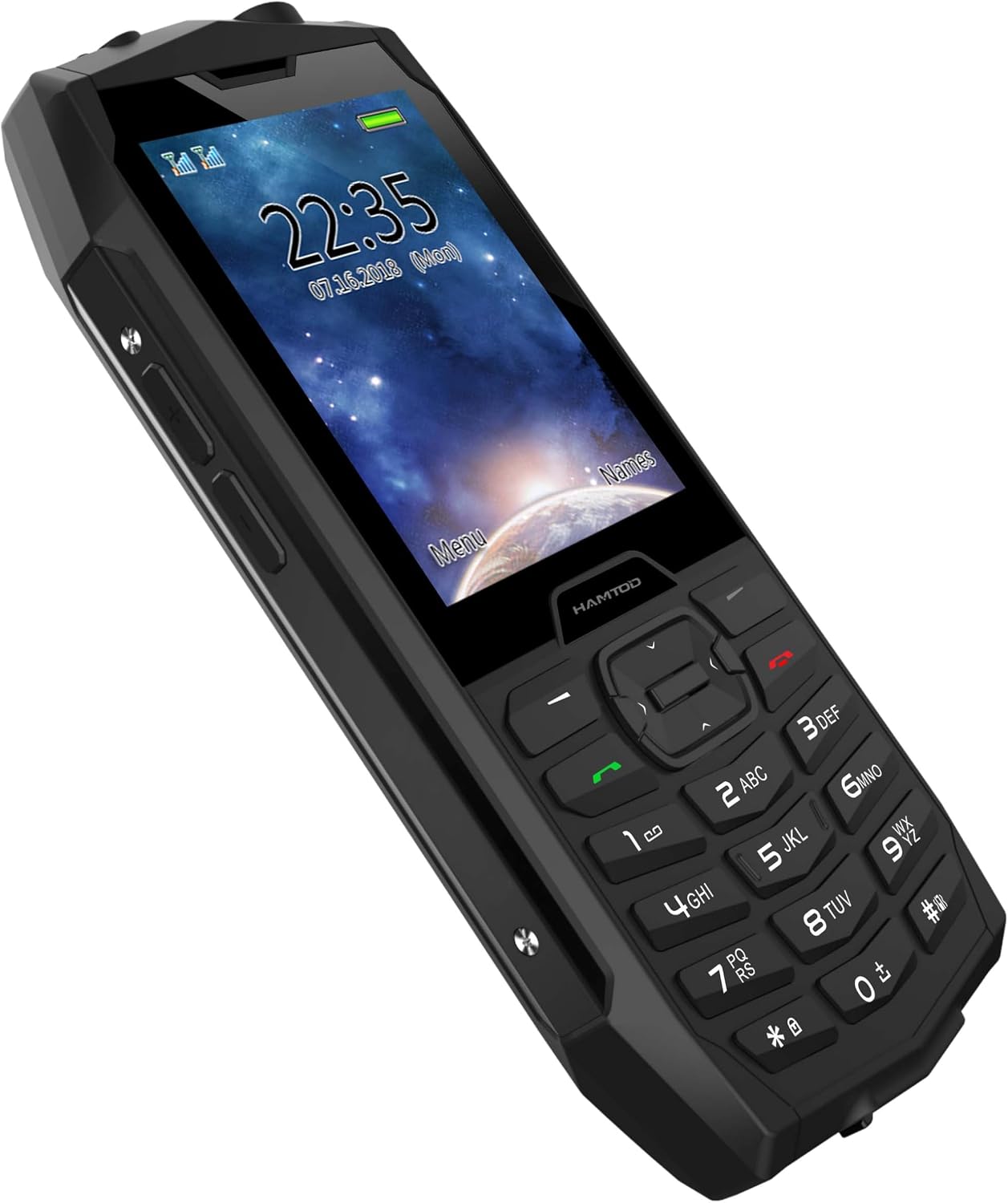
Image: Front and side view of the H3 Rugged Phone, showcasing its robust design and physical keypad.
2. Product Overview
The H3 Rugged Phone is engineered with features to withstand challenging conditions while providing essential communication capabilities. Key features include:
- IP68 Durability: Resistant to water, dust, and shocks, making it suitable for harsh environments.
- Large 2.8-inch Display: Provides clear visibility for texts and images.
- Long-lasting 2000mAh Battery: Offers extended usage time.
- 4G VoLTE Connectivity: Ensures fast and reliable communication.
- SOS Button: For emergency situations, allowing quick contact with pre-set numbers.
- Independent Flashlight: A dedicated powerful LED flashlight for convenience in low-light conditions.
- Dual SIM Support: Allows for two SIM cards simultaneously.
- Physical Keypad: Large, easy-to-press buttons for simple operation.

Image: A collage highlighting key features such as the 2.8-inch screen, IP68 rating, 2000mAh battery, independent flashlight, 4G VoLTE, RTOS operating system, T107 Quad-core processor, and 1.0GHz speed.

Image: Demonstrates the phone's IP68 certification, showing its resistance to 1.5m water depth for 30 minutes, dust, and 2m drop resistance.
3. Setup
3.1 Battery Installation
- Locate the battery cover on the back of the phone.
- Gently remove the battery cover by sliding or prying it open from the designated notch.
- Insert the 2000mAh battery into the battery compartment, ensuring the gold contacts align with the phone's terminals.
- Replace the battery cover, pressing firmly until it clicks into place.
3.2 SIM Card and TF Card Installation
- With the battery removed, locate the SIM card slot(s) and TF card slot.
- Insert your SIM card(s) into the designated slots, ensuring the cut corner aligns correctly. The phone supports dual SIM.
- If using, insert a TF (microSD) card into its slot for expanded storage.
- Reinstall the battery and battery cover.
3.3 Initial Charging
Before first use, fully charge the phone using the provided adapter. Connect the charger to the phone's charging port and plug it into a power outlet. The charging indicator will show the charging status.
4. Operating Instructions
4.1 Power On/Off
- Power On: Press and hold the Power/End Call button until the screen lights up.
- Power Off: Press and hold the Power/End Call button, then select "Power Off" from the options on the screen.
4.2 Making Calls
- From the home screen, use the keypad to dial the desired phone number.
- Press the Green Call button to initiate the call.
- To end a call, press the Red End Call button.
4.3 Sending Messages
- Navigate to the "Messages" menu from the main screen.
- Select "New Message" or "Create SMS".
- Enter the recipient's number or select from contacts.
- Type your message using the keypad.
- Press "Send".
4.4 SOS Function
The H3 features a dedicated SOS button for emergencies. You can pre-set up to 5 emergency contacts.
- Setting SOS Contacts: Go to "Settings" > "SOS Settings" and add emergency numbers.
- Using SOS: In an emergency, press and hold the SOS button on the back of the phone. The phone will automatically dial the pre-set numbers sequentially and send an emergency SMS.
4.5 Flashlight
The independent flashlight can be activated quickly.
- Activation: Locate the dedicated flashlight button (usually on the side of the phone) and press it to turn the flashlight on/off.

Image: The H3 Rugged Phone with its independent flashlight illuminated, demonstrating its utility in dark environments.
5. Maintenance
5.1 Cleaning Your Phone
To maintain the phone's appearance and functionality:
- Use a soft, lint-free cloth to wipe the screen and body.
- Avoid using harsh chemicals, cleaning solvents, or strong detergents.
- For stubborn dirt, slightly dampen the cloth with water. Ensure all ports are closed before cleaning with moisture.
5.2 IP68 Water and Dust Resistance
The H3 phone is IP68 rated, meaning it is protected against dust ingress and can withstand immersion in water up to 1.5 meters for 30 minutes. To ensure this protection:
- Ensure all port covers (charging port, headphone jack if present) are securely closed before exposing the phone to water or dust.
- Do not intentionally submerge the phone in water beyond the specified depth or duration.
- If the phone gets wet, dry it thoroughly with a clean cloth before opening any covers or charging.
- Avoid exposing the phone to high-pressure water jets or extreme temperatures.
5.3 Battery Care
- Use only the original or certified compatible charger.
- Avoid extreme temperatures, as they can affect battery life.
- Do not puncture, disassemble, or short-circuit the battery.
6. Troubleshooting
| Problem | Possible Cause | Solution |
|---|---|---|
| Phone won't turn on | Low battery; Battery not installed correctly; Software issue. | Charge the phone for at least 30 minutes. Reinstall the battery. Perform a hard reset (refer to manual for specific key combination if available). |
| No network signal | SIM card not inserted correctly; Out of network coverage; Network settings issue. | Reinsert SIM card. Move to an area with better coverage. Check network settings (e.g., preferred network type). |
| Battery drains quickly | Excessive usage; Background apps; Old battery. | Reduce screen brightness. Close unnecessary applications. Consider replacing the battery if it's old. |
| Cannot hear caller / Caller cannot hear me | Volume too low; Microphone/speaker blocked; Network issue. | Adjust call volume. Ensure microphone/speaker are not covered. Try calling from a different location. |
7. Specifications
| Model | H3 |
| Brand | Generico |
| Manufacturer | Hamtod |
| Display Size | 2.8 inches |
| Display Type | LCD |
| Resolution | 854x480 |
| Processor | A33 ARM Cortex A7 Quad Core, 1 GHz |
| RAM | 128 MB |
| Digital Storage Capacity | 128 MB (internal), 64 GB (max TF card support) |
| Battery Capacity | 2000 mAh (Lithium Ion) |
| Cellular Technology | 4G |
| SIM Support | Dual SIM |
| Water/Dust Resistance | IP68 Certified |
| Additional Features | SOS Button, Flashlight, Large Keypad |
| Dimensions | 10.73 x 5.62 x 2.07 cm |
| Weight | 367 grams |
8. Warranty and Support
This product comes with a standard manufacturer's warranty. Please refer to the warranty card included in the product packaging for specific terms and conditions, including warranty period and coverage details. Keep your purchase receipt as proof of purchase.
For technical support, troubleshooting assistance, or warranty claims, please contact the retailer or the manufacturer's customer service. Contact information can typically be found on the product packaging or the manufacturer's official website.
For more information, you may visit the product page on Amazon: H3 Rugged Phone on Amazon.it
Ask a question about this manual
Ask about setup, troubleshooting, compatibility, parts, safety, or missing instructions. Manuals+ will review the question and use this page’s manual context to help answer it.