
Generico T8
HAMTOD T8 Foldable Phone User Manual
Model: T8 | Brand: Generico
1. Introduction
This user manual provides comprehensive instructions for the HAMTOD T8 foldable phone. Designed with ease of use in mind, this device features a dual-screen display, robust connectivity options including 4G VoLTE and Bluetooth, and essential safety features like a dedicated SOS button. Please read this manual carefully to ensure proper operation and maintenance of your device.
2. Product Overview
2.1 Package Contents
- HAMTOD T8 Foldable Phone
- Battery
- Adapter
- User Manual (this document)
2.2 Device Layout
The HAMTOD T8 features a classic flip design with two displays and large, easy-to-use buttons.

Figure 2.2.1: HAMTOD T8 Foldable Phone (Blue) - Closed View. Shows the external 1.77-inch display and the dedicated SOS button on the side.
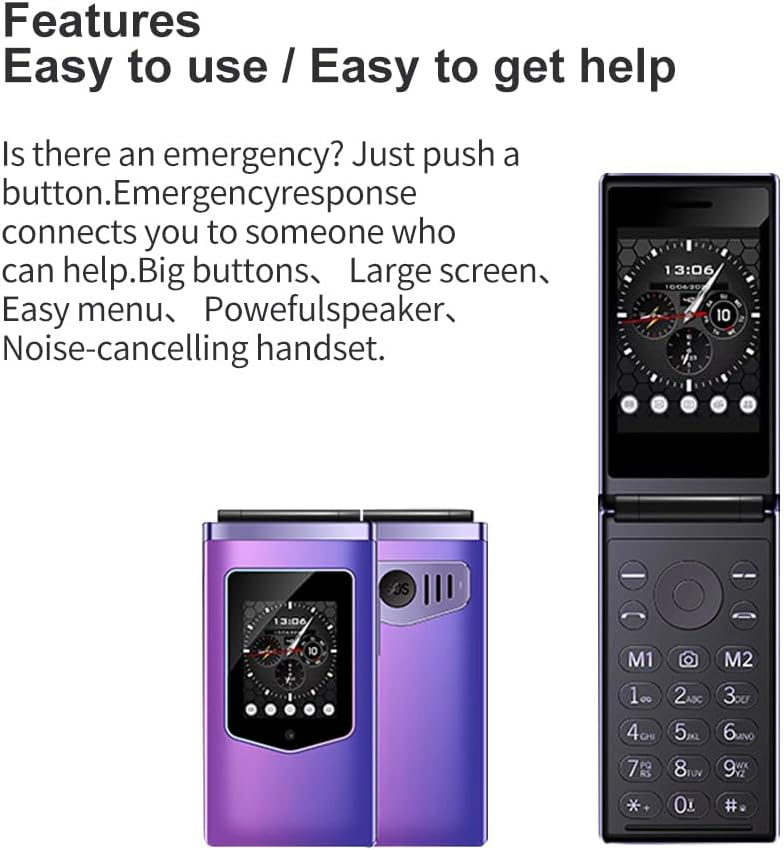
Figure 2.2.2: HAMTOD T8 Foldable Phone - Open and Closed Views. Illustrates the large keypad and the simplicity of the user interface.
- Main Display: 2.8-inch IPS HD screen located inside the flip.
- External Display: 1.77-inch color HD screen on the outside, showing time, date, and caller ID.
- Keypad: Large, well-spaced alphanumeric keys for easy dialing and navigation.
- SOS Button: Dedicated button for emergency calls, located on the side of the phone.
- Flashlight: Integrated flashlight function.
- Speaker: Powerful speaker for clear audio.
3. Setup
3.1 Battery Installation
- Carefully remove the back cover of the phone.
- Align the battery contacts with the terminals inside the battery compartment.
- Gently press the battery into place until it is secure.
- Replace the back cover, ensuring it clicks into place.
3.2 Charging the Battery
Before first use, fully charge the phone's battery.
- Connect the adapter to a power outlet.
- Connect the other end of the adapter cable to the charging port on the phone.
- The charging indicator will illuminate. Once fully charged, the indicator may change color or turn off.
- Disconnect the charger once charging is complete.

Figure 3.2.1: Battery Capacity. The HAMTOD T8 is equipped with a 1500mAh battery for extended usage.
3.3 SIM Card and TF Card Installation
The HAMTOD T8 supports dual SIM cards and a TF (microSD) card for expandable storage.
- Ensure the phone is powered off and the battery is removed.
- Locate the SIM card slots and the TF card slot.
- Insert your SIM cards into the designated slots, ensuring the gold contacts face downwards and the cut corner is correctly aligned.
- Insert the TF card into its slot until it clicks into place.
- Reinstall the battery and back cover.
4. Operating Instructions
4.1 Power On/Off
- To Power On: Press and hold the Power/End Call button (red button) until the screen lights up.
- To Power Off: Press and hold the Power/End Call button (red button) until the power off options appear, then confirm.
4.2 Making and Receiving Calls
- To Make a Call:
- Open the phone to reveal the main screen and keypad.
- Dial the desired phone number using the numeric keypad.
- Press the Call button (green button) to initiate the call.
- To Receive a Call:
- When the phone rings, you can see the caller ID on the external screen.
- Open the phone or press the Call button (green button) to answer.
- To end a call, press the Power/End Call button (red button).
4.3 SOS Emergency Function
The HAMTOD T8 features a dedicated SOS button for emergencies. This function allows you to quickly contact pre-set emergency numbers.

Figure 4.3.1: One-Button Emergency Call. The SOS button provides quick access to emergency contacts.
- Setting SOS Numbers: Navigate to the SOS settings in the phone's menu. You can typically set up to 5 emergency contact numbers.
- Using SOS: In an emergency, press and hold the dedicated SOS button on the side of the phone. The phone will automatically dial the pre-set numbers in sequence until one is answered. It may also send an emergency SMS message to these contacts.
4.4 Using the Flashlight
The HAMTOD T8 includes a built-in flashlight for convenience.
- Refer to your phone's menu or a specific shortcut key (often a long press on a numeric key like '0' or a dedicated side button) to activate and deactivate the flashlight.
4.5 Bluetooth Connectivity
Connect your HAMTOD T8 to Bluetooth headsets or other compatible devices.
- Go to the "Settings" menu and select "Bluetooth".
- Turn Bluetooth "On".
- Select "Search for devices" or "Pair new device".
- Choose your desired device from the list and follow the on-screen prompts to pair.
4.6 OTG Functionality
The HAMTOD T8 supports OTG (On-The-Go) functionality, allowing you to connect USB devices for data transfer or charging other devices.
- To use OTG, you will need a compatible OTG adapter (not included).
- Connect the OTG adapter to the phone's charging port, then connect your USB device (e.g., USB flash drive, another phone) to the adapter.
5. Maintenance
5.1 Cleaning Your Phone
- Use a soft, dry, lint-free cloth to clean the phone's surface and screens.
- Avoid using harsh chemicals, cleaning solvents, or strong detergents.
- Do not spray cleaners directly onto the phone.
5.2 Battery Care
- Avoid exposing the battery to extreme temperatures (hot or cold).
- Do not puncture, disassemble, or short-circuit the battery.
- If the phone will not be used for an extended period, charge the battery to about 50% before storing it.
5.3 Water and Shock Resistance
The HAMTOD T8 is designed to be resistant to water and shocks. However, this does not mean it is waterproof or indestructible. Take precautions to avoid excessive exposure to water or severe impacts.
- Do not submerge the phone in water.
- Avoid dropping the phone from significant heights.
- Ensure all ports and covers are securely closed to maintain water resistance.
6. Troubleshooting
| Problem | Possible Cause | Solution |
|---|---|---|
| Phone does not power on. | Battery is drained or not properly installed. | Charge the battery. Ensure the battery is correctly installed. |
| Cannot make or receive calls. | No SIM card, SIM card not properly inserted, or no network signal. | Ensure SIM card is inserted correctly. Check network signal strength. Contact your service provider if issues persist. |
| Poor call quality. | Weak network signal, interference, or speaker/microphone issue. | Move to an area with better signal. Check for obstructions around speaker/microphone. |
| Battery drains quickly. | Frequent usage, background processes, or aging battery. | Reduce screen brightness. Close unnecessary applications. Consider replacing the battery if it's old. |
| External display not working. | Software glitch or hardware issue. | Restart the phone. If the problem persists, contact customer support. |
7. Specifications
| Feature | Detail |
|---|---|
| Model | T8 |
| Brand | Generico (HAMTOD) |
| Main Display | 2.8-inch IPS HD |
| External Display | 1.77-inch Color HD |
| Processor | A33 ARM Cortex A7 Quad Core, 1 GHz |
| RAM | 48 MB |
| Internal Storage | 128 MB (Digital Memory) |
| Expandable Storage | Up to 64 GB (TF Card) |
| Battery Capacity | 1500 mAh (Lithium Ion) |
| Connectivity | 4G VoLTE, Bluetooth, OTG |
| SIM Support | Dual SIM |
| Additional Features | SOS Function, Flashlight, Water and Shock Resistant |
| Dimensions | 10.73 x 5.62 x 2.07 cm (Package) |
| Weight | 288 grams (Item) |
8. Warranty and Support
This product comes with a standard manufacturer's warranty. Please refer to the warranty card included in your package for specific terms and conditions. For technical support, troubleshooting assistance, or warranty claims, please contact your retailer or the manufacturer's customer service.
Keep your purchase receipt as proof of purchase for warranty purposes.
Ask a question about this manual
Ask about setup, troubleshooting, compatibility, parts, safety, or missing instructions. Manuals+ will review the question and use this page’s manual context to help answer it.