
Important Safety Instructions
- Read all instructions before using the machine.
- Keep the machine away from water or damp environments.
- Ensure the power cable is not damaged and is connected to a stable power source (DC 5V).
- Keep fingers and loose clothing away from moving parts during operation.
- This machine is intended for knitting yarn only. Do not attempt to knit other materials.
- Supervise children when they are near the machine.
- Unplug the machine when not in use or before cleaning.
Package Contents
Verify that all items are present in the package:
- i-Cord Knitting Machine x 1
- Instruction Manual x 1 (This document)
- Weights x 2
- Crochet Hook x 1
- USB Power Cable x 1
Product Overview
The Caydo Electric i-Cord Knitting Machine is designed for automated i-cord creation, reducing manual effort.
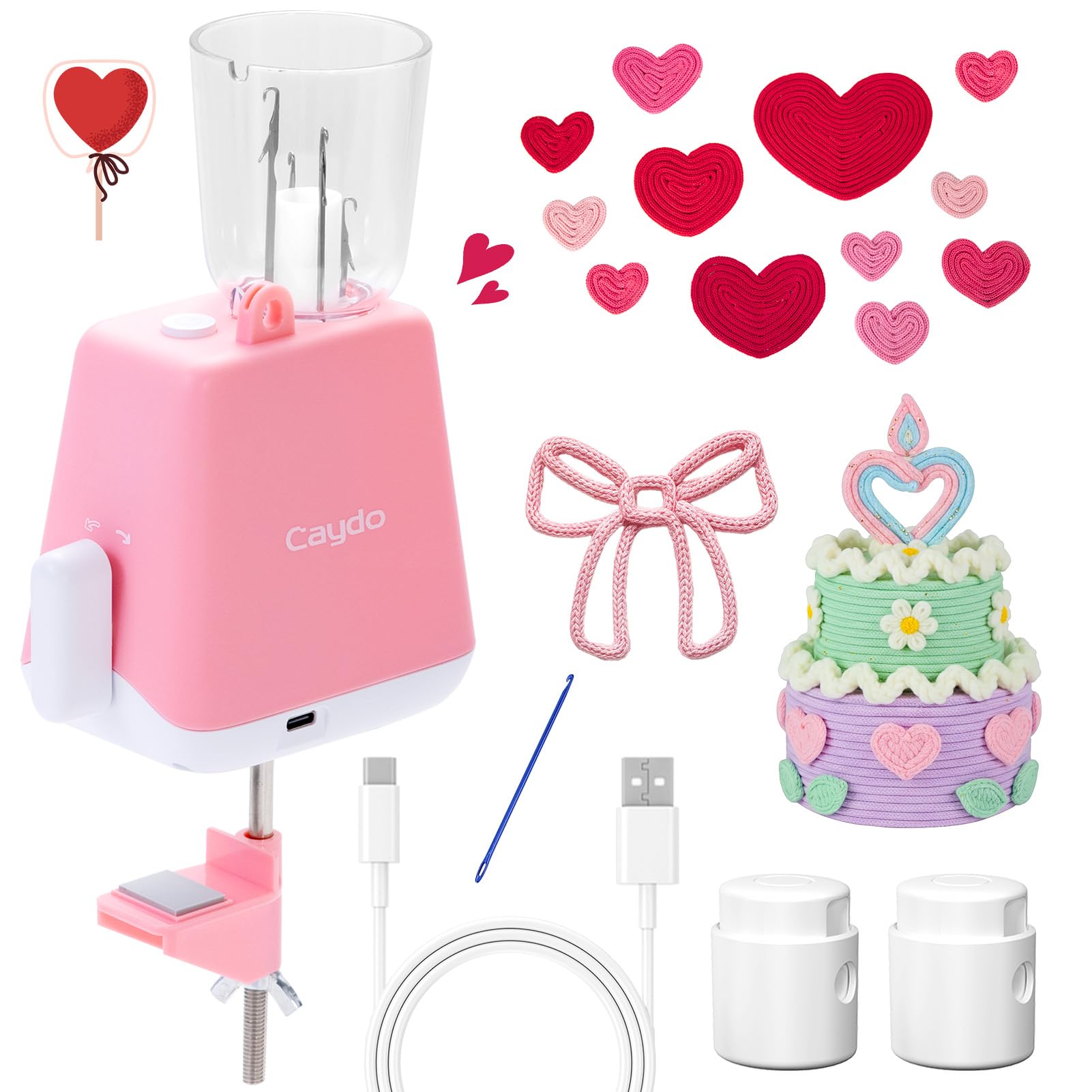
Figure 1: Caydo Electric i-Cord Knitting Machine. This image shows the compact pink machine connected via USB, with various knitted i-cords and crochet items in the background, illustrating its purpose.
Key Components:
- Yarn Guide: Directs the yarn into the knitting mechanism.
- Needles: Automatic needles that form the i-cord.
- Power Switch: On/Off control for the machine.
- USB Power Port: For connecting the power cable.
- Base Clamp: Secures the machine to a table or surface.
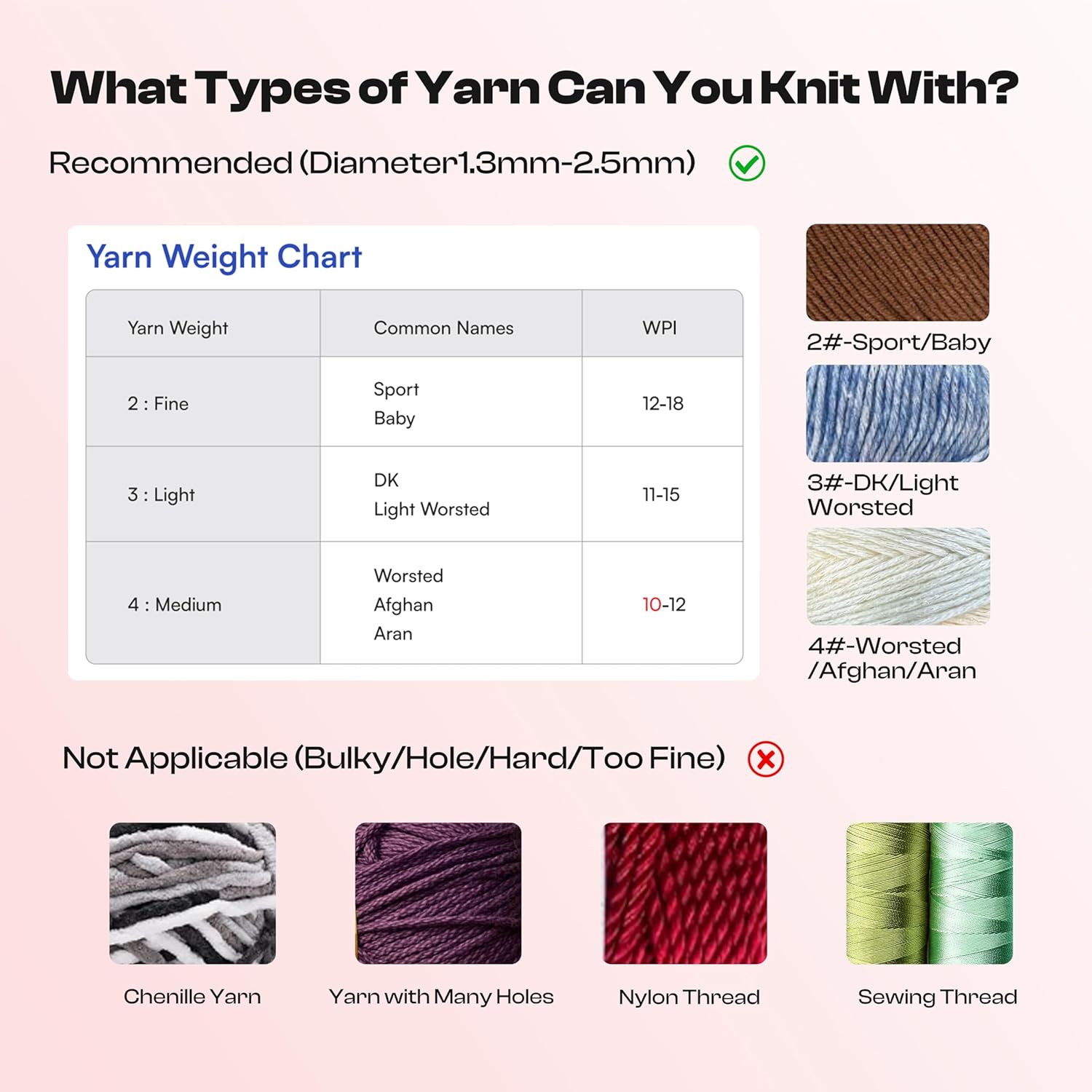
Figure 2: Patented Innovation Design. This image provides a cutaway view of the machine, highlighting its internal mechanism and the path of the yarn through the knitting process.
Setup
- Unpack: Carefully remove all components from the packaging.
- Secure the Machine: Place the i-Cord Knitting Machine on a stable, flat surface. Use the integrated base clamp to secure it firmly to a table edge.
- Connect Power: Insert the USB power cable into the machine's USB port and connect the other end to a DC 5V power adapter (not included) or a compatible USB power source.
- Prepare Yarn: Select a suitable yarn type (refer to "Yarn Compatibility" section). Ensure the yarn is free of knots and tangles.
Operating Instructions
1. Loading the Yarn
- Ensure the machine is turned OFF.
- Open the top cover of the machine.
- Thread the yarn through the yarn guide at the top.
- Using the provided crochet hook, carefully guide the yarn through the needles. Alternate the yarn over one needle and under the next, ensuring each needle catches the yarn correctly.
- Close the top cover.
- Attach one of the provided weights to the end of the yarn hanging from the bottom of the machine. This ensures adequate tension.
2. Starting the Knitting Process
- Turn the power switch to the ON position.
- The machine will begin to rotate and knit the i-cord automatically.
- Monitor the process to ensure the yarn feeds smoothly and no tangles occur.
- If the i-cord appears uneven or the machine struggles, turn it off, re-check yarn loading, and ensure proper tension with the weights.

Figure 3: Detailed Knitting Tutorials. This image shows a user guiding yarn into the machine with a crochet hook, demonstrating the initial setup step for knitting an i-cord.
3. Finishing an i-Cord
- Once the desired length of i-cord is achieved, turn the machine OFF.
- Carefully cut the yarn, leaving a tail of approximately 15-20 cm (6-8 inches).
- Using the crochet hook, gently remove the loops from the needles one by one.
- Thread the yarn tail through all the removed loops and pull tight to secure the i-cord.

Figure 4: Highly-Efficient Knitting. This image illustrates the speed advantage of the automatic machine, showing that 2 meters of i-cord can be produced in approximately 10 minutes compared to 30 minutes manually.
Yarn Compatibility
For optimal performance, use yarn with a diameter between 1.3mm and 2.5mm. Refer to the chart below for recommended yarn weights.
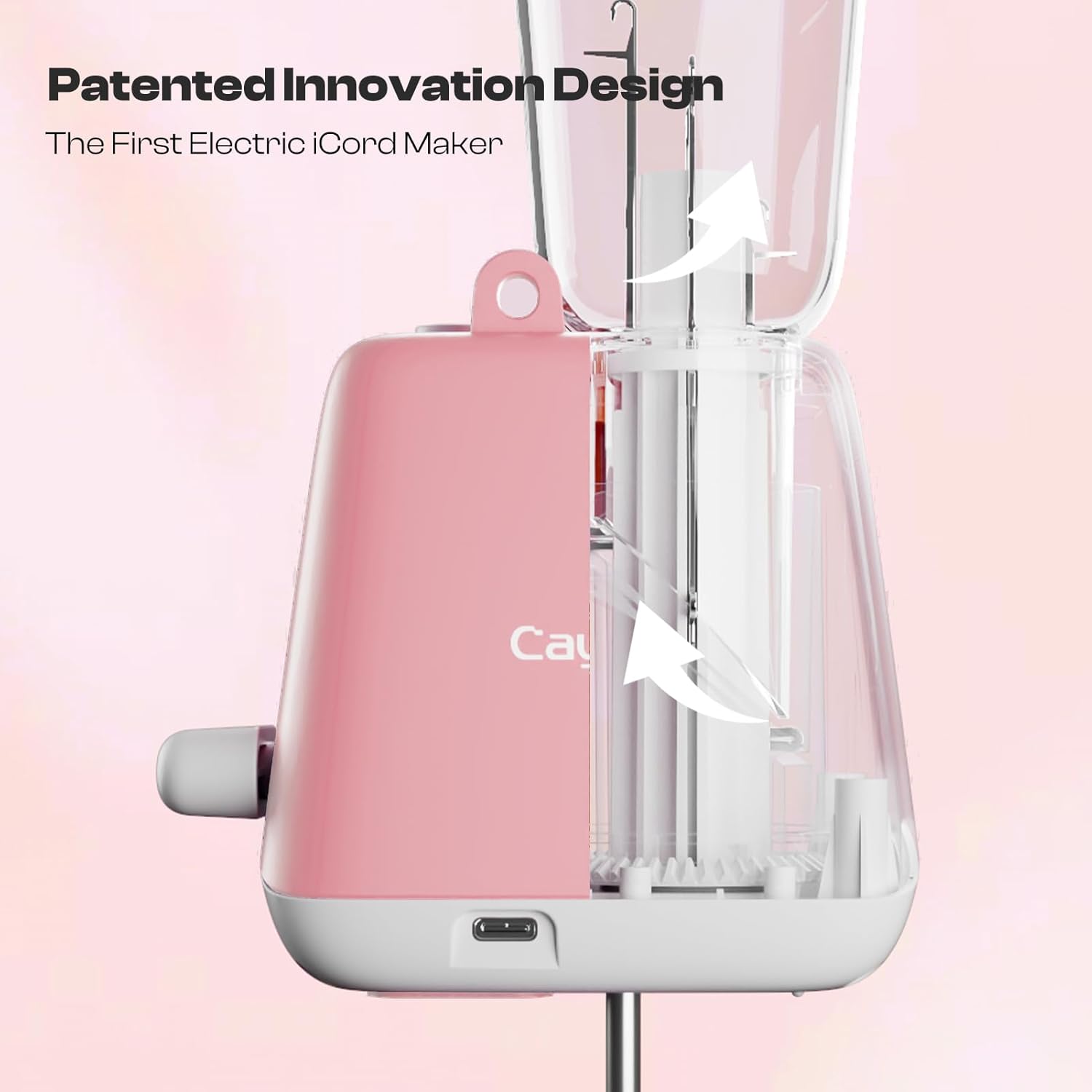
Figure 5: Yarn Weight Chart. This chart details recommended yarn weights (Fine, Light, Medium) with corresponding common names and WPI (Wraps Per Inch), and also lists yarn types that are not suitable, such as Chenille, yarn with many holes, Nylon Thread, and Sewing Thread.
Recommended Yarn Types:
- 2: Fine (Sport, Baby) - WPI: 12-18
- 3: Light (DK, Light Worsted) - WPI: 11-15
- 4: Medium (Worsted, Afghan, Aran) - WPI: 10-12
Not Applicable Yarn Types:
- Bulky or very thick yarns.
- Yarns with large holes or uneven textures (e.g., Chenille Yarn).
- Hard or stiff threads (e.g., Nylon Thread, Sewing Thread).
- Extremely fine threads.
Maintenance
- Cleaning: After each use, gently brush away any lint or yarn fibers from the needles and internal mechanisms. Use a soft, dry cloth to wipe the exterior. Do not use water or harsh chemicals.
- Storage: Store the machine in a clean, dry place away from direct sunlight and extreme temperatures.
- Inspection: Periodically check the USB cable for any signs of damage. Ensure the needles move freely.
Troubleshooting
| Problem | Possible Cause | Solution |
|---|---|---|
| Machine does not turn on. | No power, faulty cable, or power source issue. | Ensure USB cable is securely connected. Try a different USB power source (e.g., wall adapter, power bank). Check if the power switch is ON. |
| Yarn is not knitting or drops stitches. | Incorrect yarn loading, unsuitable yarn type, insufficient tension, or yarn tangle. | Turn off the machine. Re-thread the yarn carefully, ensuring all needles catch the yarn. Verify yarn compatibility (refer to "Yarn Compatibility"). Ensure weights are attached to maintain tension. Check for and remove any yarn tangles. |
| i-Cord is uneven or too loose/tight. | Inconsistent yarn tension or unsuitable yarn. | Ensure the weights are properly attached and the yarn feeds smoothly without resistance. Experiment with different yarn types within the recommended range. |
| Machine makes unusual noises or jams. | Yarn tangle, foreign object, or mechanical issue. | Immediately turn off the machine. Inspect for any yarn tangles or obstructions around the needles. Remove any foreign objects. If the issue persists, contact customer support. |
Specifications
| Product Name | Electric i-Cord Knitting Machine |
| Brand | Caydo |
| Model | Electric i-Cord Knitting Machine |
| Material | ABS+POM |
| Rated Power | 2W |
| Rated Voltage | DC 5V |
| Dimensions (LxWxH) | 6 x 10.9 x 30.5 Centimeters (Item Dimensions LxWxH) / 9D x 6W x 15.5H Centimeters (Product Dimensions) (Note: Discrepancy in source data, using both for clarity.) |
| Item Weight | 699 g |
| Power Source | Corded Electric |
| Batteries Included | No |
Warranty and Support
For warranty information or technical support, please refer to the contact details provided with your purchase or visit the official Caydo website. If you encounter any issues not covered in this manual, please contact customer service for assistance.
Caydo provides detailed video tutorials and a user manual to assist with product usage. For further questions, customer service is available.