
Introduction
This manual provides essential instructions for the safe and efficient operation, setup, and maintenance of your Sharper Image HEPA Air Purifier, Model 1017609. Please read this manual thoroughly before using the appliance and retain it for future reference.

Image: The Sharper Image HEPA Air Purifier, Model 1017609, shown with its packaging and two replacement filters. The purifier is white with a wood-grain top panel.
Product Features
- 3-Stage Filtration System: Includes a pre-filter, HEPA filter, and activated carbon filter to capture 99.97% of particles as small as 0.3 microns.
- Effective Coverage: Designed for rooms up to 82 sq. ft., providing up to 5 air changes per hour.
- Aromatherapy Feature: Integrated slot for essential oil pads (13 refill pads included) to diffuse scents without affecting filtration.
- Quiet Operation: Operates at sound levels as low as 28 dBA, up to 50 dBA on highest setting.
- User-Friendly Controls: Intuitive LED touch controls for fan speed, timer settings, and filter status.
- Multiple Fan Speeds: Three adjustable fan speeds to suit your preference.
- Auto Shut-Off Timer: Programmable timer for 2, 4, or 8 hours.
- Bonus Filter: Includes an additional replacement filter.
Package Contents
- Sharper Image Tabletop Air Purifier (Model 1017609)
- AC Power Adapter
- 2 Filters (1 pre-installed, 1 bonus replacement)
- 13 Aromatherapy Refill Pads
Setup
- Unpack the Purifier: Carefully remove the air purifier and all accessories from the packaging. Retain packaging for future storage or transport.
- Remove Filter Packaging: Before first use, open the bottom cover of the air purifier and remove the plastic packaging from the pre-installed filter. Reinsert the filter and secure the bottom cover.
- Place the Unit: Position the air purifier on a flat, stable surface, ensuring at least 6 inches of clearance from walls or furniture for optimal airflow.
- Connect Power: Plug the AC power adapter into the power port on the back of the unit, then plug the adapter into a standard electrical outlet.
- Aromatherapy Setup (Optional): Open the aromatherapy tray located on the side of the unit. Place one of the included aromatherapy pads into the tray. You may add a few drops of your preferred essential oil (not included) onto the pad. Close the tray securely.

Image: A visual representation of adding essential oils to the aromatherapy pad and the internal filter structure of the air purifier.
Operating Instructions
The air purifier features intuitive touch controls located on the top panel.
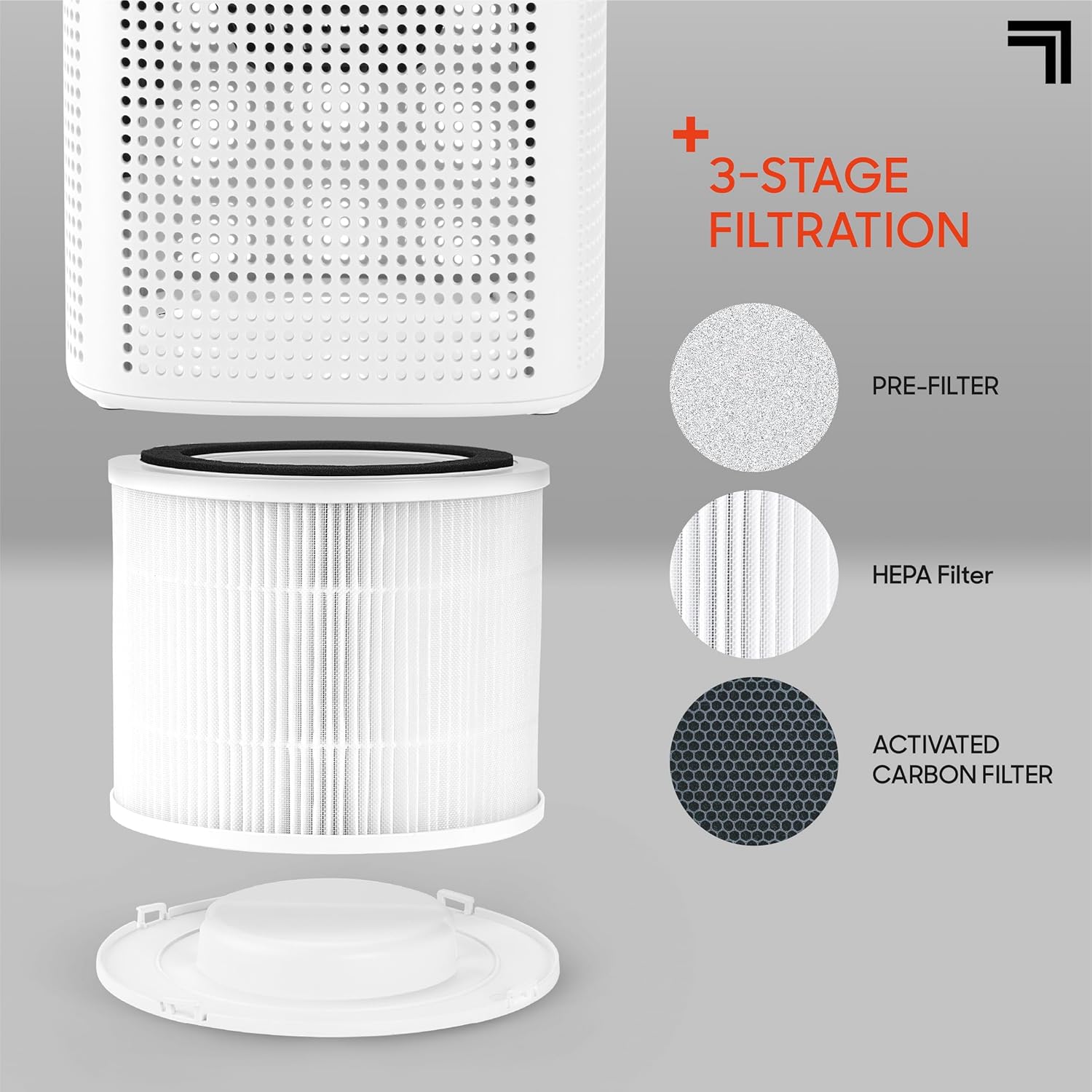
Image: A detailed view of the touch-sensitive control panel on the top of the air purifier, showing power, fan speed, and timer buttons.
Control Panel Overview
- Power Button (⏻): Press to turn the unit On or Off.
- Fan Speed Button (☯): Press repeatedly to cycle through fan speeds: 1 (Low), 2 (Medium), 3 (High).
- Timer Button (⏱): Press repeatedly to set the auto shut-off timer for 2, 4, or 8 hours. The corresponding indicator light will illuminate.
- Filter Reset Indicator (♻): This light illuminates when it's time to check or replace the filter. After replacing the filter, press and hold the Power button for 3 seconds to reset the indicator.
First Use
After connecting the power, press the Power button (⏻) to turn on the air purifier. The unit will start on the lowest fan speed. Adjust the fan speed or set a timer as desired.
Maintenance
Regular maintenance ensures optimal performance and extends the lifespan of your air purifier.
Filter Replacement
The filter life depends on air quality and usage. The Filter Reset Indicator (♻) will illuminate when it's time to check or replace the filter, typically every 3-6 months. Your unit includes one bonus replacement filter.
- Turn off and unplug the air purifier.
- Carefully turn the unit upside down.
- Twist the bottom cover counter-clockwise to unlock and remove it.
- Remove the old filter by pulling it upwards.
- Insert the new filter, ensuring it is seated correctly.
- Replace the bottom cover and twist clockwise to lock it into place.
- Plug in the unit. With the unit powered on, press and hold the Power button (⏻) for 3 seconds to reset the filter indicator.

Image: An exploded diagram illustrating the three layers of the air purifier filter: pre-filter, HEPA filter, and activated carbon filter, along with the filter housing.
Cleaning the Unit
- Always unplug the unit before cleaning.
- Wipe the exterior of the air purifier with a soft, dry cloth.
- Do not use abrasive cleaners, waxes, or solvents.
- The filter is not washable and should not be exposed to water.
Aromatherapy Pad Care
Replace aromatherapy pads when the scent diminishes or if you wish to change essential oils. Used pads can be discarded. Ensure the aromatherapy tray is clean before inserting a new pad.
Troubleshooting
If you encounter issues with your air purifier, please refer to the following common solutions:
| Problem | Possible Cause | Solution |
|---|---|---|
| Unit does not turn on. | Not plugged in; power outlet malfunction; power adapter issue. | Ensure the power adapter is securely plugged into both the unit and a working electrical outlet. Try a different outlet. |
| Weak airflow or poor purification. | Filter is dirty or clogged; unit placed too close to obstructions. | Check and replace the filter if necessary. Ensure the unit has adequate clearance (at least 6 inches) from walls or furniture. |
| Unusual noise. | Filter not installed correctly; foreign object inside; unit on an uneven surface. | Ensure the filter is properly seated and the bottom cover is locked. Check for any obstructions. Place the unit on a stable, flat surface. |
| Filter Reset Indicator remains on after filter change. | Filter indicator not reset. | With the unit powered on, press and hold the Power button (⏻) for 3 seconds to reset the indicator. |
Specifications
| Feature | Detail |
|---|---|
| Model Number | 1017609 |
| Product Dimensions | 6.9"D x 6.9"W x 11.2"H (17.5 x 17.5 x 28.4 cm) |
| Weight | 2.5 Pounds (1.13 kg) |
| Coverage Area | Up to 82 sq. ft. |
| Air Changes Per Hour | 5 |
| Filtration Type | 3-Stage (Pre-filter, HEPA, Activated Carbon) |
| Noise Level | 28-50 dBA |
| Manufacturer | Merchsource |
| Certifications | CARB Certified, EPA Certified, ETL Certified |
Warranty and Support
For warranty information or technical support, please contact Sharper Image customer service. Refer to the product packaging or the official Sharper Image website for contact details.
Manufacturer: Merchsource


