
Introduction
This manual provides comprehensive instructions for the Maxitrol G6R-H3T5 Remote Control Transmitter. Designed for use with fireplaces equipped with spark ignition systems, this transmitter offers convenient control over your fireplace settings. Please read this manual thoroughly before installation and operation to ensure safe and efficient use.
Important Safety Information
- Read all instructions carefully before using the remote control.
- Keep the remote control out of reach of children.
- Do not expose the remote control to water, excessive moisture, or extreme temperatures.
- Use only the specified battery type. Incorrect battery usage can lead to leakage or damage.
- Ensure the fireplace system is properly installed and maintained by a qualified professional.
Package Contents
- Maxitrol G6R-H3T5 Remote Control Transmitter
- (Batteries are typically not included and must be purchased separately)
Setup and Installation
1. Battery Installation
The Maxitrol G6R-H3T5 remote control requires batteries for operation. Follow these steps to install them:
- Locate the battery compartment cover on the back of the transmitter.
- Slide the cover downwards or press the latch to open the compartment.
- Insert the required batteries (typically AAA, refer to the compartment label for exact type and quantity), ensuring correct polarity (+/-) as indicated inside the compartment.
- Close the battery compartment cover securely.
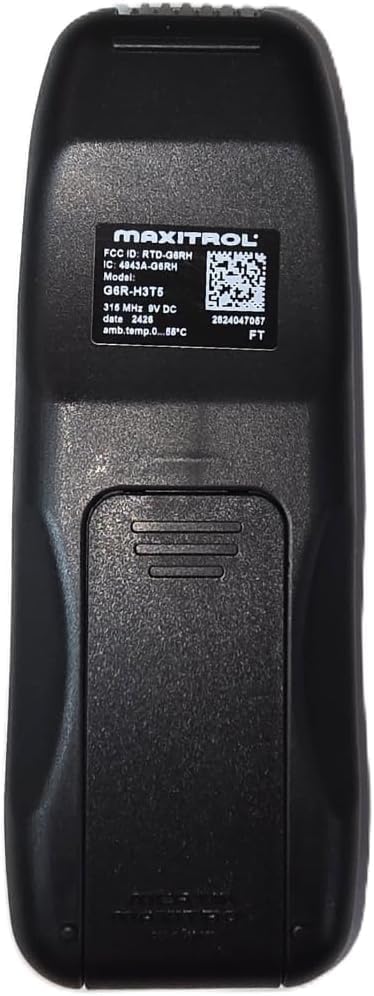
This image shows the back of the Maxitrol G6R-H3T5 remote control. A large battery compartment cover is visible in the lower half. Above it, a label provides regulatory information including FCC ID, IC, Model G6R-H3T5, frequency, date, and ambient temperature range.
2. Pairing with Receiver Module
This remote transmitter is designed to operate exclusively with the Maxitrol G6R-R3AM receiver module (sold separately). It is not compatible with other Maxitrol control modules. Refer to the instruction manual provided with your G6R-R3AM receiver module for detailed pairing procedures. Generally, the pairing process involves:
- Ensuring the receiver module is powered and in pairing mode.
- Activating a pairing function on the G6R-H3T5 transmitter.
- Confirming successful communication between the transmitter and receiver.
Operating Instructions

This image displays the front of the Maxitrol G6R-H3T5 remote control. It features a rectangular LCD screen at the top, below which are a red 'OFF' button, a 'SET' button, and two pairs of buttons for flame control. The remote has a sleek black design.
Basic Controls
- ON/OFF Button: The red 'OFF' button controls the main power to the fireplace. Pressing it will turn the fireplace off. To turn the fireplace on, typically press one of the flame control buttons.
- SET Button: Used to access and adjust various settings, such as temperature or timer functions. Refer to the display for menu navigation.
- Flame Control Buttons: These buttons (depicted with flame icons) are used to ignite the fireplace and adjust the flame height or heat output.
- Temperature Display: The large LCD screen provides an easy-to-read display of the current temperature and other operational information.
5-Day Pilot Shutoff Feature
The G6R-H3T5 transmitter includes an energy-saving 5-day pilot shutoff feature. If the fireplace remains inactive for five consecutive days, the pilot light will automatically shut off to conserve gas. To reactivate the pilot and resume normal operation, simply turn the fireplace ON using the remote control.
Maintenance
Battery Replacement
When the low battery indicator appears on the remote's display, or if the remote's performance becomes erratic, it is time to replace the batteries. Follow the battery installation steps outlined in the 'Setup and Installation' section.
Cleaning
To clean the remote control, use a soft, dry cloth. Do not use abrasive cleaners, solvents, or liquids, as these can damage the remote's finish or internal components.
Troubleshooting
- Remote Not Responding:
- Check the batteries in the remote control. Ensure they are inserted correctly with the proper polarity and are not depleted.
- Ensure the remote is within effective range of the fireplace receiver module (G6R-R3AM).
- Verify that the receiver module is powered and functioning correctly. Check its power source.
- If the issue persists, try re-pairing the remote with the receiver module according to the receiver's instructions.
- Display Not Working or Faint:
- Replace the batteries with fresh ones.
- If the display remains blank or unreadable after battery replacement, contact customer support.
- Intermittent Operation:
- Check for potential interference from other electronic devices.
- Ensure there are no obstructions between the remote and the receiver.
Specifications
| Model Number | G6R-H3T5 |
| Manufacturer | Maxitrol |
| Item Weight | 4.1 ounces |
| Package Dimensions | 7 x 3.5 x 2 inches |
| Batteries Required | Yes (Disposable Batteries) |
| Connectivity Technology | Infrared |
| Number of Buttons | 2 (plus SET and ON/OFF, as visually indicated) |
Compatibility Guide
The Maxitrol G6R-H3T5 remote transmitter is designed for use with fireplaces equipped with Maxitrol G6R-R3AM receivers. It is compatible with a range of fireplace brands and models, including but not limited to:
- American Hearth (Empire): Slope Glaze Vista Burners, Harmony Burners, Loft VF Multi-Sided Burners.
- Heat-N-Glo: SL-550TR, Tiara II Gas Stove.
- Mendota: DXV-35 (August 2001 and later).
- Real Fyre: G10, G18, G19A Unvented Burners.
- Valor: H4 Series, Legend G3, Horizon, Vogue, and Portrait models.
- Travis Industries: Avalon, Fireplace Xtrordinair, Lopi (e.g., Berkshire GS2).
- White Mountain Hearth: Slope Glaze Burners, Loft VF Burners.
Cross Reference Models
This remote may also be cross-referenced with the following models:
- American Hearth (Empire): R11576
- RH Peterson / Real Fyre: AT-01V-2
- Valor: 4001910 / G6R-H3T5 / 4001038
Important Note:
Always verify your current remote transmitter model (G6R-H3T5) or receiver (G6R-R3AM) to ensure compatibility before purchasing or attempting to use this product. If your existing model differs, explore other Maxitrol remote transmitters to find the correct match.
Warranty and Support
For specific warranty information regarding your Maxitrol G6R-H3T5 Remote Control Transmitter, please refer to the documentation provided at the time of purchase or contact the seller, GIZMO TECH PARTS, directly. For technical assistance, troubleshooting beyond this manual, or inquiries about replacement parts, please reach out to GIZMO TECH PARTS or the manufacturer, Maxitrol.
GIZMO TECH PARTS Contact Information: Refer to your purchase receipt or the seller's information on the platform where the product was acquired.


