
1. Introduction
This manual provides essential information for the safe and efficient operation of your Turbionaire Trend HRV 150 WMW Decentralized Heat Recovery Ventilation Unit. Please read these instructions carefully before installation, use, or maintenance. Keep this manual for future reference.
The Turbionaire Trend HRV 150 WMW is a decentralized heat recovery ventilation unit designed to improve indoor air quality while minimizing energy loss. It features a ceramic heat exchanger, Wi-Fi connectivity, a humidity sensor, and remote control operation.
2. Safety Information
General Safety:
- Ensure the unit is installed by a qualified professional in accordance with local electrical and building codes.
- Do not operate the unit with damaged power cords or plugs.
- Keep children and pets away from the unit during operation.
- Do not block the air inlets or outlets.
- Disconnect power before performing any maintenance or cleaning.
Electrical Safety:
- The unit operates on 230 Volts (AC). Ensure the power supply matches this requirement.
- Avoid contact with water or wet hands when handling the power cord or unit.
- The unit has IPX4 protection, making it suitable for humid environments, but it is not submersible.
3. Product Overview and Components
The Turbionaire Trend HRV 150 WMW unit is designed for efficient air exchange and heat recovery. Key components include:
- Ceramic Heat Exchanger: Recovers up to 90% of heat from exhaust air.
- DC Brushless Motor: Provides quiet and efficient operation.
- Telescopic PVC Tube: Adapts to various wall thicknesses (300–580 mm).
- Outdoor Grille: Includes a mosquito net and inclined slats.
- Indoor Unit: Features a matte white front panel, LED indicator, and humidity sensor.
- Remote Control: For convenient operation.
- Wi-Fi Module: Enables app control and smart features.

Image 3.1: Exploded view showing the main components of the Turbionaire Trend HRV 150 WMW unit, including the ceramic heat exchanger, telescopic tube, indoor unit, and outdoor grille.
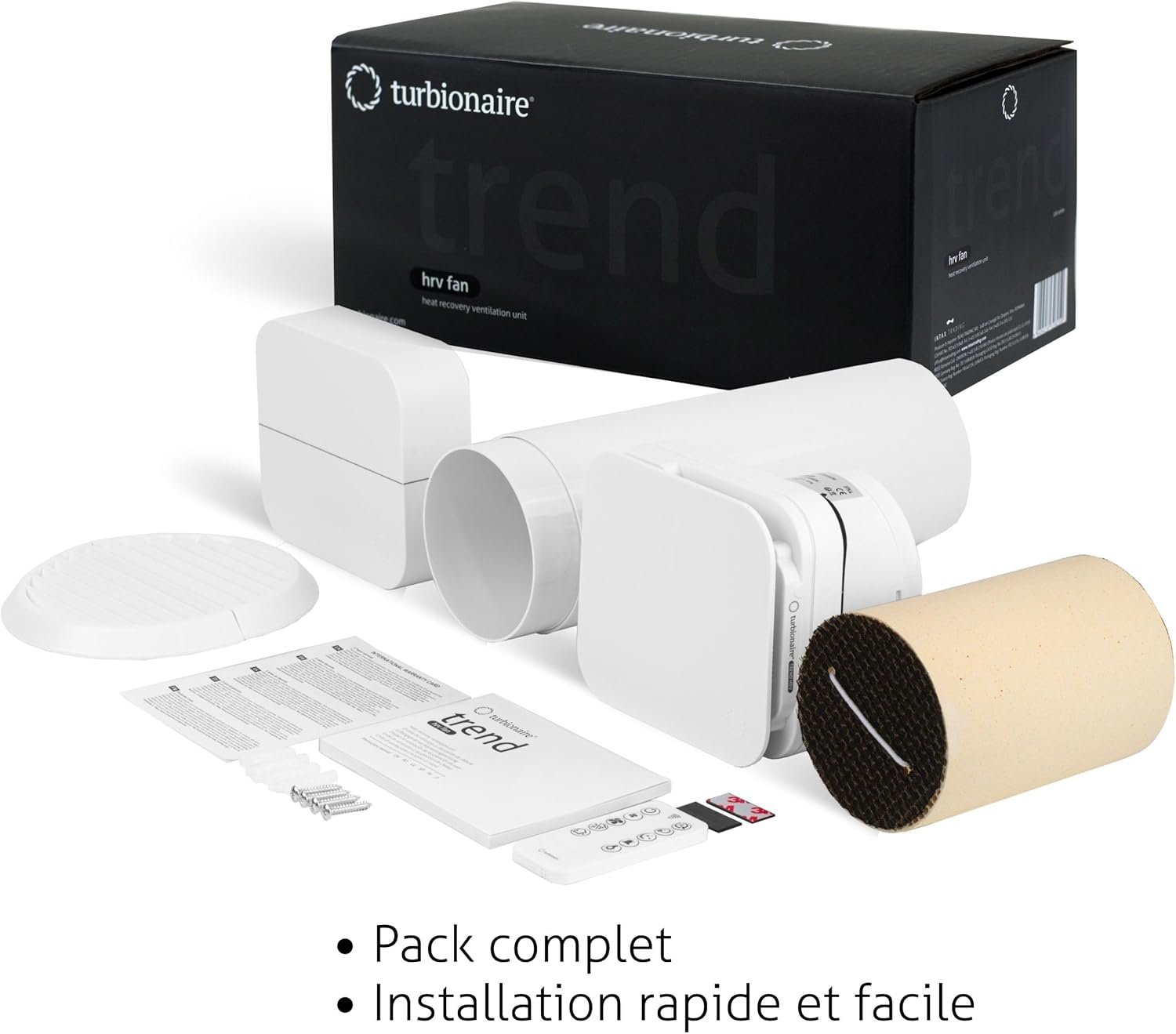
Image 3.2: The Turbionaire Trend HRV 150 WMW unit with its packaging and included accessories, such as the telescopic tube, outdoor grille, and remote control.
4. Setup and Installation
Installation should be performed by a qualified technician. The unit is designed for wall mounting.
- Prepare the Wall Opening: A minimum hole diameter of Ø160 mm is required. The telescopic PVC tube accommodates wall thicknesses between 300–580 mm.
- Insert the Telescopic Tube: Place the telescopic PVC tube into the prepared wall opening.
- Install the Outdoor Grille: Secure the outdoor grille on the exterior side of the wall. Ensure the mosquito net is properly positioned.
- Mount the Indoor Unit: Attach the indoor unit to the interior wall, connecting it to the telescopic tube and ensuring proper electrical connections.
- Power Connection: Connect the unit to a 230V AC power supply.
- Wi-Fi Setup (Optional): Download the Turbionaire app and follow the in-app instructions to connect the unit to your Wi-Fi network for remote control.

Image 4.1: The unit can be oriented horizontally or vertically, offering flexible installation options.
5. Operating Instructions
The unit can be controlled via the included remote control or through the dedicated Wi-Fi application.
5.1. Remote Control and App Features
- 8 Speeds: Adjust airflow precisely (intake 10–30 m³/h / extraction 16–45 m³/h).
- Reversible Airflow Modes:
- Intake-Extraction Mode: Alternates between drawing fresh air in and expelling stale air out, with heat recovery.
- Extraction Only Mode: Continuously expels stale air.
- AUTO Mode: Unit automatically adjusts operation based on sensor readings (e.g., humidity).
- Adjustable Humidity Sensor: Automatically adjusts ventilation based on detected humidity levels.
- Adjustable Timer: Program the unit's operation according to your schedule.
- Sleep Mode: Operates quietly (21–34 dB at 3m) for undisturbed night use.
- Dimmable LED Indicator: Adjust the brightness of the unit's LED light.

Image 5.1: The remote control and smartphone application provide comprehensive control over the unit's functions.
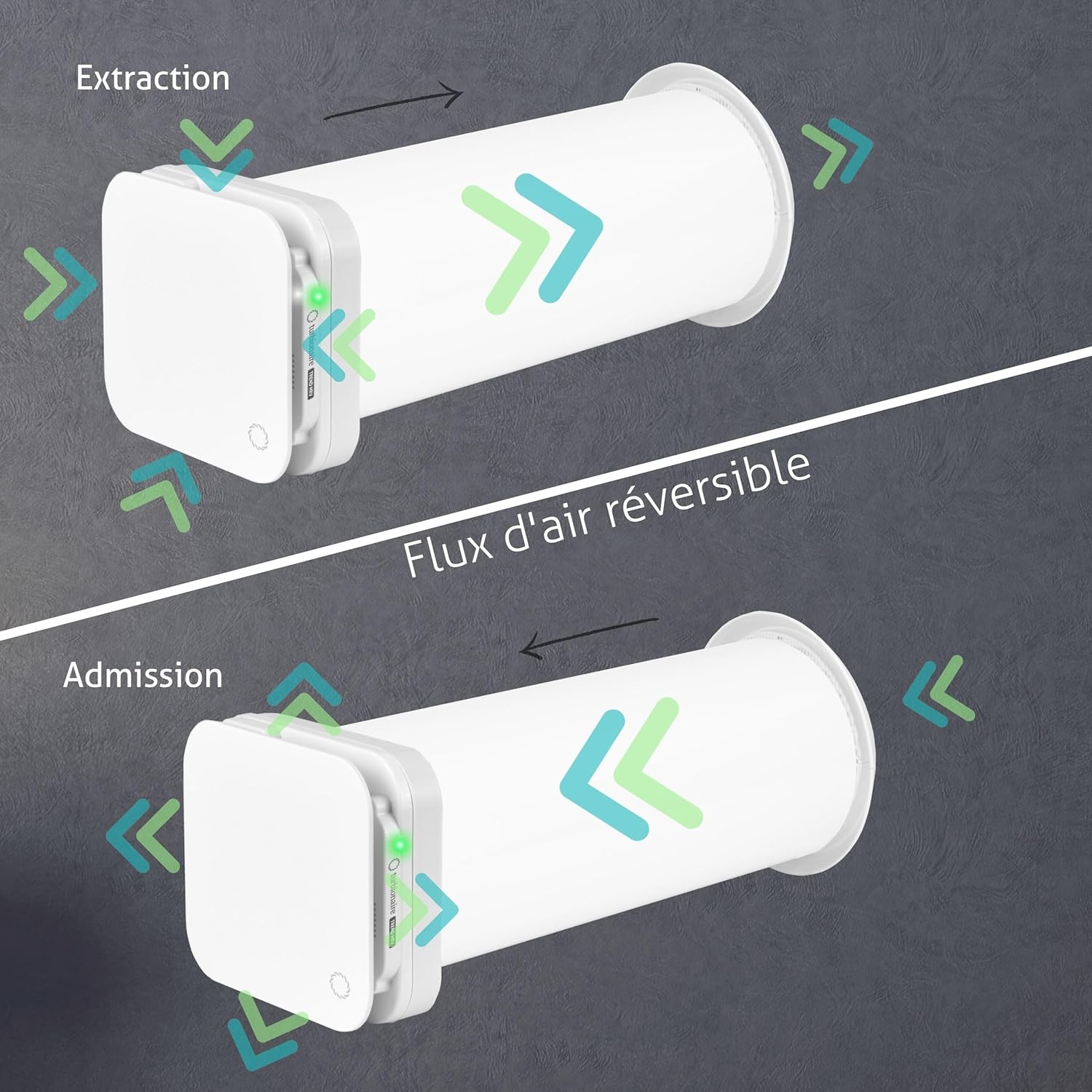
Image 5.2: Illustration of the reversible airflow function, showing both extraction and intake cycles.
5.2. Multi-Unit Control
The Wi-Fi application allows for the management of a single unit or multiple installed units simultaneously, providing centralized control over your ventilation system.

Image 5.3: Example of multiple units installed in different rooms, all controllable via a single remote or application.
6. Maintenance
Regular maintenance ensures optimal performance and longevity of your unit.
- Filter Cleaning: The unit contains removable and washable dust filters. Clean these filters regularly (e.g., monthly) or as indicated by the unit's performance.
- Heat Exchanger Cleaning: Periodically clean the ceramic heat exchanger to maintain heat recovery efficiency. Refer to the detailed cleaning instructions in the full manual (not provided here).
- Exterior Cleaning: Wipe the exterior surfaces of the unit with a soft, damp cloth. Do not use abrasive cleaners or solvents.
- Outdoor Grille: Check and clean the outdoor grille and mosquito net for any debris or blockages.
Always disconnect the power supply before performing any cleaning or maintenance tasks.
7. Troubleshooting
If you encounter issues with your unit, refer to the following common troubleshooting steps:
| Problem | Possible Cause | Solution |
|---|---|---|
| Unit does not turn on | No power supply; Power cord disconnected; Unit malfunction. | Check power connection and outlet; Ensure power cord is securely plugged in; Contact customer support if problem persists. |
| Poor airflow | Blocked filters; Blocked outdoor grille; Incorrect fan speed setting. | Clean or replace filters; Clear any obstructions from the outdoor grille; Increase fan speed. |
| Wi-Fi connection issues | Incorrect Wi-Fi password; Unit out of Wi-Fi range; Router issues. | Verify Wi-Fi password; Move unit closer to router or use a Wi-Fi extender; Restart router; Follow app's connection guide. |
| Unit is noisy | High fan speed; Obstruction in fan; Loose components. | Reduce fan speed; Check for and remove any obstructions; Ensure unit is securely mounted. |
For issues not listed here or if problems persist, please contact Turbionaire customer support.
8. Specifications
| Brand | Turbionaire |
| Model Number | THRV150WMW |
| Color | White matte |
| Product Dimensions (L x W x H) | 21.5 x 34.5 x 18 cm |
| Item Weight | 2.5 g (Note: This weight seems unusually low for a ventilation unit. Please verify with product packaging if concerned.) |
| Power | 6 Watts |
| Voltage | 230 Volts (AC) |
| Material | Plastic |
| Number of Speeds | 8 |
| Noise Level | 21 Decibels (minimum) |
| Heat Recovery Efficiency | Up to 90% |
| Wall Hole Diameter | Min. Ø160 mm |
| Wall Thickness Range | 300–580 mm |
| Protection Rating | IPX4 |
| Connectivity | Wi-Fi, Remote Control |
| Special Features | Reversible airflow, App operation, Dimmable LED, Humidity sensor, Adjustable timer, Sleep mode. |
9. Warranty Information
Information regarding the specific warranty period and terms for the Turbionaire Trend HRV 150 WMW unit is not available in the provided product details. Please refer to the warranty card included with your product or contact Turbionaire customer support for detailed warranty information.
Typically, warranties cover manufacturing defects under normal use. Damage resulting from improper installation, misuse, or unauthorized repairs may void the warranty.
10. Support
For technical assistance, troubleshooting beyond this manual, or warranty inquiries, please contact Turbionaire customer support.
Manufacturer: Turbionaire
Spare Parts Availability: Information unavailable. Please contact Turbionaire directly for spare parts inquiries.
Please have your model number (THRV150WMW) and purchase date ready when contacting support.