
1. Introduction
This manual provides essential information for the safe and efficient operation, installation, and maintenance of your Turbionaire Trend HRV 150 WM Heat Recovery Ventilator. Please read this manual thoroughly before installation and use, and retain it for future reference.
The Turbionaire Trend HRV 150 WM is designed to combine intelligent ventilation with heat recovery, ensuring optimal indoor comfort. It features a ceramic heat exchanger, an integrated humidity sensor, and a quiet DC brushless motor for continuous, efficient, and economical air circulation, while minimizing heat loss from your home.
2. Safety Information
Always follow basic safety precautions when using electrical appliances to reduce the risk of fire, electric shock, and injury.
- Ensure the power supply matches the voltage specified on the unit.
- Do not operate the unit with a damaged cord or plug.
- Keep the unit away from water or other liquids.
- Do not insert objects into the ventilation openings.
- Maintenance and repairs should only be performed by qualified personnel.
- Disconnect power before cleaning or performing any maintenance.
3. Product Components
The Turbionaire Trend HRV 150 WM consists of several key components designed for optimal performance. Refer to the diagram below for an overview of the unit's parts.

Figure 3.1: Exploded View of Components. This image displays the disassembled parts of the Turbionaire Trend HRV 150 WM, including the multifunctional fan with matte front panel, air damper cover, humidity sensor, variable intensity LED indicator, magnetic power supply board, extensible PVC tube, ceramic heat exchanger, removable and washable dust filters, handle, and external grille with insect mesh. The remote control is also shown separately.
- Multifunctional Fan with Matte Front Panel: The main unit housing the motor and controls.
- Air Damper Cover: Regulates airflow.
- Humidity Sensor: Detects ambient humidity levels.
- Variable Intensity LED Indicator: Provides operational status feedback.
- Magnetic Power Supply Board: For instant electrical connection.
- Extensible PVC Tube: Connects the internal and external components.
- Ceramic Heat Exchanger: Recovers heat from extracted air.
- Removable and Washable Dust Filters: For air purification.
- Handle: For easy installation and removal of internal components.
- External Grille with Insect Mesh: Protects against insects and debris.
- Remote Control: For convenient operation of all functions.
4. Installation
The Turbionaire Trend HRV 150 WM is designed for easy wall installation with a Ø150 mm opening. It is suitable for homes, offices, or bedrooms and compatible with thick walls and standard ventilation ducts.
4.1. Mounting Orientation
The unit offers flexible orientation, allowing for both horizontal and vertical mounting to suit your installation needs.

Figure 4.1: Flexible Orientation. This image illustrates the ability to mount the Turbionaire Trend HRV 150 WM either horizontally or vertically, demonstrating its adaptability to different wall spaces.
4.2. Magnetic Fixation
The fan features magnetic fixation for the front panel, allowing for instant electrical connection and easy access for maintenance.

Figure 4.2: Magnetic Fixation. This image shows the magnetic attachment mechanism for the fan's front panel, highlighting the ease of installation and instant electrical connection.
4.3. Complete Package
The product comes as a complete package, ensuring quick and easy installation.
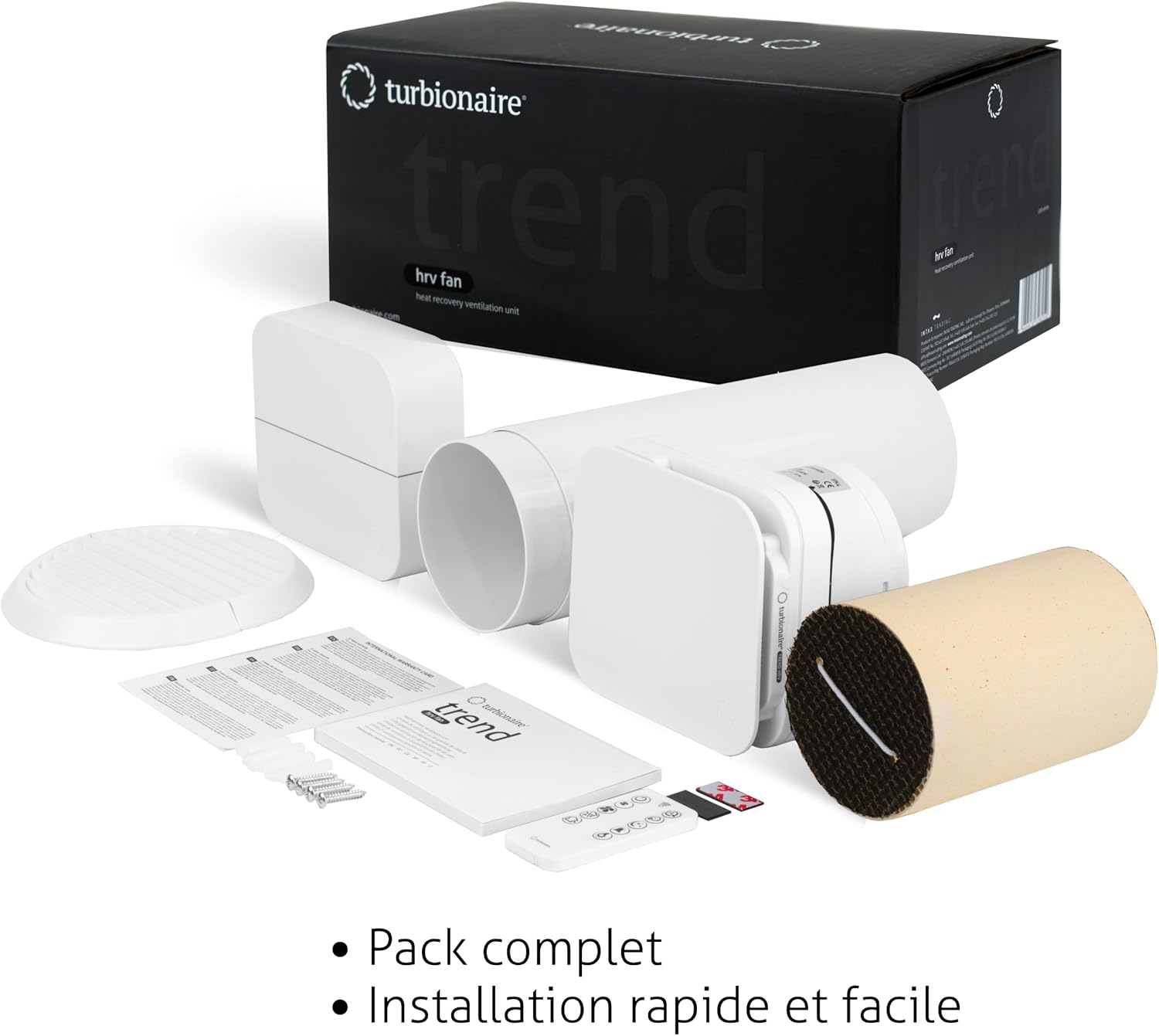
Figure 4.3: Complete Package. This image displays all items included in the Turbionaire Trend HRV 150 WM package, such as the main unit, remote control, mounting hardware, and documentation, emphasizing its readiness for installation.
5. Operating Instructions
The Turbionaire Trend HRV 150 WM is controlled via a remote control, offering various settings for personalized comfort and efficient ventilation.

Figure 5.1: Remote Control Features. This image highlights the various functions available on the remote control, including 8 speeds, sleep mode, humidity sensor activation, timer, admission/extraction modes, extraction mode, auto function, and variable intensity LED indicator.
5.1. Remote Control Functions
The remote control allows you to manage the following functions:
- 8 Speeds: Adjust the fan speed to your preference.
- Sleep Mode: Activates a silent nocturnal mode for minimal disturbance.
- Humidity Sensor: Enables automatic detection and adjustment based on humidity levels.
- Timer: Set the operating duration.
- Admission/Extraction Mode: Alternates between air intake and exhaust.
- Extraction Mode: Continuous air exhaust.
- Auto Function: Automatically regulates speed based on ambient conditions.
- Variable Intensity LED Indicator: Adjusts the brightness of the status light.
5.2. Reversible Airflow
The unit features reversible airflow, automatically alternating between extraction and insufflation (intake) to balance temperature and air quality.

Figure 5.2: Reversible Airflow. This diagram illustrates the two modes of operation: extraction (air moving out) and admission (air moving in), demonstrating how the unit alternates to provide balanced ventilation.
5.3. Multi-Unit Control Flexibility
You can control each unit with its own remote control or manage multiple units with a single remote control for integrated ventilation across different rooms.

Figure 5.3: Multi-Unit Control. This image depicts a floor plan with multiple Turbionaire Trend HRV 150 WM units installed in different rooms, all being controlled by a single remote, showcasing the system's flexibility.
6. Maintenance
Regular maintenance ensures the longevity and optimal performance of your Turbionaire Trend HRV 150 WM.
- Filter Cleaning: The dust filters are removable and washable. Clean them regularly (e.g., monthly or as needed) to maintain airflow and air quality. Disconnect power before removing filters.
- Exterior Cleaning: Wipe the exterior surfaces with a soft, damp cloth. Do not use abrasive cleaners or solvents.
- Ceramic Heat Exchanger: Periodically inspect the ceramic heat exchanger for dust buildup. If necessary, carefully remove and clean according to the full product manual (not provided here).
- General Inspection: Annually inspect the unit for any signs of wear or damage.
7. Troubleshooting
If you encounter issues with your Turbionaire Trend HRV 150 WM, refer to the following common troubleshooting steps.
- Unit not turning on:
- Check if the unit is properly connected to the power supply.
- Ensure the power outlet is functional.
- Verify the remote control batteries are not depleted.
- Reduced airflow:
- Clean or replace the dust filters.
- Check for any obstructions in the air ducts or grilles.
- Unusual noise:
- Ensure the unit is securely mounted.
- Check for any loose components or debris inside the unit.
- Remote control not responding:
- Replace the remote control batteries.
- Ensure there are no obstructions between the remote and the unit.
For persistent issues, please contact customer support.
8. Specifications
| Brand | Turbionaire |
| Model Number | THRV150WM |
| Color | White |
| Dimensions (L x W x H) | 35 x 22 x 19 cm (13.8 x 8.7 x 7.5 inches) |
| Power | 6 Watts |
| Voltage | 220 Volts |
| Material | Plastic |
| Number of Speeds | 8 |
| Noise Level | 34 Decibels |
| Item Weight | 2.39 Kilograms (5.27 lbs) |
| Special Features | Silent operation, Timer, Remote control, Humidity sensor, Reversible airflow, Ceramic heat exchanger |
| Mounting Type | Wall Mount |
| Power Source | Corded Electric |
| Batteries | 1 Non-standard battery (included for remote) |
9. Warranty and Support
For warranty information, please refer to the documentation included with your product or contact your retailer.
Regarding spare parts availability, information is currently unavailable. For technical support, troubleshooting assistance beyond this manual, or service inquiries, please contact Turbionaire customer service through their official website or the contact details provided with your purchase.