
OLEVS G2900
OLEVS G2900 Men's Chronograph Watch Instruction Manual
Model: G2900
1. Introduction
Thank you for choosing the OLEVS G2900 Men's Chronograph Watch. This timepiece combines luxury design with reliable functionality, featuring an analog quartz movement for precise timekeeping. It includes a multi-functional dial with chronograph capabilities and a moon phase display. The watch is designed for daily wear with water resistance and luminous hands for visibility in low light conditions.

Figure 1: Front view of the OLEVS G2900 Chronograph Watch.
2. Setup
2.1 Setting the Time and Date
To set the time, gently pull out the crown (middle button on the right side of the watch case) to the appropriate position. Rotate the crown to adjust the hour and minute hands. Push the crown back in to secure the setting and start the watch.
2.2 Adjusting the Strap
The stainless steel bracelet can be adjusted to fit your wrist. A steel strap adjustment tool is included in the watch packaging. Use this tool to remove or add links as needed for a comfortable fit. Refer to the diagram below for button identification.
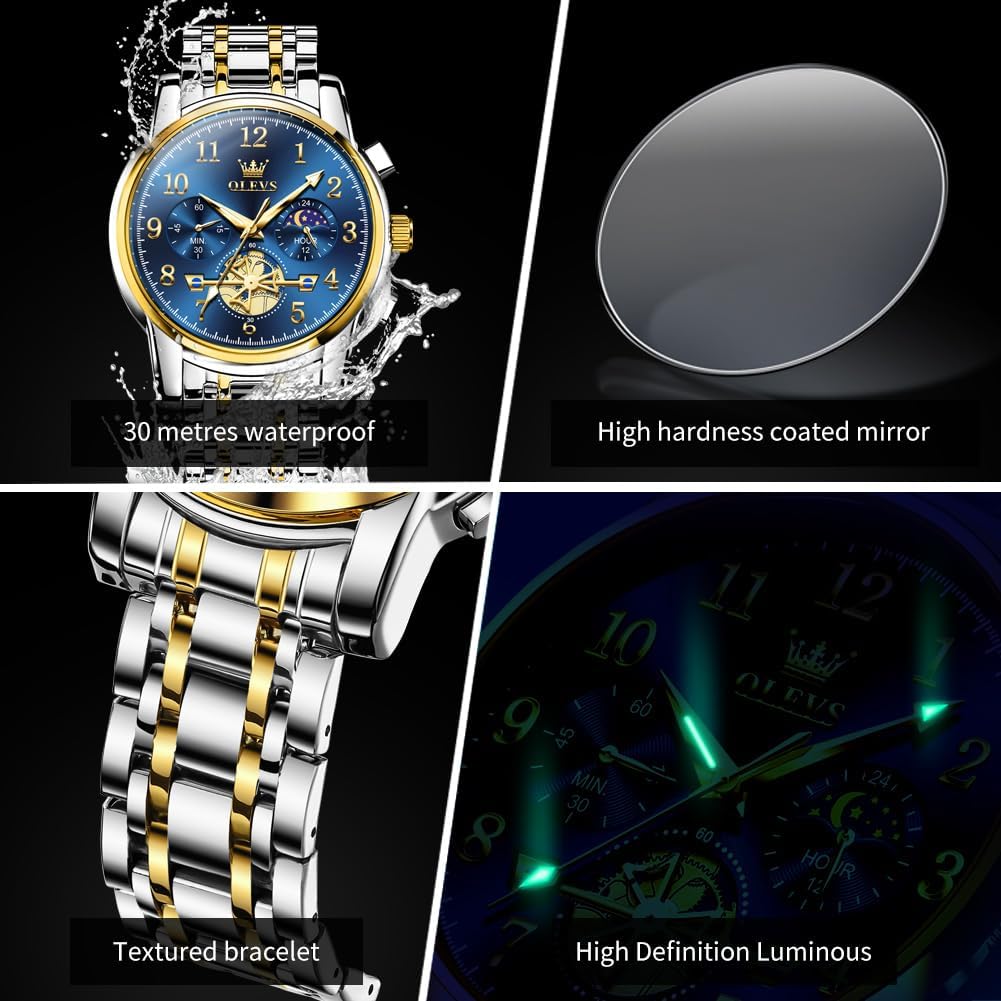
Figure 2: Side view illustrating the crown and timing buttons.
- Top Pusher: Timer start/pause button.
- Middle Crown: Pull out to adjust time.
- Bottom Pusher: Timing reset button.
3. Operating Instructions
3.1 Chronograph Function
The watch features a chronograph function for measuring elapsed time. To start the timer, press the top pusher. Press it again to pause the timer. To reset the chronograph to zero, press the bottom pusher.
3.2 Moon Phase Display
The moon phase dial automatically changes as time progresses, indicating the current phase of the moon. This function operates continuously with the watch's movement.
3.3 Luminous Display
The watch hands and markers are equipped with a luminous coating. After exposure to sufficient light, they will glow in dark environments, allowing for clear time reading at night.

Figure 3: Luminous display for enhanced visibility in low light.
4. Maintenance
4.1 Water Resistance
This watch is water resistant up to 30 meters (3 ATM). This means it can withstand splashes, rain, and brief immersion in water. It is not suitable for swimming, diving, or showering with hot water, as steam and pressure changes can compromise the seals.

Figure 4: The watch is designed to resist water splashes and rain.
4.2 General Care
- Clean the watch regularly with a soft, dry cloth to remove dust and smudges.
- Avoid exposing the watch to extreme temperatures, direct sunlight for prolonged periods, or strong magnetic fields.
- Prevent contact with harsh chemicals, solvents, or detergents, as these can damage the watch's finish and seals.
- If the watch gets wet, wipe it dry immediately with a soft cloth.
5. Troubleshooting
| Problem | Possible Cause | Solution |
|---|---|---|
| Watch stops or time is inaccurate | Low battery or incorrect time setting. | Ensure the crown is fully pushed in. If the issue persists, the battery may need replacement by a professional watchmaker. |
| Chronograph not functioning correctly | Buttons not pressed firmly or internal mechanism issue. | Press the start/pause and reset buttons firmly. If the issue continues, contact support. |
| Luminous display is dim | Insufficient exposure to light. | Expose the watch face to a bright light source (natural or artificial) for a few minutes to charge the luminous material. |
| Strap is too loose or too tight | Incorrect strap length for wrist size. | Use the provided strap adjustment tool to add or remove links for a comfortable fit. |
6. Specifications

Figure 5: Key product specifications.
- Model Number: G2900 (Internal: C-XLY-S-G2900GJ-JJL)
- Movement: Quartz
- Case Material: Stainless Steel
- Band Material: Stainless Steel
- Water Resistance: 30 meters (3 ATM)
- Case Diameter: 41mm
- Case Thickness: 11mm
- Band Width: 20mm
- Band Length: 21cm
- Watch Weight: 126g
- Crystal: High hardness coated mineral glass
7. Warranty & Support
For any questions, concerns, or warranty claims regarding your OLEVS G2900 watch, please contact the seller, XIN LINGYU, directly through your purchase platform. Please retain your proof of purchase for warranty validation.
Seller Contact: XIN LINGYU Seller Page
Related documentsG2900


Ask a question about this manual
Ask about setup, troubleshooting, compatibility, parts, safety, or missing instructions. Manuals+ will review the question and use this page’s manual context to help answer it.