
1. Product Overview
The VERMESS TV Stand is designed to accommodate televisions up to 65 inches, providing a stable and functional platform for your entertainment setup. It features integrated power outlets, adjustable LED lighting, and four fabric storage drawers, making it a versatile media console or storage unit for various rooms.

Image 1.1: VERMESS TV Stand with TV and decor.
- TV Accommodation: Supports TVs up to 65 inches with a sturdy desktop.
- Storage: Features open shelves and four fabric drawers for organizing media devices, books, and other items. The middle shelf is adjustable.
- Power Outlets: Includes 3 AC and 2 USB power outlets for convenient charging of electronic devices.
- LED Lighting: Built-in RGB LED lights with remote and smartphone app control, offering over 60,000 color options.
2. Safety Information
Please read and understand all safety instructions before assembly and use to prevent injury or damage.
- Avoid placing heavy objects on the open shelves to prevent tip-over.
- Be cautious of sharp edges during assembly and use.
- Always follow proper electrical safety guidelines when using the power outlets.
- Ensure the TV stand is placed on a level surface to maintain stability.
3. Package Contents
Verify that all components are present before beginning assembly. If any parts are missing or damaged, contact customer support.
- Top Panel
- Side Panels (2)
- Middle Shelf Panels (2)
- Bottom Panel
- Metal Frame Components
- Fabric Drawers (4)
- Power Outlet Strip (pre-installed or separate)
- LED Light Strip
- Remote Control for LED Lights
- Assembly Hardware (screws, dowels, cam locks, etc.)
- Assembly Tools (e.g., Allen wrench)
- Instruction Manual
4. Setup and Assembly
Assembly is required for this TV stand. Please follow the detailed instructions and diagrams provided in the included assembly guide. It is recommended to have two people for assembly to ensure ease and safety.
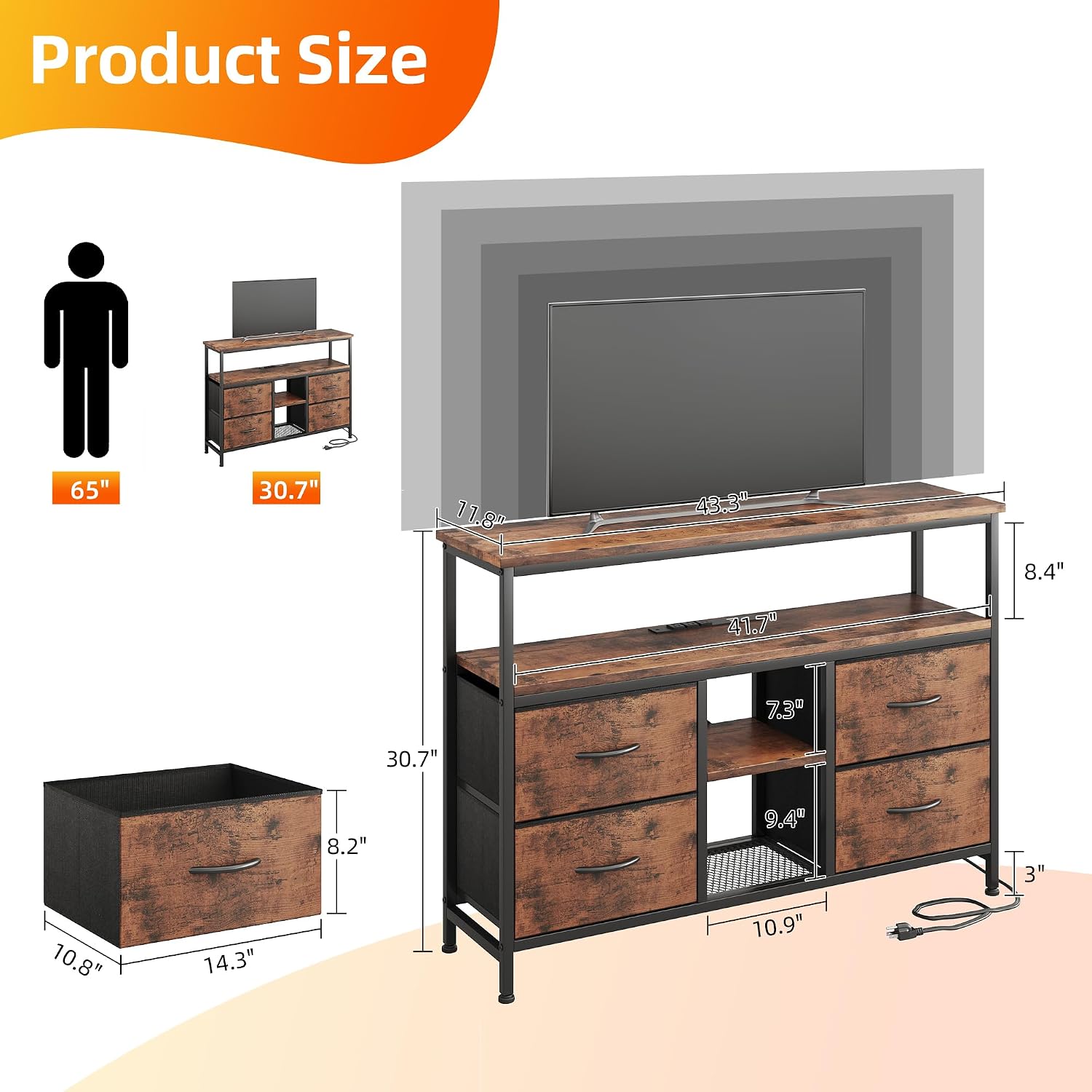
Image 4.1: Product dimensions and component breakdown.
- Unpack: Carefully unpack all components and lay them out on a clean, soft surface to prevent scratches.
- Identify Parts: Refer to the parts list in your assembly guide to identify each component.
- Assemble Frame: Begin by assembling the metal frame structure according to the step-by-step instructions.
- Attach Panels: Secure the wooden panels to the frame using the provided hardware.
- Install Power Strip: Ensure the power outlet strip is correctly installed and secured.
- Install LED Lights: Attach the LED light strip as indicated in the manual.
- Insert Drawers: Assemble the fabric drawers and insert them into their designated slots.
- Final Check: Tighten all screws and ensure the stand is stable before placing any items on it.
Adjustable feet are included to help level the stand on uneven floors.

Image 4.2: Key features and adjustable feet.
5. Operating Instructions
5.1 Power Outlets
The TV stand is equipped with a built-in power strip for convenient charging and powering of your devices.
- AC Outlets: 3 standard AC outlets (120V/12A) are provided for larger electronics like TVs, Wi-Fi routers, or gaming consoles.
- USB Ports: 2 USB ports (5V/2A) are available for charging smartphones, tablets, and other USB-powered devices.
- Usage: Simply plug your devices into the appropriate outlets. The vertical insertion design helps maintain a neat appearance.

Image 5.1: Built-in power strip with AC and USB outlets.
5.2 LED Lighting
Enhance your room's ambiance with the integrated RGB LED lights.
- Control: The LED strip lights can be controlled via the included wireless remote or a dedicated smartphone application.
- Color Options: Choose from over 60,000 DIY color options to match your mood or decor.
- Modes: Various lighting modes and effects are available through the remote/app.

Image 5.2: RGB LED lights and remote control.
6. Maintenance
Regular maintenance will help prolong the life and appearance of your TV stand.
- Cleaning Surfaces: Wipe wooden and metal surfaces with a soft, damp cloth. Avoid harsh chemicals or abrasive cleaners.
- Fabric Drawers: For fabric drawers, spot clean with a mild detergent and allow to air dry. Do not machine wash.
- Electrical Components: Ensure power cords and LED light connections are secure and free from damage. Unplug from the wall outlet before cleaning electrical components.
- Hardware: Periodically check and tighten all assembly hardware to maintain structural integrity.
7. Troubleshooting
If you encounter issues with your VERMESS TV Stand, refer to the following common problems and solutions.
| Problem | Possible Cause | Solution |
|---|---|---|
| Stand is wobbly after assembly. | Loose hardware; uneven floor. | Ensure all screws are tightened. Adjust the leveling feet on the bottom of the stand. |
| LED lights are not working. | Power connection issue; remote battery dead; app not connected. | Check if the LED strip is properly plugged into the power source. Replace remote battery. Ensure smartphone app is correctly paired. |
| Power outlets are not providing power. | Power strip not plugged in; circuit breaker tripped. | Ensure the main power cord of the stand is securely plugged into a wall outlet. Check your household circuit breaker. |
| Drawers do not slide smoothly. | Drawer not assembled correctly; obstruction. | Re-check drawer assembly. Ensure nothing is obstructing the drawer's path. |
For issues not covered here, please contact VERMESS customer support.
8. Specifications
| Feature | Detail |
|---|---|
| Brand | VERMESS |
| Model Number | SCCBDSG |
| Colour | Vintage |
| Material | Engineered Wood |
| Dimensions (L x W x H) | 110 x 30 x 78 Centimetres (43.3 x 11.8 x 30.7 inches) |
| Number of Drawers | 4 |
| Number of Shelves | 4 (including top surface) |
| Assembly Required | Yes |
| Power Outlets | 3 AC, 2 USB |
| LED Light | RGB, Remote/App Control |
9. Warranty Information
This product is sold without a manufacturer's warranty. Please refer to the retailer's return policy for details on returns or exchanges.
10. Customer Support
For any questions, concerns, or assistance with your VERMESS TV Stand, please contact VERMESS customer support through the retailer's platform or their official website.
Manufacturer: VERMESS