
ACMER S1 2500mW
ACMER S1 2500mW Laser Engraver User Manual
Model: S1 2500mW
Brand: ACMER
Introduction
This manual provides detailed instructions for the safe and efficient operation of your ACMER S1 Laser Engraver. Please read this manual thoroughly before using the device to ensure proper setup, operation, and maintenance. Retain this manual for future reference.
Important Safety Information
The ACMER S1 is a Class 4 laser product. Improper use can result in serious injury, including eye damage, skin burns, and fire. Always adhere to the following safety precautions:
- Always wear the provided professional safety goggles to protect your eyes from direct or reflected laser light.
- Never look directly into the laser beam or at reflections.
- Operate the laser engraver in a well-ventilated area to avoid inhaling fumes and smoke produced during engraving.
- Keep flammable materials away from the engraving area.
- Ensure the device is placed on a stable, non-flammable surface.
- Do not leave the machine unattended during operation.
- Keep children and pets away from the operating area.
- Disconnect power before performing any maintenance or adjustments.

Image: The laser module clearly displays a "DANGER" warning, indicating the presence of a Class 4 laser. Safety symbols are visible on the machine's base.
Product Overview
The ACMER S1 is a compact and portable laser engraver designed for both beginners and experienced users. It offers precise engraving and cutting capabilities across a wide range of materials.
Key Features:
- Superior Engraving & Cutting Performance: Multi-level laser power options (2500mW/3500mW/6000mW) with Class 4 laser certification. Processes over 100 materials with an ultra-fine 0.04×0.04mm laser spot and high-speed 10000mm/min operation.
- Exceptional Performance: 5.1×5.1-inch engraving area, compatible with materials like wood, acrylic, leather, and glass. Reproduces intricate pattern details with accuracy.
- Portable Design & Wide Compatibility: Compact, lightweight, and space-saving. Compatible with professional engraving software such as LightBurn and LaserGRBL.
- Beginner-Friendly: Designed for ease of use with no complex setup. Includes a detailed user manual and instructional videos.
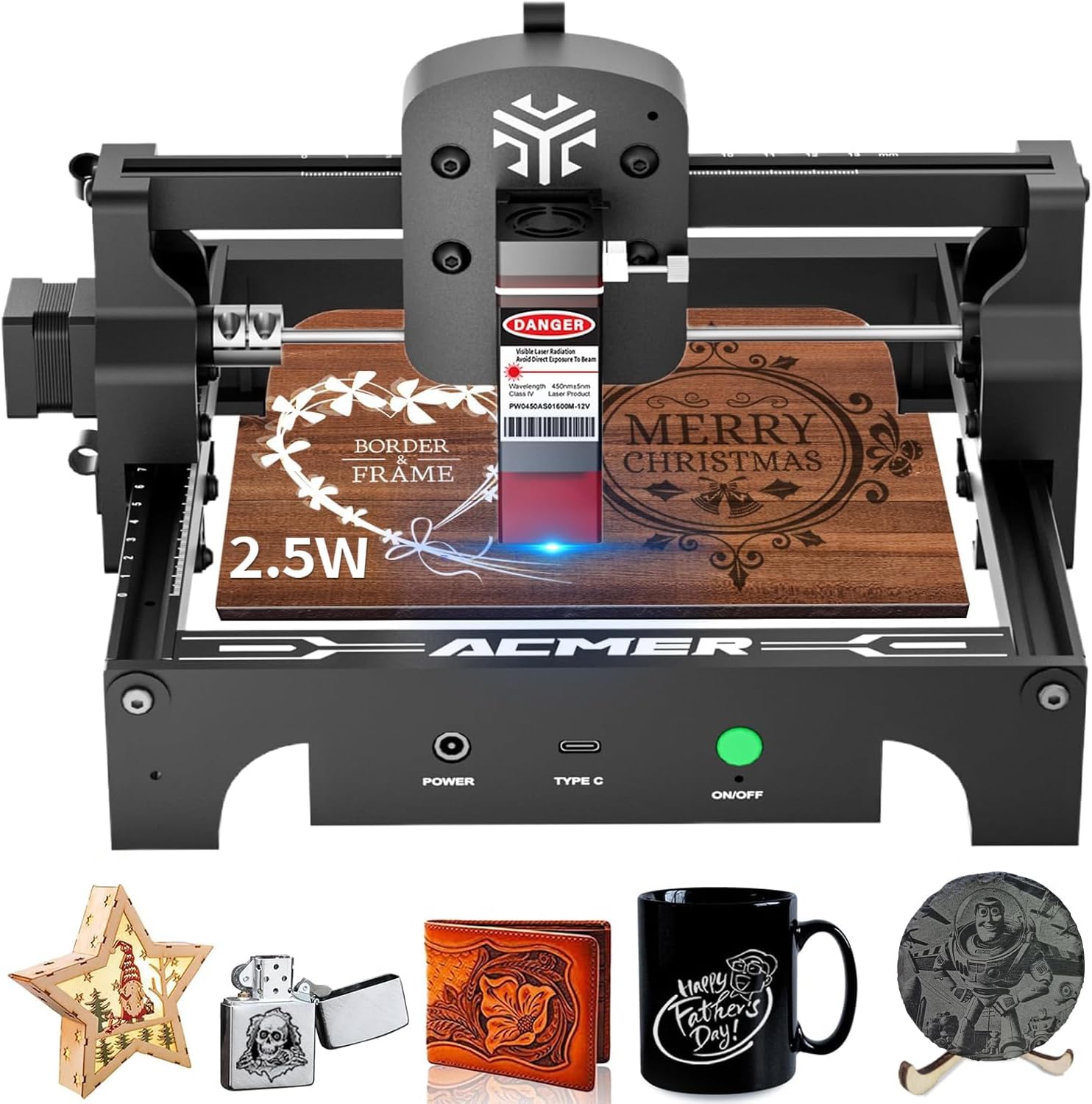
Image: The ACMER S1 laser engraver shown with examples of engraved items, including wood, leather, and plastic, demonstrating its versatility.

Image: An infographic highlighting key specifications of the ACMER S1: 10,000mm/min engraving speed, 0.04x0.04mm laser spot size, 130x130mm working area, and compatibility with over 100 materials.
Setup Instructions
- Unpacking: Carefully remove all components from the packaging. Verify that all parts listed in the packing list are present.
- Assembly: The ACMER S1 is designed for minimal assembly. Follow the quick start guide included in the box for step-by-step assembly instructions. Ensure all connections are secure.
- Placement: Place the engraver on a stable, level, and non-flammable surface in a well-ventilated area. Ensure adequate space around the machine for safe operation and heat dissipation.
- Power Connection: Connect the power adapter to the engraver and then to a suitable power outlet.
- Software Installation: Install the recommended engraving software (e.g., LightBurn or LaserGRBL) on your computer. Drivers may be required for your operating system (Windows, macOS, Linux). Refer to the software's documentation for installation details.
- Initial Connection: Connect the engraver to your computer using the provided USB cable.
Video: This video demonstrates the initial setup and ease of use for the portable laser engraver, highlighting its beginner-friendly design.
Operating Instructions
- Material Preparation: Place the material to be engraved or cut on the working platform. Ensure it is flat and securely positioned.
- Focus Adjustment: Adjust the laser module's height to achieve the optimal focus for your material. The laser module often includes a focusing aid or a fixed focal length guide.
- Software Configuration:
- Open your chosen engraving software (LightBurn, LaserGRBL).
- Load your design file (e.g., SVG, DXF, JPG, PNG).
- Set the engraving or cutting parameters (speed, power, passes) according to your material and desired outcome. Recommended parameters for common materials are often provided in the software or supplementary guides.
- Preview the engraving path to ensure correct positioning and scale.
- Start Engraving/Cutting:
- Ensure you are wearing safety goggles.
- Initiate the engraving or cutting process from the software.
- Monitor the process closely. In case of any issues or emergencies, immediately press the emergency stop button or disconnect power.
- Completion: Once the process is complete, wait for the laser to stop and any smoke to clear before removing the engraved material.

Image: A user wearing safety goggles operates the ACMER S1 laser engraver, demonstrating safe usage during the engraving process.
Video: This video showcases the ACMER S1 laser engraver in action, demonstrating its ability to engrave various materials with precision.
Maintenance
Regular maintenance ensures the longevity and optimal performance of your ACMER S1 Laser Engraver.
- Cleaning the Lens: Periodically clean the laser lens with a soft, lint-free cloth and lens cleaning solution to maintain engraving quality.
- Cleaning the Machine: Keep the working area and the machine free from dust and debris. Use a soft brush or compressed air to clean the rails and moving parts.
- Lubrication: Apply a small amount of lubricant to the guide rails as needed to ensure smooth movement of the laser module.
- Firmware Updates: Check the manufacturer's website for any available firmware updates to ensure your device has the latest features and performance improvements.
Troubleshooting
If you encounter issues with your ACMER S1, refer to the following common problems and solutions:
- Laser Not Firing:
- Check if the power cable is securely connected and the device is turned on.
- Verify the USB connection to your computer.
- Ensure the laser module is properly seated and connected.
- Confirm software settings for laser power and speed are correct.
- Poor Engraving Quality:
- Adjust the laser focus.
- Clean the laser lens.
- Experiment with different speed and power settings for your specific material.
- Ensure the material is flat and stable during engraving.
- Machine Not Responding:
- Restart the engraver and your computer.
- Check for any error messages in the engraving software.
- Reinstall the software drivers if necessary.
If the problem persists, please contact ACMER customer support for assistance.
Specifications
| Feature | Detail |
|---|---|
| Brand | ACMER |
| Model | S1 2500mW |
| Material | Metal, Plastic |
| Color | Black |
| Product Dimensions | 5.1"L x 5.1"W |
| Item Weight | 1.84 Kilograms (4.05 pounds) |
| Operation Mode | Automatic |
| Power Source | AC/DC |
| Included Components | Engraving Machine |
| Laser Spot Size | 0.04×0.04mm (Ultra-fine) |
| Engraving Speed | Up to 10000mm/min |
| Working Area | 5.1×5.1 inches (130x130mm) |
| Software Compatibility | LightBurn, LaserGRBL |
Warranty and Support
ACMER provides comprehensive after-sales support for your S1 Laser Engraver. If you encounter any issues during use, our dedicated support team is available to provide professional assistance and satisfactory solutions.
For support inquiries, please refer to the contact information provided in your product packaging or visit the official ACMER website.
Related documentsS1 2500mW


Ask a question about this manual
Ask about setup, troubleshooting, compatibility, parts, safety, or missing instructions. Manuals+ will review the question and use this page’s manual context to help answer it.