1. Introduction
Thank you for choosing the INGCO CIWLI2040 Lithium-Ion Cordless Impact Wrench. This powerful and versatile tool is designed for fastening and loosening nuts and bolts with high torque. Featuring a brushless motor, variable speed control, and an integrated LED work light, it provides efficient and convenient operation for various applications. Please read this manual carefully before use to ensure safe and optimal performance of your tool.
2. Safety Information
Always follow basic safety precautions to reduce the risk of fire, electric shock, and personal injury when operating power tools.
- Wear Eye Protection: Always wear appropriate eye protection (safety glasses or goggles) to protect against flying debris.
- Wear Hearing Protection: Prolonged exposure to noise from power tools can cause hearing damage.
- Keep Work Area Clean: Cluttered areas invite accidents. Ensure your workspace is well-lit and free from obstructions.
- Avoid Dangerous Environments: Do not use power tools in damp or wet locations, or expose them to rain. Keep the work area well-ventilated.
- Secure Workpiece: Always secure the workpiece with clamps or a vise. Holding it by hand is dangerous and can lead to loss of control.
- Maintain Proper Footing and Balance: Do not overreach. Keep proper footing and balance at all times.
- Disconnect Tool: Disconnect the battery pack from the tool before making any adjustments, changing accessories, or storing the tool.
- Use the Right Tool: Do not force a small tool or attachment to do the job of a heavy-duty tool.
- Store Idle Tools: When not in use, tools should be stored in a dry, high, or locked-up place, out of reach of children.
- Check for Damaged Parts: Before further use of the tool, a guard or other part that is damaged should be carefully checked to determine that it will operate properly and perform its intended function.
3. Product Overview
The INGCO CIWLI2040 impact wrench is designed for robust performance. Key features include:
- Brushless Motor: Provides increased efficiency, longer runtime, and extended tool life.
- 1/2 Inch Square Drive: Compatible with standard impact sockets.
- Variable Speed Control: Allows adjustment of speed and impact rate for different applications.
- High Torque Output: Up to 400 Nm fastening torque and 550 Nm nut-busting torque.
- Integrated LED Work Light: Illuminates the work area for better visibility.
- Ergonomic Design: Lightweight and comfortable for extended use.
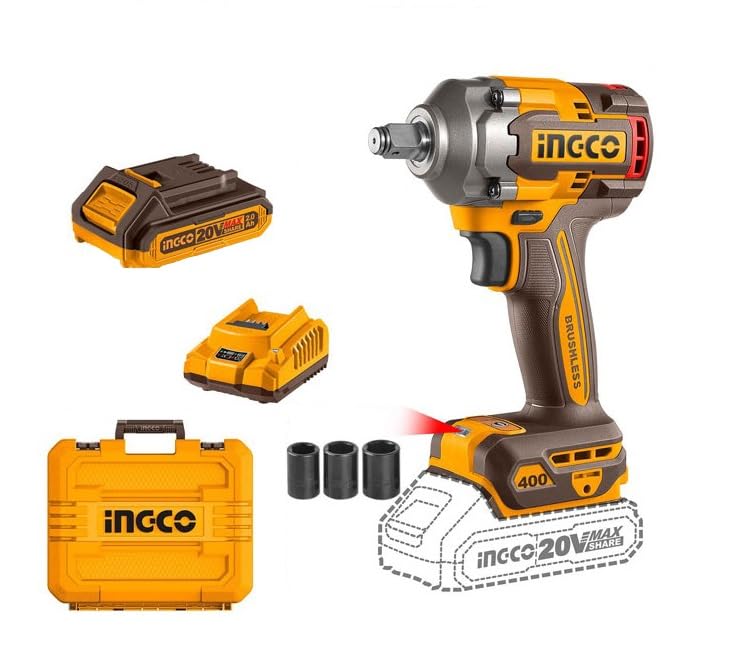
Figure 1: INGCO CIWLI2040 Cordless Impact Wrench with included batteries, charger, and sockets.
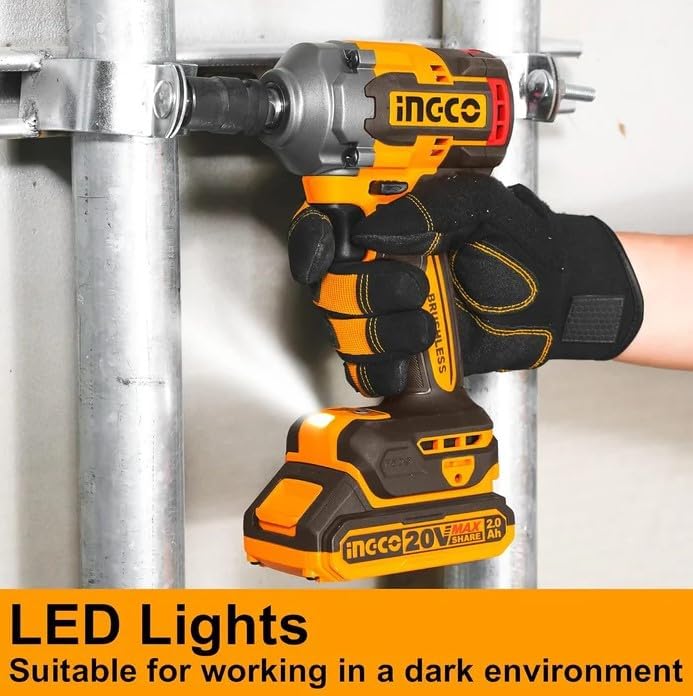
Figure 2: The integrated LED work light provides illumination for working in dark environments.
4. Setup
4.1 Battery Charging
The tool is powered by 20V Lithium-Ion batteries. Before first use, fully charge the battery pack.
- Connect the charger to a standard 220-240V ~ 50/60Hz power outlet.
- Slide the battery pack onto the charger until it clicks into place.
- The charger indicator light will show the charging status (refer to charger manual for specific light patterns).
- Once fully charged, remove the battery pack from the charger. Do not overcharge.
Note: The battery pack may become warm during charging. This is normal. Allow the battery to cool before use if it is excessively hot.
4.2 Attaching and Removing Sockets
The impact wrench uses a 1/2-inch square drive for attaching sockets.
- To Attach: Align the square opening of the desired socket (e.g., 17mm, 19mm, 21mm) with the 1/2-inch square drive on the tool. Push the socket firmly onto the drive until it locks securely.
- To Remove: Pull the socket firmly off the square drive. Some sockets may have a detent ball or pin that requires a slight pull to release.
Figure 3: The INGCO CIWLI2040 impact wrench showing the 1/2-inch square drive.
5. Operating Instructions
5.1 Installing/Removing Battery Pack
- To Install: Slide the charged battery pack into the base of the tool handle until it clicks into place. Ensure it is fully seated.
- To Remove: Press the battery release button (usually located on the battery pack) and slide the battery pack out of the tool handle.
5.2 Powering On/Off and Speed Control
The tool is activated by the trigger switch.
- To Turn On: Squeeze the trigger switch. The LED work light will also activate.
- To Turn Off: Release the trigger switch.
- Variable Speed: The tool features variable speed. The further the trigger is pressed, the higher the speed and impact rate (0-1600/0-1900/0-2300 RPM and 0-2100/0-2500/0-2900 IPM).

Figure 4: The impact wrench offers multiple speed and torque settings for precise control.
5.3 Forward/Reverse Rotation
A forward/reverse selector switch is located above the trigger to change the direction of rotation.
- Push the selector to the left for forward (tightening) rotation.
- Push the selector to the right for reverse (loosening) rotation.
- Ensure the selector is in the center position to lock the trigger and prevent accidental starting.
5.4 General Operation Tips
- Always select the appropriate socket size for the fastener.
- Apply firm, steady pressure to the tool when operating.
- For tightening, start at a lower speed and gradually increase as needed. For loosening, use full power if necessary.
- Avoid prolonged continuous operation at maximum torque to prevent overheating.

Figure 5: The impact wrench in use, demonstrating its application for fastening.
6. Maintenance
Regular maintenance ensures the longevity and optimal performance of your tool.
- Cleaning: Keep the tool's ventilation openings clean and free from dust and debris. Use a soft, damp cloth to clean the exterior. Do not use harsh chemicals or abrasive cleaners.
- Battery Care: Store batteries in a cool, dry place. Do not store fully discharged batteries for extended periods. Charge them periodically if not in use.
- Storage: When not in use, store the tool and accessories in a dry, secure location, away from direct sunlight and extreme temperatures.
- Inspection: Periodically inspect the tool for any signs of damage, loose screws, or worn parts. If any damage is found, do not use the tool and contact customer support.
7. Troubleshooting
If you encounter issues with your impact wrench, refer to the following table:
| Problem | Possible Cause | Solution |
|---|---|---|
| Tool does not start. | Battery not charged; Battery not properly installed; Forward/reverse selector in neutral position. | Charge battery; Reinstall battery securely; Move selector to forward or reverse position. |
| Low power/torque. | Battery low; Incorrect speed setting; Worn socket. | Recharge battery; Adjust speed setting; Replace worn socket. |
| Battery not charging. | Charger not plugged in; Faulty battery or charger. | Check power connection; Contact customer support for replacement. |
| Excessive vibration. | Loose socket; Damaged tool component. | Ensure socket is securely attached; Discontinue use and contact support. |
8. Specifications
| Feature | Specification |
|---|---|
| Brand | INGCO |
| Model Number | CIWLI2040 (HKSPA1068) |
| Voltage | 20V |
| Motor Type | Brushless |
| Square Drive | 1/2 inch |
| No-load Speed | 0-1600 / 0-1900 / 0-2300 RPM |
| Impact Rate | 0-2100 / 0-2500 / 0-2900 IPM |
| Max. Fastening Torque | 400 Nm |
| Max. Nut-Busting Torque | 550 Nm |
| Battery Type | Lithium-Ion |
| Battery Capacity | 2.0 Ah (x2 included) |
| Charger Input | 220-240V ~ 50/60Hz |
| Product Dimensions | 10 x 20 x 37 cm |
| Item Weight | 209 g (tool only, without battery) |
| Material | Alloy Steel |
| Included Components | 1x Impact Wrench, 2x 2.0Ah Batteries, 1x Charger, 3x Sockets (17mm, 19mm, 21mm) |
9. Warranty
This INGCO product is covered by a limited warranty against defects in materials and workmanship. The duration and terms of the warranty may vary by region. Please retain your proof of purchase for warranty claims. For detailed warranty information, refer to the warranty card included with your product or contact INGCO customer service.
10. Customer Support
For technical assistance, spare parts, or any questions regarding your INGCO CIWLI2040 Impact Wrench, please contact INGCO customer support. Contact information can typically be found on the product packaging, the official INGCO website, or your local distributor's website.
Please have your model number (CIWLI2040 or HKSPA1068) and purchase date ready when contacting support.


