
BURCHDA HC26
BURCHDA HC26 Electric Mountain Bike User Manual
Model: HC26 | Brand: BURCHDA
1. Introduction
Welcome to the user manual for your new BURCHDA HC26 Electric Mountain Bike. This manual provides essential information for the safe operation, assembly, maintenance, and troubleshooting of your electric bicycle. Please read this manual thoroughly before your first ride to ensure proper use and to maximize your riding experience.
The HC26 is a brand new electric mountain bike equipped with powerful brushless motors on both the front and rear hubs, designed for strong performance and exceptional rideability.
Safety Warnings
- Always wear a helmet when riding.
- Familiarize yourself with local traffic laws and regulations.
- Perform a pre-ride inspection before each use, checking brakes, tires, and battery.
- Do not ride under the influence of alcohol or drugs.
- Avoid riding in adverse weather conditions such as heavy rain, snow, or ice.
2. Product Components
The BURCHDA HC26 Electric Mountain Bike features advanced components designed for durability and performance.
Dual Brushless Motors
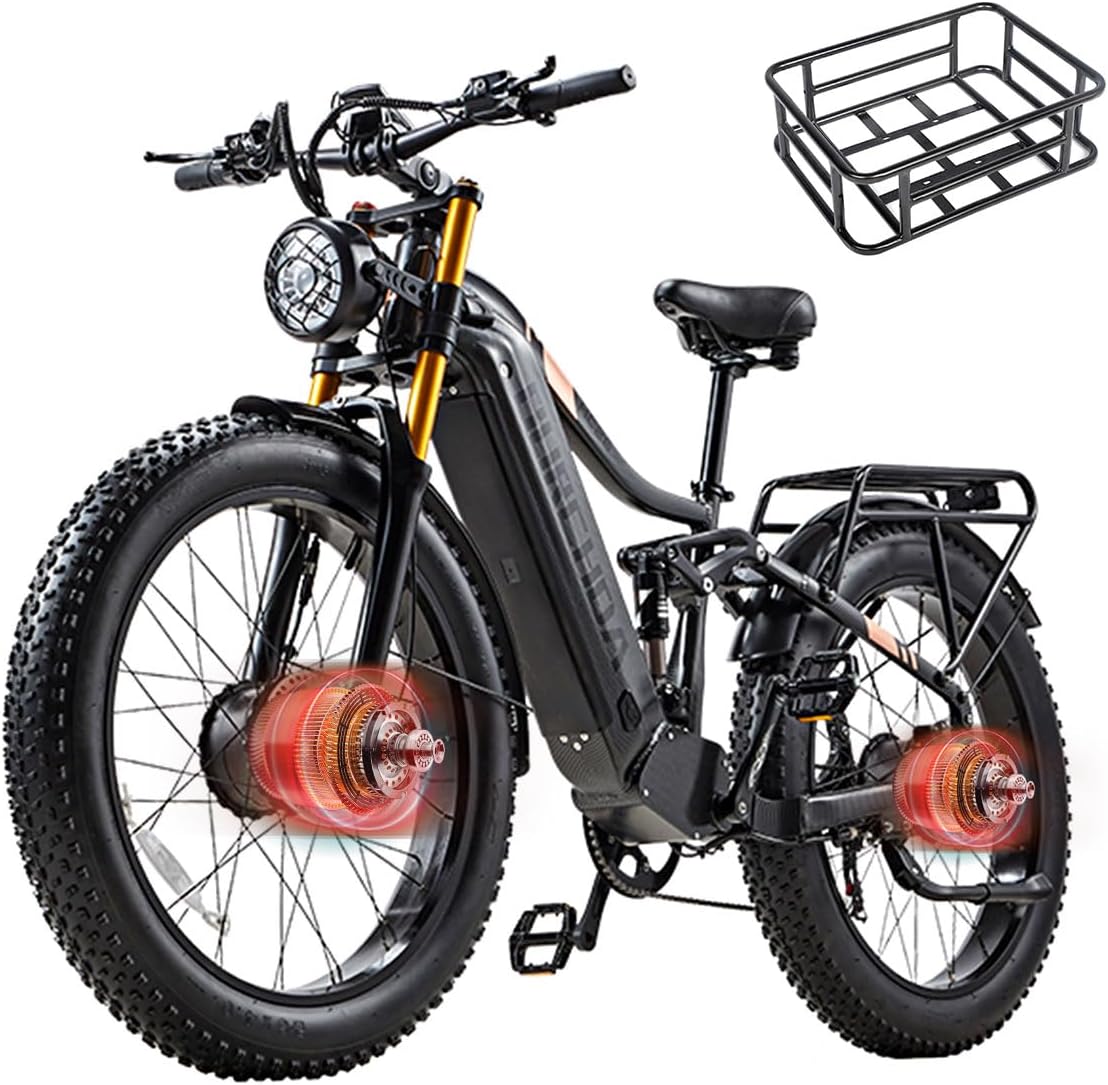
The bike is equipped with two brushless motors, one on the front hub and one on the rear hub. These motors provide strong power, with an excellent climbing capacity and a maximum torque of 2 x 95 Nm. They are also IP64 waterproof.
Removable 48V 30AH Battery

The integrated 30 Ah battery is removable, waterproof, and dustproof, enhancing range, stability, and safety. It features a Battery Management System (BMS) for protection and comes with a 3A fast charger.
Dual Hydraulic Oil Brakes

Both front and rear wheels are equipped with brand-name hydraulic oil brakes featuring a super powerful 4-piston braking system. The brake levers include a power-off protection function, ensuring quick and stable braking.
6061 Aluminum Alloy Frame with Carbon Fiber Coating

The bike frame is constructed from durable 6061 Aluminum alloy, featuring an imitation carbon fiber coating for a sleek aesthetic.
26" 4.0 Fat Tyres
The 26-inch 4.0 fat tyres provide enhanced grip and traction, making the bike suitable for various terrains including beaches, snow, and mountain roads.
Full Suspension System

The bike features a full suspension system, providing a comfortable ride by absorbing shocks and bumps on uneven terrain.
What's in the Box:
- BURCHDA HC26 Electric Mountain Bike (partially assembled)
- Removable 48V 30AH Battery
- Battery Charger
- Mudguards
- Luggage Rack
- User Manual (this document)
- Assembly Tools (basic)
3. Setup and Assembly
Your BURCHDA HC26 bike comes partially assembled. Follow these steps to complete the assembly and prepare for your first ride.
- Unpacking: Carefully remove all components from the packaging. Retain packaging for future transport or storage.
- Handlebar Installation: Attach the handlebar to the stem. Ensure it is centered and tightened securely. The handlebar can rotate up to 120 degrees for adjustment.

This image illustrates the handlebar's rotational capability, allowing for ergonomic adjustments.
- Front Wheel Installation: Install the front wheel, ensuring the brake rotor aligns correctly with the caliper. Secure the quick-release skewer or axle nuts.
- Pedal Installation: Identify left (L) and right (R) pedals. Thread the pedals into the crank arms. The left pedal threads counter-clockwise, and the right pedal threads clockwise. Tighten firmly.
- Seat Post and Saddle: Insert the seat post into the frame and adjust the saddle height for comfortable riding. Ensure the minimum insertion mark is not visible. Tighten the quick-release lever or bolt.
- Battery Installation: Insert the fully charged battery into its compartment in the frame. Ensure it clicks securely into place.
- Mudguards and Luggage Rack: Attach the mudguards and luggage rack using the provided hardware.
- Pre-Ride Checks: Before your first ride, double-check all bolts and quick releases for tightness. Inflate tires to the recommended pressure (check tire sidewall for details). Test brakes and ensure all electronic components are functioning.
4. Operating Instructions
Understanding how to operate your BURCHDA HC26 will enhance your riding experience.
Powering On/Off and Display
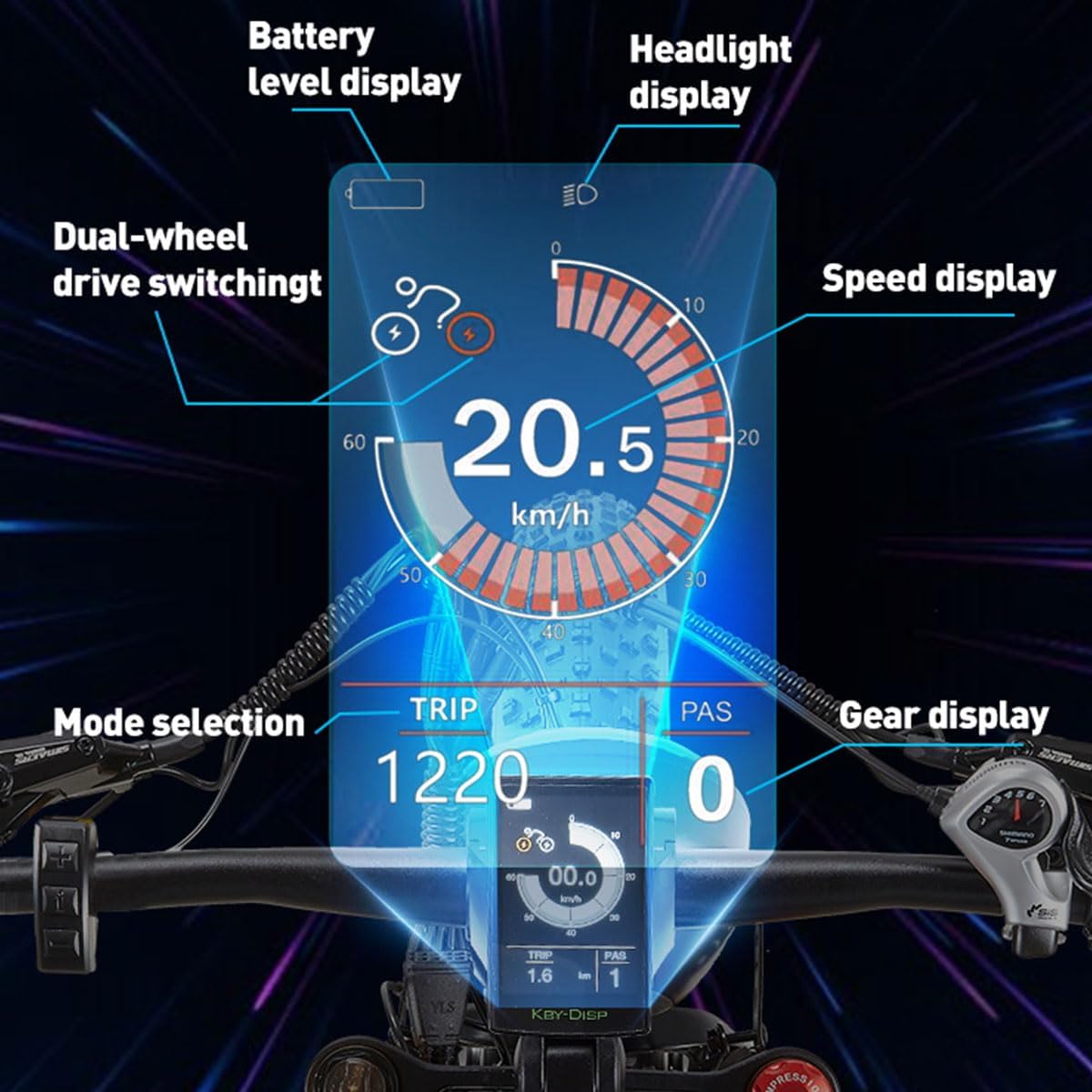
The digital display provides crucial information during your ride. It shows battery level, headlight status, current speed, selected riding mode, trip distance, and gear display. Refer to the display manual for detailed operation.
- Power On: Press and hold the power button on the display unit.
- Power Off: Press and hold the power button again.
- Display Functions: Navigate through different display screens using the control buttons to view speed, battery level, odometer, trip distance, and assistance level.
Riding Modes
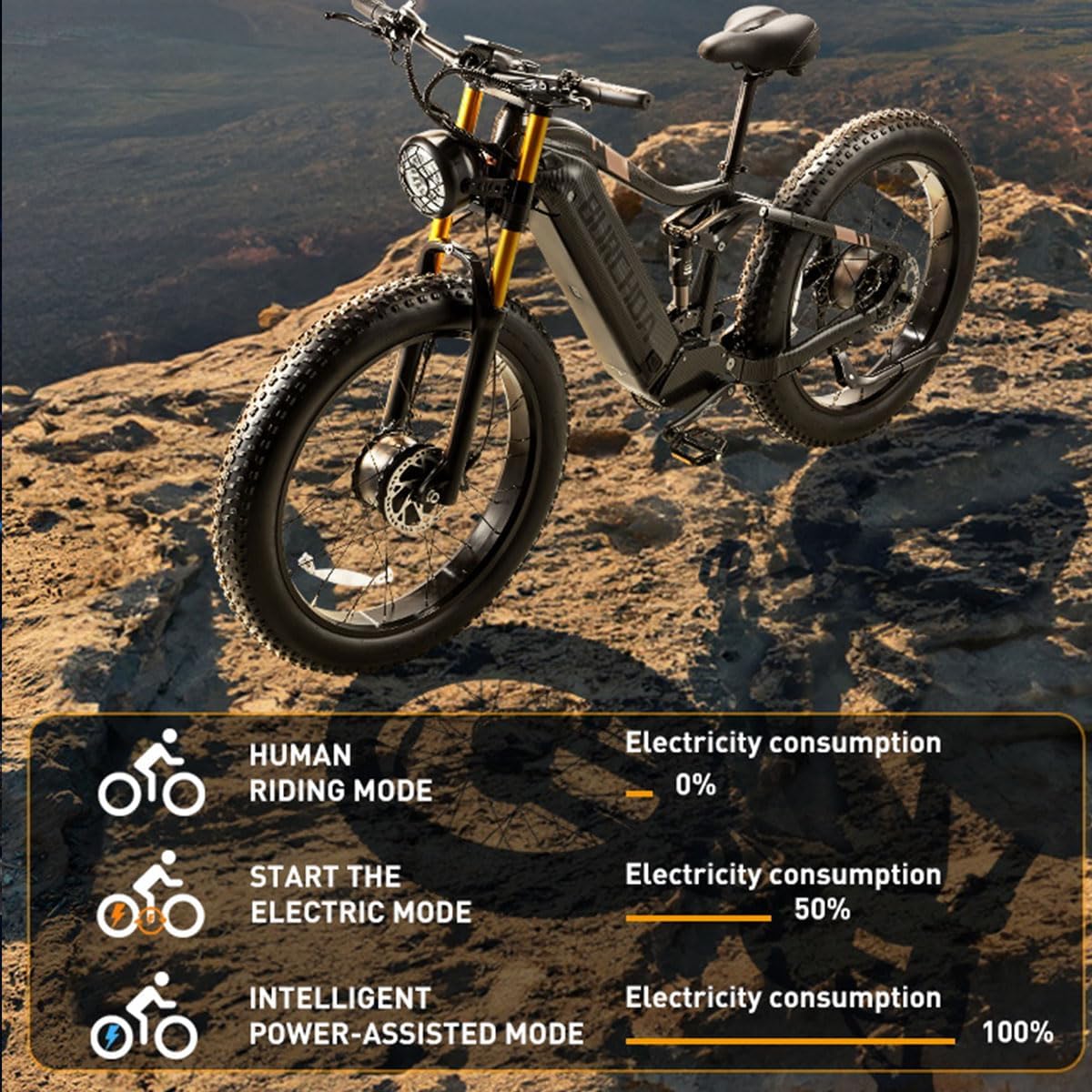
This diagram explains the three available riding modes and their approximate electricity consumption.
- Human Riding Mode (Pedal Only): 0% electricity consumption. Ride the bike like a traditional bicycle using only pedal power.
- Electric Mode (Throttle Only): Approximately 50% electricity consumption. Engage the throttle for pure electric propulsion without pedaling. This mode offers an unexpectedly fast riding experience.
- Intelligent Power-Assisted Mode (Pedal Assist): Approximately 100% electricity consumption (variable based on assist level). The motor provides assistance as you pedal, making riding easier, especially on inclines. Adjust the assistance level via the display.
Gear Shifting
The 7-speed transmission system allows you to easily switch gears while riding, helping you conquer various terrains and achieve exceptional acceleration. Use the gear shifter on the handlebar to change gears smoothly.
Braking System
The dual hydraulic oil brakes provide powerful and reliable stopping power. When the brake lever is pressed, the motor power is cut off, ensuring quick and stable braking. Regularly check brake pad wear and brake fluid levels.
5. Maintenance and Care
Regular maintenance ensures the longevity and optimal performance of your BURCHDA HC26 electric bike.
- Battery Care:
- Charge the battery fully before first use.
- Charge the battery regularly, even if not in use, to maintain its health.
- Store the battery in a cool, dry place, away from direct sunlight and extreme temperatures.
- Do not completely discharge the battery.
- The estimated battery life depends on rider weight, speed, temperature, wind, tire pressure, terrain, slopes, and other conditions. Mileage may vary.
- Tire Pressure: Check tire pressure before each ride. Maintain the recommended PSI (pounds per square inch) indicated on the tire sidewall for optimal performance and safety.
- Brakes: Inspect brake pads for wear and replace them when necessary. Ensure brake levers are firm and responsive. Check hydraulic fluid levels periodically if applicable.
- Chain and Drivetrain: Keep the chain clean and lubricated. Regularly inspect the chain, gears, and derailleur for wear or damage.
- Cleaning: Clean the bike regularly with a damp cloth. Avoid using high-pressure washers directly on electrical components. Dry thoroughly after cleaning.
- Fasteners: Periodically check all bolts, nuts, and quick releases for tightness. Loose components can affect safety and performance.
- Storage: Store the bike in a dry, sheltered area. If storing for extended periods, ensure the battery is partially charged (around 50-70%) and recharged every 1-2 months.
6. Troubleshooting Guide
This section addresses common issues you might encounter with your BURCHDA HC26 electric bike.
| Problem | Possible Cause | Solution |
|---|---|---|
| Bike does not power on. | Battery not charged, battery not properly seated, loose electrical connection, display issue. | Charge battery fully. Ensure battery is securely installed. Check all visible cable connections. Contact support if issue persists. |
| Motor not assisting. | Low battery, pedal assist level set to zero, brake lever engaged, motor connection issue. | Check battery level and charge if low. Increase pedal assist level on display. Ensure brake levers are fully released. Check motor cable connections. |
| Brakes feel weak or spongy. | Worn brake pads, air in hydraulic system, low brake fluid. | Inspect and replace brake pads. Bleed the hydraulic brake system (professional service recommended). Check and refill brake fluid. |
| Unusual noises from drivetrain. | Dry chain, bent derailleur hanger, loose components. | Clean and lubricate chain. Inspect derailleur for alignment. Check tightness of crank arms and pedals. |
| Tire loses air quickly. | Puncture, valve stem issue, improperly seated tire. | Inspect tire for punctures and repair/replace tube. Check valve stem for leaks. Re-seat tire bead if necessary. |
If you encounter an issue not listed here or if the suggested solutions do not resolve the problem, please contact BURCHDA customer support.
7. Technical Specifications
Detailed specifications for the BURCHDA HC26 Electric Mountain Bike.
| Model Number | HC26 |
| Brand | BURCHDA |
| Age Range | Adult |
| Bike Type | Fat Tire, Mountain Bike |
| Brake Type | Hydraulic Oil Brake (4-piston) |
| Color | Imitation Carbon Fiber |
| Frame Material | 6061 Aluminum |
| Number of Speeds | 7 |
| Special Features | Multiple Speeds, Digital Display, Odometer |
| Suspension Type | Full Suspension |
| Wheel Size | 26 Inches |
| Motor Type | Dual Brushless Hub Motors (Front & Rear) |
| Motor Torque | 2 x 95 Nm (Max) |
| Waterproof Rating | IP64 (Motors), IP65 (Battery) |
| Battery Capacity | 48V 30AH (Removable) |
| Included Components | Mudguards, Luggage Rack |
8. Warranty and Support
BURCHDA stands behind the quality of its products. For specific warranty details, please refer to the warranty card included with your purchase or visit the official BURCHDA website.
Customer Support:
If you have any questions, require technical assistance, or need to report an issue, please contact BURCHDA customer support through the following channels:
- Website: www.burchda.com (Please note: This is a placeholder URL, replace with actual if available)
- Email: support@burchda.com (Please note: This is a placeholder email, replace with actual if available)
- Phone: Refer to your purchase documentation for regional contact numbers.
When contacting support, please have your model number (HC26) and purchase date ready.
Related documentsHC26


Ask a question about this manual
Ask about setup, troubleshooting, compatibility, parts, safety, or missing instructions. Manuals+ will review the question and use this page’s manual context to help answer it.