
Introduction
Thank you for choosing the Fame SP-5 Stage Piano. This manual provides essential information for the safe and efficient use of your instrument. Please read it thoroughly before operating the device and keep it for future reference.
The Fame SP-5 is a versatile stage piano featuring a hammer-action keyboard, designed for musicians requiring quality sound and performance in various settings. It offers a wide range of sounds, accompaniment styles, and recording capabilities.
Safety Instructions
- Power Supply: Use only the specified power adapter. Ensure the voltage matches your local power supply.
- Water and Moisture: Do not expose the instrument to rain, moisture, or excessive humidity. Avoid placing liquid containers on the piano.
- Ventilation: Ensure adequate ventilation around the instrument. Do not block ventilation openings.
- Placement: Place the instrument on a stable, level surface. Avoid direct sunlight, heat sources, or extreme temperatures.
- Cleaning: Disconnect the power before cleaning. Use a soft, dry cloth. Do not use liquid cleaners or solvents.
- Servicing: Do not attempt to service the instrument yourself. Refer all servicing to qualified personnel.
Setup
1. Unpacking
Carefully remove the Fame SP-5 from its packaging. Retain all packaging materials for potential future transport or storage. Verify that all accessories, including the power adapter and music rest, are present.
2. Connecting the Music Rest
Insert the included music rest into the designated slots on the top panel of the piano. Ensure it is securely seated.

Figure 1: Fame SP-5 Stage Piano with the music rest installed. This image shows the full keyboard, control panel, and the metal music rest in position.
3. Rear Panel Connections
The rear panel of the Fame SP-5 provides various input and output options. Refer to the image below for connection points.

Figure 2: Rear panel of the Fame SP-5, showing various ports including USB, MIDI In/Out, Pedal inputs, Line Out (L/R), Aux In, and the 12V DC power input.
- Power (12V DC): Connect the supplied power adapter to the 12V DC input jack and then to a suitable power outlet.
- Pedal Connections:
- UNIT PEDAL: For connecting a multi-pedal unit (if applicable).
- PEDAL 1 (Sustain): For connecting a sustain pedal.
- PEDAL 2 (Expression): For connecting an expression pedal.
- Audio Output (LINE OUT L/R): Connect these jacks to an amplifier, mixer, or powered speakers using standard 1/4-inch TS cables.
- Audio Input (AUX IN): Connect an external audio player (e.g., smartphone, MP3 player) to this jack using a stereo 1/8-inch (3.5mm) cable to play along with your favorite music.
- MIDI (IN/OUT): Use standard MIDI cables to connect to other MIDI devices.
- USB (TO DEVICE/TO HOST):
- TO DEVICE: For connecting a USB flash drive to save/load data.
- TO HOST: For connecting the piano to a computer for MIDI communication.
Operating Instructions
1. Power On/Off
Press the POWER button (usually located near the volume knob) to turn the instrument on or off. The display will illuminate upon power-up.
2. Volume Control
Adjust the overall output volume using the VOLUME knob. Start with a low volume and gradually increase it to a comfortable listening level.

Figure 3: Left-center control panel showing the Volume knob, Power button, and various Style/Sound selection buttons.
3. Sound Selection
The Fame SP-5 offers a variety of instrument sounds. Use the SOUND button and navigation controls to browse and select different tones such as Piano, Organ, Guitar, Strings, Brass, etc.

Figure 4: Right-center control panel, highlighting buttons for sound categories (Piano, Organ, Guitar, Strings, Brass, Alto Sax, Lead) and function buttons (Function, Mixer, Touch, Lesson).
4. Style Selection (Accompaniment)
To use the automatic accompaniment feature, press the STYLE button. Use the navigation buttons to select from various styles like Sun.Beat, Rock 1, Ballad 1, Waltz, etc. The display will show the currently selected style.
5. Display Navigation
The central display provides visual feedback on selected sounds, styles, settings, and song information. Use the MENU, ENTER, EXIT, and arrow buttons to navigate through menus and adjust parameters.
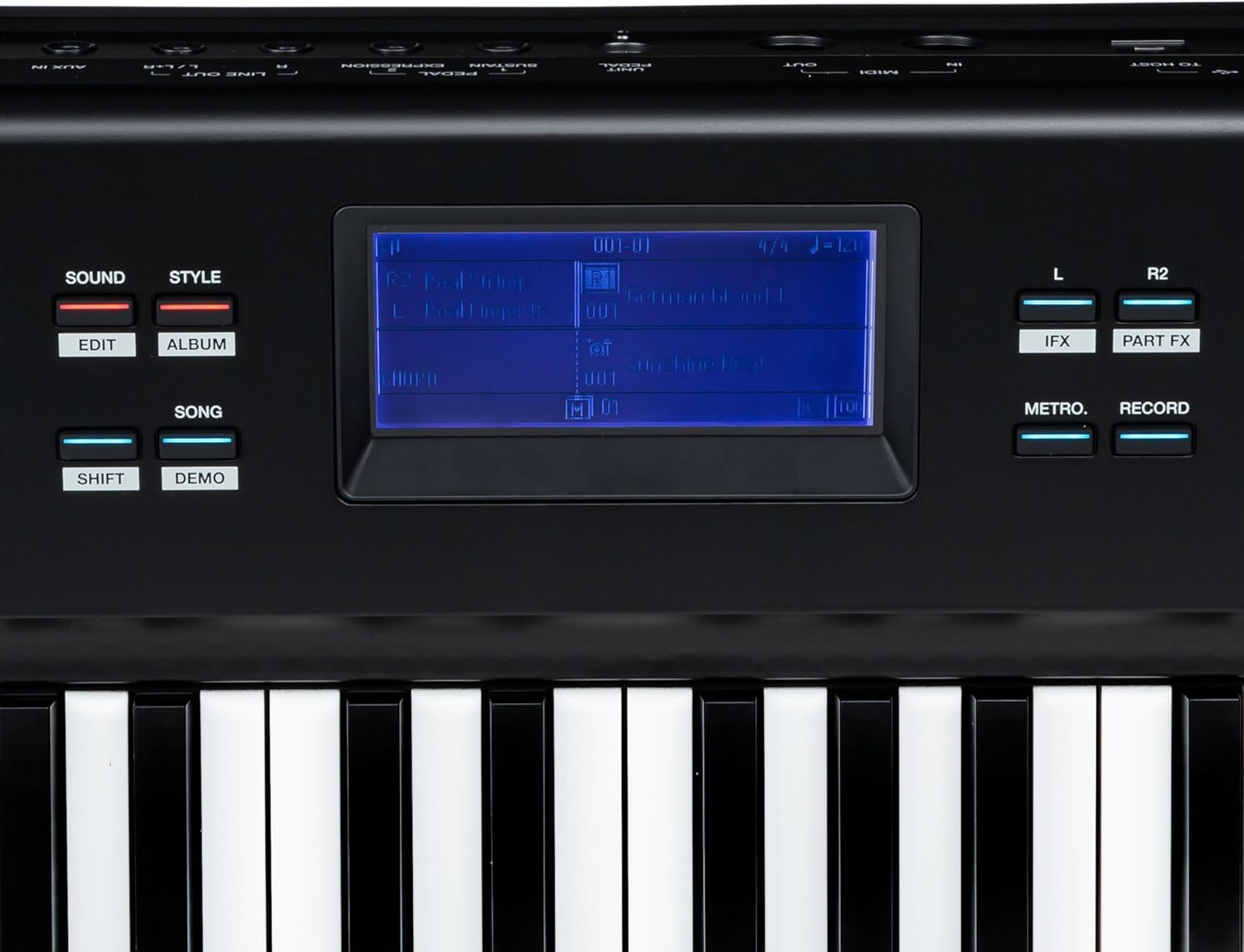
Figure 5: Central display area showing the screen with current settings, along with Metro, Record, IFX, and Part FX buttons.
6. Key Functions
- FUNCTION: Accesses advanced settings and parameters.
- MIXER: Adjusts the volume balance between different parts (e.g., main sound, accompaniment).
- TOUCH: Adjusts the touch sensitivity of the keyboard.
- LESSON: Accesses built-in lesson functions.
- TRANSPOSE: Changes the pitch of the entire keyboard in semitone steps.
- OCTAVE: Shifts the keyboard's pitch in octave steps.
- METRO (Metronome): Activates the built-in metronome for practice.
- RECORD: Initiates recording of your performance.
- M1-M6 (Memory): Store and recall your favorite settings (sounds, styles, tempos). Use STORE to save and the respective M button to recall.
- SUSTAIN: Toggles the sustain effect on/off (if no pedal is connected or for continuous sustain).
Maintenance
1. Cleaning
Regularly wipe the instrument with a soft, dry, lint-free cloth. For stubborn dirt, slightly dampen the cloth with water and a mild detergent, then wipe dry immediately. Avoid abrasive cleaners, waxes, or solvents.
2. Storage
When not in use for extended periods, store the Fame SP-5 in a dry, dust-free environment, away from extreme temperatures and direct sunlight. If possible, use a dust cover to protect the keys and control panel.
3. Transportation
When transporting the instrument, use appropriate protective cases or the original packaging to prevent damage. Disconnect all cables and remove the music rest before moving.
Troubleshooting
- No Power:
- Ensure the power adapter is securely connected to the instrument and a working power outlet.
- Verify the power outlet is functional by plugging in another device.
- No Sound:
- Check the VOLUME knob and ensure it is turned up.
- If using external speakers or headphones, ensure they are properly connected and their volume is adjusted.
- Verify that the correct sound is selected and not set to a silent patch.
- Keys Not Responding:
- Restart the instrument.
- Check if any specific mode (e.g., Lesson mode) is active that might restrict normal play.
- Distorted Sound:
- Reduce the VOLUME level on the piano and any connected audio equipment.
- Check all audio cables for proper connection and damage.
If you encounter issues not covered here, please consult the support section or contact customer service.
Specifications
| Feature | Specification |
|---|---|
| Model | Fame SP-5 |
| Keyboard Type | Hammer Action |
| Dimensions (L x W x H) | 146 x 38 x 21.6 cm (57.5 x 15 x 8.5 inches) |
| Weight | 16.72 kg (36.86 lbs) |
| Power Supply | 12V DC (via included adapter) |
| Connectivity | USB (To Device, To Host), MIDI In/Out, Pedal (Sustain, Expression), Line Out (L/R), Aux In |
Warranty Information
The Fame SP-5 Stage Piano comes with a standard manufacturer's warranty. Please refer to the warranty card included in your product packaging for specific terms, conditions, and duration. Keep your proof of purchase for warranty claims.
Support
For technical assistance, spare parts, or further inquiries, please contact your authorized Fame dealer or visit the official Fame website. When contacting support, please have your product model (SP-5) and serial number ready.
Official Website: www.fame-music.com (Example link, please verify actual support contact information)


