
1. Introduction
The Nitecore EDC29 LUMINBLADE is an ultra-slim, high-performance rechargeable flashlight designed for everyday carry. It features a dual LED system with 18 cores, delivering up to 6,500 lumens of brightness and a beam distance of 400 meters. This manual provides essential information for the safe and effective use of your EDC29 flashlight, including setup, operation, maintenance, and specifications.

Image 1.1: Nitecore EDC29 LUMINBLADE flashlight with included accessories.

Image 1.2: The Nitecore EDC29 LUMINBLADE, highlighting its 6500 lumen output.
2. Setup
2.1 Unboxing and Package Contents
Upon opening the package, verify that all components are present:
- Nitecore EDC29 LUMINBLADE Flashlight
- USB Type-C Charging Cable
- USB Wall Adapter
- Lanyard (if included in your specific package)
2.2 Initial Charging
The EDC29 features a built-in 2,500mAh Li-ion battery. Before first use, it is recommended to fully charge the device.
- Connect the USB Type-C charging cable to the flashlight's USB-C port.
- Connect the other end of the cable to the provided USB wall adapter or any compatible USB power source.
- The OLED display will indicate charging status. Charging is complete when the display shows a full battery icon or indicates 'Full'.
The flashlight can be used during charging, but performance may be limited.
3. Operating Instructions
The EDC29 utilizes dual two-stage tail switches for intuitive control.
3.1 Power On/Off
- To Turn On: Press and hold the power button (typically the larger, primary tail switch) until the light activates.
- To Turn Off: Press and hold the power button again until the light deactivates.
3.2 Brightness Levels and Modes
The EDC29 offers four brightness levels and specialized modes: LUMIN SHIELD, STROBE READY, and SEARCH Mode.
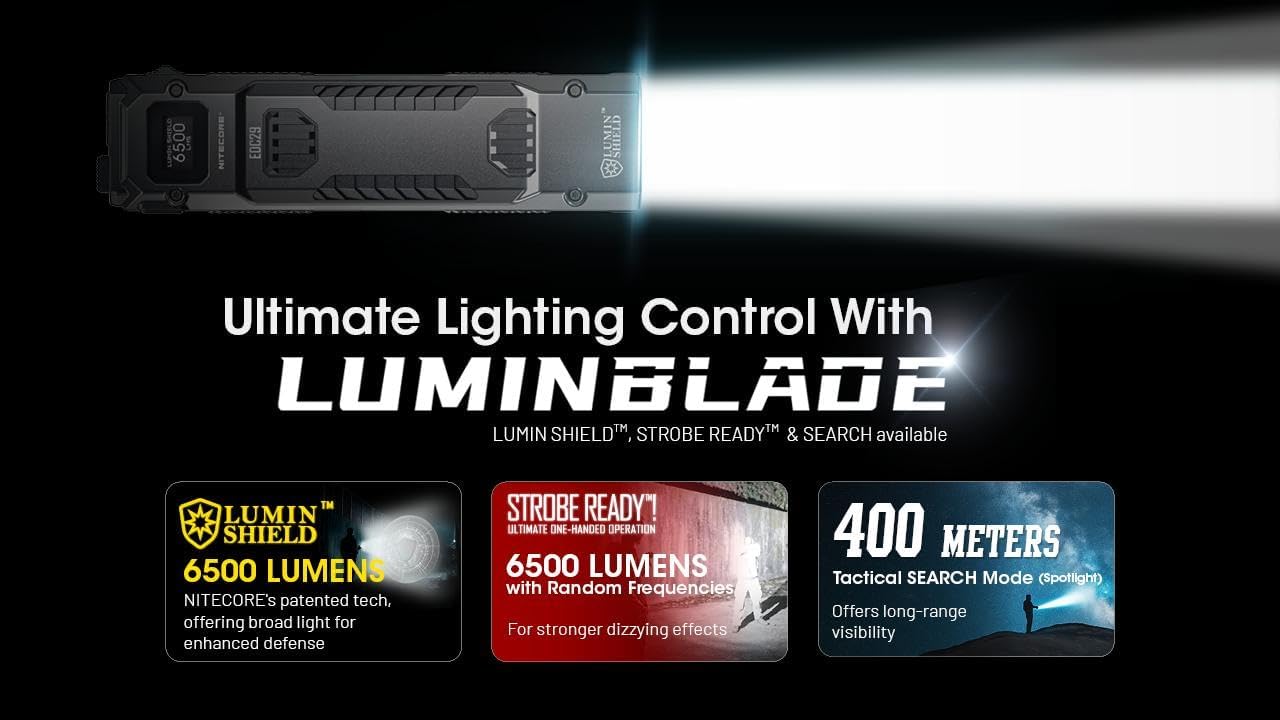
Image 3.1: Overview of the EDC29's lighting control features.
- Cycling Brightness: With the light on, short press the mode button (secondary tail switch) to cycle through the four available brightness levels.
- LUMIN SHIELD (6500 Lumens): This mode provides a wide-area, high-intensity light. It can be accessed via a customizable button press (see 3.3).
- STROBE READY: This mode features randomly changing frequencies (16 Hz to 20 Hz) for disorienting effects. It can be accessed via a customizable button press (see 3.3).
- SEARCH Mode (3000 Lumens, 400 Meters): This tactical mode activates the two primary LED cores for a focused, long-range beam. It can be accessed via a customizable button press (see 3.3).

Image 3.2: The STROBE READY mode with randomly changing frequencies.

Image 3.3: The Tactical SEARCH Mode providing a 400-meter beam.
3.3 Customizable Button Access
The EDC29 allows users to tailor functions to their needs:
- Half Press: Can be configured for instant access to SEARCH mode.
- Full Press: Can be configured for instant access to LUMIN SHIELD or STROBE mode.
Refer to the specific button configuration instructions in the full product manual for detailed customization steps.
3.4 Rapid Lock (Lockout Switch)
The Rapid Lock feature prevents accidental activation. It offers two modes:
- Semi Lockout Mode: Allows access to certain functions while preventing full activation.
- Full Lockout Mode: Completely disables all functions to prevent any accidental activation during transport or storage.
Slide the lockout switch to engage or disengage these modes. A simple slide allows for quick locking or unlocking.
3.5 OLED Display
The integrated OLED display provides real-time information, including:
- Brightness Level
- Battery Voltage
- Remaining Power
- Runtime
3.6 Advanced Temperature Regulation (ATR)
The EDC29 incorporates an ATR module that adjusts output based on the flashlight's internal temperature, preventing overheating and prolonging LED lifespan.
4. Maintenance
4.1 Cleaning
- Wipe the flashlight body with a clean, soft cloth.
- For stubborn dirt, a slightly damp cloth can be used. Avoid harsh chemicals or abrasive materials.
- Keep the USB-C port clean and free of debris.
4.2 Battery Care
The built-in Li-ion battery requires proper care for optimal performance and longevity:
- Avoid fully discharging the battery frequently.
- Charge the flashlight regularly, even if not in frequent use, to maintain battery health.
- Store the flashlight in a cool, dry place when not in use.
4.3 Water and Dust Resistance
The EDC29 has an IP54 rating, meaning it is protected against dust ingress and splashing water from any direction. While it can withstand light rain or splashes, it is not designed for submersion in water.
5. Troubleshooting
If you encounter issues with your EDC29 flashlight, refer to the following common problems and solutions:
| Problem | Possible Cause | Solution |
|---|---|---|
| Flashlight does not turn on. | Low battery, Lockout Mode engaged, or faulty switch. | Charge the battery. Disengage the Rapid Lock switch. Ensure buttons are pressed correctly. |
| Light is dim or flickers. | Low battery, or ATR system adjusting output due to heat. | Recharge the battery. Allow the flashlight to cool down if it has been operating at high output for an extended period. |
| Flashlight not charging. | Faulty cable/adapter, dirty USB-C port, or battery issue. | Try a different USB-C cable and adapter. Clean the USB-C port. If the issue persists, contact support. |
| OLED display not working. | Software glitch or hardware malfunction. | Ensure the battery is charged. If the issue persists, contact support. |
If these solutions do not resolve the issue, please contact Nitecore customer support or your retailer for further assistance.
6. Specifications
The following table outlines the key technical specifications for the Nitecore EDC29 LUMINBLADE flashlight:

Image 6.1: Key features and components of the EDC29 LUMINBLADE.
| Feature | Detail |
|---|---|
| Max Output | 6,500 Lumens |
| Max Beam Distance | 400 Meters |
| Max Beam Intensity | 35,360 cd (40,230 cd in SEARCH mode) |
| Max Runtime | 61 Hours |
| LED | 2 x UHi 20 MAX LEDs |
| Battery | Built-in 2,500mAh Li-ion Battery |
| Charging Port | USB-C |
| Length | 133.5 mm / 5.26 in |
| Width | 34.6 mm / 1.36 in |
| Weight | 160 g / 5.64 oz |
| Water Resistance | IP54 |
| Impact Resistance | 1 Meter |
| Material | Stainless steel shells with carbon fiber composite frame |
| Special Features | OLED Display, Rapid Lock, ATR Module, Level Preset Function |
7. Warranty and Support
Specific warranty terms and direct customer support contact information are not provided within this manual. For detailed warranty information, please refer to the warranty card included with your product, visit the official Nitecore website, or contact your point of purchase. For technical support or service inquiries, please reach out to the authorized Nitecore distributor or retailer from whom you purchased the product.


