
PAXA OpenAirMaxAI01
PAXA Ai Translator Earbuds User Manual
Model: OpenAirMaxAI01 | Brand: PAXA
1. Product Overview
The PAXA Ai Translator Earbuds are a versatile 3-in-1 device designed for real-time language translation, music playback, and clear call quality. Featuring advanced AI technology and Bluetooth 5.4, these earbuds offer high-precision translation in 135 languages and accents, along with a smart touchscreen charging case for enhanced control and convenience.

Image: The PAXA Ai Translator Earbuds, showcasing both earbuds and the smart charging case with its touchscreen display.
2. Package Contents
- AI Translation Earbuds (Left and Right)
- Smart Charging Case
- Charging Cable
- User Manual
3. Setup Guide
3.1 Initial Charging
Before first use, fully charge the earbuds and the charging case. Connect the charging case to a power source using the provided charging cable. The touchscreen on the case will indicate charging status.
3.2 Pairing with Your Device
- Ensure the earbuds are in the charging case and the case is open.
- On your smartphone or tablet, enable Bluetooth.
- Select "PAXA OpenAirMaxAI01" from the list of available Bluetooth devices.
- Once connected, a confirmation sound will play through the earbuds.
3.3 App Installation
To utilize the full translation features and smart functions, download the official PAXA application from your device's app store (iOS/Android). Follow the in-app instructions for registration and setup. Note that the translation software offers one year of free usage after registration, after which a subscription may be required.

Image: The PAXA earbuds in their charging case next to a smartphone displaying the translation application interface, highlighting the "Three in One" functionality for translation, music playback, and phone calls.
4. Operating Instructions
4.1 Smart Touchscreen Case Functions
The charging case features a touchscreen for convenient control:
- Music Control: Play, pause, skip tracks, and adjust volume directly from the screen.
- Equalizer Settings: Select from various sound modes (e.g., Normal, Rock, POP, Classic, Jazz) to customize your audio experience.
- Remote Photo Capture: Use the case as a remote shutter for your phone's camera.
- "Find My Earphone": Activate this function to locate misplaced earbuds by having them emit a sound prompt. This feature requires the PAXA app and location permissions.
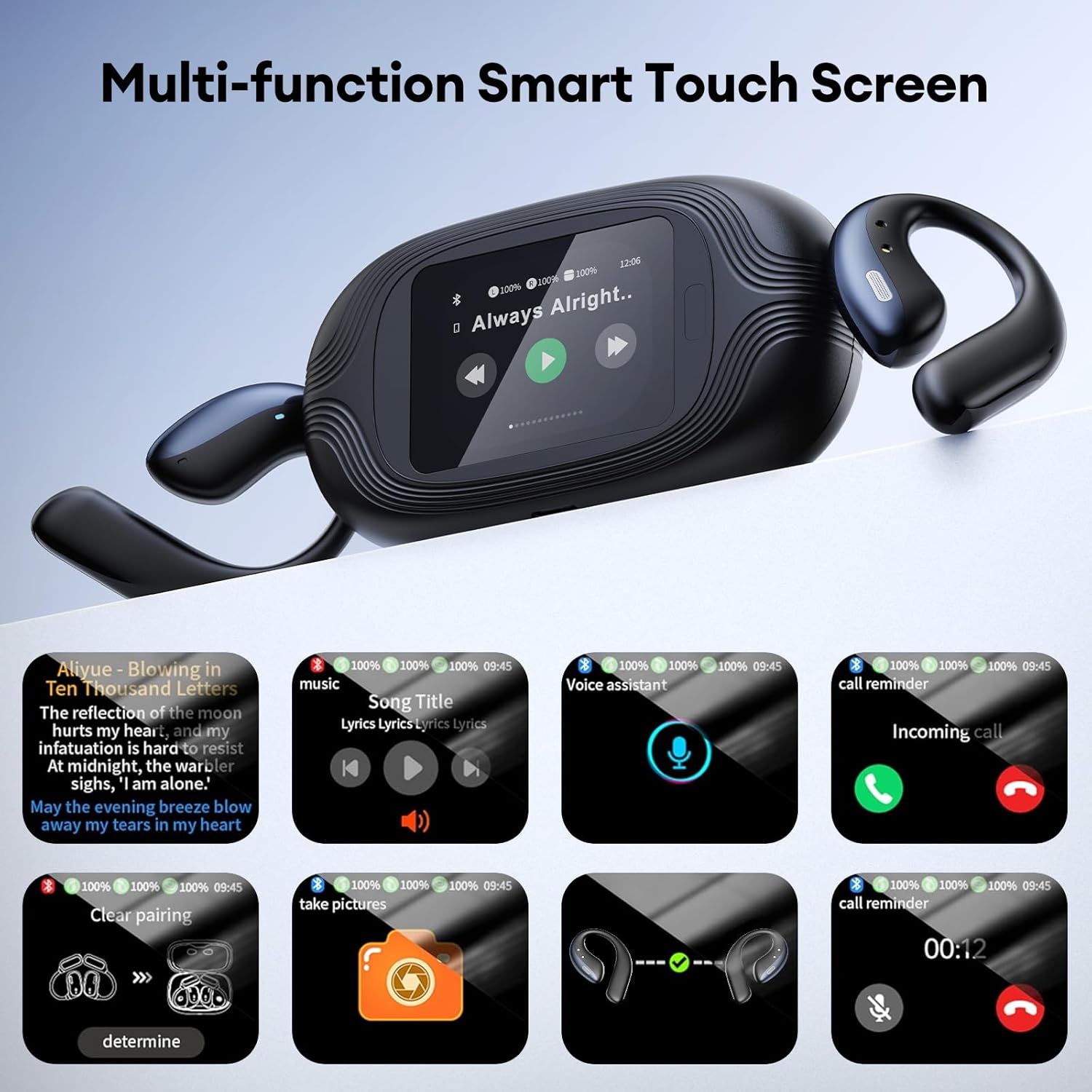
Image: A close-up of the PAXA smart charging case's touchscreen, displaying icons for music control, voice assistant, call reminders, clear pairing, remote photo capture, earbud pairing status, and "Find My Earphone" function.
4.2 Earbud Touch Controls
The earbuds feature touch-sensitive areas for various functions:
- Answer/End Call: Click the headset touch area.
- Reject Call: Press and hold the earphone touch area for 2 seconds.
- Start Voice Assistant: Click the headset touch area.
- Play/Pause: Click the headset touch area.
- Previous Song: Double-click the left earphone touch area.
- Next Song: Double-click the right earphone touch area.
- Volume +: Triple-click the right earphone touch area.
- Volume -: Triple-click the left earphone touch area.

Image: A visual guide illustrating the touch control functions for the left and right PAXA earbuds, including call management, music playback, voice assistant activation, and volume adjustments.
4.3 Translation Modes
The PAXA Ai Translator Earbuds offer four distinct translation modes for various scenarios:
- Free Talk Mode: Ideal for casual conversations while traveling. This mode allows for natural, continuous two-way translation.
- Translation Machine Mode: Suitable for focused translation, where one person speaks into the phone and the translation is heard through the earbuds.
- Headphone+Phone Mode: Perfect for language learning. Speak into your earbuds, and the translation appears on your phone screen.
- Dual Ear Click Mode: For business meetings or direct conversations. Click to speak, and the translation is provided on the fly.

Image: A composite image demonstrating the four translation modes: Free Talk Mode (group conversation), Translation Machine Mode (individual use with phone), Headphone+Phone Mode (learning scenario), and Dual Ear Click Mode (one-on-one interaction).

Image: Two individuals, one wearing the earbuds, navigating a city street, illustrating the "Discover the World with Confidence" concept using Free Talk Mode for travel communication.

Image: Three business professionals in a meeting, with two wearing earbuds, demonstrating the "Break Barriers, Build Connections" concept using Dual-ear Click Mode for seamless communication in global business meetings.

Image: A man wearing an earbud and looking at his phone, illustrating the "Learn Smarter, Speak Better" concept using Headphone+Phone Mode as a companion for mastering new languages.

Image: A doctor and a patient interacting, with the doctor wearing an earbud, depicting the "Our Overseas Lifeguards" scenario where the phone speaks and earbuds receive translation for critical dialogue in emergencies.
5. Maintenance and Care
- Cleaning: Use a soft, dry, lint-free cloth to clean the earbuds and charging case. Do not use abrasive cleaners or solvents.
- Storage: Store the earbuds in their charging case when not in use to protect them and keep them charged.
- Battery Care: To prolong battery life, avoid fully discharging the battery frequently. Charge regularly, even if not in daily use.
- Water Resistance: The earbuds are not waterproof. Avoid exposure to water, sweat, or high humidity.
6. Troubleshooting
| Problem | Possible Cause | Solution |
|---|---|---|
| Earbuds not pairing. | Bluetooth is off, earbuds not in pairing mode, or low battery. | Ensure Bluetooth is on. Place earbuds in case, open lid to enter pairing mode. Charge earbuds and case. |
| Translation accuracy is low. | Background noise, unclear speech, or outdated software. | Speak clearly and at a moderate pace. Reduce background noise. Ensure the PAXA app is updated to the latest version. |
| "Find My Earphone" not working. | App not installed, location permissions denied, or earbuds out of range/powered off. | Install the PAXA app. Grant location permissions. Ensure earbuds are powered on and within Bluetooth range of your phone. |
| No sound from earbuds. | Volume too low, not connected, or media not playing. | Increase volume on earbuds and connected device. Re-pair earbuds. Ensure media is playing. |
7. Specifications
| Feature | Detail |
|---|---|
| Model Number | OpenAirMaxAI01 |
| Product Dimensions | 9.5 x 1.57 x 6.09 inches |
| Item Weight | 7.4 ounces |
| Batteries | 3 Lithium Polymer batteries (included) |
| Bluetooth Version | 5.4 |
| Translation Languages | 135 languages and accents |
| Charging Case Battery | 500mAh |
| Earbud Battery Life | Up to 13 hours (continuous listening) |
| Total Battery Life (with case) | Over 30 hours (up to 60 hours with case charges) |
| Manufacturer | PAXA |
| Country of Origin | China |

Image: A graphic summarizing key features of the PAXA 3-in-1 AI language translator earbuds, including 135 languages, 0.5-1s low latency, AI translation learning, premium stereo sound, 500mAh long battery life, and Bluetooth 5.4.
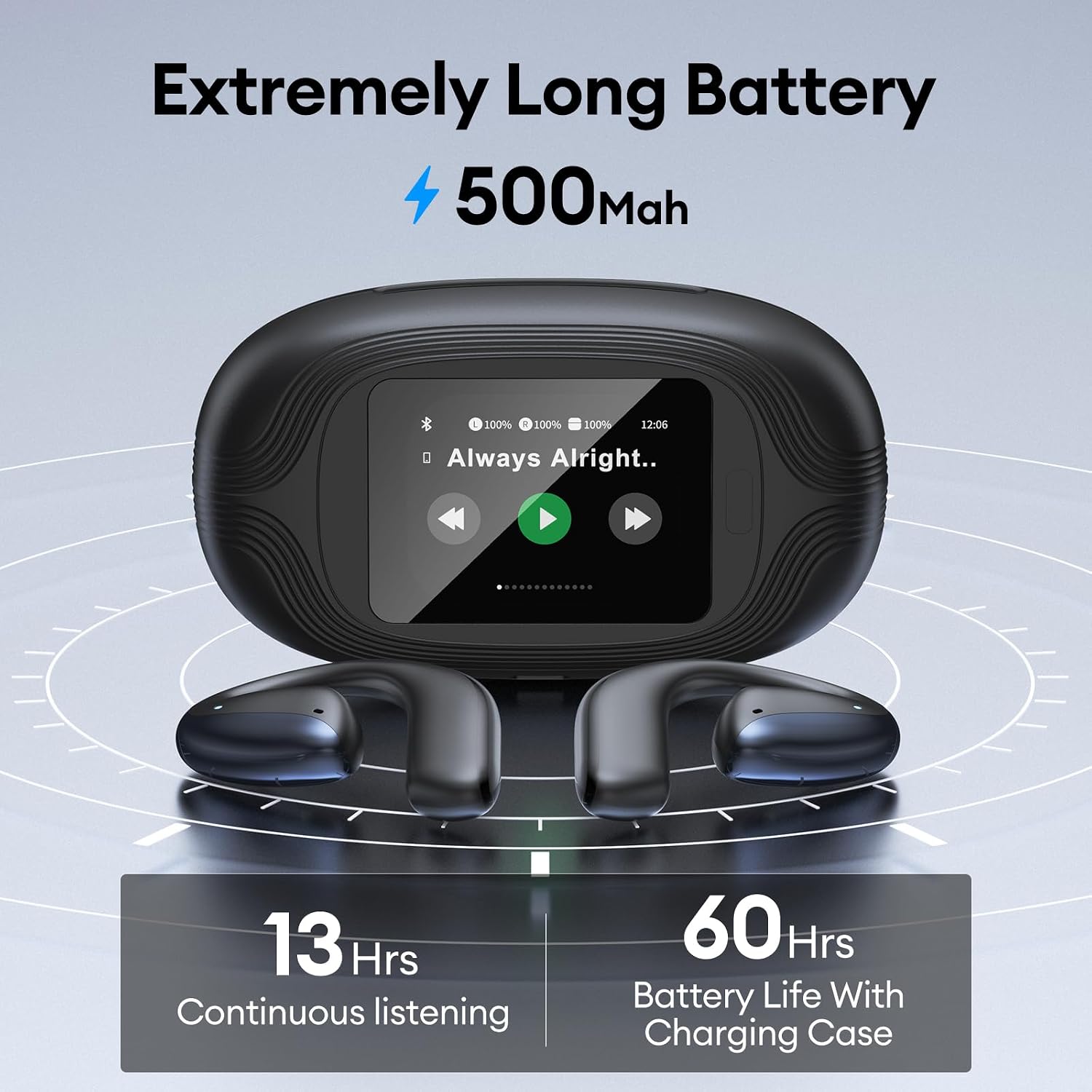
Image: A visual representation of the PAXA earbuds' battery life, showing 13 hours of continuous listening and 60 hours of total battery life with the 500mAh charging case.
8. Warranty and Support
The PAXA Ai Translator Earbuds come with a one-year free usage period for the translation software upon registration. After this period, a subscription will be required for continued access to the translation services.
For technical support, warranty claims, or further assistance, please refer to the contact information provided in the product packaging or visit the official PAXA website.
Related documentsOpenAirMaxAI01

Ask a question about this manual
Ask about setup, troubleshooting, compatibility, parts, safety, or missing instructions. Manuals+ will review the question and use this page’s manual context to help answer it.