
1. Product Overview
The Wiltec Indoor Hydroponic Garden, Model 65424, is designed for cultivating herbs and plants indoors without soil. This intelligent hydroponic system accommodates up to 20 plants, providing an efficient and elegant solution for home gardening. It features an adjustable LED grow light and a large water reservoir to ensure optimal growth conditions with minimal maintenance.

Image 1.1: The Wiltec Indoor Hydroponic Garden in operation, showcasing various plants thriving under the LED light panel.
2. Setup Instructions
- Unpack Components: Carefully remove all parts from the packaging. Verify that all components listed in the packing list are present.
- Assemble the Unit:
- Place the main water reservoir base on a stable, flat surface.
- Insert the adjustable support rod into the designated slot on the base. Ensure it is securely seated.
- Attach the LED light panel to the top of the support rod.

Image 2.1: Illustration of the extendable rods, demonstrating the adjustable height feature of the LED light panel, ranging from 218mm to 634mm (8.58 to 25 inches).
- Fill the Water Reservoir:
- Open the built-in water inlet cover.
- Fill the reservoir with clean water up to the indicated maximum fill line. The reservoir has a capacity of 9.8 liters.
- Add the recommended hydroponic nutrient solution according to the manufacturer's instructions (not included).
- Close the water inlet cover securely.

Image 2.2: Detail of the built-in water inlet cover, designed for durability and easy access to the reservoir. A technical diagram with dimensions is also shown.
- Plant Seeds/Seedlings:
- Place your chosen seeds or seedlings into the provided grow sponges/pods.
- Insert the grow pods into the designated holes on the top cover of the hydroponic system. The system can accommodate up to 20 plants.
- Connect Power: Plug the power adapter into the unit and then into a standard electrical outlet (100-240V AC).
3. Operating Instructions
3.1. Control Panel
The unit features an advanced control panel with touch-sensitive buttons for managing the light and pump functions. Refer to the display for current time and operational status.

Image 3.1: The advanced control panel, featuring a digital clock and timer functions for precise management of the hydroponic system's operations.
3.2. LED Grow Light
- Power On/Off: Press the light button on the control panel to turn the LED grow light on or off.
- Timer Function: Use the timer button to set the desired light cycle. The system typically operates on an automatic cycle (e.g., 16 hours on, 8 hours off) for optimal plant growth. Consult the control panel for specific timer settings.
- Adjusting Height: The LED light panel can be adjusted in height from 21 cm to 64 cm (8.58 to 25 inches) to accommodate different plant growth stages. Gently slide the light panel up or down the support rod to the desired position. Ensure the light is positioned appropriately above the plants for maximum effectiveness.
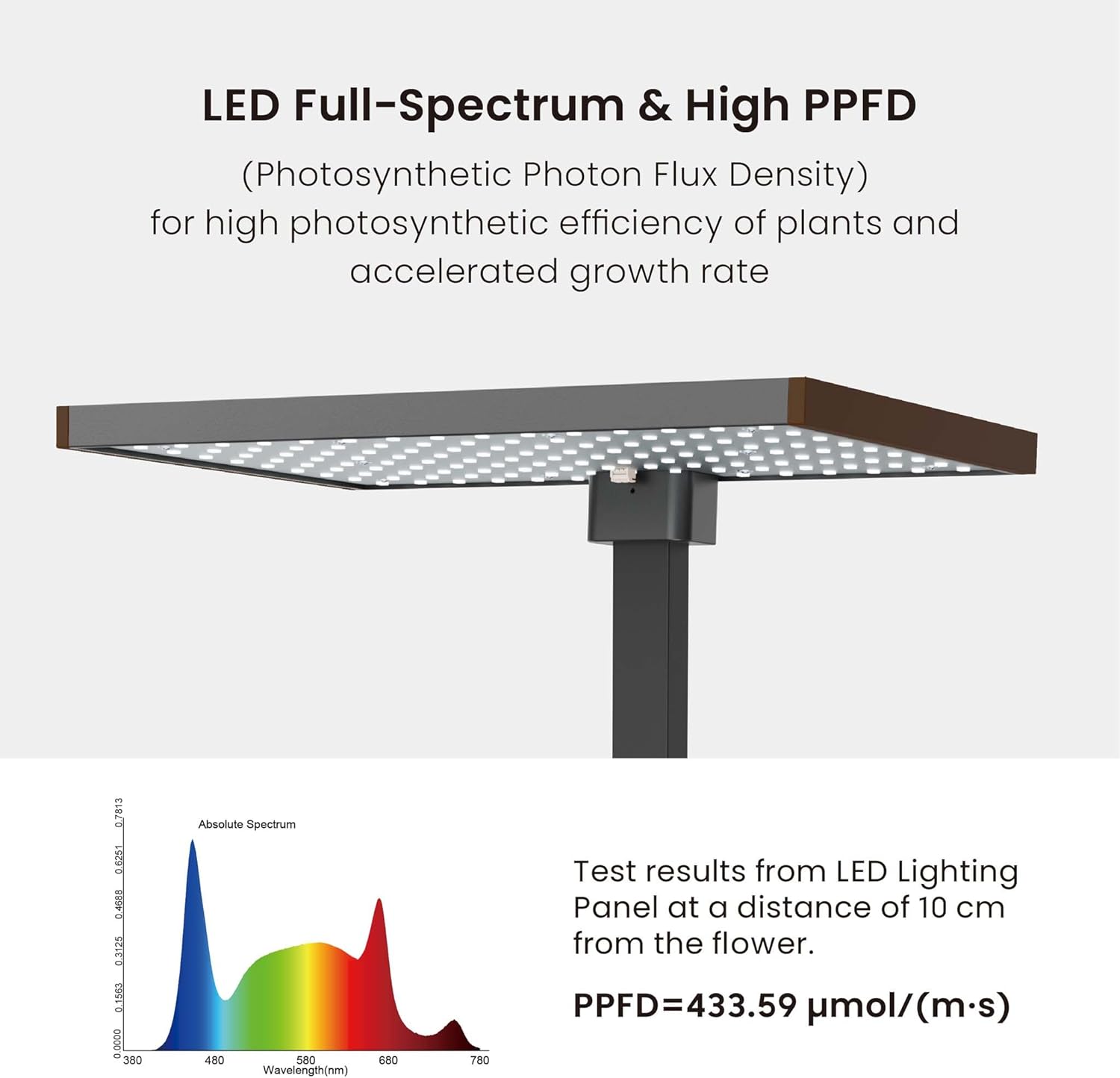
Image 3.2: Illustration detailing the LED full-spectrum light and Photosynthetic Photon Flux Density (PPFD) for high photosynthetic efficiency and accelerated plant growth. Test results show a PPFD of 433.59 µmol/(m·s) at 10 cm distance.
3.3. Water Pump
- The integrated water pump circulates water and nutrients to the plants. It operates quietly, typically below 20dB.
- Automatic Cycle: The pump is designed to run on an automatic cycle, such as 15 minutes ON and 105 minutes OFF during daytime hours, to ensure consistent hydration and nutrient delivery.

Image 3.3: Visual representation emphasizing the quiet operation of the water pump (less than 20dB) and its automatic 15-minute ON / 105-minute OFF cycle during the day.
4. Maintenance
- Water Level Monitoring: Regularly check the water level in the reservoir. Refill with fresh water and nutrient solution as needed. The 9.8-liter capacity reduces the frequency of refills.
- Nutrient Solution Replacement: It is recommended to completely replace the nutrient solution every 2-3 weeks to ensure plants receive a balanced supply of fresh nutrients and to prevent algae buildup.
- Cleaning: Periodically clean the reservoir and pump components to prevent mineral buildup and maintain optimal system performance. Disconnect power before cleaning.
- Plant Care: Prune plants as they grow to encourage bushier growth and prevent overcrowding. Harvest mature plants regularly.
5. Troubleshooting
| Problem | Possible Cause | Solution |
|---|---|---|
| Plants not growing or wilting | Insufficient water/nutrients, incorrect light cycle, improper light height. | Check water level and nutrient concentration. Adjust LED light height and verify light timer settings. |
| Water pump not working | Power disconnected, pump clogged, pump malfunction. | Ensure power is connected. Clean the pump for any debris. If issues persist, contact support. |
| LED light not turning on | Power disconnected, light timer off, LED malfunction. | Check power connection. Verify light timer settings on the control panel. |
| Algae growth in reservoir | Excessive light exposure to water, infrequent water changes. | Ensure the reservoir is adequately covered. Perform regular water and nutrient solution changes. |
6. Technical Specifications
- Model Number: 65424
- Dimensions (L x W x H): 40.6 x 26 x 35.8 cm (16 x 10.2 x 14.1 inches)
- Weight: 3.32 kg (7.32 lbs)
- Water Reservoir Capacity: 9.8 Liters
- Plant Capacity: Up to 20 plants
- Adjustable Light Height: 21 cm to 64 cm (8.58 to 25 inches)
- Power Input: 100-240V AC
- Power Output: 24V DC, 1.5A, 36W
- Water Pump Noise Level: ≤20dB
- Country of Origin: China
- Manufacturer: Wiltec
7. Warranty and Support
Warranty Information: Specific warranty details are not available in the provided product data. Please refer to the product packaging or contact Wiltec directly for warranty terms and conditions.
Customer Support: For technical assistance, spare parts, or any inquiries regarding your Wiltec Indoor Hydroponic Garden, please contact Wiltec customer service. Contact information can typically be found on the manufacturer's website or product documentation.
