
1. Introduction
Thank you for choosing the MDWXDOFP Digital Illuminometer TA630B Split Light Meter. This device is designed for precise measurement of light intensity (illuminance) in various environments. It features a split sensor design for flexible positioning and accurate readings. This manual provides essential information for the safe and effective use of your illuminometer.

Figure 1: MDWXDOFP Digital Illuminometer (TA630A model shown, TA630B features a split sensor).
2. Safety Information
Please read and understand all safety instructions before operating the device. Failure to follow these instructions may result in injury or damage to the device.
- Do not expose the device to extreme temperatures, humidity, or direct sunlight for prolonged periods.
- Avoid dropping or subjecting the device to strong impacts.
- Keep the sensor clean and free from dust or obstructions to ensure accurate measurements.
- Do not attempt to disassemble or modify the device. Refer all servicing to qualified personnel.
- Remove batteries if the device will not be used for an extended period to prevent leakage.
3. Product Components and Features
The TA630B model features a main display unit and a separate, coiled-cable connected light sensor for enhanced flexibility in measurement.
- Main Display Unit: Shows measurement readings, units, and various indicators.
- Split Light Sensor: Connects to the main unit via a coiled cable, allowing for precise positioning.
- Buttons:
- UNIT: Switches between Lux and Foot-Candle (FC) measurement units.
- HOLD: Freezes the current reading on the display.
- MAX: Displays the maximum measured value.
- MIN: Displays the minimum measured value.
- Power Button: Turns the device on/off.
- Automatic Power Off (APO): The device automatically shuts down after 15 minutes of inactivity to conserve battery power. This feature can typically be disabled by holding a specific button during power-on (refer to specific model instructions if available).
- Large Measurement Range: Capable of measuring up to 200,000 LUX.
- High Resolution: Provides readings with a resolution of 0.1 LUX.

Figure 2: TA630B Split Light Meter in operation, showing the separate sensor and display.
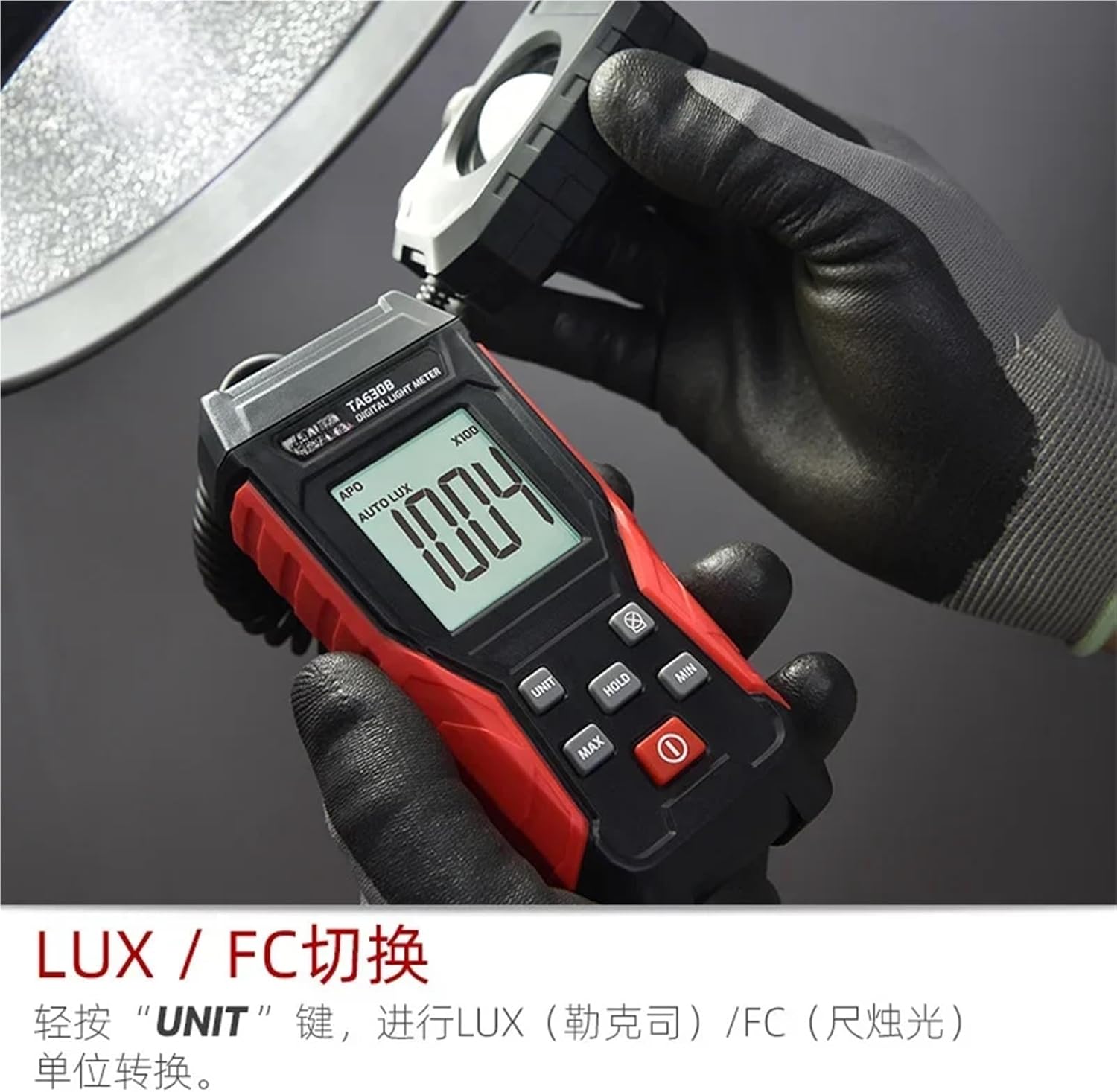
Figure 3: Close-up of the TA630B display unit, highlighting the UNIT, HOLD, MAX, MIN, and Power buttons.
4. Setup
4.1 Battery Installation
The TA630B requires two (2) 1.5V AAA batteries for operation.
- Locate the battery compartment cover on the back of the main display unit.
- Slide or unclip the cover to open the compartment.
- Insert two 1.5V AAA batteries, ensuring correct polarity (+ and -) as indicated inside the compartment.
- Replace the battery compartment cover securely.

Figure 4: Battery compartment with two AAA batteries installed.
4.2 Sensor Connection (TA630B Specific)
For the TA630B Split model, ensure the coiled cable connecting the light sensor to the main unit is securely attached. The sensor is permanently attached and does not require separate connection steps, but ensure the cable is not damaged or excessively stretched.
5. Operating Instructions
5.1 Power On/Off
- Press the Power Button (usually marked with ⓘ) to turn the device on.
- Press and hold the Power Button for a few seconds to turn the device off.
5.2 Taking Measurements
- Turn on the illuminometer.
- Position the light sensor at the location where you wish to measure light intensity. Ensure the sensor dome is facing the light source and is not obstructed.
- Read the illuminance value directly from the LCD display. The unit (LUX or FC) will be indicated.
5.3 Unit Switching (LUX/FC)
To switch between Lux and Foot-Candle (FC) units:
- Press the UNIT button briefly. The display will change the unit indicator accordingly.
5.4 Data Hold Function
To freeze the current reading on the display:
- Press the HOLD button. The "HOLD" indicator will appear on the display.
- Press the HOLD button again to release the reading and return to live measurement.
5.5 Maximum/Minimum Measurement
To view the maximum or minimum light intensity measured since the device was powered on or the function was reset:
- Press the MAX button to display the maximum recorded value. The "MAX" indicator will appear.
- Press the MIN button to display the minimum recorded value. The "MIN" indicator will appear.
- Press the MAX or MIN button again to cycle through MAX, MIN, and current readings, or to exit the function (behavior may vary slightly by specific firmware version).
5.6 Automatic Power Off (APO)
The device is equipped with an Automatic Power Off feature that turns off the unit after approximately 15 minutes of inactivity to save battery life. To disable APO, typically you would press and hold a specific button (e.g., HOLD or MAX) while powering on the device. Refer to the device's on-screen indicators or a more detailed manual if available for specific instructions on disabling APO.
6. Maintenance
6.1 Cleaning
- Wipe the device body with a soft, dry cloth.
- For the light sensor, use a soft, lint-free cloth to gently clean the dome. Do not use abrasive cleaners or solvents.
6.2 Battery Replacement
When the low battery indicator appears on the display, replace the batteries as described in Section 4.1. Always use fresh 1.5V AAA batteries.
6.3 Storage
If the device will not be used for an extended period, remove the batteries to prevent potential leakage and damage. Store the device in a cool, dry place, away from direct sunlight and extreme temperatures.
7. Troubleshooting
- Device does not power on:
- Check if batteries are installed correctly with the right polarity.
- Replace with new batteries.
- Inaccurate readings:
- Ensure the light sensor is clean and unobstructed.
- Verify the sensor is positioned correctly towards the light source.
- Check for strong electromagnetic interference nearby.
- Display shows "OL" or "OVER":
- The light intensity exceeds the measurement range of the device.
8. Specifications
| Model: | TA630B Split |
| Brand: | MDWXDOFP |
| Measurement Range: | Up to 200,000 LUX |
| Resolution: | 0.1 LUX |
| Units: | LUX, Foot-Candle (FC) |
| Power Supply: | 2 x 1.5V AAA Batteries |
| Automatic Power Off: | Approx. 15 minutes of inactivity |
| Item Weight: | 1.76 ounces (approx. 50g) |
| Manufacturer: | MDWXDOFP |
9. Warranty and Support
For warranty information, technical support, or service inquiries, please contact your retailer or the manufacturer directly. Please retain your purchase receipt as proof of purchase.