
VIHELM BLE-9908
VIHELM BLE-9908 Multifunctional Water Quality Tester User Manual
Model: BLE-9908
1. Introduction
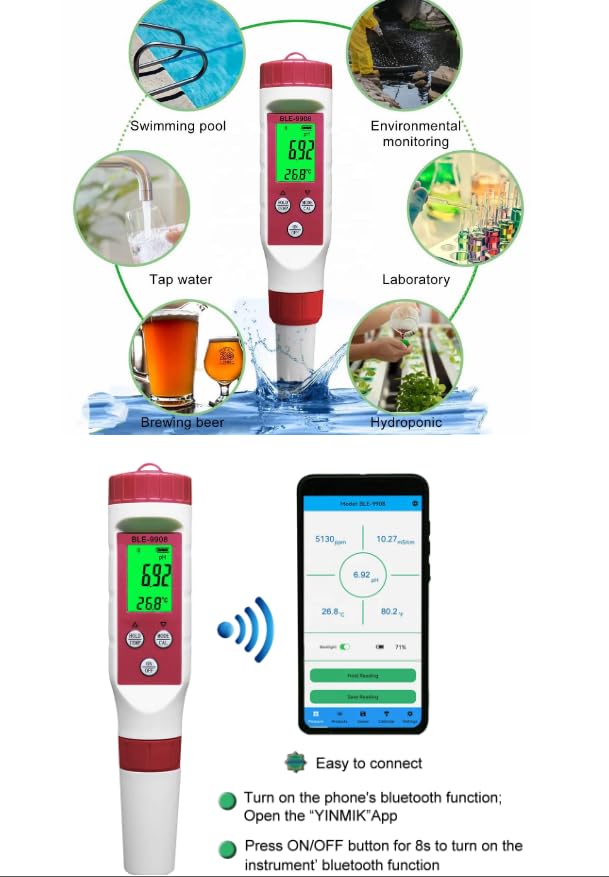
The VIHELM BLE-9908 is a versatile digital meter designed for comprehensive water quality testing. It accurately measures pH, Electrical Conductivity (EC), Total Dissolved Solids (TDS), and Temperature. This device is suitable for a wide range of applications, including swimming pools, environmental monitoring, tap water analysis, laboratory use, brewing, and hydroponics.
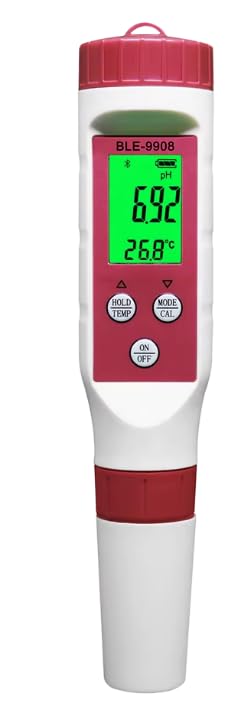
Key Features:
- Multi-parameter measurement: pH, EC, TDS, Temperature.
- High accuracy and resolution for precise readings.
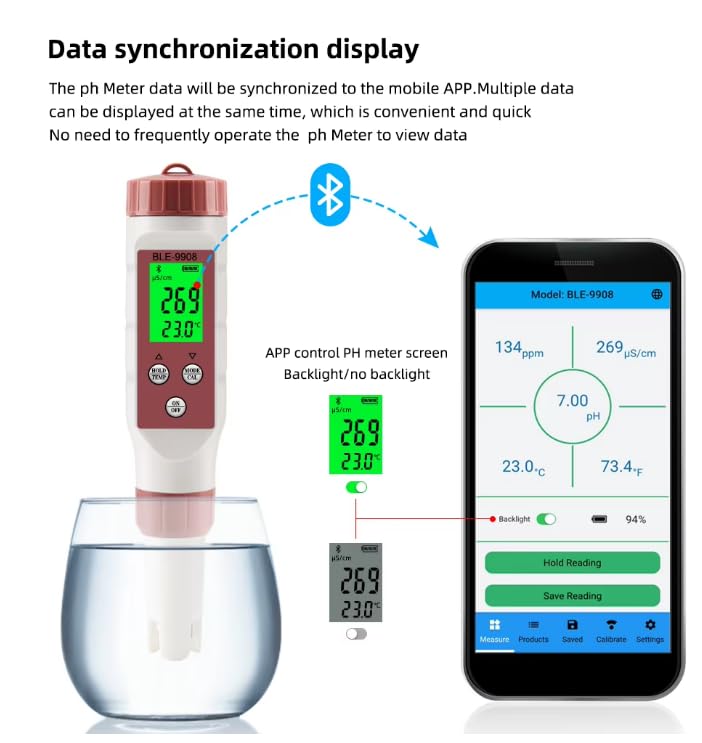
- Bluetooth 5.2 connectivity for seamless data synchronization with mobile app (Android/iOS).
- IP67 waterproof rating for durability.
- Automatic Temperature Compensation (ATC).
- Backlit LCD display for clear visibility.
- Data saving and export functions (Excel sheet).
- Replaceable electrode for extended device lifespan.
Package Contents:
- 1x BLE-9908 Multifunctional Water Quality Tester
- 5x Calibration Powder packets
- 1x Instruction Manual (English)
2. Setup and Initial Use
2.1 Battery Installation
The BLE-9908 uses 3*1.5V (LR44) button cell batteries. Ensure correct polarity when inserting. The device features a low battery indicator on the display.
2.2 Connecting to the Mobile App (YINMIK App)
The BLE-9908 supports Bluetooth 5.2 for data synchronization with your smartphone.
- Ensure Bluetooth is enabled on your smartphone.
- Download and open the "YINMIK" App from your device's app store (available for Android and Apple iOS).
- Press and hold the ON/OFF button on the BLE-9908 for approximately 8 seconds to activate the instrument's Bluetooth function.
- Follow the on-screen prompts in the YINMIK App to pair with your BLE-9908 device.
3. Operation
3.1 Taking Measurements
- Ensure the electrode is clean and dry before use.
- Press the ON/OFF button to power on the device.
- Immerse the electrode into the sample solution, ensuring the sensor is fully submerged.
- Allow the reading to stabilize on the LCD screen. The device will display pH, EC, TDS, and Temperature simultaneously.
- Press the HOLD/TEMP button to hold the current reading on the display. Press again to release.
- To switch between temperature units (°C/°F), press and hold the HOLD/TEMP button.
3.2 Calibration
Regular calibration ensures the accuracy of your meter. pH calibration is user-adjustable, while EC and TDS are factory calibrated.
pH Calibration:
The meter supports 3-point pH calibration. Use the provided calibration powders.
- Prepare the calibration solutions according to the instructions on the powder packets.
- Press the MODE/CAL button to enter calibration mode.
- Follow the on-screen prompts to calibrate at the specified pH buffer points (e.g., 4.00, 6.86/7.00, 9.18/10.01).
- Rinse the electrode with distilled water between each buffer solution.
EC/TDS Calibration:
EC and TDS are factory calibrated at 1413µs/cm. For optimal accuracy, it is recommended to use the factory calibration or consult the manufacturer for advanced calibration procedures if necessary.
3.3 App Functions and Data Management
The YINMIK App provides extensive control and data management capabilities:
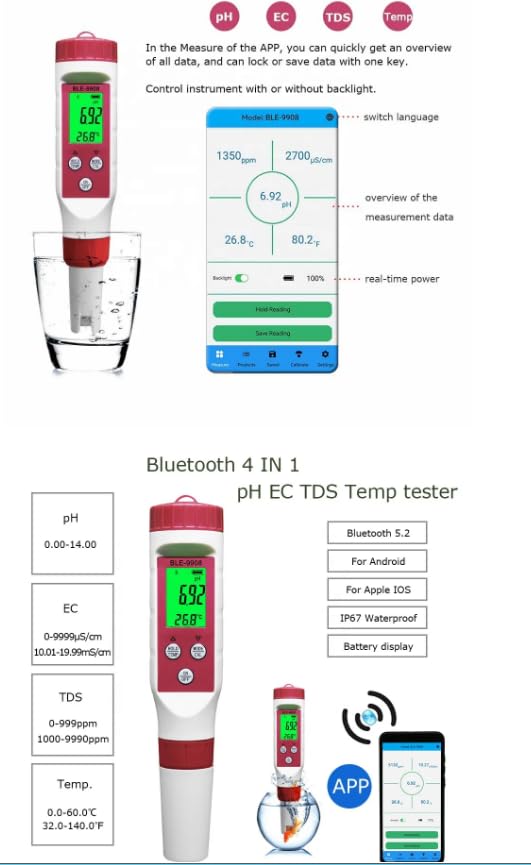
- Overview of Data: Quickly view all measurement data (pH, EC, TDS, Temp) in one place.
- Lock/Save Data: Lock current readings or save data with a single key press.
- Control Backlight: Control the instrument's backlight directly from the app.
- Switch Language: Change the app's language settings.
- Real-time Power: Monitor the device's battery level.
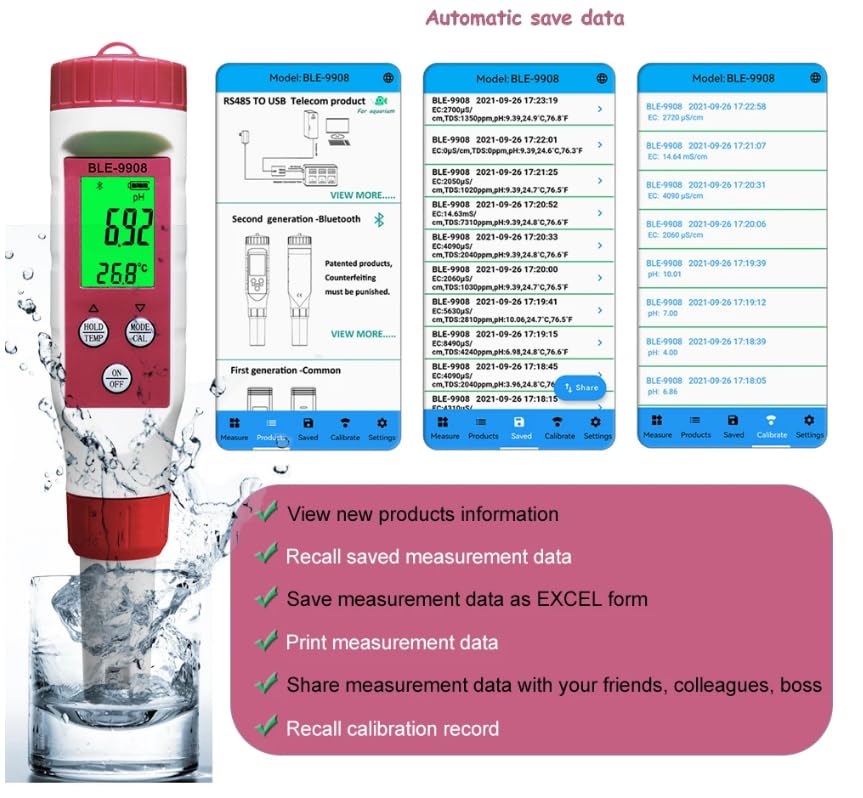
- Recall Saved Data: Access previously saved measurement records.
- Export Data: Save measurement data as an Excel sheet for further analysis.
- Print Data: Print measurement data directly from the app.
- Share Data: Share measurement data with colleagues or friends.
- Recall Calibration Record: View past calibration records.
4. Maintenance
4.1 Electrode Care
- Always rinse the electrode thoroughly with distilled or deionized water before and after each use.
- Do not touch the electrode's sensitive glass bulb or sensor with your fingers.
- Store the electrode in a suitable storage solution (e.g., KCL solution or pH 4 buffer) when not in use to prevent it from drying out. Never store dry.
4.2 Electrode Replacement
The BLE-9908 features a replaceable electrode. If the electrode becomes damaged or its performance degrades significantly despite proper cleaning and calibration, it can be replaced. Refer to the manufacturer's guidelines for purchasing and installing a new electrode.
4.3 Cleaning the Device
Wipe the main body of the meter with a clean, damp cloth. Do not use abrasive cleaners or immerse the main unit in water.
5. Troubleshooting
This section provides general guidance for common issues. For more complex problems, please contact customer support.
| Problem | Possible Cause | Solution |
|---|---|---|
| Inaccurate readings | Electrode dirty or dry; Calibration needed; Expired calibration solution. | Clean electrode; Perform calibration; Use fresh calibration solutions. |
| No display/Power issues | Low or dead batteries; Incorrect battery installation. | Replace batteries; Check battery polarity. |
| Bluetooth connection failure | Bluetooth not enabled on device/phone; App not open; Meter not in pairing mode. | Ensure Bluetooth is on; Open YINMIK App; Press ON/OFF for 8s to activate meter's Bluetooth. |
6. Specifications
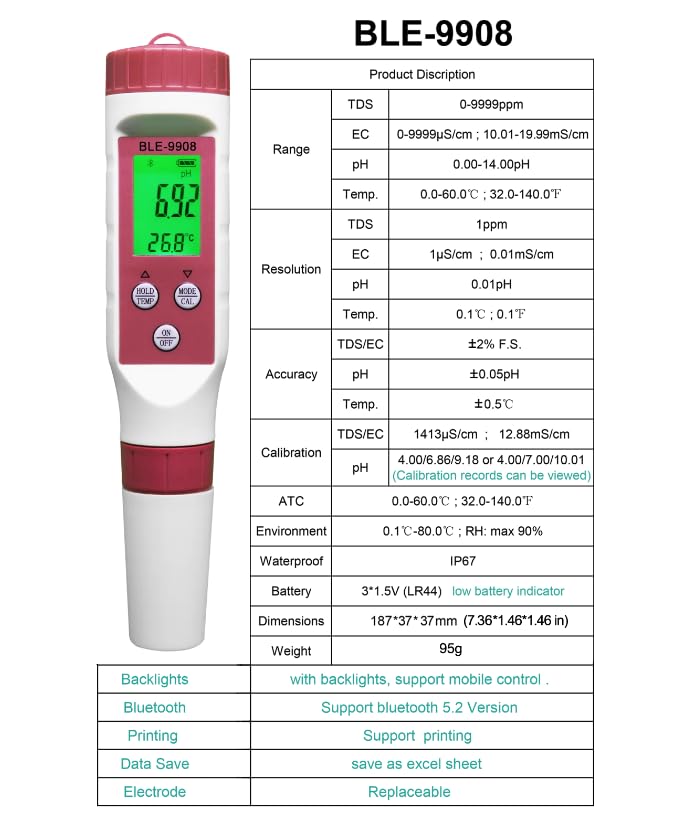
| Parameter | Value |
|---|---|
| Model Number | BLE-9908 |
| pH Range | 0.00-14.00 pH |
| pH Resolution | 0.01 pH |
| pH Accuracy | ±0.05 pH |
| EC Range | 0-9999 µS/cm; 10.01-19.99 mS/cm |
| EC Resolution | 1 µS/cm; 0.01 mS/cm |
| EC Accuracy | ±2% F.S. |
| TDS Range | 0-9999 ppm |
| TDS Resolution | 1 ppm |
| TDS Accuracy | ±2% F.S. |
| Temperature Range | 0.0-60.0°C (32.0-140.0°F) |
| Temperature Resolution | 0.1°C (0.1°F) |
| Temperature Accuracy | ±0.5°C |
| ATC (Automatic Temperature Compensation) | 0.0-60.0°C (32.0-140.0°F) |
| Environment | 0.1°C-80.0°C; RH: max 90% |
| Waterproof Rating | IP67 |
| Battery | 3*1.5V (LR44) |
| Dimensions | 187 x 37 x 37 mm (7.36 x 1.46 x 1.46 in) |
| Weight | 95g |
| Backlight | Yes, with mobile control |
| Bluetooth Version | 5.2 |
| Data Save | As Excel sheet |
| Electrode | Replaceable |
7. Support
For further assistance, technical support, or warranty inquiries, please contact VIHELM customer service through the contact information provided with your purchase or on the official VIHELM website.