1. Product Overview
The Mericonia 66 inch L-Shaped Desk is designed for versatile use in home offices, bedrooms, or gaming setups. It features a spacious L-shaped desktop, a sturdy metal frame, and practical additions like a CPU stand and side hooks. The desk is constructed from durable particleboard with a scratch-resistant surface, ensuring longevity and ease of cleaning.
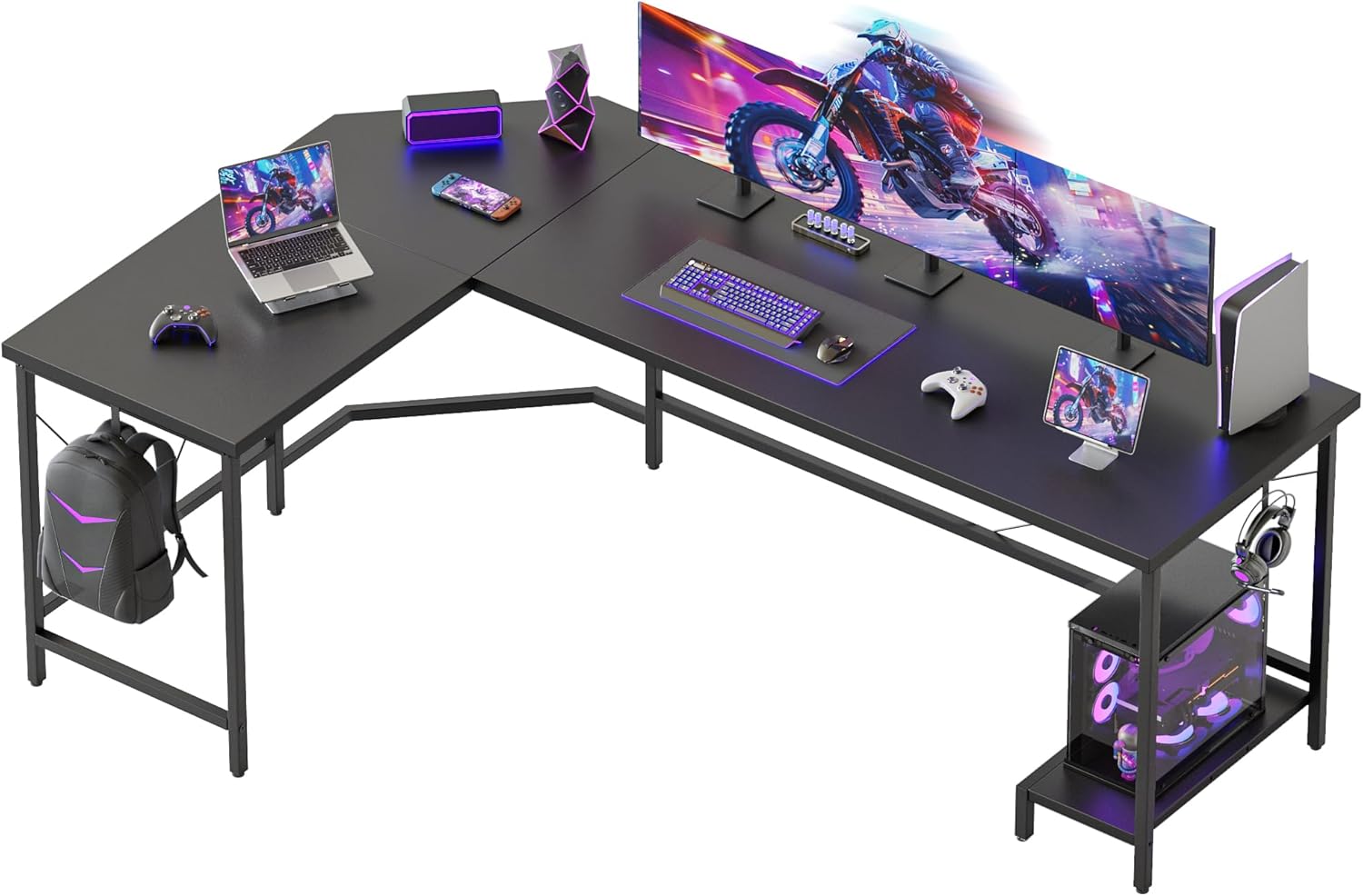
Figure 1: Mericonia 66 inch L-Shaped Desk (Black)
2. Safety Information
WARNING: Failure to follow these safety instructions may result in injury or damage to the product.
- Always assemble the desk according to the provided instructions.
- Do not exceed the maximum weight limit of 130 lbs (60 kg) on the desktop.
- Keep the work area clear of obstacles during assembly and use.
- Ensure the desk is placed on a level surface and, if necessary, properly anchored to the floor to prevent tipping.
- Keep small parts away from children during assembly to prevent choking hazards.
3. Package Contents
Before beginning assembly, verify that all parts listed below are present and undamaged. If any parts are missing or damaged, please contact customer support.
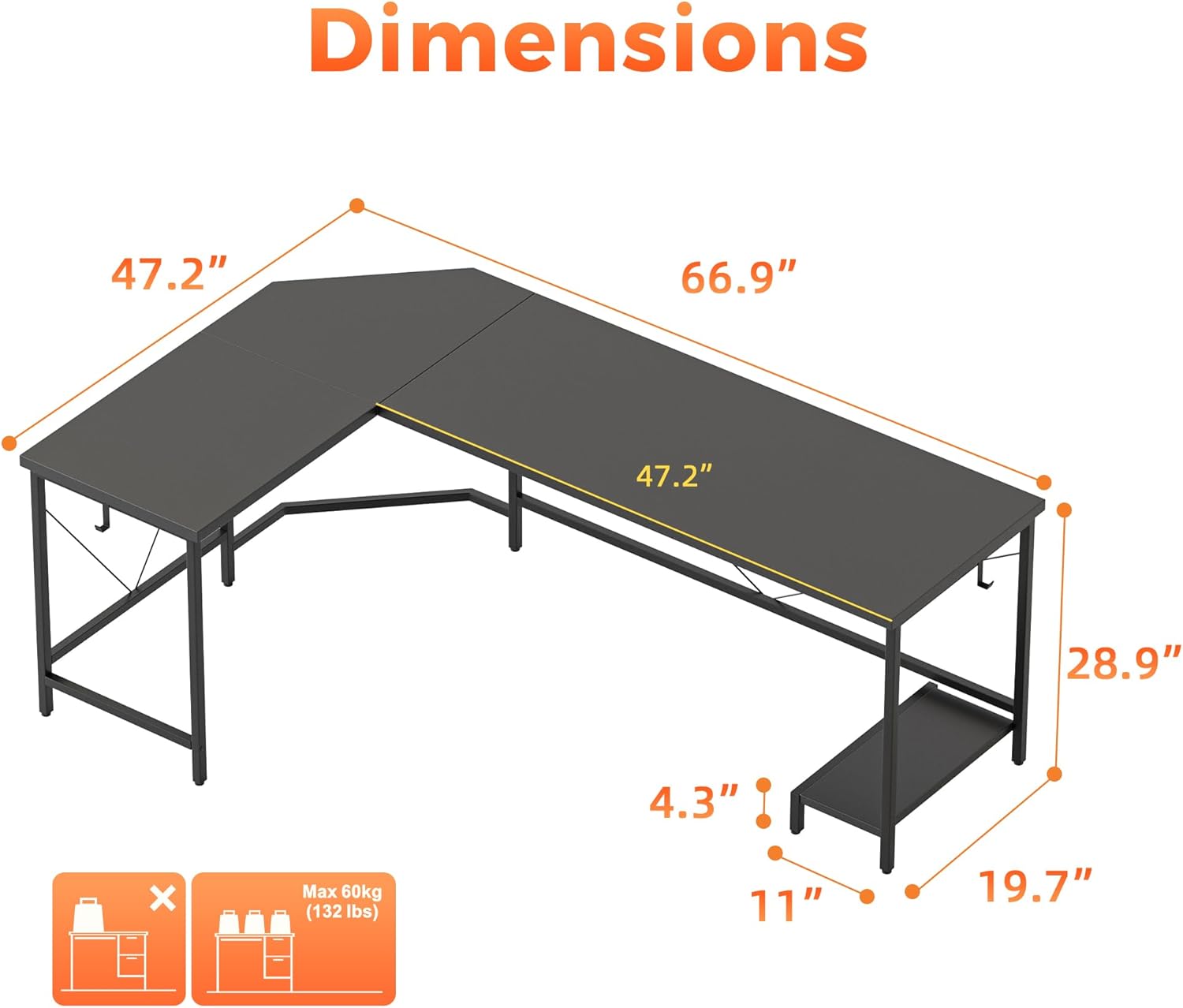
Figure 2: Desk components and hardware
Hardware (Example)
- Screws (various sizes)
- Allen Wrench
- Wooden Dowels
- Adjustable Foot Pads
- CPU Stand
- Headphone Hooks
Desk Panels & Frame
- Main Desktop Panels (L-shaped sections)
- Metal Frame Legs and Support Bars
- Corner Connector Panel
4. Assembly Instructions
Assembly is straightforward and typically takes one person approximately 40 minutes. Follow the step-by-step guide below. All necessary tools are included.
Assembly Video Guide
Video 1: Step-by-step assembly guide for the Mericonia L-Shaped Desk.
Step-by-Step Written Guide
- Prepare the Area: Clear a spacious area for assembly. Lay out all components and hardware, matching them with the parts list.
- Attach Foot Pads: Screw the adjustable foot pads into the bottom of all leg frames.
- Assemble Leg Frames: Connect the horizontal support bars to the vertical leg frames using the provided screws and Allen wrench. Ensure all connections are secure.
- Install CPU Stand and Hooks: Attach the CPU stand to the designated leg frame using screws. Secure the headphone hooks to the side of the desk frame as shown in the diagrams.
- Connect Corner Frame: Assemble the central corner frame section, ensuring the V-frame tech supports are correctly positioned for stability.
- Attach Desktop Panels: Carefully place the desktop panels onto the assembled frame. Align the pre-drilled holes with the frame and secure them using screws. For the L-shaped connection, use wooden dowels and screws to join the corner panel to the main desktop sections.
- Final Tightening: Once all components are in place, gently tighten all screws to ensure the desk is stable and secure. Do not overtighten.
5. Operating Instructions
The Mericonia L-Shaped Desk is designed for optimal functionality and comfort.
Utilizing Desk Features
- Spacious Workstation: The L-shaped design provides ample space for multiple monitors, laptops, and other office essentials. Arrange your setup to maximize productivity and comfort.
- CPU Stand: Place your computer tower on the dedicated bottom CPU stand to keep it off the floor, promoting better airflow and protecting it from dust.
- Headphone Hooks: Use the integrated side hooks to hang headphones, bags, or other small items, keeping your desktop clutter-free.
- Cable Management: The diamond-cut corners feature built-in cable slots to help organize and route your cables, maintaining a tidy workspace.
- Adjustable Foot Pads: If your floor is uneven, adjust the foot pads at the bottom of the legs to stabilize the desk and prevent wobbling.

Figure 3: Smart Diamond-Cut Corner for cable management

Figure 4: Modern Multifunctional Desk setup
6. Maintenance
To ensure the longevity and appearance of your Mericonia L-Shaped Desk, follow these simple maintenance guidelines:
- Cleaning: Wipe the desktop and frame with a soft, damp cloth. Avoid harsh chemicals or abrasive cleaners, which can damage the finish.
- Spills: Immediately wipe up any spills to prevent staining or damage to the engineered wood surface.
- Tighten Fasteners: Periodically check and tighten all screws and fasteners to maintain desk stability.
- Avoid Excessive Weight: Do not place items heavier than the recommended 130 lbs (60 kg) on the desk.
- Heat Protection: Use coasters or protective pads under hot items to prevent heat damage to the desktop.

Figure 5: High-quality desktop features
7. Troubleshooting
If you encounter any issues with your Mericonia L-Shaped Desk, refer to the following common problems and solutions:
| Problem | Possible Cause | Solution |
|---|---|---|
| Desk is wobbly | Uneven floor; loose screws | Adjust the foot pads on the bottom of the legs. Check and tighten all assembly screws. |
| Parts do not align during assembly | Incorrect orientation of parts; screws not fully loosened | Review the assembly instructions carefully to ensure parts are oriented correctly. Loosen all screws slightly before aligning, then tighten. |
| Missing hardware or parts | Packaging error | Double-check all packaging materials. If still missing, contact Mericonia customer support with your purchase details. |
8. Specifications

Figure 6: Desk Dimensions
- Brand: Mericonia
- Model Number: L shaped office desk-66"
- Shape: L-Shape
- Product Dimensions (D x W x H): 66.9" x 47.2" x 28.9"
- Color: Black
- Top Material Type: Engineered Wood
- Base Material: Steel (Metal Frame)
- Special Features: CPU Stand, 2 Hooks, Adjustable Foot Pads, Cable Slots
- Maximum Weight Recommendation: 130 Pounds (60 kg)
- Assembly Required: Yes
9. Warranty & Support
This Mericonia L-Shaped Desk comes with a Limited Warranty. For specific details regarding warranty coverage, please refer to the warranty card included in your package or contact Mericonia customer support.
Customer Support
If you have any questions, require assistance with assembly, or need to report missing/damaged parts, please contact Mericonia customer support through the retailer where you purchased the product or visit the official Mericonia website for contact information.


