
Makita DTD173Z
Makita DTD173Z 18V Li-ion Brushless LXT Impact Driver Instruction Manual
Model: DTD173Z
Introduction
The Makita DTD173Z is a professional-grade 18V Li-ion Brushless LXT Impact Driver designed for efficient and precise fastening. Its compact and lightweight design, combined with a powerful brushless motor, makes it suitable for a wide range of applications, from delicate tasks to driving into tough materials. This manual provides essential information for proper setup, operation, maintenance, and troubleshooting to ensure safe and optimal performance of your tool.

Figure 1: Makita DTD173Z 18V Li-ion Brushless LXT Impact Driver
Key Features
The DTD173Z Impact Driver incorporates several advanced features for enhanced performance and user comfort:
- High Power Brushless Motor: Delivers up to 3,600 RPM and 180 Nm (1,590 in. lbs) of maximum fastening torque for efficient operation and longer run-time.
- Compact Design: Slim tool body with an overall length of 114mm (4-3/8 inches) for easier access into tight corners and confined spaces.
- Electronic 4-Stage Impact Power Selection: Offers Wood, Bolt, T-Mode (max), Hard, Medium, and Soft modes for versatile application control.
- Power Selection Switch: Conveniently located for precise fastening control.
- Quick Mode Switching Button: Allows for rapid changes between impact modes.
- Anti-Bit Wobbling Structure: Utilizes two ball bearings to securely hold the anvil, reducing bit wobbling.
- Twin LED Job Lights: Features pre-glow and after-glow functions to illuminate the work area.
- One-Touch Bit Installation: Simplifies bit changes.
- Ergonomic Handle with Soft Grip: Designed for increased comfort during extended use.
- 1/4" Hex Driving Shank: Standard chuck for various bits.
- Phosphorescent Bumper: Glows in the dark for improved visibility.
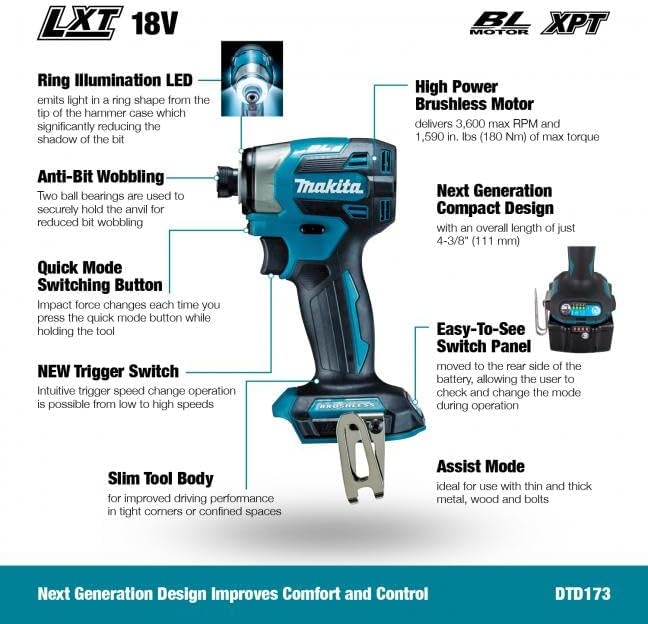
Figure 2: Detailed features of the Makita DTD173Z Impact Driver
Setup
Battery Installation
The Makita DTD173Z is powered by an 18V Li-ion LXT slide-type battery (not included). Ensure the battery is fully charged before use. To install, align the battery with the tool's receptacle and slide it in until it clicks securely into place. To remove, press the release button on the battery and slide it out.
Bit Installation
The tool features a one-touch bit installation mechanism. To install a bit, simply push the 1/4" hex shank bit directly into the chuck until it locks. To remove, pull the chuck collar forward and pull the bit out.
Operating Instructions
Powering On/Off and Speed Control
The tool's speed is controlled by the trigger. Press the trigger to start the tool and release it to stop. The variable speed trigger allows for precise control from low to high speeds, depending on the pressure applied.
Impact Power Selection
The DTD173Z features an electronic 4-stage impact power selection system, along with specialized modes. Use the power selection switch, conveniently located near the battery, to cycle through the modes:
- Wood Mode: Optimized for driving screws into wood.
- Bolt Mode: Ideal for fastening bolts.
- T-Mode (Max): Provides maximum power for demanding applications.
- Hard Mode: High impact power.
- Medium Mode: Balanced impact power.
- Soft Mode: Lower impact power for delicate tasks.
The quick mode switching button allows for rapid changes between these settings during operation.

Figure 3: Close-up of the control panel and mode selection switch
LED Job Lights
The twin LED job lights illuminate the work area. They feature pre-glow and after-glow functions, turning on before the trigger is fully depressed and remaining on for a short period after release, ensuring clear visibility in low-light conditions.

Figure 4: The twin LED job lights illuminating the work area
Application Examples
The DTD173Z is designed for various fastening tasks. Its slim body and powerful torque allow for efficient work even in tight spaces.

Figure 5: The impact driver being used to fasten a bolt
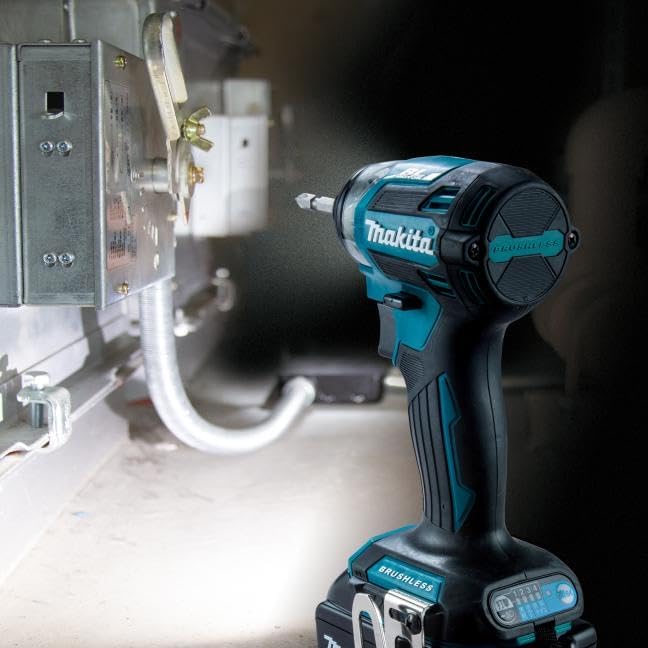
Figure 6: The compact design allows for use in confined areas
Maintenance
Regular maintenance ensures the longevity and optimal performance of your Makita DTD173Z Impact Driver.
- Cleaning: Keep the tool's ventilation openings clean to prevent overheating. Use a soft, damp cloth to wipe down the tool. Do not use harsh chemicals or abrasive cleaners.
- Battery Care: Store batteries in a cool, dry place away from direct sunlight. Do not store fully discharged batteries for extended periods.
- Bit Chuck: Periodically inspect the 1/4" hex chuck for debris or wear. Clean as necessary to ensure smooth bit installation and removal.
- General Inspection: Before each use, inspect the tool for any signs of damage, loose screws, or worn parts. If any issues are found, discontinue use and have the tool serviced by a qualified technician.
- Storage: When not in use, store the tool in a secure, dry location, out of reach of children.
Troubleshooting
If you encounter issues with your Makita DTD173Z, refer to the following common troubleshooting steps:
- Tool Not Turning On:
- Ensure the battery is fully charged and properly installed.
- Check if the reverse switch is in the neutral (locked) position.
- Loss of Power/Reduced Performance:
- The battery may be low on charge. Recharge the battery.
- Ensure the correct impact mode is selected for the application.
- Check for excessive debris in the chuck or motor vents.
- Bit Wobbling:
- Ensure the bit is fully inserted and locked into the chuck.
- Verify that the bit itself is not bent or damaged.
- Overheating:
- Ensure ventilation openings are clear and not obstructed.
- Avoid continuous heavy-duty use without breaks.
Important Note: The DTD173Z is not compatible with Makita G-Series batteries. The use of non-genuine or non-recommended parts, accessories, batteries, or chargers with Makita tools will invalidate the Makita guarantee for your tool.
Specifications
| Specification | Value |
|---|---|
| Brand | Makita |
| Model Number | DTD173Z |
| Power Source | Battery Powered |
| Voltage | 18 Volts |
| Maximum Torque | 180 Nm |
| No-Load Speed (Max) | 3600 RPM |
| Blows Per Minute (Max) | 3800 BPM |
| Chuck Size | 1/4" Hex |
| Item Weight | 1.8 Pounds |
| Product Dimensions | 4.37"L x 3.19"W x 9.21"H |
| Material | Metal |
| Included Components | 1 x Makita DTD173Z (Tool Only) |
Warranty and Support
Makita offers a 1-year manufacturer warranty on the DTD173Z Impact Driver. This warranty can be extended by a further 2 years when the product is registered within 30 days of purchase. Please note that this guarantee does not apply where non-genuine or non-recommended parts or accessories are fitted to the tool, or if non-genuine or compatible batteries and chargers are used.
For further support, product registration, or to find authorized service centers, please visit the official Makita Store or contact Makita customer service.
Ask a question about this manual
Ask about setup, troubleshooting, compatibility, parts, safety, or missing instructions. Manuals+ will review the question and use this page’s manual context to help answer it.