
1. Introduction
This manual provides essential instructions for the installation, operation, and maintenance of the FAAC 400 CBAC Hydraulic Gate Operator Single Kit. This system is designed for industrial duty applications, capable of operating large ornate gates up to 18 feet wide and weighing up to 1300 pounds. It ensures smooth and reliable gate automation with a powerful hydraulic motor supporting up to 80 cycles per day. Please read this manual thoroughly before proceeding with installation or operation to ensure safe and efficient use of the product.
2. Safety Information
WARNING: Improper installation or use can lead to serious injury or property damage. Always follow all safety precautions and instructions.
- Installation must be performed by qualified personnel in accordance with all local electrical and safety codes.
- Ensure all power is disconnected before performing any installation, maintenance, or repair work.
- The FAAC 400 CBAC system is UL325 compliant, ensuring high safety standards. However, additional safety devices such as photocells (XP 30 included) and safety edges are crucial for preventing entrapment and injury.
- Keep children and pets away from the gate area, especially during operation.
- Do not attempt to operate the gate if any part of the system is damaged or malfunctioning.
- Regularly inspect the gate and operator for signs of wear or damage.
3. Package Contents
Verify that all components listed below are present and undamaged before beginning installation.
- (1) FAAC 455D Control Panel
- (1) Prewired Fiberglass Enclosure (14"x16")
- (1) FAAC 400 CBAC Gate Arm (Model 10420212.5)
- (1) FAAC 433 RC Plug-In Radio Receiver
- (2) FAAC 4-Channel XT4 433 RC Transmitters
- (1) Pair of FAAC XP 30 Photobeam Photocells
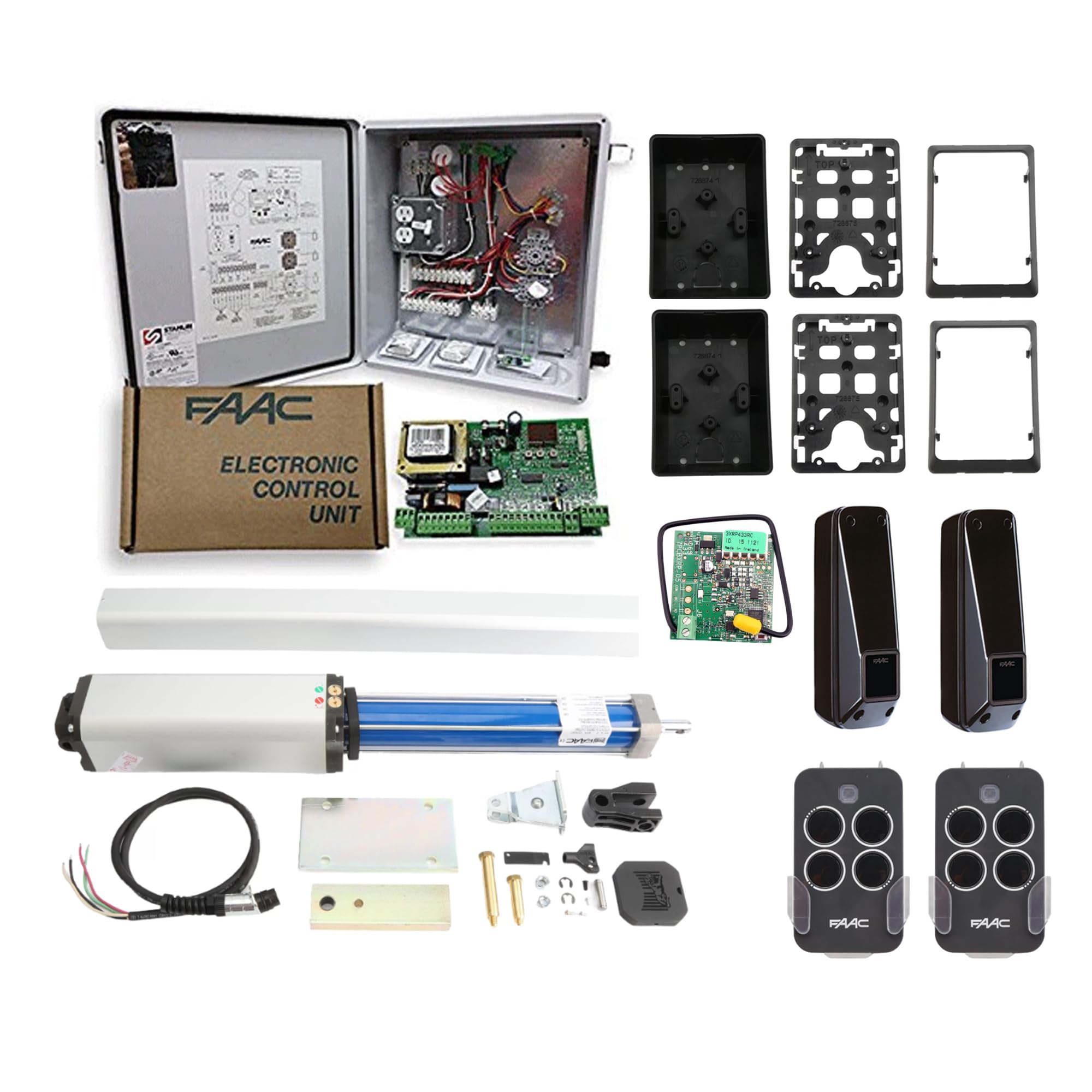
An image showing the main components of the FAAC 400 CBAC Hydraulic Gate Operator Single Kit, including the gate arm, control panel, and accessories.
4. Setup and Installation
This section provides an overview of the installation process. For detailed wiring diagrams and specific mounting instructions, refer to the separate technical installation manual provided with your kit or available from the manufacturer.
4.1 Mounting the Gate Arm
The 400 CBAC gate arm should be securely mounted to the gate post and the gate itself, ensuring proper alignment for smooth hydraulic operation. The mounting points must be robust enough to withstand the forces exerted during gate movement.
4.2 Control Panel Installation
The 455D Control Panel, housed in its prewired fiberglass enclosure, should be mounted in a protected, easily accessible location near the gate. Ensure all electrical connections are made by a qualified electrician, adhering to local codes. The control panel operates on 115V or 230V single-phase power.
4.3 Safety Device Connection
Connect the XP 30 photobeam photocells to the control panel. These devices are critical for detecting obstructions in the gate's path and preventing accidents. Position them according to the technical manual to cover the entire gate opening.
4.4 Radio Receiver and Transmitter Setup
Plug the 433 RC Radio Receiver into the designated port on the control panel. Program the two 4-Channel XT4 433 RC Transmitters according to the control panel's instructions to enable remote operation of the gate.
5. Operating Instructions
The FAAC 455D control panel offers versatile operating modes for various applications.
5.1 Standard Operation
Pressing a programmed button on the XT4 433 RC transmitter will initiate the gate's opening or closing cycle. The gate will automatically stop when fully open or closed, or if an obstruction is detected by the safety devices.
5.2 Control Panel Modes
The 455D control panel features six operating modes, which can be configured during installation or by a qualified technician. These modes include:
- Automatic Mode: Gate opens with a command and automatically closes after a set time.
- Semi-Automatic Mode: Gate opens with one command and closes with another.
- Hold-Open Function: Allows the gate to remain open indefinitely until a close command is given.
- Garage-Door-Like Operation: Single command cycles the gate (open-stop-close-stop).
- Other specialized modes for specific access control requirements.
Refer to the 455D control panel manual for detailed configuration of these modes.
5.3 Manual Release
In case of a power outage or system malfunction, the gate operator is equipped with a convenient manual release mechanism. Locate the release lever on the gate arm and follow the instructions in the technical manual to disengage the operator, allowing the gate to be moved manually. Ensure the gate is secured once manually opened or closed.
6. Maintenance
Regular maintenance ensures the longevity and reliable operation of your FAAC 400 CBAC gate operator.
- Monthly: Inspect the gate's hinges, rollers, and other moving parts for wear or damage. Lubricate as necessary.
- Quarterly: Check all electrical connections for tightness and corrosion. Clean the photocell lenses to ensure proper function.
- Annually: Have a qualified technician inspect the hydraulic system, fluid levels, and overall operator performance.
- Keep the area around the gate and operator clear of debris and vegetation.
7. Troubleshooting
This section addresses common issues. For complex problems, contact a qualified technician.
| Problem | Possible Cause | Solution |
|---|---|---|
| Gate does not respond to transmitter. | Dead transmitter battery, transmitter out of range, radio receiver issue, power supply issue. | Replace transmitter battery. Move closer to the gate. Check power to the control panel. Re-program transmitter if necessary. |
| Gate opens but does not close. | Photocells obstructed or misaligned, safety edge activated, control panel setting. | Clear any obstructions from photocell path. Clean photocell lenses. Check alignment of photocells. Consult control panel manual for settings. |
| Gate operates slowly or with difficulty. | Low hydraulic fluid, worn gate hinges/rollers, obstruction in gate path. | Inspect gate for physical obstructions. Lubricate gate hinges/rollers. Contact technician for hydraulic system inspection. |
| Gate stops unexpectedly. | Safety device activation (photocell, safety edge), power interruption, motor overload. | Check for obstructions. Verify stable power supply. Allow motor to cool if overloaded. |
8. Specifications
| Model | FAAC 400 CBAC Hydraulic Gate Operator Single Kit |
| Max Gate Length | 18 feet (5.49 meters) |
| Max Gate Weight | 1300 pounds (590 kg) |
| Duty Cycle | Industrial Duty, up to 80 cycles per day |
| Max Gate Swing | 115 degrees |
| Opening Time | Approximately 17 seconds |
| Power Supply | 115V or 230V Single-Phase |
| Control Panel | FAAC 455D (UL325 Compliant) |
| Accessory Receptacle | 5-amp |
| Safety Features | XP 30 Monitored Photobeam Photocells, UL325 Compliance |
| Manual Release | Standard feature for power outages |
| Manufacturer | FAAC |
| Date First Available | August 30, 2017 |
9. Warranty and Support
For specific warranty details, please refer to the documentation included with your product or contact the manufacturer directly.
For technical support, troubleshooting assistance beyond this manual, or to inquire about replacement parts, please contact your authorized FAAC dealer or the manufacturer's customer service department.
Manufacturer: FAAC
Model: 400 CBAC


