
Introduction
This manual provides instructions for the setup, operation, and maintenance of your Bose SoundLink Flex Portable Bluetooth Speaker (2nd Gen). This device is designed to deliver high-fidelity audio in a portable, durable form factor.
What's in the Box
Verify that all items are present:
- SoundLink Flex Speaker (2nd Gen)
- USB-C® (C to A) cable
- Safety Sheet
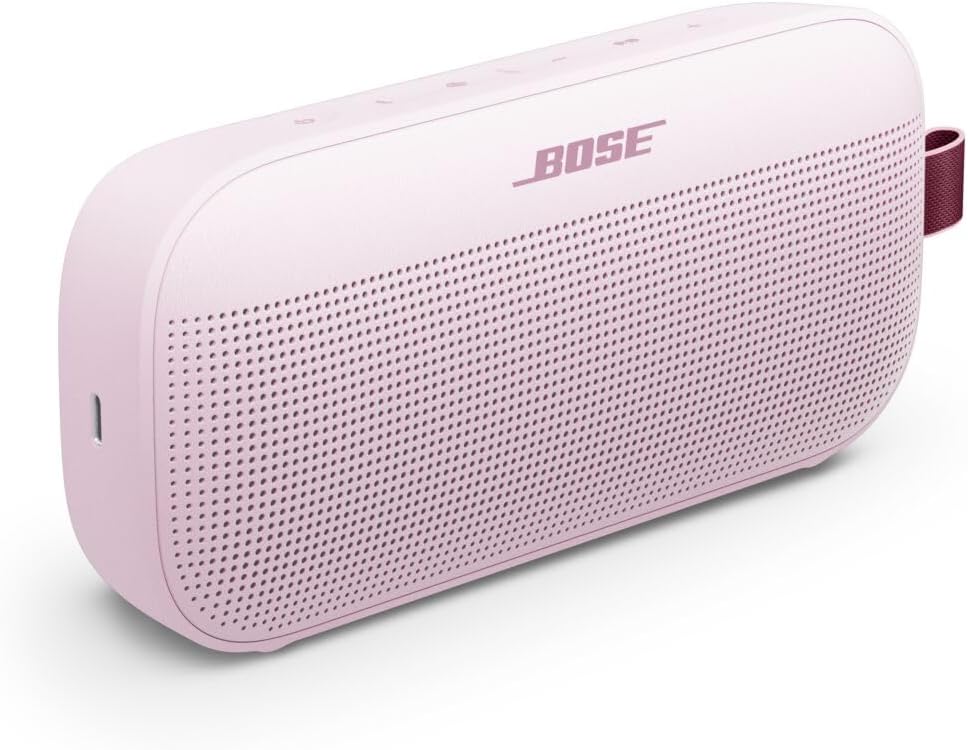
Image: The Bose SoundLink Flex speaker shown next to its included USB-C charging cable.
Setup
1. Charging the Speaker
Before initial use, fully charge the speaker. Connect the supplied USB-C cable to the speaker's USB-C port and the other end to a USB power source (not included). A full charge takes approximately 4 hours.
2. Powering On/Off
To power on the speaker, press the Power button located on the top panel. The power indicator light will illuminate. To power off, press and hold the Power button until the indicator light turns off.

Image: Top view of the Bose SoundLink Flex speaker, highlighting the power, Bluetooth, volume, and multi-function buttons.
3. Bluetooth Pairing
- Power on the speaker.
- Press the Bluetooth button. The Bluetooth indicator light will blink blue, indicating it is ready to pair.
- On your device (smartphone, tablet), enable Bluetooth and select "Bose SoundLink Flex" from the list of available devices.
- Once connected, the Bluetooth indicator light will glow solid white.
The speaker supports Bluetooth 5.3 for a stable connection up to 30 feet (9 meters) and multipoint technology for connecting to multiple devices simultaneously.
4. Bose Connect App
For enhanced control and features, download the Bose Connect app from your device's app store. The app allows you to manage Bluetooth connections, customize settings, and access additional functionalities.
Operating Instructions
Basic Controls
- Power Button: Powers the speaker on or off.
- Bluetooth Button: Initiates Bluetooth pairing.
- Volume Buttons (+/-): Adjusts the playback volume.
- Multi-function Button: Controls playback (single press for play/pause, double press for next track, triple press for previous track) and manages calls.
PositionIQ Technology
The speaker features PositionIQ technology, which automatically detects the speaker's orientation (standing, lying flat, or hanging) and adjusts the audio output to optimize sound quality for that position.
Party Mode and Stereo Mode
You can link two compatible Bose speakers for a more expansive audio experience:
- Party Mode: Plays audio simultaneously through both speakers for amplified sound.
- Stereo Mode: Designates one speaker as the left channel and the other as the right channel for true stereo separation.
Refer to the Bose Connect app for detailed instructions on enabling Party Mode or Stereo Mode.
Waterproof and Dustproof Use
The SoundLink Flex is IP67-rated, making it waterproof and dustproof. It can withstand submersion in water up to 1 meter for 30 minutes. The speaker is also designed to float, preventing it from sinking if dropped in water.

Image: The Bose SoundLink Flex speaker in Petal Pink, showcasing its durable silicone body and integrated utility loop for portability.
Maintenance
Cleaning
To clean the speaker, use a soft, damp cloth. Avoid using solvents, chemicals, or abrasive cleaners. Ensure the USB-C port is dry before charging.
Storage
Store the speaker in a cool, dry place away from direct sunlight and extreme temperatures. For long-term storage, ensure the battery is partially charged to maintain battery health.
Troubleshooting
- No Power: Ensure the speaker is charged. Connect it to a power source using the USB-C cable.
- Cannot Pair Bluetooth: Ensure the speaker is in pairing mode (blinking blue light). Check your device's Bluetooth settings and try reconnecting. If issues persist, turn off and on both the speaker and your device.
- No Sound/Low Volume: Check the volume levels on both the speaker and your connected device. Ensure the speaker is not muted.
- Poor Sound Quality: Move the speaker closer to your device to reduce interference. Ensure no obstructions are blocking the speaker grille.
- Speaker Automatically Shuts Off: The speaker may enter a power-saving mode if inactive for a period. Ensure it is connected and playing audio, or disable auto-off via the Bose Connect app if available.
Specifications
| Model Name | Bose SoundLink Flex Portable Bluetooth Speaker (2nd Gen) |
| Model Number | 887612-0600 |
| Dimensions (D x W x H) | 3.56" x 7.93" x 2.06" (9.04 cm x 20.14 cm x 5.23 cm) |
| Item Weight | 1.3 pounds (0.59 kg) |
| Connectivity Technology | Bluetooth 5.3 |
| Bluetooth Range | Up to 30 feet (9 meters) |
| Battery Life | Up to 12 hours (at typical listening levels) |
| Charging Time | Approximately 4 hours |
| Water Resistance Level | IP67 (Waterproof and Dustproof) |
| Control Method | On-device buttons, Bose Connect App |
| Audio Output Mode | Stereo |
Warranty and Support
Limited Warranty
This product is covered by a limited warranty. Please refer to the safety sheet included in your product packaging or visit the official Bose website for detailed warranty terms and conditions.
Customer Support
For further assistance, technical support, or to download the full user manual in PDF format, please visit the official Bose support website or contact Bose customer service. A PDF version of the user manual is available here.
