

1. Product Overview
The OWON HDS241 is a versatile 3-in-1 handheld device integrating a single-channel oscilloscope, a 24000-count digital multimeter, and a 100kHz signal generator. Designed for both outdoor and indoor use, it offers a compact form factor with powerful measurement capabilities for various electrical and electronic applications.

Image 1.1: The OWON HDS241 device, highlighting its oscilloscope, multimeter, and signal generator functions.
2. Safety Information
Before using the OWON HDS241, please read and understand all safety instructions to prevent electric shock, injury, or damage to the device. Keep this manual for future reference.
- General Safety: Always use the device within its specified voltage and current limits. Do not operate the device in wet or damp conditions.
- Probe Safety: Ensure probes are correctly connected and rated for the measurement being performed. Avoid touching exposed wiring or components when the device is powered on.
- Battery Safety: Use only the specified battery type. Do not disassemble, crush, or expose the battery to extreme temperatures.
- Maintenance: Refer all servicing to qualified personnel. Do not attempt to repair the device yourself.
3. Key Features
- Digital Multimeter: 4 1/2 digit True RMS digital multimeter for measuring AC/DC voltage/current, resistance, diode, capacitance, and continuity. Maximum input voltage is AC 750V, DC 1000V.
- Signal Waveform Generator: 1-channel 100 kHz generator supporting sine, square, ramp, and pulse wave outputs. Maximum output amplitude is 2.5 Vpp.
- Oscilloscope: Waveform refresh rate up to 10,000 wfms/s, 40MHz bandwidth, and real-time sampling rate up to 250MSa/s. Features auto-setup, multiple measurement functions, 8K record length, cursor measurement, and slow scan mode for long-term signal monitoring.
- Compact Design: Portable form factor with a 3.5-inch high-definition color LCD screen, suitable for various environments.
- Long Battery Life: Low-power design with a 2000 mAh high-capacity lithium battery and standard Type-C port for charging and power bank compatibility.
4. Package Contents
The standard package for the OWON HDS241 includes:
- OWON HDS241 Handheld Oscilloscope Unit
- Test Leads for Multimeter
- Oscilloscope Probe
- USB Type-C Cable
- User Manual (this document)
Note: Additional accessories such as a BNC-to-alligator clip cable or carrying case may need to be purchased separately.
5. Device Layout and Controls
Familiarize yourself with the physical components and controls of the HDS241.

Image 5.1: Front and side view of the OWON HDS241 with key controls and ports labeled. Labels include: signal input connector, display area, multifunction keys, channel key, mode switching key, system settings, save settings, power button, relative value/activation menu key, multimeter input port, horizontal time base setting/signal adjustment, return key, range switch/measurement menu key, arrow keys, auto range/auto setting key, hold value/Stop/Run key, probe compensation output (2.5V/1kHz square wave or signal generator output), USB charging/communication interface, approximate weight (0.6 kg host, excluding battery), gross weight (1.2 kg).
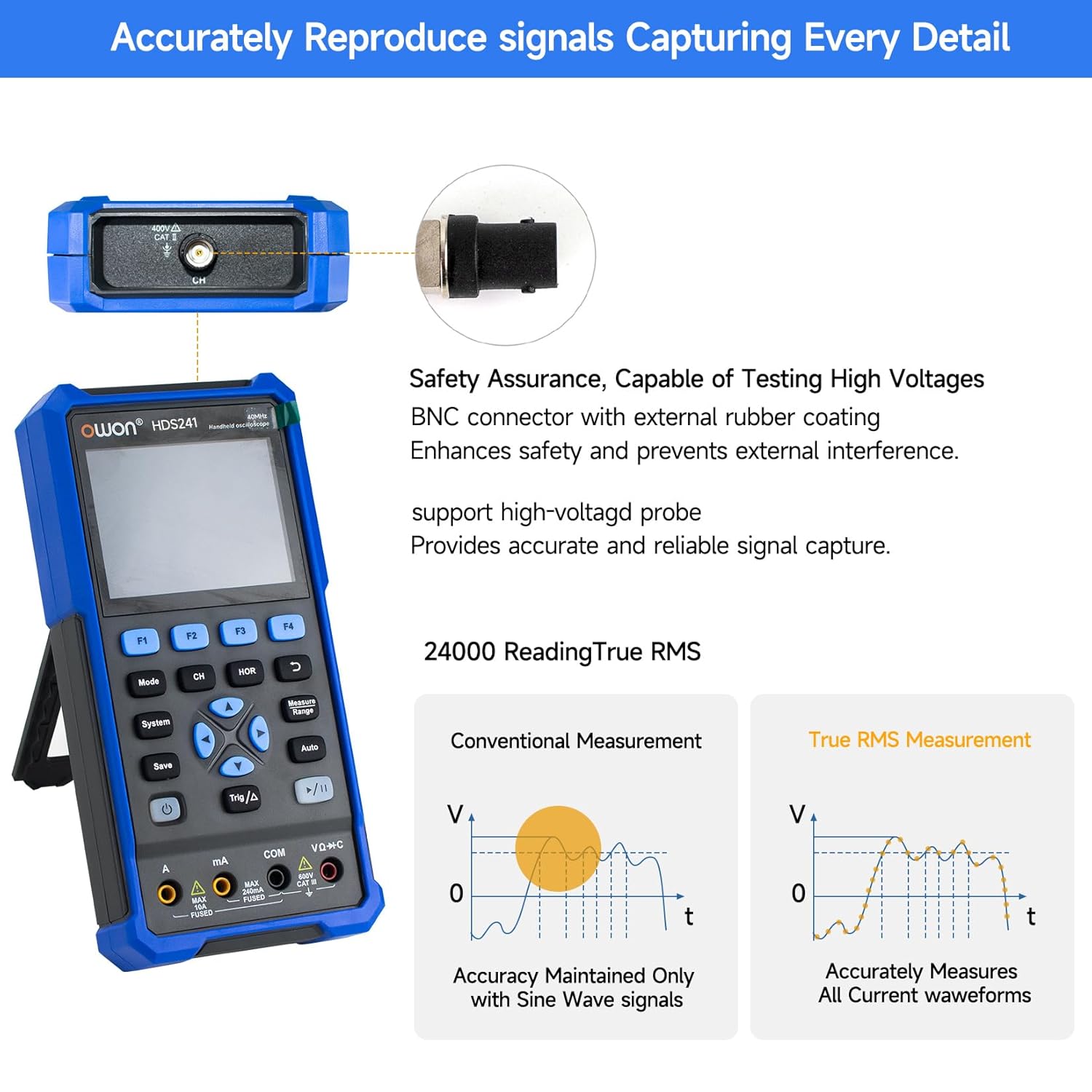
Image 5.2: Detail of the BNC connector, designed for safety and signal integrity, with external rubber coating.
6. Initial Setup
6.1 Charging the Device
The HDS241 is equipped with a built-in 2000 mAh lithium battery. Before first use, fully charge the device using the provided USB Type-C cable and a compatible power adapter (not included) or a computer USB port.
- Connect the USB Type-C cable to the device's Type-C port.
- Connect the other end of the cable to a USB power source.
- The charging indicator will show the charging status.

Image 6.1: The USB Type-C charging port and internal battery compartment, emphasizing long-lasting performance.
6.2 Powering On/Off
Press and hold the Power button to turn the device on or off.
7. Operating Modes
The HDS241 features three primary operating modes: Oscilloscope, Multimeter, and Signal Generator. Press the Mode button to switch between these functions.
7.1 Oscilloscope Mode
In Oscilloscope mode, the device displays real-time waveforms, allowing for detailed analysis of electrical signals. Connect the oscilloscope probe to the BNC connector on the top of the device.
- Auto-Setup: Press the Auto button for automatic scaling and positioning of the waveform.
- Measurements: Use the Measure menu (accessed via F1) to select automatic measurements like Frequency, Period, Amplitude, Max, Min, Peak-to-Peak, and RMS.
- Cursor Measurements: Activate cursor measurements (accessed via F2) to manually measure voltage (ΔV) and time (ΔT) differences between points on the waveform.
- Trigger Settings: Adjust trigger type, level, and mode using the Trig/Δ button.
- Horizontal/Vertical Controls: Use the navigation arrows to adjust time base (horizontal) and voltage scale (vertical).

Image 7.1.1: Examples of oscilloscope display features including dual sampling mode, high refresh rate, 8 types of auto-measurements, and cursor measurements.

Image 7.1.2: Examples of actual measured waveforms, demonstrating the oscilloscope's signal capture capabilities for different signal types.
7.2 Multimeter Mode
In Multimeter mode, the HDS241 functions as a digital multimeter. Connect the test leads to the appropriate input ports (VΩ+C, COM, A, mA) at the bottom of the device.
- Function Selection: Use the Mode button to cycle through measurement types (Voltage, Current, Resistance, Capacitance, Diode, Continuity).
- Auto-Ranging: The device supports auto-ranging for convenient measurement.
- Data Hold: Use the Save button or a dedicated hold function (if available) to freeze the current reading.
7.3 Signal Generator Mode
The Signal Generator mode allows the device to output various waveforms. Connect the output to the circuit under test using the appropriate cable (e.g., BNC to alligator clips, not included).
- Waveform Selection: Use the F-keys to select sine, square, ramp, or pulse waveforms.
- Parameter Adjustment: Adjust frequency and amplitude using the navigation arrows. The maximum output amplitude is 2.5 Vpp.
8. Data Management
The HDS241 supports data transfer to a computer via its USB Type-C port for further analysis and record-keeping.
- Connecting to PC: Use the provided USB Type-C cable to connect the device to your computer.
- Software: Refer to the OWON website for any necessary drivers or software to facilitate data transfer and analysis.
- Saving Data: Use the Save button to store waveform images, settings, or measurement data directly on the device.
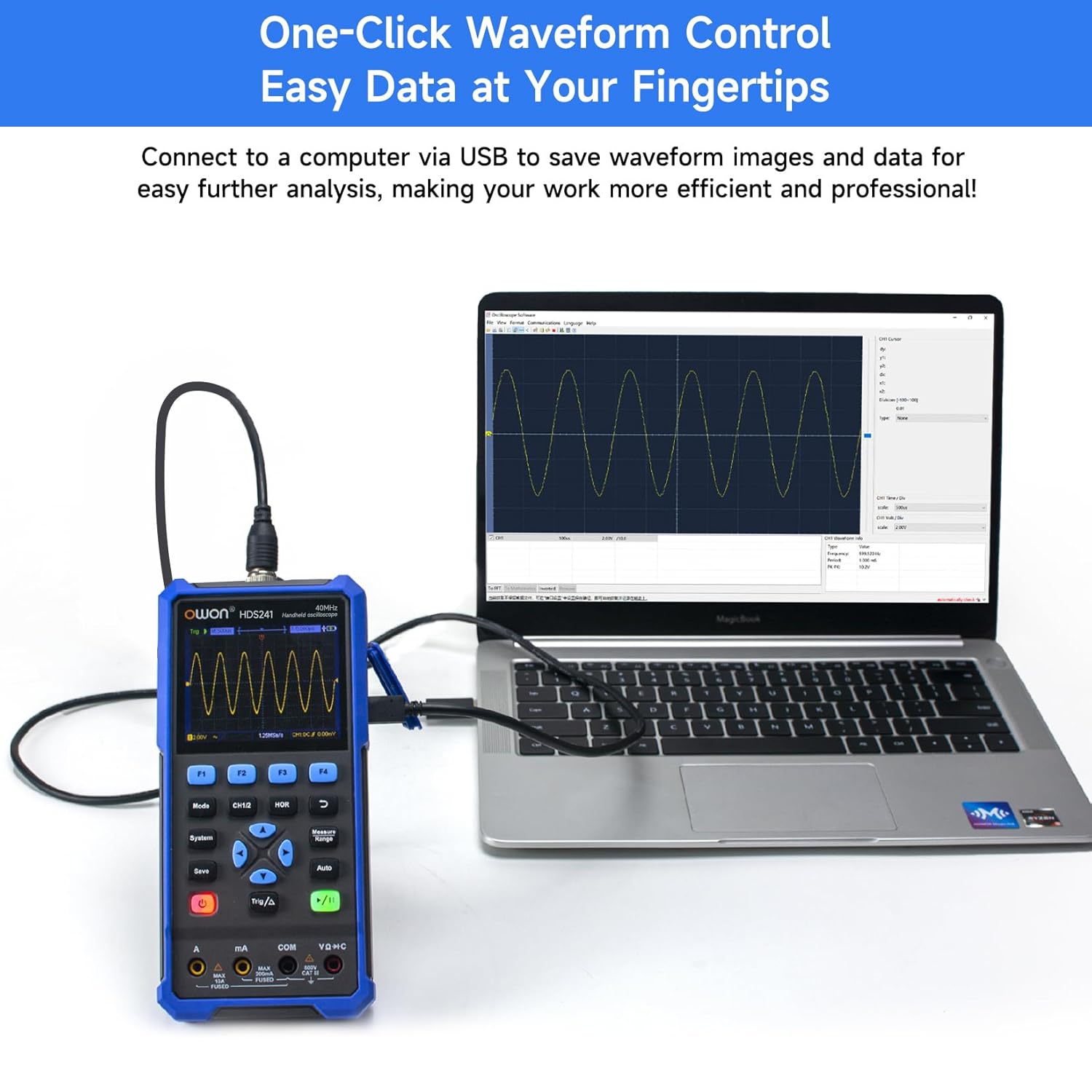
Image 8.1: The OWON HDS241 connected to a computer for data transfer and analysis, enabling easy waveform control.
9. Maintenance
- Cleaning: Clean the device with a soft, dry cloth. Do not use abrasive cleaners or solvents.
- Storage: Store the device in a cool, dry place away from direct sunlight and extreme temperatures.
- Battery Care: For long-term storage, ensure the battery is partially charged (around 50%) and recharge it every few months to maintain battery health.
- Probe Calibration: Periodically calibrate the oscilloscope probe using the dedicated probe compensation output to ensure accurate measurements.
10. Troubleshooting
| Problem | Possible Cause | Solution |
|---|---|---|
| Device does not power on. | Low or depleted battery. | Connect the device to a power source using the USB Type-C cable and allow it to charge. |
| No waveform displayed in oscilloscope mode. | Probe not connected correctly; signal too small or too large; incorrect time base or voltage scale. | Ensure probe is securely connected. Press Auto for automatic setup. Adjust vertical and horizontal scales manually. Check trigger settings. |
| Multimeter readings are inaccurate. | Test leads not properly connected; incorrect measurement function selected; external interference. | Verify test lead connections. Ensure the correct measurement mode (voltage, current, resistance) is selected. Minimize external electrical noise. |
| Signal generator output is not as expected. | Incorrect waveform type, frequency, or amplitude set. | Check the selected waveform, frequency, and amplitude settings in the signal generator menu. |
11. Technical Specifications
Oscilloscope Specifications:
| Parameter | Value |
|---|---|
| Bandwidth | 40MHz |
| Channel | 1 |
| Sampling Rate | 250MSa/s |
| Acquisition Mode | Sample, Peak Detect |
| Record Length | Max. 8K |
| Display | 3.5 inch LCD |
| Waveform Refresh Rate | 10,000 wfms/s |
| Input Coupling | DC, AC, Ground |
| Input Impedance | 1 MΩ±2%, in parallel with 16 pF±10 pF |
| Probe Attenuation | 1X, 10X, 100X, 1000X |
| Max Input Voltage | 400V (DC + AC, PK-PK) |
| Sensitivity Resolution | 10mV/div-10V/div |
| Vertical Resolution | 8 bit |
| Horizontal Scale | 5ns/div-1000s/div, step 1-2-5 |
| Trigger Type | Edge |
| Trigger Mode | Auto, Normal, Single |
| Auto Measurement | Period, Frequency, Mean, PK-PK, Max, Min, Amplitude, RMS |
| Cursor Measurement | ΔV, ΔT |

Image 11.1: Detailed oscilloscope specifications.
Digital Multimeter Specifications:
| Parameter | Value |
|---|---|
| Display Count | 4½ digits (max 24000 counts) |
| Test Modes | Voltage, Current, Resistance, Capacitance, Diode, Continuity |
| Max Input Voltage | AC 750V, DC 1000V |
| Max Input Current | AC 10A, DC 10A |
| Auto Range | Yes |
| True RMS | Yes |

Image 11.2: Detailed digital multimeter specifications.
Signal Waveform Generator Specifications:
| Parameter | Value |
|---|---|
| Waveforms | Sine, Square, Ramp, Pulse |
| Output Frequency | 10Hz-100KHz |
| Amplitude | 2Vpp-2.5Vpp |

Image 11.3: Detailed signal waveform generator specifications.
General Specifications:
- Dimensions: 9.6 x 3.8 x 19.8 cm
- Item Weight: 1.2 Kilograms
- Power Source: Battery Powered (2000 mAh Lithium Battery)
- Color: Blue
- Certifications: CE, True RMS
12. Warranty and Support
OWON products are designed for reliability and performance. For warranty information, technical support, or service inquiries, please refer to the official OWON website or contact your local distributor.
- Warranty Period: Standard manufacturer's warranty applies. Please check your purchase documentation for specific terms and duration.
- Technical Support: Visit the OWON official website for FAQs, software downloads, and contact information for technical assistance.
- Returns: Refer to the retailer's return policy for details on product returns and exchanges.


