
1. Product Overview
The KIDYWOLF Kidyweather is an educational weather station designed to introduce children aged 6 and above to fundamental meteorological concepts. This device includes an outdoor sensor for comprehensive weather monitoring, covering aspects such as hygrometry (humidity), barometry (atmospheric pressure), and thermometry (temperature).
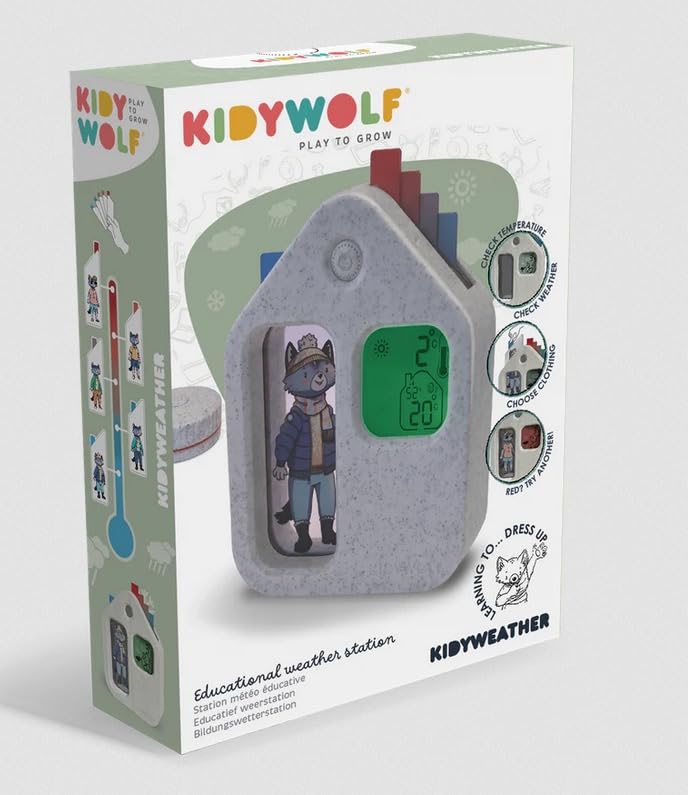
Image of the KIDYWOLF Kidyweather educational weather station, showing its main display unit and the external sensor.
2. What's in the Box
- KIDYWOLF Kidyweather Main Unit
- Outdoor Sensor
- Power Cord
3. Setup Instructions
- Unpack Components: Carefully remove all items from the packaging.
- Insert Batteries: The main unit requires 2 AAA batteries (not included). Open the battery compartment on the back of the unit and insert the batteries, ensuring correct polarity.
- Connect Power: Plug the provided power cord into the main unit and then into a standard electrical outlet.
- Position Outdoor Sensor: Place the outdoor sensor in a location that is sheltered from direct sunlight and rain, but still allows for accurate ambient temperature and humidity readings. Ensure it is within range of the main unit for wireless communication.
- Initial Synchronization: The main unit and outdoor sensor should automatically synchronize. If not, refer to the troubleshooting section.
4. Operating Instructions
The Kidyweather station displays various meteorological data. Once set up, the unit will begin to show readings from both its internal sensors and the external sensor.
- Temperature Display: The screen will show indoor and outdoor temperatures. Units (Celsius/Fahrenheit) may be switchable via a button (refer to specific button labels on your device).
- Humidity Display: Indoor and outdoor humidity levels (hygrometry) are displayed as a percentage.
- Barometric Pressure: The station provides barometric pressure readings, often with an indicator for rising or falling pressure, which can help predict weather changes.
- Educational Features: The Kidyweather is designed to be intuitive for children, presenting weather data in an engaging format. Explore the display for any animated weather icons or simple forecasts.
5. Maintenance
- Cleaning: Wipe the main unit and outdoor sensor with a soft, dry cloth. Do not use abrasive cleaners or immerse in water.
- Battery Replacement: Replace the AAA batteries in the main unit when the low battery indicator appears on the display.
- Outdoor Sensor Placement: Periodically check the outdoor sensor's placement to ensure it remains protected from extreme weather conditions and is providing accurate readings.
- Storage: If storing the device for an extended period, remove all batteries to prevent leakage.
6. Troubleshooting
- No Display/Power:
- Ensure the power cord is securely plugged into both the unit and the electrical outlet.
- Check if the AAA batteries in the main unit are inserted correctly and are not depleted.
- Outdoor Sensor Not Connecting:
- Ensure the outdoor sensor is within the specified wireless range of the main unit.
- Check if the outdoor sensor has its own power source (if applicable, though not specified in provided data, it's a common point).
- Try repositioning both the main unit and the outdoor sensor to improve signal.
- Perform a manual re-synchronization if your device has this feature (consult the device's physical buttons for a 'Sync' or 'Channel' button).
- Inaccurate Readings:
- Ensure the outdoor sensor is not in direct sunlight or near heat sources, which can skew temperature readings.
- Verify that the main unit is not placed near appliances that generate heat or humidity.
7. Specifications
| Feature | Detail |
|---|---|
| Manufacturer | Kidywolf |
| Model Reference | KIDYWEATHER |
| Product Dimensions (L x W x H) | 14.5 x 27 x 4.5 cm |
| Weight | 494 Grams |
| Power Source | Corded Electric |
| Batteries Required | 2 AAA (for main unit, not included) |
| Special Features | External Sensor, Hygrometer, Barometer, Thermometer |
| Measurement Accuracy | +/- 5% |
| Temperature Accuracy | 1 °C |
| Recommended Use | Educational Weather Monitoring |
| Included Components | Power Cord |
8. Warranty and Support
Warranty information for the KIDYWOLF Kidyweather educational weather station is typically provided with the product packaging or can be found on the official KIDYWOLF website. For technical support, product inquiries, or warranty claims, please refer to the contact information provided in your product documentation or visit the manufacturer's website.
Manufacturer Website: KIDYWOLF Official Store
