1. Introduction
The RDINSCOS MT28C is a non-invasive, pinless moisture meter designed for quick and accurate detection of moisture content in various building materials and wood. This device utilizes advanced sensor technology to measure moisture up to 0.75 inches (19mm) deep without causing damage to surfaces. Its large color LCD and LED bar graph provide clear, easy-to-read data, making it an essential tool for homeowners, contractors, and DIY enthusiasts for identifying potential moisture problems.
2. Safety Information
- Read all instructions carefully before using the device.
- Do not expose the device to extreme temperatures, humidity, or direct sunlight.
- Keep the device away from water and other liquids.
- Do not attempt to open or modify the device. Refer all servicing to qualified personnel.
- Dispose of batteries according to local regulations.
- Avoid placing the meter near strong electromagnetic fields, as this may affect readings.
3. Package Contents
Verify that all items are present in the package:
- 1 x RDINSCOS MT28C Pinless Moisture Meter
- 1 x 9V Battery
- 1 x User Manual
- 1 x Storage Bag
4. Product Features
- Pinless Measurement: Non-invasive detection of moisture up to 0.75 inches (19mm) deep, preventing damage to surfaces.
- Wide Application: Suitable for various materials including walls, masonry, softwood, hardwood, plaster, and concrete.
- Clear Display: Large color LCD with backlight and a three-color LED bar graph for easy data interpretation (Dry, Mid, Wet).
- Over-range Alarm: Automatic alarm indicates when moisture levels exceed predefined thresholds.
- Data Hold Function: Allows users to lock abnormal readings for later review and analysis.
- Integrated Flashlight: Built-in LED for improved visibility in dimly lit areas.
- Battery Powered: Operates on a 9V battery for portability.
5. Setup
5.1 Battery Installation
- Locate the battery compartment cover on the back of the device.
- Open the battery compartment. No screws are typically needed for access.
- Insert the included 9V battery, ensuring correct polarity (+/-).
- Close the battery compartment cover securely.

Figure 5.1: Rear view of the MT28C meter, indicating the battery compartment. Ensure the 9V battery is installed correctly.
6. Operating Instructions
6.1 Powering On/Off
Press the power button (usually marked with a power symbol) to turn the device on. Press and hold the power button to turn it off. The device may also have an auto-off feature to conserve battery life.
6.2 Selecting Measurement Mode
Press the "MODE" button to cycle through different material types: Wall, Masonry, Softwood, Hardwood. Select the mode that best matches the material you are testing for accurate readings.

Figure 6.1: The MT28C meter can measure moisture up to 0.75 inches (19mm) deep and supports various material types including wall, masonry, softwood, and hardwood.
6.3 Taking a Measurement
- Ensure the correct material mode is selected.
- Place the back of the meter flat against the surface you wish to measure.
- Apply a consistent, firm pressure (approximately 2.5 KG is recommended for accurate results, as shown in Figure 6.3).
- The moisture percentage will be displayed on the LCD screen.
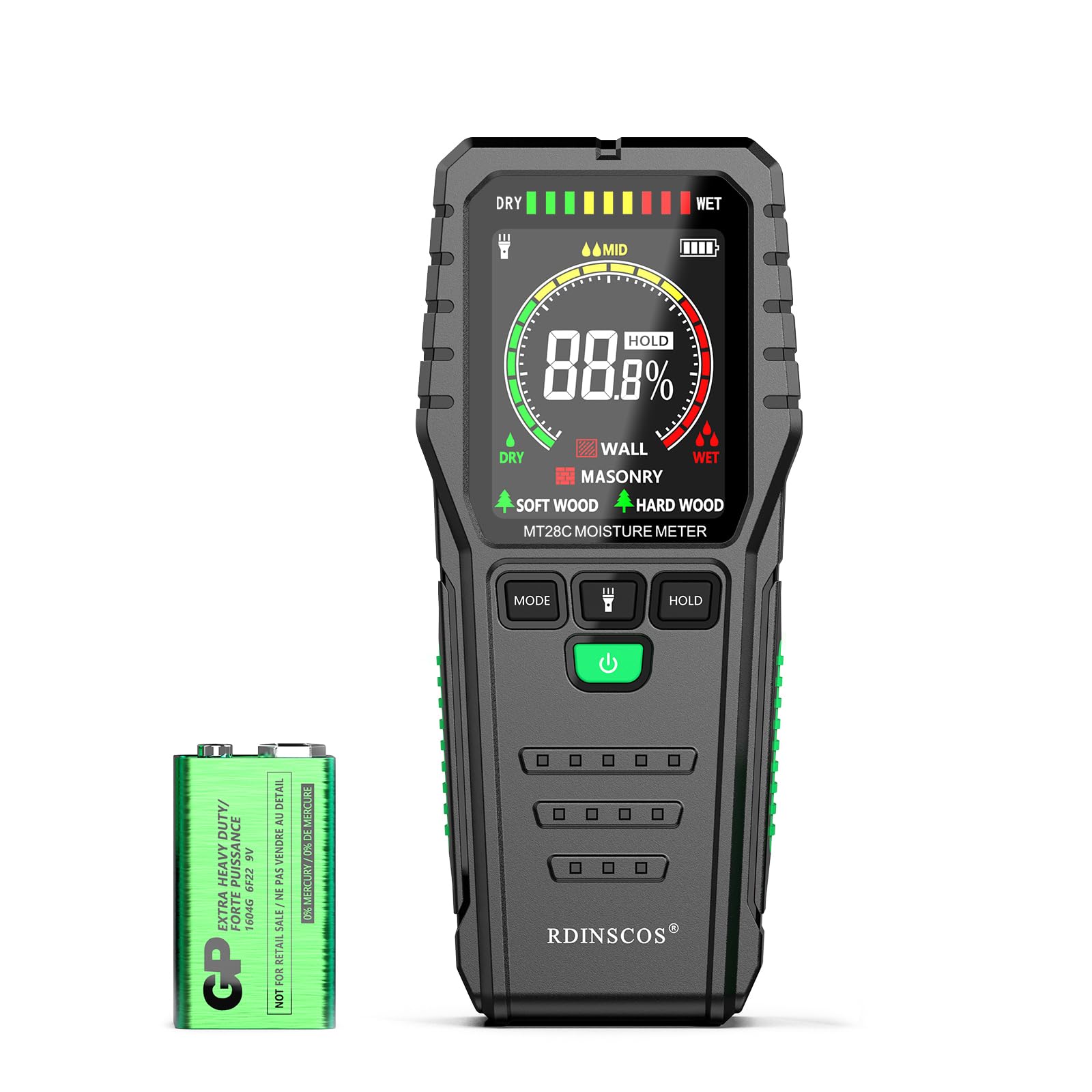
Figure 6.2: Scan an area by moving the meter across the surface to compare relative moisture content.

Figure 6.3: For accurate results, apply approximately 2.5 KG of pressing force when taking measurements.
6.4 Interpreting Readings
The color LCD and LED bar graph provide visual indicators of moisture levels:
- Green (DRY): Indicates low moisture content.
- Yellow (MID): Indicates moderate moisture content.
- Red (WET): Indicates high moisture content, potentially requiring further investigation.

Figure 6.4: The display clearly indicates moisture levels as DRY, MID, or WET using color-coded indicators.
Note: The measured value is relative. When scanning an area quickly to detect moisture, use the HOLD key to lock abnormal readings for recording and analysis.
Important: Testing on pure drywall is not recommended as its low density can lead to inaccurate readings. Actual readings vary with moisture and material density.
6.5 Hold Function
Press the "HOLD" button to freeze the current reading on the display. This is useful for noting down specific measurements or when measuring in hard-to-reach areas. Press the "HOLD" button again to release the reading and resume live measurement.
7. Maintenance
- Cleaning: Wipe the device with a soft, dry cloth. Do not use abrasive cleaners or solvents.
- Storage: Store the meter in its provided storage bag in a cool, dry place when not in use. Remove the battery if storing for extended periods to prevent leakage.
- Battery Replacement: Replace the 9V battery when the low battery indicator appears on the display.
8. Troubleshooting
| Problem | Possible Cause | Solution |
|---|---|---|
| Device does not power on. | Low or dead battery; incorrect battery installation. | Replace the 9V battery; ensure correct polarity. |
| Inaccurate or inconsistent readings. | Incorrect material mode selected; insufficient contact with surface; presence of metal objects; measuring pure drywall. | Select the appropriate material mode; ensure firm, flat contact; avoid metal objects; note that pure drywall may yield inaccurate results. |
| Display is dim or unreadable. | Low battery. | Replace the 9V battery. |
9. Specifications
| Feature | Detail |
|---|---|
| Model Number | MT28C |
| Measurement Type | Pinless, Non-invasive |
| Measurement Depth | Up to 0.75 inches (19mm) |
| Accuracy | ±4% |
| Measurement Range | 0-43% |
| Display | Color LCD with backlight, 3-color LED bar graph |
| Power Source | 1 x 9V Battery (included) |
| Dimensions | 16.9 x 8.4 x 4.2 cm (6.65 x 3.3 x 1.65 inches) |
| Weight | 240 g (0.53 lbs) |
| Manufacturer | SHENZHEN REDDRAGON INSTRUMENTS CO.,LTD |
10. Warranty and Support
For warranty information or technical support, please refer to the contact details provided with your purchase or visit the official RDINSCOS website. Keep your purchase receipt as proof of purchase for any warranty claims.


