
Introduction
Welcome to your new Orbegozo DH 1245 Dehumidifier. This manual provides essential information for the safe and efficient operation, maintenance, and troubleshooting of your appliance. Please read it thoroughly before use and keep it for future reference.
Safety Instructions
To reduce the risk of fire, electric shock, or injury, always follow these basic precautions:
- Read all instructions before operating the appliance.
- Ensure the power supply matches the specifications (230V ~ 50Hz).
- Do not block air inlets or outlets.
- Do not operate with a damaged cord or plug.
- Keep out of reach of children.
- Use only in an upright position.
- Do not use near water or in excessively wet environments.
- Unplug before cleaning or maintenance.
- The appliance uses R290 refrigerant; handle with care and ensure proper ventilation.
- Do not attempt to repair or modify the unit yourself. Contact qualified service personnel.
Product Overview
The Orbegozo DH 1245 is a compact and efficient dehumidifier designed to reduce humidity in residential spaces up to 50 m². It features a touch control panel, a 2.5 L water tank, and an anti-freeze system.
Components
- Air Inlet/Outlet
- Touch Control Panel with Digital Display
- Water Tank (2.5 L capacity) with Water Level Window
- Reusable and Washable Anti-dust Filter
- Drain Connection for Continuous Drainage
- Integrated Handle and Wheels for Easy Transport
Visual Guide
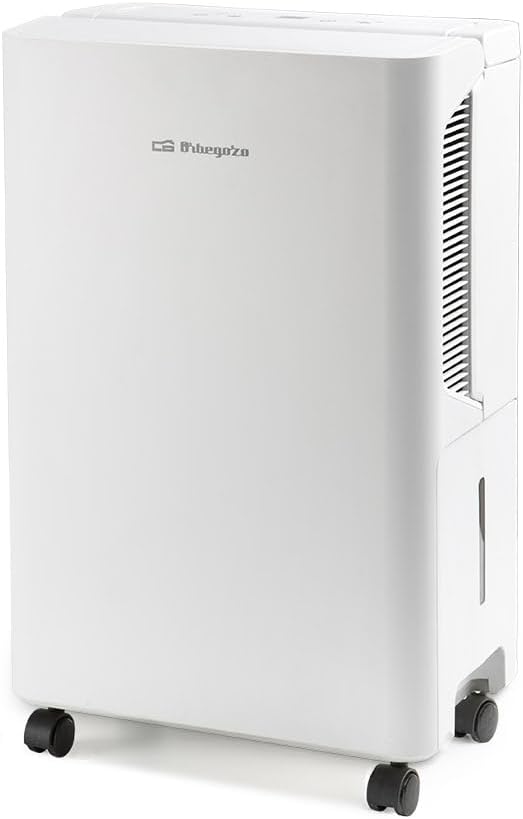


Setup
Unpacking
- Carefully remove the dehumidifier from its packaging.
- Remove all packing materials, including any protective films or tapes.
- Inspect the appliance for any signs of damage. If damaged, do not operate and contact your retailer.
Placement
- Place the dehumidifier on a firm, level surface to prevent vibrations and ensure proper water collection.
- Ensure at least 20 cm (8 inches) of clear space around the air inlets and outlets for proper airflow and efficient operation.
- Avoid placing the unit near heat sources (e.g., radiators, ovens) or in direct sunlight, as this can affect performance.
- For optimal dehumidification, position the unit in the center of the room or area requiring humidity control.
Power Connection
Plug the power cord into a grounded electrical outlet (230V ~ 50Hz). Ensure the outlet is easily accessible.
Continuous Drainage (Optional)
For continuous operation without the need to manually empty the water tank, you can connect a drain hose (not included) to the drain connection port. Ensure the hose is sloped downwards to allow gravity drainage into a suitable receptacle or floor drain. Refer to the diagram in the full manual for the exact location of the drain port.
Operating Instructions
Control Panel Functions (Refer to Figure 2)
- Power Button (⏻): Press once to turn the unit ON, press again to turn it OFF.
- Humidity Setting (%): Press this button to adjust your desired humidity level. The range is typically 30% to 90% relative humidity. The unit will operate until this set level is reached.
- Timer (L): Use this button to set an automatic shut-off timer. You can typically set it for 1 to 24 hours. The unit will turn off automatically after the set time.
- Mode/Fan Speed (☼ / ☀): This button allows you to cycle through different operating modes or fan speeds, if available. Consult the full manual for specific mode descriptions.
- Defrost Indicator (☃): This light illuminates when the anti-freeze system is active, indicating that the unit is automatically defrosting its coils.
- Full Tank Indicator (☒): This light illuminates when the water tank is full. The unit will automatically stop operating until the tank is emptied.
- Digital Display: Shows the current room humidity, the set humidity level, or the remaining time when the timer function is active.
Starting Operation
- Ensure the water tank is correctly inserted and empty.
- Plug in the appliance to a suitable power outlet.
- Press the Power Button (⏻) to turn on the dehumidifier.
- Use the Humidity Setting button (%) to set your desired humidity level. The unit will begin to operate.
- (Optional) Use the Timer button (L) to set an operating duration if you wish for the unit to turn off automatically.
Stopping Operation
Press the Power Button (⏻) to turn off the dehumidifier. For extended periods of non-use, unplug the unit from the power outlet.
Maintenance
Regular maintenance ensures the longevity and efficiency of your dehumidifier. Always unplug the unit from the power outlet before performing any maintenance tasks.
Emptying the Water Tank
- When the Full Tank Indicator (☒) illuminates, the unit will stop operating.
- Carefully pull out the water tank from the side of the unit (refer to Figure 3).
- Empty the collected water into a sink or drain.
- Reinsert the tank firmly until it clicks into place. The unit will automatically resume operation if the power is on and the humidity setting requires it.
Cleaning the Anti-dust Filter
The anti-dust filter is reusable and washable, and regular cleaning is crucial for maintaining air quality and unit efficiency.
- Locate and remove the filter (typically found at the back or side of the unit).
- Wash the filter with lukewarm water and a mild detergent. Gently scrub if necessary to remove accumulated dust.
- Rinse thoroughly under running water to remove all soap residue.
- Allow the filter to air dry completely before reinserting it into the unit. Do not use a dryer or direct heat.
- Clean the filter every two weeks or more frequently depending on usage and ambient air quality.
Cleaning the Exterior
Wipe the exterior surfaces of the dehumidifier with a soft, damp cloth. Do not use abrasive cleaners, solvents, or harsh chemicals, as these can damage the finish.
Storage
If storing the unit for an extended period, ensure the water tank is empty and clean, and the anti-dust filter is clean and dry. Store the dehumidifier in an upright position in a cool, dry place, protected from dust.
Troubleshooting
Before contacting customer support, please refer to the following table for common issues and their solutions:
| Problem | Possible Cause | Solution |
|---|---|---|
| Unit does not turn on | No power supply; Power cord not plugged in; Full water tank; Unit not upright. | Check power outlet and circuit breaker; Plug in cord securely; Empty water tank; Ensure unit is on a level surface. |
| No dehumidification or low efficiency | Air inlets/outlets blocked; Filter dirty; Room temperature too low; Humidity setting too high; Room size exceeds capacity. | Clear obstructions; Clean filter; Ensure room temperature is above 5°C; Lower desired humidity setting; Consider unit placement. |
| Unit is noisy | Unit not on a level surface; Filter dirty; Internal components vibrating. | Place on a level, stable surface; Clean filter; If noise persists, contact support. |
| Water leaks | Water tank not properly inserted; Drain hose not connected correctly (if using continuous drainage); Unit tilted. | Reinsert water tank firmly; Check drain hose connection and ensure proper slope; Ensure unit is upright and level. |
| Defrost indicator is on frequently | Low ambient temperature. | This is normal operation in cooler environments. The unit will resume dehumidifying once defrosting is complete. |
Specifications
- Model: DH 1245
- Brand: Orbegozo
- Dehumidification Capacity: 12 L/day (at 80% RH, 30°C)
- Refrigerant: R290 (environmentally friendly)
- Maximum Noise Level: 36 dB
- Power Consumption: 235 W
- Humidity Adjustment Range: 30% – 90%
- Application Area: Up to 50 m²
- Water Tank Capacity: 2.5 L
- Dimensions (W x H x D): 30 x 48 x 19 cm
- Weight: 9 kg
- Voltage: 230 V ~ 50 Hz
- Special Features: Compact design, Touch control panel, Drain connection, Operation and full tank indicator light, Anti-freeze system, Handle and wheels for easy transport, Reusable and washable anti-dust filter, Water level window.
Warranty and Support
For detailed warranty information and technical support, please refer to the warranty card included with your purchase. It is recommended to keep your proof of purchase for any warranty claims.
You may also visit the official Orbegozo website for further assistance and product information:
Orbegozo Official Website: www.orbegozo.com