
Introduction
This manual provides instructions for the proper setup, operation, and maintenance of your Accutime Zelda Breath of The Wild Logo Analog Watch. Please read this manual thoroughly before using your watch to ensure optimal performance and longevity.
Package Contents
- Accutime Zelda Breath of The Wild Logo Analog Watch
- Instruction Manual (this document)
Setup
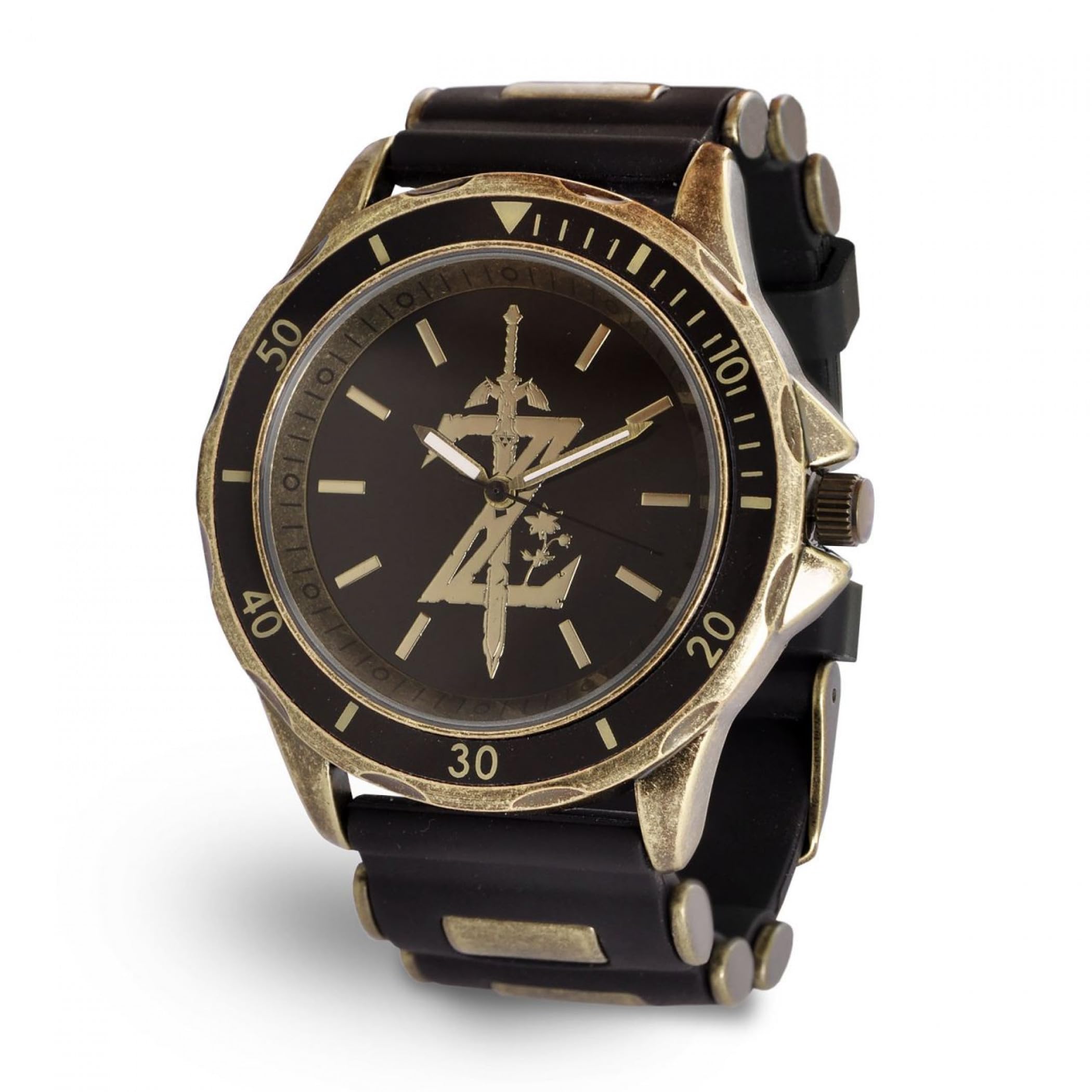
Image: The Accutime Zelda Breath of The Wild Logo Analog Watch, featuring a black strap and a gold-toned case with the Zelda 'Z' logo on the watch face.
1. Setting the Time
- Locate the crown (the small knob on the side of the watch case).
- Gently pull the crown outwards until you feel a click. This is the time-setting position.
- Rotate the crown clockwise or counter-clockwise to move the hour and minute hands to the correct time.
- Once the time is set, push the crown back into its original position against the watch case. This will start the watch movement.
2. Adjusting the Strap
The watch features a buckle clasp. To adjust the fit, simply insert the pin of the buckle into one of the holes on the strap that provides a comfortable and secure fit on your wrist. Ensure the watch is not too tight to avoid discomfort, nor too loose to prevent it from moving excessively.
Operating the Watch
Your Accutime Zelda Breath of The Wild Logo Analog Watch is designed for straightforward timekeeping. Once the time is set, the watch will continuously display the current time as long as the battery is functional and the crown is fully pushed in.
- Reading the Time: The watch face features hour, minute, and second hands. The longer, thinner hand indicates seconds, the longer hand indicates minutes, and the shorter hand indicates hours.
- Daily Wear: Avoid exposing the watch to extreme temperatures, strong magnetic fields, or sudden impacts.
Maintenance
1. Cleaning
To maintain the appearance of your watch, wipe the case and strap regularly with a soft, dry cloth. For more stubborn dirt, a slightly damp cloth can be used, followed by immediate drying. Avoid using harsh chemicals or abrasive materials, as these can damage the watch's finish.
2. Battery Replacement
The watch is powered by a standard watch battery. When the watch stops running or the second hand begins to skip, it indicates that the battery needs replacement. It is recommended to have the battery replaced by a qualified watch technician to ensure proper sealing and prevent damage to the internal components.
3. Water Resistance
This watch is generally designed for everyday use and can withstand minor splashes. It is not suitable for swimming, showering, or diving. Avoid submerging the watch in water.
Troubleshooting
- Watch Not Running:
- Check if the crown is fully pushed in. If it is pulled out, the watch will not run.
- The battery may be depleted. Refer to the 'Battery Replacement' section.
- Time Inaccuracy:
- Ensure the time was set correctly and the crown is fully pushed in.
- Extreme temperatures or strong magnetic fields can affect accuracy. Avoid such environments.
- If the issue persists, the watch may require professional inspection.
Specifications
| Brand | Accutime |
| Model Number | 030506474920 |
| Movement Type | Analog |
| Strap Width | 2.5 cm |
| Maximum Wrist Circumference | 22.2 cm |
| Materials | Metal, Plastic, Stainless Steel Case Back |
| Water Resistance | Splash resistant (not for swimming/showering) |
Warranty Information
This product is covered by the manufacturer's standard warranty. Please refer to the warranty card included with your purchase or contact Accutime customer service for detailed information regarding warranty terms and conditions.
Support
For further assistance, technical support, or inquiries regarding your Accutime watch, please visit the official Accutime website or contact their customer service department. Contact details can typically be found on the product packaging or the manufacturer's website.