
1. Introduction
Thank you for choosing the Alohappy Farmhouse Executive Desk. This manual provides essential information for the safe assembly, operation, and maintenance of your new desk. Please read it thoroughly before use and retain it for future reference.
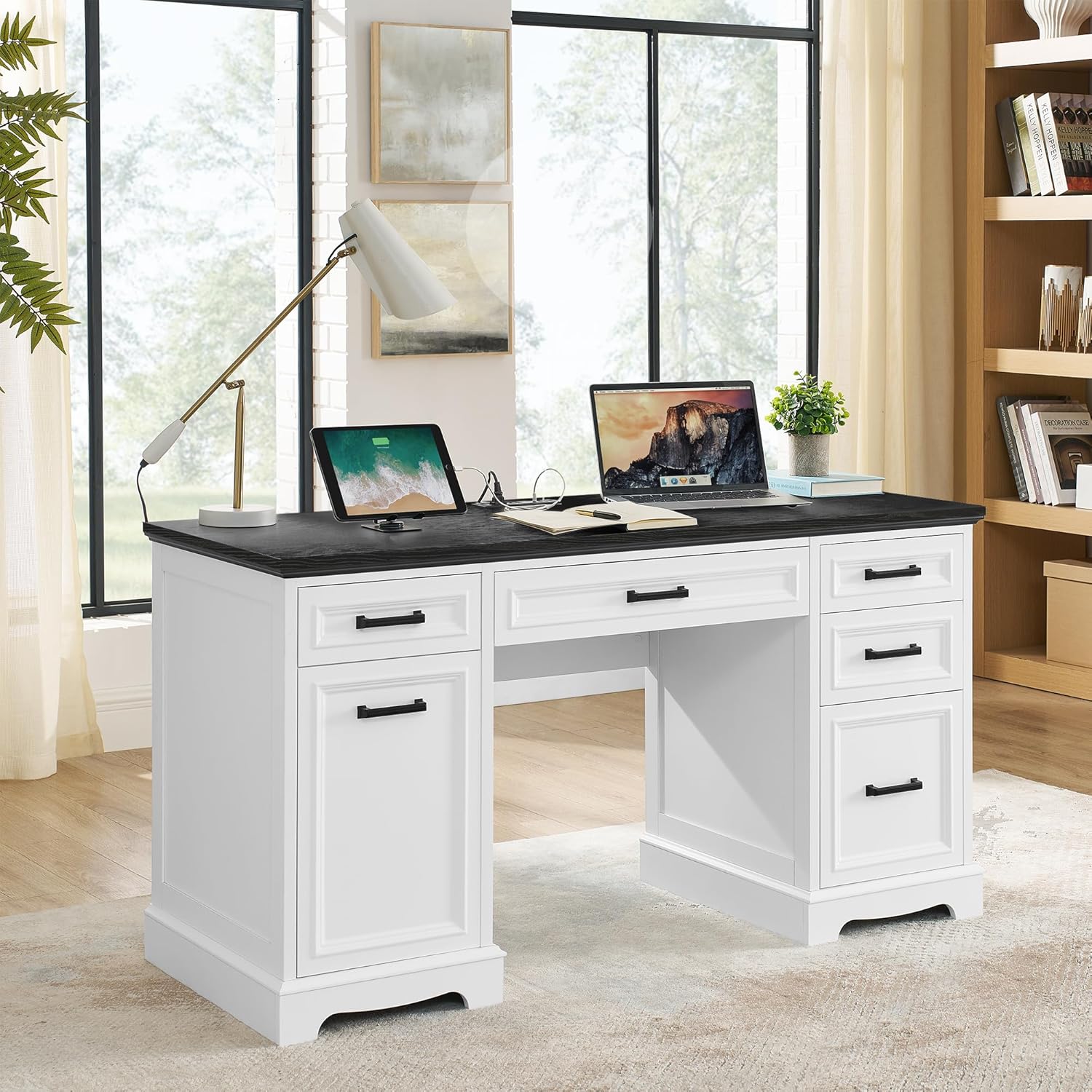
Image 1.1: The Alohappy Farmhouse Executive Desk in a home office environment.
2. Safety Information
WARNING: Heavy objects require careful handling. Always follow assembly instructions and use appropriate tools to avoid injury. Keep the desk away from heat sources and do not place heavy objects on the edges to prevent tipping.
- Ensure all connections are secure before use.
- Do not overload drawers or shelves.
- Keep children and pets away during assembly.
- Use on a level surface to prevent instability.
3. Assembly Instructions
The Alohappy Farmhouse Executive Desk is designed for straightforward assembly. Detailed installation instructions, along with all necessary parts and accessories, are included in the package. All components are clearly identified with numbered stickers to simplify the process.
- Recommended Assembly Time: While the manual may suggest a shorter time, allow ample time for careful assembly.
- Recommended Number of People: 1 person.
- Tools Required: A screwdriver is recommended. All other necessary assembly tools are included.
- Follow the step-by-step diagrams and instructions provided in the separate assembly guide.
- Do not overtighten screws to avoid damaging the wood.
4. Product Features and Operation
4.1 Integrated Charging Station
The desk features a built-in charging station for convenient power access. This includes:
- 2 Standard AC Power Outlets
- 1 USB Port
- 1 Type-C Port
This station provides power for your computer, laptop, printer, scanner, phone, headset, gaming gear, and other electronic devices, ensuring fast charging and reducing cable clutter.

Image 4.1.1: Detail of the charging station with power outlets, USB, and Type-C ports.
Video 4.1.2: Demonstration of the charging station and various storage options of the desk.
4.2 Spacious Desktop
The desk offers a generous 55.1-inch wide tabletop, providing ample space for your laptop, monitor, keyboard, mouse, and other office essentials, creating a comfortable and organized workspace.

Image 4.2.1: Overview of the desk's spacious desktop, suitable for various work setups.
4.3 Large Capacity Storage
This executive desk is equipped with five drawers and a storage cabinet to help keep your workspace tidy and organized.
- Drawers: Features three different depths of drawers to accommodate various items. The bottom right drawer is a dedicated file drawer designed to securely hold both letter and A4-sized documents. Each drawer is equipped with high-quality sliding rails for smooth operation.
- Storage Cabinet: The cabinet includes an adjustable/removable shelf with three height levels, allowing you to customize the storage space according to your needs.

Image 4.3.1: Detailed view of the desk's drawers, highlighting their smooth operation and file storage capability.

Image 4.3.2: The storage cabinet with its adjustable shelf, demonstrating flexible storage options.
5. Maintenance
To maintain the appearance and longevity of your Alohappy desk, follow these simple care instructions:
- Wipe the desk surfaces with a dry cloth.
- Avoid using harsh chemicals or abrasive cleaners, which can damage the finish.
- Protect the surface from excessive moisture and direct sunlight.
- Periodically check and tighten any loose hardware.
6. Troubleshooting
If you encounter any issues with your Alohappy Farmhouse Executive Desk, please refer to the following general advice:
- Stability Issues: Ensure the desk is on a level surface and all assembly screws are securely tightened.
- Drawer Operation: Check that drawer slides are free of obstructions and properly aligned.
- Charging Station Not Working: Verify the power cord is fully plugged into a functional wall outlet. Check for any tripped circuit breakers.
For persistent problems or specific concerns, please contact Alohappy customer support.
7. Specifications
| Feature | Detail |
|---|---|
| Brand | Alohappy |
| Model Number | desk 5360 |
| Product Dimensions (D x W x H) | 21.7"D x 55.1"W x 29.5"H |
| Color | White |
| Style | Modern Farmhouse |
| Base Material | Wood |
| Top Material Type | Engineered Wood |
| Finish Type | Painted |
| Number of Drawers | 5 |
| Number of Cabinets | 1 |
| Charging Station | 2 AC Outlets, 1 USB Port, 1 Type-C Port |
| Item Weight | 99.2 Pounds |
| Required Assembly | Yes |
| Recommended Assembly People | 1 |
| Tools Included | Yes |

Image 7.1: Dimensional drawing of the desk, showing height, width, and depth measurements.
8. Warranty and Support
Your Alohappy Farmhouse Executive Desk comes with a Limited Warranty. For specific details regarding coverage and duration, please refer to the warranty information included in your product packaging.
If you encounter any issues, have questions, or require assistance with your product, please contact Alohappy customer support. We are committed to providing a satisfactory solution for any concerns you may have.
Contact Information: Please refer to the contact details provided in your product packaging or visit the official Alohappy website for support.