
1. Introduction
Thank you for choosing the Vipdrive NAVIGATOR 1.2 Electric Bicycle. This manual provides essential information for the safe assembly, operation, and maintenance of your e-bike. Please read it thoroughly before your first ride and keep it for future reference. The NAVIGATOR 1.2 is a smart urban electric bicycle designed for comfort and efficiency, featuring a powerful motor, long-range battery, and smart app integration.
2. Safety Information
Your safety is paramount. Always wear a helmet and appropriate safety gear when riding. Ensure all components are correctly assembled and secured before each use. Adhere to local traffic laws and regulations. Avoid riding in adverse weather conditions or under the influence of alcohol or drugs. Regular maintenance is crucial for safe operation.
- Always check tire pressure, brakes, and battery charge before riding.
- Be visible: use lights at night and wear reflective clothing.
- Do not exceed the maximum load capacity of 120 kg.
- Familiarize yourself with the e-bike's controls and handling in a safe, open area before riding in traffic.
3. Package Contents
Your Vipdrive NAVIGATOR 1.2 Electric Bicycle comes 90% pre-assembled. The package includes:
- Vipdrive NAVIGATOR 1.2 Electric Bicycle (main frame, rear wheel, motor, battery pre-installed)
- Front Wheel
- Handlebars
- Pedals
- Saddle and Seatpost
- Charger
- Tool Kit for Assembly
- User Manual
4. Setup and Assembly
The Vipdrive NAVIGATOR 1.2 is largely pre-assembled. Follow these steps for final assembly:
4.1 Unpacking and Initial Inspection
Carefully remove the e-bike and all components from the packaging. Inspect for any shipping damage. If you find any damage or missing parts, contact customer support immediately.
4.2 Handlebar Installation
Attach the handlebars to the stem, ensuring they are centered and tightened securely. Adjust the angle for comfortable riding posture.
4.3 Front Wheel Installation
Install the front wheel using the quick-release mechanism. Ensure the wheel is properly seated in the fork and the quick-release lever is firmly closed. Check that the brake rotor is correctly aligned within the caliper.
4.4 Pedal Installation
Identify the left (L) and right (R) pedals. Apply a small amount of grease to the threads. Screw the pedals into the crank arms by hand, then tighten firmly with a wrench. Note that the left pedal has a reverse thread.
4.5 Saddle and Seatpost Adjustment
Insert the seatpost into the frame. Adjust the saddle height to ensure your feet can comfortably touch the ground when stopped, or for optimal pedaling efficiency (recommended height range: 168 cm - 198 cm). Secure the quick-release clamp firmly.
4.6 Battery Installation and Initial Charge
The 48V 15Ah removable lithium battery is typically pre-installed. Ensure it is securely locked into the frame. For the first use, fully charge the battery. Refer to the 'Battery Care and Charging' section for detailed instructions.

Image: The 48V 15Ah removable battery, highlighting its features like anti-theft protection, range, charging time, BMS, and waterproofing.
5. Operating Instructions
5.1 Powering On/Off
To power on the e-bike, press and hold the power button on the LCD display. To power off, press and hold the power button again until the display turns off.
5.2 Understanding the LCD Display
The smart LCD display provides real-time information:
- Battery Level: Shows remaining battery charge.
- Speed: Displays current riding speed.
- PAS Level: Indicates the current Pedal Assist System level (0-3).
- Distance: Shows trip distance or total odometer.
The display also features a USB charging port for mobile devices.

Image: The smart LCD display and its integration with the smartphone app, showing key metrics and the USB charging port.

Image: Detailed view of the clear and versatile LCD display, showing battery, speed, PAS levels, and mileage.
5.3 Riding Modes and PAS Levels
The NAVIGATOR 1.2 offers 5 riding modes and 3 Pedal Assist System (PAS) levels:
- Electric Mode: Full electric power without pedaling.
- Pedal-Assisted Mode (3 PAS levels): The motor provides assistance as you pedal. Adjust the PAS level for more or less assistance.
- Classic Bicycle Mode: Ride without any motor assistance, like a traditional bicycle.
- Walk Assist Mode: Provides low-speed assistance for walking the bike.
- Cruise Control Mode: Maintains a constant speed without continuous throttle input.

Image: Visual representation of the five riding modes available on the NAVIGATOR 1.2.
5.4 Gear Shifting
The e-bike is equipped with a 7-speed gear system. Use the shifter on the handlebars to change gears according to terrain and desired speed. Shift smoothly to avoid strain on the drivetrain.

Image: The 7-speed gear system and pedal sensor for flexible and easy riding.
5.5 Using the Smart APP
The Vipdrive NAVIGATOR 1.2 supports a dedicated smartphone app. Download the app from your device's app store. Pair your e-bike via Bluetooth. The app offers:
- GPS Navigation: Plan and follow routes.
- Speed Control: Adjust and monitor speed settings.
- Ride Data: Track your mileage, speed, and other ride statistics.
- Social Sharing: Share your cycling routes and achievements.
5.6 Lights Operation
The e-bike is equipped with a front light and a rear brake light for enhanced visibility. Operate the lights via the controls on the handlebars or through the app. Always use lights when riding in low-light conditions or at night.

Image: The rear brake light enhancing safety during night rides.
6. Battery Care and Charging
6.1 Charging Procedure
To charge the battery:
- Ensure the e-bike is powered off.
- Locate the charging port on the battery.
- Connect the charger to the battery, then plug the charger into a standard power outlet.
- The indicator light on the charger will show charging status (e.g., red for charging, green for fully charged).
- A full charge typically takes 4-6 hours. Do not overcharge.
- Once fully charged, disconnect the charger from the outlet first, then from the battery.
6.2 Battery Removal and Installation
The battery is removable for convenient charging or storage. Use the provided key to unlock the battery from its hidden compartment in the frame. To reinstall, slide the battery back into place and lock it securely with the key.
6.3 Battery Management System (BMS)
The integrated BMS protects the battery from overcharging, over-discharging, and short circuits, extending its lifespan and ensuring safe operation.
6.4 Waterproofing
The battery design is waterproof (IP65 rated), allowing for use in various weather conditions. However, avoid submerging the battery or using high-pressure water jets directly on electrical components.
7. Maintenance
Regular maintenance ensures the longevity and safe operation of your e-bike.
7.1 Cleaning
Clean your e-bike regularly with a damp cloth and mild soap. Avoid using high-pressure washers directly on electrical components, bearings, or the motor. Dry thoroughly after cleaning.
7.2 Tire Pressure
Check tire pressure before each ride. Maintain the recommended pressure (usually indicated on the tire sidewall) for optimal performance, safety, and battery range.
7.3 Brake Inspection
Regularly inspect brake pads for wear and ensure brake levers provide firm and responsive braking. Adjust or replace brake pads as needed. Ensure brake cables are not frayed or damaged.
7.4 Chain Lubrication
Keep the chain clean and lubricated to ensure smooth gear changes and prevent premature wear. Apply bicycle-specific chain lubricant periodically.
7.5 Suspension Care
The e-bike features a lockable front suspension fork. Keep the suspension stanchions clean. If the suspension feels stiff or makes unusual noises, consult a professional.
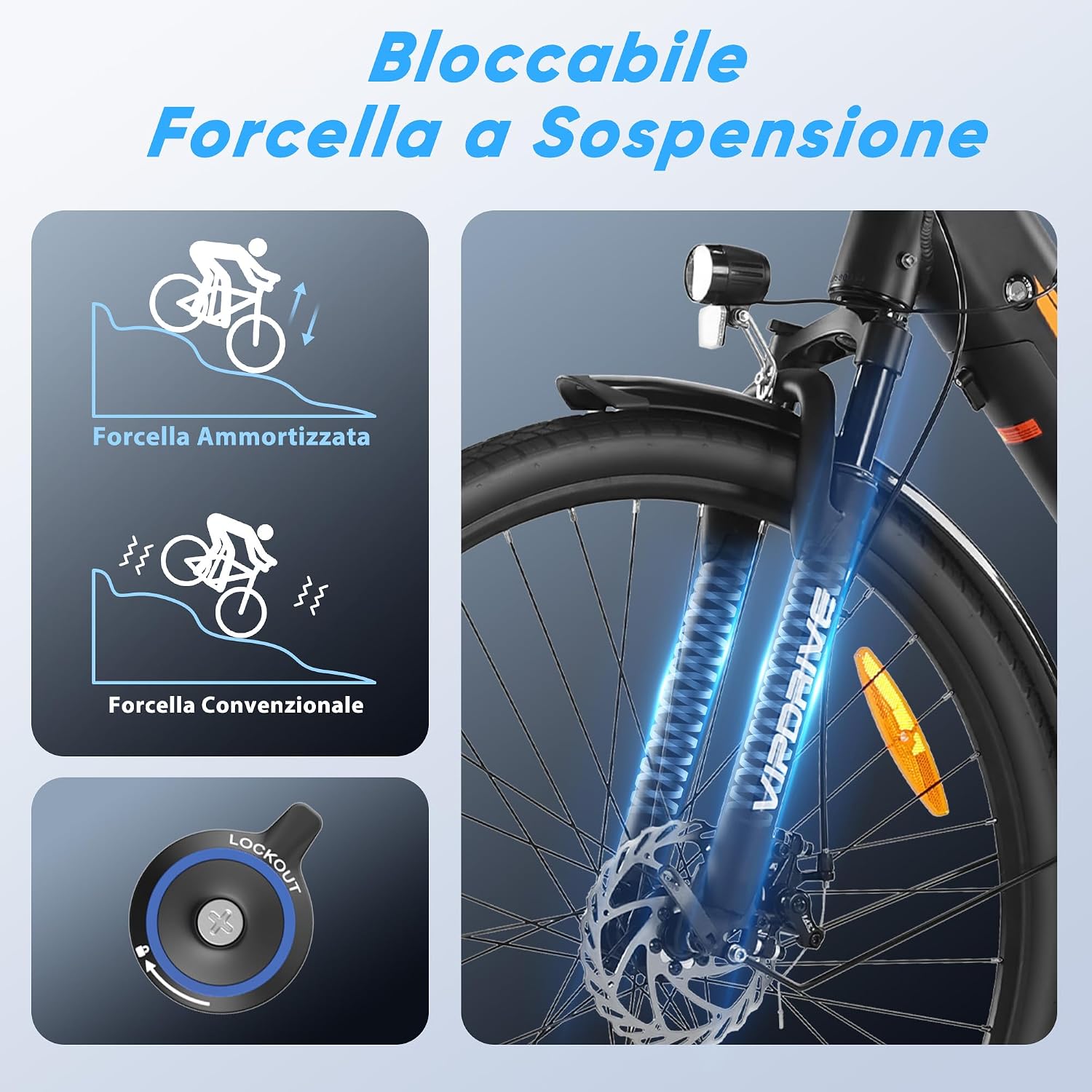
Image: The lockable front suspension fork, designed to reduce vibrations for a comfortable ride.
7.6 Fenders and Storage
The front and rear fenders help protect against splashes. The robust rear rack with elastic straps provides convenient storage for transporting goods.

Image: Front and rear fenders for protection against splashes.

Image: The robust rear rack and potential for additional storage accessories.
8. Troubleshooting
This section addresses common issues you might encounter with your Vipdrive NAVIGATOR 1.2 e-bike.
| Problem | Possible Cause | Solution |
|---|---|---|
| E-bike does not power on | Battery low or not installed correctly; loose connections; power button issue. | Charge battery fully; ensure battery is locked in place; check all cable connections; contact support if issue persists. |
| Motor not assisting | PAS level set to 0; brake levers engaged; motor connection issue. | Increase PAS level; ensure brake levers are fully released; check motor cable connections. |
| Short battery range | Under-inflated tires; heavy load; frequent use of high PAS levels; cold weather. | Inflate tires to recommended pressure; reduce load; use lower PAS levels; store battery in moderate temperatures. |
| Brakes feel weak | Worn brake pads; loose brake cables; air in hydraulic system (if applicable). | Inspect and replace brake pads; adjust brake cable tension; have brakes serviced by a professional. |
For issues not listed here or if solutions do not resolve the problem, please contact Vipdrive customer support.
9. Specifications
Key technical specifications for the Vipdrive NAVIGATOR 1.2 Electric Bicycle:
| Feature | Specification |
|---|---|
| Model | NAVIGATOR 1.2 |
| Dimensions (L x W x H) | 188 x 63 x 126 cm |
| Item Weight | 36.4 kg |
| Frame Material | 6061 Aluminum Alloy |
| Wheel Size | 28 inches |
| Motor | Efficient Brushless Motor (250W) |
| Max Speed (Default) | 25 km/h |
| Torque | 62 Nm |
| Battery | 48V 15Ah Removable Lithium Battery (250 Watt-hours) |
| Range | 40-100 km (depending on mode) |
| Charging Time | 4-6 hours |
| Gears | 7-Speed Shifter |
| Suspension | Lockable Front Suspension |
| Display | Smart LCD Display with USB Charging Port |
| Recommended Rider Height | 168 cm - 198 cm |
| Max Load Capacity | 120 kg |

Image: Key dimensions and specifications of the Vipdrive NAVIGATOR 1.2 electric bicycle.

Image: The 250W powerful brushless motor and its performance metrics.
10. Warranty and Support
The Vipdrive NAVIGATOR 1.2 Electric Bicycle comes with a limited warranty of up to one year. The specific warranty period for each component is detailed in the full user manual. For warranty claims, technical assistance, or any questions regarding your e-bike, please do not hesitate to contact Vipdrive customer support. We are committed to providing satisfactory solutions.
An installation video is available on the product page for additional assembly guidance.


