
VIHELM BLE-C600
BLE-C600 WaterQuality Pen 7 in 1 PH/EC/TDS/ORP/Salt S.G/Temp Meter
Model: BLE-C600
Product Overview
The VIHELM BLE-C600 is a versatile 7-in-1 water quality testing pen designed for comprehensive analysis. It accurately measures pH, EC (Electrical Conductivity), TDS (Total Dissolved Solids), ORP (Oxidation-Reduction Potential), Salinity, Specific Gravity (S.G), and Temperature. This intelligent control tester features Bluetooth connectivity for seamless integration with a mobile app, allowing for real-time data monitoring, storage, and analysis.

The BLE-C600 Water Quality Pen, a compact and portable device for multi-parameter testing.

The BLE-C600 pen shown partially submerged in water, demonstrating its intended use for liquid testing.
Key Features:
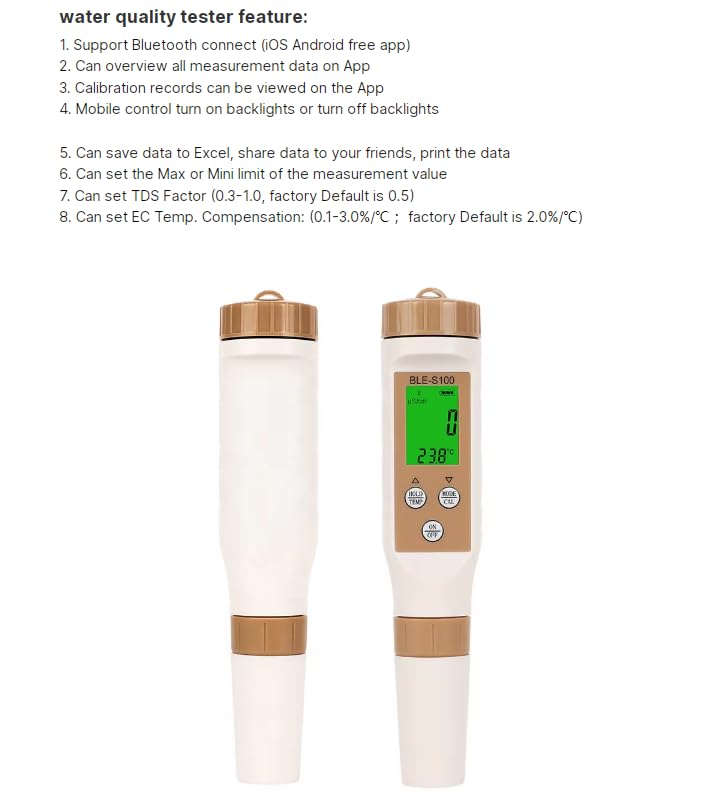
- Multi-Function Meter: Measures PH, EC, TDS, ORP, SALT, S.G, and Temperature.
- Bluetooth Connectivity: Connects to a mobile app for intelligent control and data management.
- Cloud-Based Data Management: Real-time Bluetooth data transmission, synchronized save time and data record, and data sharing.
- Automatic Calibration: Supports high-sensitive replaceable probe and easy automatic calibration with two sets of calibration points.
- Automatic Temperature Compensation (ATC): Ensures accurate readings across varying temperatures (0-60.0°C / 32-140.0°F).
- High Accuracy: Features a high-accuracy algorithm chip and electrode for precise measurements.
- LCD Display: Backlit display for clear readings, with support for English language.
- Data Hold & Save: One-key lock reading function, automatic/manual data saving, and export to Excel.
Setup
Battery Installation:
The BLE-C600 uses 3*1.5V button batteries. To install or replace batteries, unscrew the top cap of the pen. Insert the batteries according to the polarity markings. Securely screw the cap back on.

Diagram showing the 3*1.5V button battery compartment and other key components of the BLE-C600, including the backlit display, data hold/temperature unit conversion key, function conversion/calibration key, ON/OFF key, and high-precision probe.
App Download and Bluetooth Connection:
The BLE-C600 requires a mobile application for full functionality. Follow these steps to download and connect:
- Scan the QR code corresponding to your mobile operating system (Android or iOS) to download the app.
- Turn on the Bluetooth function on the BLE-C600 pen. After the water quality pen is turned on, there is no Bluetooth logo, and it cannot connect to Bluetooth. You need to press and hold the power button for 5 seconds, and then you can connect to Bluetooth after the Bluetooth logo appears.
- Turn off the Bluetooth function. After turning on the Bluetooth standard, press the power button for 5 seconds to turn off the Bluetooth function.
QR codes for downloading the companion app for Android and iOS devices. The Android app can be found at http://www.zghuiquan.com/app/yinmik.apk and the iOS app at https://apps.apple.com/us/app/yinmik/id1590106540.
Operating Instructions
Basic Operation:
- ON/OFF Key: Press to turn the device on or off.
- HOLD/TEMP Key: Press to hold the current reading. Long press to switch between temperature units (°C/°F).
- MODE/CAL Key: Press to cycle through different measurement modes (PH, EC, TDS, ORP, SALT, S.G). Long press to enter calibration mode.
Measurement Process:
- Ensure the probe is clean and dry before use.
- Turn on the device.
- Immerse the probe into the liquid to be tested. Ensure the liquid covers the electrode.
- Wait for the reading to stabilize on the display.
- Press the HOLD key to lock the reading if desired.
- Record the measurement or view it in the mobile app.
- Rinse the probe with distilled water after each use and cap it.
App Features and Data Management:
The mobile app provides enhanced control and data analysis capabilities:
- View All Measurement Data: Overview all parameters on the app interface.
- Calibration Records: View past calibration data.
- Mobile Control: Turn on/off backlights directly from the app.
- Data Saving & Sharing: Save data automatically or manually. Export saved data to Excel and share with others.
- Set Max/Min Limits: Define upper and lower limits for measurements. If a test result exceeds the range, the value will be displayed in red.
- Set TDS Factor: Adjust the TDS conversion factor (0.3-1.0, factory default is 0.5).
- Set EC Temp. Compensation: Adjust the EC temperature compensation (0.1-3.0%/°C, factory default is 2.0%/°C).
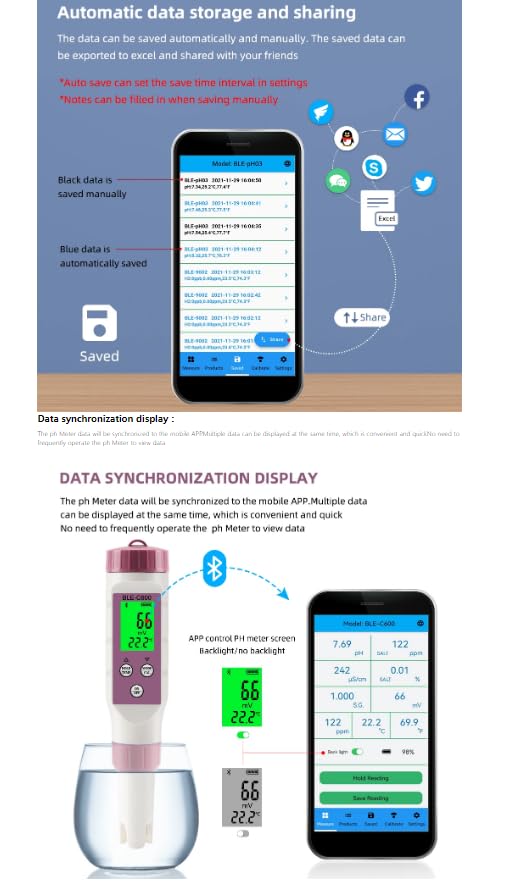
The app interface demonstrating automatic and manual data saving, with options to export to Excel and share via various platforms. Black data is saved manually, blue data is automatically saved.
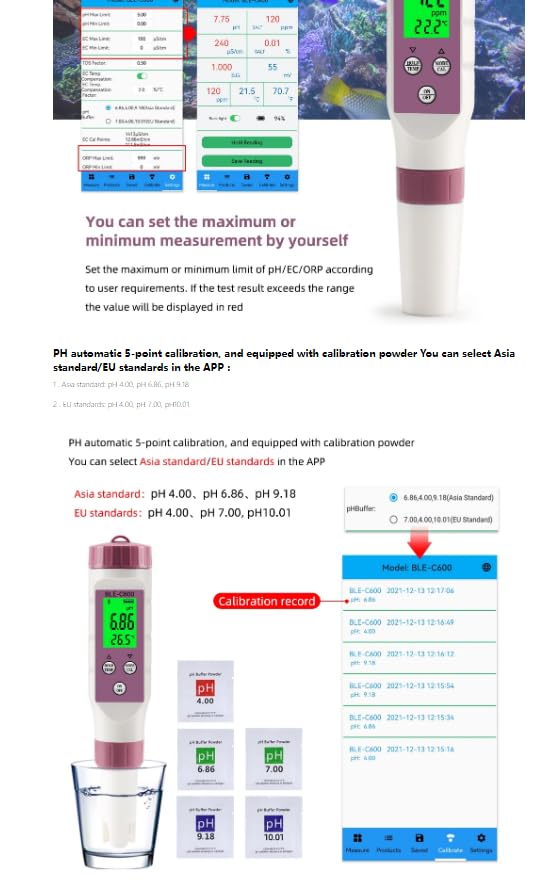
Illustration of data synchronization between the BLE-C600 meter and the mobile app, showing real-time display of measurements.
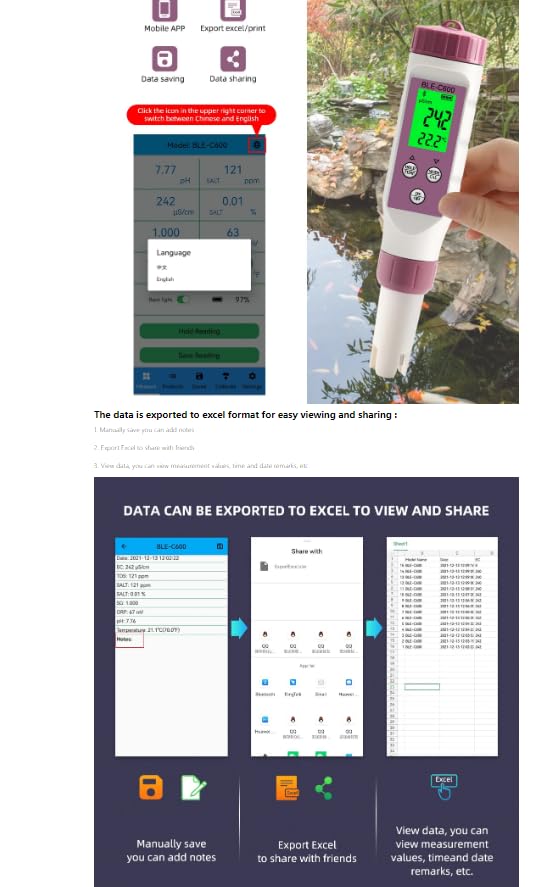
The BLE-C600 undergoing pH calibration with standard buffer solutions (pH 4.00, 6.86, 9.18, 7.00, 10.01). The image also shows the calibration record within the app, detailing past calibration dates and values.
Calibration:
The BLE-C600 supports automatic 5-point pH calibration using standard buffer solutions. You can select between Asia standard (pH 4.00, 6.86, 9.18) and EU standards (pH 4.00, 7.00, 10.01) within the app.
- Prepare the required calibration buffer solutions.
- Clean the probe with distilled water and dry it.
- Long press the MODE/CAL key to enter calibration mode.
- Follow the on-screen instructions in the app to immerse the probe in each buffer solution sequentially. The device will automatically recognize the buffer and calibrate.
- Once calibration is complete, rinse the probe and store it properly.
Maintenance
Probe Care:
- Always rinse the electrode with distilled or deionized water before and after each use to prevent contamination and ensure accuracy.
- Do not touch the electrode glass bulb with your fingers.
- If the electrode becomes dry, soak it in electrode storage solution or pH 4.0 buffer for at least 30 minutes before use.
Storage:
- Store the meter with the protective cap on, ensuring the sponge inside the cap is moist with electrode storage solution or a few drops of pH 4.0 buffer.
- Store in a cool, dry place away from direct sunlight.
Battery Replacement:
When the low battery warning appears on the display, replace the 3*1.5V button batteries as described in the Setup section.
Troubleshooting
- No Display/Power On: Check battery installation and ensure batteries are not depleted.
- Inaccurate Readings:
- Ensure the probe is clean.
- Perform a calibration.
- Check if the electrode is damaged or dry.
- Bluetooth Connection Issues:
- Ensure Bluetooth is enabled on both the meter (long press power button for 5 seconds) and your mobile device.
- Make sure the app is installed and running.
- Restart both the meter and your mobile device.
- Data Not Saving/Exporting: Ensure the app has necessary permissions to access storage on your device.
Specifications

Detailed specifications for the BLE-C600 Water Quality Pen, including measurement ranges and physical dimensions.
| Parameter | Range |
|---|---|
| Model | BLE-C600 |
| PH | 0.00-14.00 |
| TEMP | 0.1-60.0°C; 32.1-140.0°F |
| ORP | -999mV ~ +999mV |
| S.S.G | 1.000-1.222 |
| EC | 0-9999 us/cm; 10.01-19.99 ms/cm; 20.1-400.0 ms/cm |
| SALT | 0.01-25.00%; 0-9999 ppm; 10.01-200.0 ppt |
| TDS | 0-9999 ppm; 10.01-200.0 ppt |
| ATC (Automatic Temperature Compensation) | 0-60.0°C; 32.0-140.0°F |
| Work Environment | 0.1°C-80.0°C; RH: max 90% |
| Waterproof Grade | IP67 |
| Size | 187mm*37mm (7.36*1.46*1.46in) |
| Power Supply Mode | 3*1.5 V battery (not included), low battery warning |
| Weight | 95g |
What's in the Box:
- 1 x BLE-C600 Bluetooth Salinity/PH/TDS/EC/ORP/Seawater Specific Gravity/Temperature Water Quality Pen
Warranty and Support
For any technical assistance or warranty inquiries, please contact VIHELM customer support through the retailer where the product was purchased. Keep your purchase receipt as proof of purchase.
Ask a question about this manual
Ask about setup, troubleshooting, compatibility, parts, safety, or missing instructions. Manuals+ will review the question and use this page’s manual context to help answer it.