
Introduction
Thank you for choosing the TIMEMOON 2026 Digital Clock. This plug-in clock is designed for clear readability, featuring a large-font display suitable for the elderly and individuals with visual needs. It includes essential functions such as time, date, month, and year display, multiple alarm settings, and automatic Daylight Saving Time (DST) adjustment. This manual provides detailed instructions for setup, operation, and maintenance to ensure optimal performance.

Image: The TIMEMOON 2026 Digital Clock, 10 Inch Black, displaying time and date.
Setup
- Unpacking: Carefully remove the clock and all accessories from the packaging.
- Power Connection: This clock requires a continuous power supply. Plug the provided power adapter into the clock's power input port and then into a standard electrical outlet. Note: The clock is not battery-powered for operation but has a memory function.
- Initial Power-On: Once plugged in, the clock will power on automatically.
- Memory Function: The clock features a power outage memory function. All settings (time, alarms, etc.) are retained even after a power interruption, eliminating the need for re-setting when power is restored.
- Automatic DST Adjustment: The clock is equipped with automatic Daylight Saving Time (DST) adjustment. Ensure this feature is enabled in the settings for automatic time changes.

Image: The digital clock showing its plug-in requirement and automatic DST adjustment feature.
Operating Instructions
1. Time Display Modes
The clock offers three distinct time display modes to suit various preferences:
- Classic Digital Clock: Displays time in a traditional digital format, ideal for general use.
- Colorful Clock: Features a multi-color display to differentiate between the week, time, and date, enhancing visual appeal and readability.
- Wall Clock (Imitation Pointer): Presents time with an imitation analog pointer display, offering a classic aesthetic suitable for room decoration.
Video: Demonstrates the various display themes and how to change them, including the option to display personal photos from an SD card.
2. Alarm Settings
The clock supports multiple alarms for daily reminders:
- 12 Daily Alarms: Set up to 12 daily alarms for various activities such as meals, appointments, exercises, feeding pets, or drinking water.
- 3 Medication Reminders: Dedicated settings for 3 groups of medication reminders. Each alarm can be set to repeat or be a one-time event.
Refer to the on-screen menu for detailed instructions on setting and managing alarms. Press any button on the clock to stop an active alarm.

Image: Visual representation of the 12 daily alarm functions and 3 medication reminder settings.
3. Automatic Dimming and Brightness Settings
The screen brightness can be configured in two ways:
- Automatic Dimming Mode: The clock automatically adjusts screen brightness between day and night based on the time. Typically, it brightens from 7:00 AM to 6:59 PM and dims from 7:00 PM to 6:59 AM.
- Fixed Brightness: You can manually set a fixed brightness level (Low, Mid, High) to suit specific lighting conditions or personal preference.
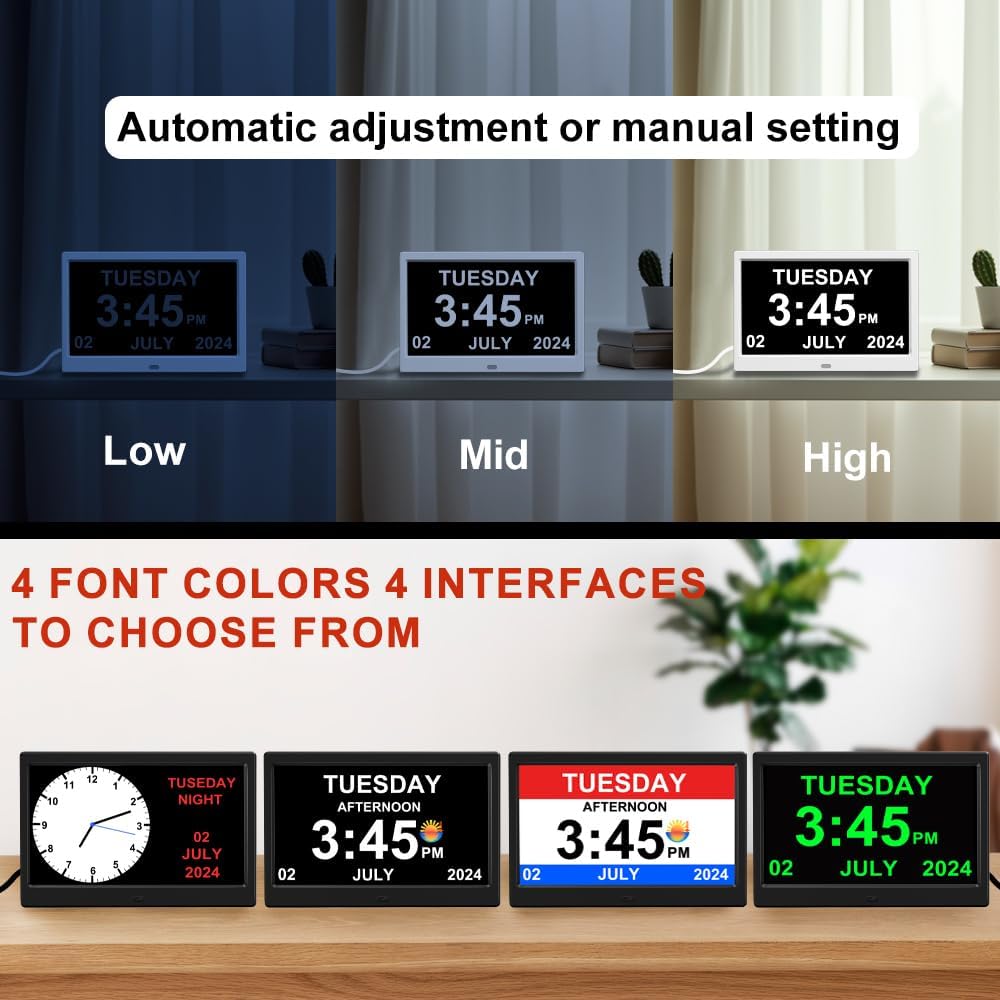
Image: The clock displaying different brightness levels (Low, Mid, High) and various font color options.
4. Language Settings
The clock supports 10 built-in system languages:
- English
- German
- Spanish
- Portuguese
- French
- Italian
- Dutch
- Czech
- Polish
- Swedish
Navigate through the settings menu to select your preferred language.

Image: Flags representing the 10 supported languages for the clock's interface.
5. Font Color Options
In the classic digital clock mode, you can customize the font color for enhanced visibility. Available colors include:
- White (Default)
- Yellow
- Red
- Green
These options are particularly beneficial for users with specific visual needs.
Maintenance
- Cleaning: Use a soft, dry cloth to clean the screen and casing. Avoid abrasive cleaners or solvents that may damage the surface.
- Placement: Place the clock on a stable, flat surface or mount it securely on a wall. Avoid direct sunlight or extreme temperatures.
- Power Supply: Ensure the clock is always connected to a stable power source.
Troubleshooting
| Problem | Possible Cause | Solution |
|---|---|---|
| Clock does not power on. | No power supply or faulty adapter. | Ensure the power adapter is securely plugged into both the clock and a working electrical outlet. Test the outlet with another device. |
| Time is incorrect after a power outage. | Memory function failure (rare) or prolonged power loss. | The clock has a memory function. If the time is incorrect, manually adjust it through the settings menu. |
| DST not adjusting automatically. | Automatic DST setting is disabled. | Access the settings menu and ensure the "Automatic DST Adjustment" feature is enabled. |
| Alarms are not sounding. | Alarm volume is too low or alarm is disabled. | Check the alarm settings to ensure they are enabled and the volume is set to an audible level. |
| Screen is too bright/dim. | Brightness settings need adjustment. | Adjust the brightness settings in the menu. Switch between automatic dimming mode and fixed brightness levels as needed. |
Specifications
| Feature | Detail |
|---|---|
| Brand | TIMEMOON |
| Model Number | TMN-CL-0 |
| Display Type | Digital |
| Screen Size | 10 inches |
| Product Dimensions | 9.7"W x 6.4"H |
| Item Weight | 1.2 pounds |
| Power Source | Corded Electric (Plug-in, No Battery) |
| Special Features | Adjustable Volume, Alarm, Auto Dimmable, Loud Alarm, Night Mode, Power Outage Memory, Automatic DST Adjustment |
| Languages Supported | English, German, Spanish, Portuguese, French, Italian, Dutch, Czech, Polish, Swedish |
| Material Type | Acrylonitrile Butadiene Styrene (ABS) |
| Mounting Type | Tabletop |

Image: The clock displaying its physical dimensions and the flags of supported languages.
Warranty and Support
This product comes with a Limited Warranty. For specific details regarding the warranty period and coverage, please refer to the documentation included with your purchase or contact TIMEMOON customer support.
For technical assistance, troubleshooting, or any inquiries, please contact TIMEMOON customer support through the retailer's platform or the official TIMEMOON website. Please have your model number (TMN-CL-0) and purchase information ready when contacting support.
Manufacturer: TIMEMOON