
1. Introduction
Thank you for choosing the Walfront Ultrasonic Water Tank Level Sensor. This device is designed to monitor liquid levels and temperatures in water tanks, providing real-time data on a digital display. It features a wireless transmitter with solar charging and a receiver unit for indoor monitoring. Please read this manual carefully before installation and operation to ensure correct usage and optimal performance.
Package Contents
- 1 x Receiver Unit
- 1 x Transmitter Unit
- 1 x Charging Cable (USB)
- 3 x Mounting Screws
- 1 x User Manual (this document)

2. Safety Information
- Do not attempt to disassemble or repair the device yourself. Refer to qualified personnel for service.
- Ensure the transmitter is installed securely to prevent accidental falls.
- Keep the receiver unit away from water or excessive moisture.
- Use only the specified power sources (AAA batteries or DC 5V for receiver, built-in NiMH for transmitter).
- Dispose of batteries according to local regulations.
3. Product Features
- Wireless Transmission: Cordless sensor with an open transmission distance of approximately 100m (328.1ft) and an effective distance of approximately 30m (98.4ft) at 433Hz.
- Digital Display: 4.3-inch LCD screen with backlight for clear readability.
- Water Level Monitoring: Measures water level depth from 1m to 5m (3.3ft to 16.4ft) with 0.01m resolution. Displays water level on a 10-element LCD bar graph.
- Temperature Monitoring: Displays indoor temperature (0℃-50℃ / 32℉-122℉) and water tank temperature (-40℃-60℃ / -40℉-140℉) with 0.1℃ resolution.
- Alarm Functions: High and low water level alarms with adjustable settings and a 120-second buzzer duration. Alarm sound can be toggled on/off.
- Time Display: 12H/24H time format with an alarm clock function.
- Power Supply: Receiver powered by 3 x AAA batteries (not included) or DC 5V cable. Transmitter powered by 6 x AAA NiMH batteries (built-in, 900mAh each) with a solar panel for automatic recharging.
- Durability: Transmitter has an IP65 protecting grade, offering effective guard against rain.


4. Components Overview
4.1 Receiver Unit
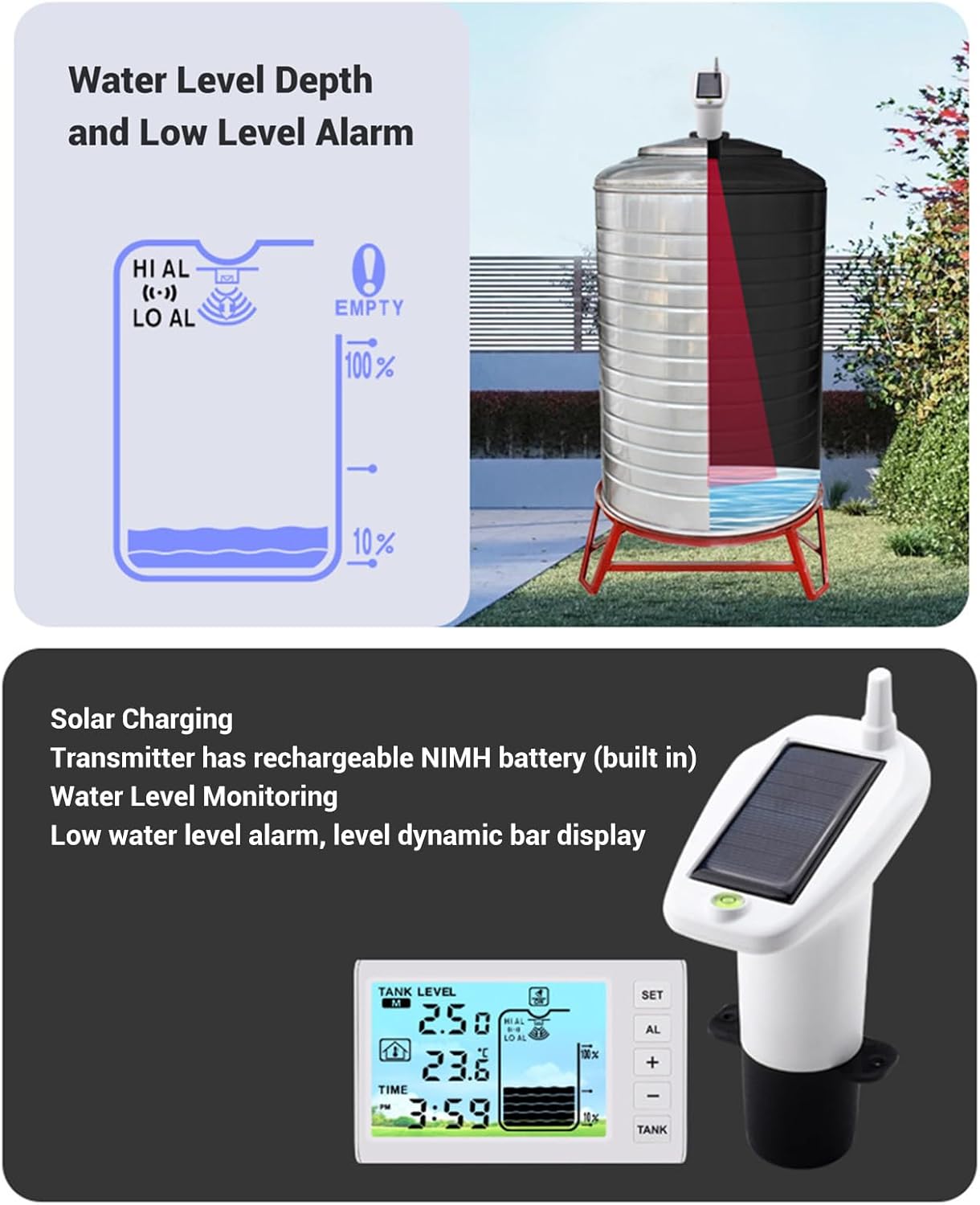
The receiver unit is the indoor display and control center. It shows water tank level, indoor temperature, tank temperature, time, and alarm status. It is powered by AAA batteries or a DC 5V power cable.
4.2 Transmitter Unit
The transmitter unit is installed on top of the water tank. It uses ultrasonic technology to measure the liquid depth and wirelessly sends this data, along with tank temperature, to the receiver. It features a solar panel for continuous recharging of its built-in NiMH batteries and has an IP65 waterproof rating.

5. Setup and Installation
5.1 Receiver Power-Up
- Insert 3 x AAA batteries (not included) into the battery compartment on the back of the receiver, observing polarity. Alternatively, connect a DC 5V power cable to the receiver.
- The receiver display will power on.
5.2 Transmitter Installation
- Ensure the transmitter's built-in 6 x AAA NiMH batteries are charged. The solar panel will automatically recharge them when exposed to sunlight.
- Install the transmitter unit in the center of the top of your water tank. Ensure the solar panel faces a sunny direction for optimal charging.
- The transmitter should be positioned so that the ultrasonic sensor has a clear, unobstructed path to the liquid surface. Avoid placing it near inlets or outlets where water turbulence might occur.
5.3 Initial Configuration
- Step 1: Set Tank Depth. After powering the receiver, press the 'SET' button to enter the tank depth setting mode. The default display is 0.50m. Adjust the value using the '+' and '-' buttons to match your tank's actual depth (Setting Range: 0.5m - 5m / 1.64ft - 16.4ft).
- Step 2: Set Air Gap Value. Press 'SET' again to set the air gap value (distance from the top of the tank to the maximum liquid level). The default display is 0.50m. Adjust this value using the '+' and '-' buttons.
- Step 3: Confirm Transmitter Connection. Once the transmitter is installed and powered, the receiver should automatically detect it and begin displaying water level and temperature data.


6. Operation
6.1 Display Functions
The receiver's 4.3-inch LCD screen displays various information:
- Tank Level: Shows the current liquid depth in meters or feet, and a 10-element bar graph indicating percentage.
- Indoor Temperature: Displays the ambient temperature around the receiver.
- Water Tank Temperature: Displays the temperature of the liquid in the tank.
- Time: Current time in 12H or 24H format.
- Alarm Indicators: Icons for high (HI AL) and low (LO AL) water level alarms.
- Low Battery Reminder: For the transmitter.
6.2 Button Functions
- SET: Enters setting modes (tank depth, air gap, time, alarm).
- AL: Accesses alarm settings.
- +: Increases values or navigates up in settings.
- -: Decreases values or navigates down in settings.
- TANK: Toggles between water level display units (meters/feet) or other tank-related settings.
6.3 Setting Alarms
The device supports high and low water level alarms. When the water level exceeds or falls below the set thresholds, an audible alarm will sound for 120 seconds.
- Press the 'AL' button to enter alarm setting mode.
- Use the '+' and '-' buttons to adjust the high water level alarm threshold.
- Press 'AL' again to set the low water level alarm threshold.
- Press 'SET' to confirm and exit alarm settings.
- The alarm sound can be toggled on or off through the settings menu (default is on).

7. Maintenance
- Cleaning: Wipe the receiver and transmitter with a soft, dry cloth. Do not use abrasive cleaners or solvents.
- Transmitter Solar Panel: Ensure the solar panel on the transmitter is kept clean and free of debris to maintain efficient charging.
- Battery Replacement (Receiver): Replace AAA batteries in the receiver when the low battery indicator appears on the display.
- Transmitter Battery: The transmitter's NiMH batteries are built-in and recharged by the solar panel. If the transmitter consistently shows low battery despite adequate sunlight, contact support.
8. Troubleshooting
- No Display on Receiver: Check if AAA batteries are correctly inserted and charged, or if the DC 5V power cable is properly connected.
- No Water Level Reading: Ensure the transmitter is powered on and correctly installed on the tank. Verify that the receiver and transmitter are within effective transmission range (approx. 30m). Check for obstructions between the transmitter and the liquid surface.
- Inaccurate Readings: Re-verify the tank depth and air gap settings in the receiver. Ensure the transmitter is centrally located and stable on the tank.
- Transmitter Low Battery Warning: Ensure the solar panel is clean and receiving sufficient direct sunlight.
- Alarm Not Sounding: Check if the alarm sound is enabled in the receiver settings.
9. Specifications
| Parameter | Specification |
|---|---|
| Item Type | Ultrasonic Level Sensor |
| Material | ABS |
| Receiver Power Supply | 3 x AAA Battery (not included) or DC 5V Power Cable |
| Transmitter Power Supply | 6 x AAA NiMH Battery (built-in, 900mAh each) with Solar Panel |
| Receiver Indoor Temperature Range | 0℃-50℃ (32℉-122℉) |
| Transmitter Water Tank Temperature Range | -40℃-60℃ (-40℉-140℉) |
| Temperature Resolution | 0.1℃ |
| Temperature Accuracy | ±1℃ |
| Water Level Measurement Range | Approx. 1-5m (3.3-16.4ft) |
| Water Level Resolution | 0.01m |
| Water Level Accuracy | ±0.05m |
| Transmitter Protecting Grade | IP65 |
| Transmitting Frequency | 433Hz |
| Open Distance (Wireless) | Approx. 100m (328.1ft) |
| Effective Distance (Wireless) | Approx. 30m (98.4ft) |
| Screen Size | 4.3 inch |
| Product Dimensions | 8.27 x 4.72 x 3.94 inches |
| Item Weight | 14.8 ounces |
10. Warranty and Support
This product is covered by a standard manufacturer's warranty. For specific warranty terms and conditions, please refer to the documentation provided at the time of purchase or contact your retailer. For technical support, troubleshooting assistance, or inquiries about replacement parts, please contact Walfront customer service through your purchase platform or the official Walfront website.