
1. Introduction
Thank you for choosing the INGCO CIDLI20558 20V Brushless Impact Drill. This manual provides essential information for the safe and effective operation, maintenance, and troubleshooting of your new tool. Please read this manual thoroughly before first use and keep it for future reference. This drill is designed for drilling into wood, metal, plastic, and masonry, as well as for driving screws.
2. Safety Instructions
Always observe basic safety precautions to reduce the risk of fire, electric shock, and personal injury.
2.1 General Power Tool Safety
- Work Area Safety: Keep your work area clean and well-lit. Cluttered or dark areas invite accidents. Do not operate power tools in explosive atmospheres, such as in the presence of flammable liquids, gases, or dust.
- Electrical Safety: Power tool plugs must match the outlet. Never modify the plug in any way. Avoid body contact with earthed or grounded surfaces such as pipes, radiators, ranges, and refrigerators.
- Personal Safety: Always wear eye protection. Use personal protective equipment such as dust masks, non-skid safety shoes, hard hats, or hearing protection when appropriate. Dress properly; avoid loose clothing or jewelry.
2.2 Drill Specific Safety
- Secure Workpiece: Always secure the workpiece firmly. Holding it by hand can lead to loss of control and injury.
- Proper Grip: Maintain a firm grip on the drill, especially during start-up and when drilling through tough materials.
- Avoid Overreaching: Keep proper footing and balance at all times.
- Check for Hidden Obstructions: Before drilling into walls, floors, or ceilings, check for hidden electrical wires, gas pipes, or water pipes.
- Bit Changes: Ensure the tool is switched off and the battery is removed before changing drill bits or accessories.
3. Package Contents
Carefully unpack your INGCO CIDLI20558 Impact Drill and verify that all items are present and in good condition. If any items are missing or damaged, please contact your retailer.
- 1 x INGCO CIDLI20558 20V Brushless Impact Drill
- 2 x 20V 2.0Ah Li-Ion Batteries
- 1 x 220-240V Charger
- 3 x Masonry Drill Bits
- 1 x 47-piece Accessory Set (various bits, screws)
- 1 x Carrying Case

Image 3.1: The INGCO CIDLI20558 Impact Drill kit, including the drill, batteries, charger, and accessories, neatly organized within its durable carrying case.

Image 3.2: All components of the INGCO CIDLI20558 kit, including the drill, two batteries, charger, masonry drill bits, and the 47-piece accessory set, displayed outside the carrying case.
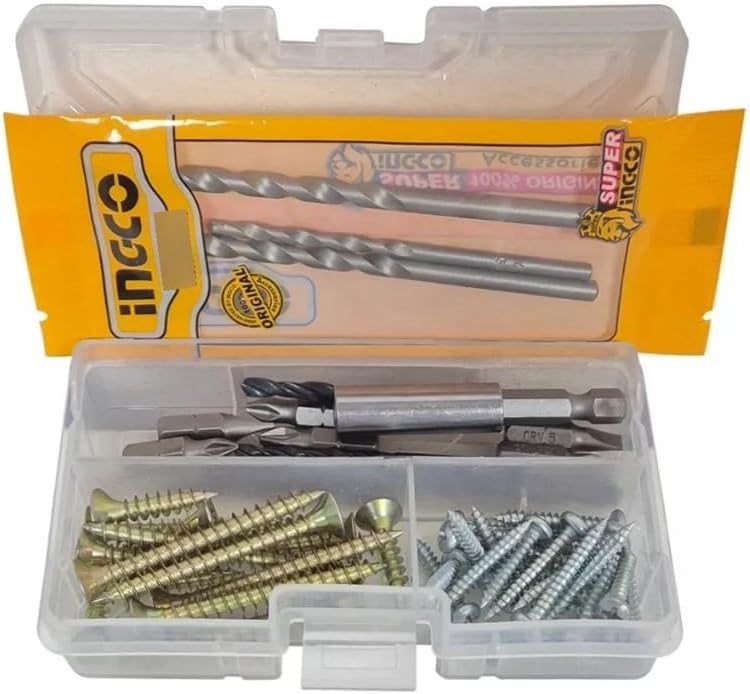
Image 3.3: A close-up view of the 47-piece accessory set, featuring various screwdriver bits, drill bits, and fasteners, provided with the INGCO Impact Drill.
4. Product Overview
Familiarize yourself with the different parts of your INGCO CIDLI20558 Impact Drill before operation.

Image 4.1: The INGCO CIDLI20558 Impact Drill with an attached battery, alongside masonry drill bits and a box of accessories. This image highlights the main components of the tool and its included items.

Image 4.2: Detailed view of the INGCO CIDLI20558 Impact Drill, showing the 13mm keyless chuck and the mode selector switch located near the trigger, indicating the forward/reverse function.
Key Components:
- 13mm Keyless Chuck: For quick and easy bit changes.
- Torque Adjustment Ring: Selects the desired torque setting (22+1+1 positions).
- Mode Selector: Switches between drilling, impact drilling, and driving modes.
- 2-Speed Selector: Adjusts the gear speed (Low/High).
- Forward/Reverse Switch: Changes the rotation direction.
- Trigger Switch: Activates the drill and controls speed.
- LED Work Light: Illuminates the work area.
- Battery Pack: 20V Li-Ion power source.
- Battery Status Indicator: Displays remaining battery charge.
- Spindle Lock Function: Allows for manual tightening of the chuck.
5. Setup
5.1 Battery Charging
The 20V Li-Ion batteries are not fully charged upon delivery. It is recommended to fully charge them before first use.
- Connect the charger to a standard 220-240V AC power outlet.
- Slide the battery pack onto the charger until it clicks into place.
- The charger indicator light will show the charging status. Refer to the charger's manual for specific light indications.
- Once fully charged, disconnect the battery from the charger and unplug the charger from the power outlet.
Note: Do not charge damaged batteries. Do not expose batteries to extreme temperatures or moisture.
5.2 Battery Installation and Removal
- Installation: Align the battery pack with the base of the drill handle and slide it in until it locks securely into place.
- Removal: Press the battery release button (usually located on the sides of the battery pack) and slide the battery out of the drill handle.
5.3 Accessory Installation (Drill Bits/Screwdriver Bits)
- Ensure the drill is switched off and the battery is removed.
- Rotate the chuck counter-clockwise to open the jaws.
- Insert the desired drill bit or screwdriver bit into the chuck, ensuring it is centered.
- Rotate the chuck clockwise to tighten the jaws firmly around the bit. For extra security, use the spindle lock function to hold the chuck while tightening.
- To remove, reverse the process.
6. Operating Instructions
6.1 Powering On/Off and Speed Control
- To start the drill, press the trigger switch.
- The speed is variable and controlled by the pressure applied to the trigger switch. Pressing lightly results in lower speed, while pressing fully increases the speed.
- To stop the drill, release the trigger switch.
6.2 Forward/Reverse Rotation
The forward/reverse switch, located above the trigger, controls the direction of rotation.
- Push the switch to the left for forward rotation (for drilling and driving screws).
- Push the switch to the right for reverse rotation (for removing screws or freeing jammed bits).
- When the switch is in the center position, the trigger is locked, preventing accidental start-up.
6.3 2-Speed Adjustment
The 2-speed selector switch is located on top of the drill housing.
- Position 1 (Low Speed): Provides higher torque for driving screws and drilling larger holes in softer materials. (0-500 rpm)
- Position 2 (High Speed): Provides higher speed for drilling smaller holes in wood, metal, and plastic. (0-2000 rpm)
Caution: Do not change the speed setting while the drill is running.
6.4 Torque Settings and Mode Selection
The torque adjustment ring allows you to select the appropriate torque for driving screws or switch to drilling/impact drilling modes.
- Torque Settings (1-22): Use these settings for driving screws. The lower the number, the lower the torque, preventing overtightening or stripping screw heads. Start with a lower setting and increase as needed.
- Drilling Mode (Drill Bit Symbol): For general drilling into wood, metal, and plastic. The clutch is disengaged, providing maximum torque.
- Impact Drilling Mode (Hammer Symbol): For drilling into masonry and concrete. This mode combines rotation with a hammering action.
6.5 LED Work Light and Battery Status Indicator
- The integrated LED work light automatically illuminates the work area when the trigger is pressed.
- The battery status indicator, usually located on the battery pack or the drill, shows the remaining charge level. Refer to the indicator lights to determine when recharging is necessary.
7. Maintenance
Regular maintenance ensures the longevity and optimal performance of your drill.
7.1 Cleaning
- Always disconnect the battery before cleaning.
- Keep the ventilation openings of the drill clean to prevent overheating. Use a soft brush or compressed air to remove dust and debris.
- Wipe the tool housing with a damp cloth. Do not use harsh chemicals or abrasive cleaners.
7.2 Battery Care and Storage
- Store batteries in a cool, dry place, away from direct sunlight and extreme temperatures.
- For long-term storage, charge batteries to approximately 50-70% capacity.
- Do not store batteries with metal objects that could short-circuit the terminals.
7.3 General Inspection
- Regularly inspect the power cord of the charger for damage.
- Check the chuck for wear or damage.
- Ensure all screws are tight.
8. Troubleshooting
This section addresses common issues you might encounter with your drill.
| Problem | Possible Cause | Solution |
|---|---|---|
| Drill does not start | Battery not charged or improperly installed; Forward/Reverse switch in center (locked) position; Faulty battery or tool. | Charge battery; Reinstall battery correctly; Move F/R switch to forward or reverse; Test with another battery if available; Contact service. |
| Loss of power during operation | Battery charge is low; Overload due to excessive pressure or wrong speed/torque setting. | Recharge battery; Reduce pressure; Select appropriate speed/torque setting. |
| Bit wobbles or falls out | Chuck not tightened properly; Bit shank is damaged or incorrect size. | Tighten chuck firmly; Inspect bit and replace if damaged or incorrect. |
| Overheating | Blocked ventilation slots; Continuous heavy use. | Clean ventilation slots; Allow tool to cool down; Reduce workload. |
9. Specifications
Technical data for the INGCO CIDLI20558 20V Brushless Impact Drill (Model: CRHLI201681).
| Feature | Specification |
|---|---|
| Model Number | CRHLI201681 |
| Voltage | 20 Volts |
| Motor Type | Brushless |
| Maximum Torque | 55 Newton Meters (Nm) |
| No-Load Speed (Gear 1) | 0-500 RPM |
| No-Load Speed (Gear 2) | 0-2000 RPM |
| Impact Rate | 30,000 BPM |
| Chuck Size | 13 mm Keyless Steel Chuck |
| Torque Settings | 22+1+1 (Drilling, Impact, Driving) |
| Battery Type | Lithium-Ion |
| Battery Capacity | 2.0 Ah (x2 included) |
| Weight (Item) | 209 g (tool only, approximate) |
| Dimensions (Product) | 10 x 20 x 37 cm (approximate) |
| Special Features | Battery Status Indicator, Brushless Motor, Spindle Lock Function, Working Light |
10. Warranty and Support
INGCO products are manufactured to high-quality standards. For information regarding warranty coverage, terms, and conditions, please refer to the warranty card included with your product or contact your local INGCO dealer or customer service. Keep your purchase receipt as proof of purchase.
For technical assistance, spare parts, or service, please contact the authorized INGCO service center in your region.


