1. Important Safety Instructions
Please read all instructions carefully before using this treadmill. Keep this manual for future reference. Failure to follow these instructions may result in injury or damage to the product.
- Always place the treadmill on a flat, stable surface.
- Ensure there is adequate clear space (at least 2 meters) behind the treadmill for safe operation.
- Keep children and pets away from the treadmill during operation.
- Do not exceed the maximum user weight capacity of 110 kg (242 lbs).
- Wear appropriate athletic footwear and clothing during use.
- If you feel faint, dizzy, or experience pain, stop exercising immediately.
- Unplug the treadmill from the power outlet when not in use or before cleaning/maintenance.
- Do not operate the treadmill if the power cord or plug is damaged.
2. Package Contents
Carefully unpack the box and ensure all items are present and in good condition. If any items are missing or damaged, please contact customer support.

This image illustrates the complete package contents, including the main treadmill unit, remote control, power cable, necessary wrenches, lubricant, and protective floor mats.
- TODO Electric Treadmill x1
- Remote Control x1
- Power Cable x1
- Wrenches x3
- Lubricant x1
- Floor Mats x2
3. Product Overview
The TODO Electric Treadmill is a compact and versatile walking pad designed for home and office use. It features a robust motor, adjustable incline, and smart connectivity for an enhanced workout experience.

This image provides an overall view of the TODO Electric Treadmill, highlighting its compact design, manual incline adjustment, remote control, and compatibility with fitness applications.
Key Features:
- Adjustable Incline: Features a 6% manual incline to simulate uphill walking and increase calorie burn.
- Speed Range: Supports speeds from 1 km/h to 6 km/h, suitable for walking and light jogging.
- App Connectivity: Compatible with popular fitness apps like Zwift and Kinomap, and the proprietary TOUSAINS app for real-time data tracking and control.
- Remote Control: A multifunctional remote allows for easy adjustment of speed and modes without interrupting your workout.
- LCD Display: Integrated display shows essential workout data including time, distance, speed, and calories burned.
- Compact Design: Armless and streamlined design for space-saving storage and natural movement.
- Quiet Motor: Equipped with a powerful yet quiet 2.5 HP motor, operating at less than 40dB.
- Shock Absorption: Features 6 silicone shock absorbers to reduce impact on joints.

This image highlights the treadmill's powerful and quiet motor, emphasizing its low noise level (less than 40dB), speed range, motor power, and maximum weight capacity.
4. Setup
The TODO Electric Treadmill requires no complex installation. It is designed for immediate use after unboxing.
- Unpack: Carefully remove the treadmill from its packaging.
- Placement: Place the treadmill on a flat, stable surface. Ensure sufficient clear space around the unit.
- Power Connection: Connect the power cable to the treadmill and then to a grounded electrical outlet.
- Initial Check: Before first use, ensure the running belt is centered and free of any obstructions.

This image demonstrates the treadmill's compact design and portability, showing how it can be easily stored under furniture and moved using its integrated wheels.

This image illustrates the treadmill's suitability for use under a desk, providing its compact dimensions for easy integration into a workspace.
5. Operating Instructions
5.1 Basic Operation
- Power On: Plug in the treadmill and press the power button located on the unit. The LCD display will illuminate.
- Start: Use the remote control to press the 'Start' button. The treadmill will begin at a low speed.
- Adjust Speed: Use the '+' and '-' buttons on the remote control to increase or decrease the speed.
- Stop: Press the 'Stop' button on the remote control to halt the treadmill.
- Power Off: Press the power button on the unit to turn off the treadmill and unplug it from the outlet.
5.2 Remote Control & LCD Display
The remote control allows for convenient adjustment of settings, while the LCD display provides real-time workout feedback.

This image illustrates the LED display and smart remote control, showing how users can monitor their workout metrics such as time, distance, speed, and calories burned.

This image details the remote control and smartphone app control features, including the ability to mute sound signals from the treadmill.
- Remote Functions: Power on/off, Start/Stop, Speed adjustment (+/-).
- LCD Display: Shows Time, Distance, Speed, and Calories burned.
- Automatic Recording: The treadmill automatically records exercise data when a user is on the belt. Recording pauses when no user is detected.
5.3 App Connectivity
Enhance your workout experience by connecting your treadmill to compatible fitness applications.
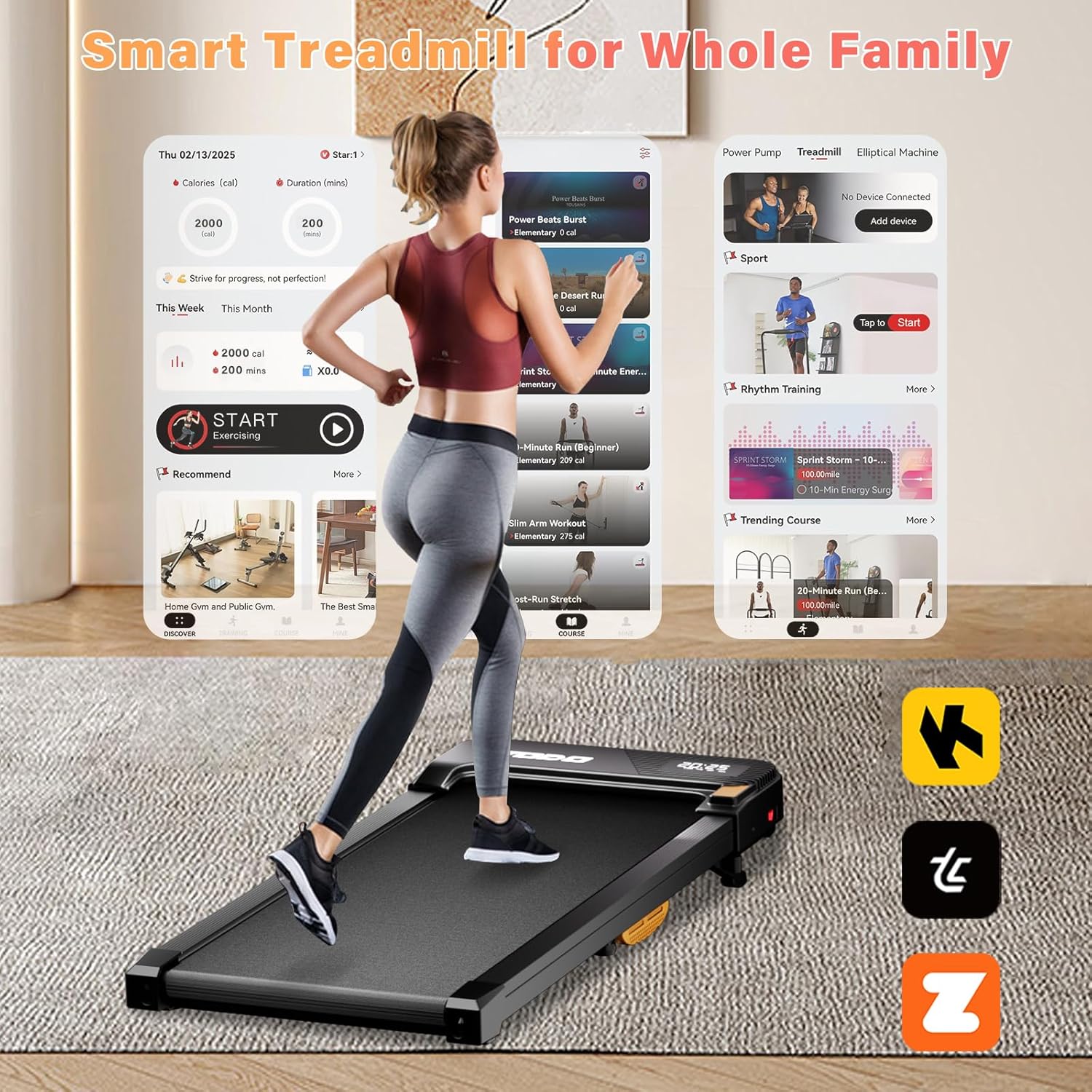
This image demonstrates the smart treadmill's compatibility with various fitness apps, including the TOUSAINS app, Zwift, and Kinomap, allowing for a connected workout experience.
- Supported Apps: The treadmill supports connectivity with popular apps like Zwift, Kinomap, and the proprietary TOUSAINS app.
- Features: Through the app, you can view real-time workout data, control the treadmill (as an alternative to the remote), and access a variety of training courses.
- Download: Search for 'TOUSAINS' or other compatible apps in your device's app store.
5.4 Incline Adjustment
The treadmill features a manual incline adjustment to vary your workout intensity.

This image visually explains the benefit of the 6% manual incline, demonstrating how it can increase calorie expenditure compared to a flat surface.
- The treadmill has a fixed 6% manual incline.
- To engage the incline, lift the rear of the treadmill and secure the support mechanism into the incline position.
- Ensure the incline is securely set before beginning your workout.
6. Maintenance
Regular maintenance ensures the longevity and optimal performance of your treadmill.
6.1 Cleaning
- Always unplug the treadmill before cleaning.
- Wipe down the treadmill surface with a damp cloth after each use to remove sweat and dust.
- Do not use abrasive cleaners or solvents, as they may damage the finish.
6.2 Lubrication
Lubricating the running belt is crucial for smooth operation and to prevent wear.

This image details the advanced 5-layer running belt, emphasizing its durability, anti-slip properties, and shock absorption capabilities.
- Frequency: It is recommended to lubricate the running belt every 15 days to one month, depending on usage frequency.
- Procedure: Lift the edge of the running belt and apply a small amount of the provided silicone lubricant directly onto the center of the deck, underneath the belt.
- Run the treadmill at a low speed for a few minutes to distribute the lubricant evenly.
6.3 Belt Adjustment
If the running belt feels loose, slips, or drifts to one side, it may need adjustment.
- Centering: If the belt drifts to one side, use the provided wrench to turn the corresponding rear roller bolt a quarter turn clockwise. Run the treadmill for a minute and observe. Repeat until the belt is centered.
- Tension: If the belt slips, turn both rear roller bolts a quarter turn clockwise simultaneously. Do not overtighten.
7. Troubleshooting
This section addresses common issues you might encounter with your treadmill.
| Problem | Possible Cause | Solution |
|---|---|---|
| Treadmill does not power on | Power cable not connected; Power outlet issue; Power button not pressed. | Ensure power cable is securely plugged in. Check if the outlet is working. Press the power button firmly. |
| Running belt slips or hesitates | Belt tension too loose; Insufficient lubrication. | Adjust belt tension (see Section 6.3). Lubricate the running belt (see Section 6.2). |
| Belt drifts to one side | Belt not centered. | Adjust belt centering (see Section 6.3). |
| Unusual noise during operation | Lack of lubrication; Loose components; Foreign object. | Lubricate the belt. Check for any loose screws or debris under the belt. |
| Remote control not responding | Remote battery low/dead; Obstruction between remote and treadmill sensor. | Replace remote control batteries. Ensure clear line of sight to the treadmill's sensor. |
If the problem persists after attempting these solutions, please contact TODO customer support for further assistance.
8. Specifications
| Model | B0DPHYPYYG |
| Brand | TODO |
| Dimensions (L x W x H) | 113 x 48 x 12 cm (44.5 x 18.9 x 4.7 inches) |
| Weight | 17.7 kg (39 lbs) |
| Speed Range | 1 - 6 km/h (0.6 - 3.7 mph) |
| Motor Horsepower | 2.5 HP |
| Maximum User Weight | 110 kg (242 lbs) |
| Display Type | LCD |
| Material | Metal |
| Power Source | Corded Electric |
| Incline | 6% Manual Incline |
9. Warranty and Support
TODO is committed to providing high-quality products and customer satisfaction. For any questions, concerns, or technical support regarding your TODO Electric Treadmill, please contact our customer service team.
- Return Policy: This product is eligible for a 30-day refund/replacement policy from the date of purchase. Please refer to your purchase platform for specific details.
- Contact Support: For assistance, please visit the TODO brand store on Amazon or refer to the contact information provided with your purchase.