
Introduction
Thank you for choosing the LEDIARY 15.7" Modern Ceiling Fan with Lights and Remote. This low-profile ceiling fan is designed to provide optimal air circulation and versatile lighting for various indoor spaces. Featuring stepless color temperature change, 6 fan speeds, and convenient remote and app control, it offers a comfortable and modern solution for your home.
Safety Information
Please read all instructions carefully before installation and use. Failure to follow these instructions may result in electric shock, fire, or serious personal injury.
- Always disconnect power at the circuit breaker before installation or servicing.
- Installation should be performed by a qualified electrician or a trained professional.
- Ensure the mounting structure can support the weight of the fan.
- Do not operate the fan with damaged wiring or if it is not functioning properly.
- Keep hands, hair, and clothing away from moving fan blades.
- This product is designed for indoor use only.
Package Contents
Verify that all components are present and undamaged before beginning installation.
- LEDIARY 15.7" Ceiling Fan with Integrated Light
- Remote Control (requires 2 AAA batteries, included)
- Mounting Hardware Kit
- Instruction Manual

Image: Overview of the LEDIARY 15.7 inch Modern Ceiling Fan, showing the integrated light, fan blades, and included remote control.
Specifications
| Feature | Detail |
|---|---|
| Model | 15.7 INCH White 1 |
| Dimensions | 15.7 x 15.7 x 5.7 inches |
| Weight | 6.89 pounds |
| Material | Acrylic, Metal, Plastic |
| Voltage | 120 Volts |
| Wattage | 44 watts |
| Light Output | 3000 Lumens |
| Color Temperature | 3000K-6500K (Stepless Change) |
| Dimming | 10%-100% Smooth Dimming |
| Fan Speeds | 6 Speeds |
| Motor Type | Reversible DC Motor |
| Control Method | Remote, App (Bluetooth required), Wall Switch |
| Timer Setting | 2H |
| Noise Level | Max 30dB Mute Operation |

Image: Detailed dimensions of the ceiling fan, highlighting its low-profile design.
Setup and Installation
Installation of the LEDIARY ceiling fan is designed to be straightforward. For safety and optimal performance, it is recommended to have the installation performed by a qualified professional.
Pre-Installation Checklist:
- Ensure power is disconnected at the main circuit breaker.
- Confirm all package contents are present and undamaged.
- Prepare necessary tools (screwdriver, wire strippers, ladder, etc.).
Mounting the Fan:
Attach the mounting bracket securely to a ceiling joist or an approved electrical junction box capable of supporting the fan's weight. Connect the electrical wiring according to local codes and the provided wiring diagram. Carefully lift and secure the fan body to the mounting bracket.
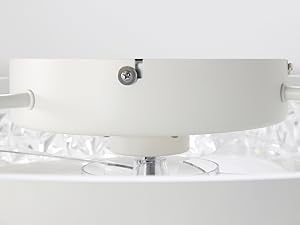
Image: Close-up view of the fan's mounting mechanism, showing how it attaches to the ceiling.
Final Assembly:
Once the fan body is securely mounted and wired, attach any decorative elements or covers. Ensure all connections are tight and secure before restoring power.
Operating Instructions
Your LEDIARY ceiling fan can be controlled via the included remote control or a dedicated mobile application (Bluetooth required).
Remote Control Functions:
- Power On/Off: Turn the fan and light on or off.
- Fan Speed Control: Select from 6 fan speeds (1-6) to adjust airflow.
- Light Brightness Adjustment: Smooth dimming from 10% to 100% brightness.
- Color Temperature Change: Adjust light color from warm white (3000K) to cool white (6500K).
- Reversible Motor (F/R): Switch between downdraft (summer mode) and updraft (winter mode) for optimal air circulation.
- Timer Setting: Set the fan to turn off automatically after 2 hours.
- Night Light Mode: Activates a low-brightness setting for ambient lighting.

Image: The remote control and a smartphone screen demonstrating the mobile app interface for controlling the fan and light functions.
App Control:
Download the LEDIARY app from your device's app store. Ensure Bluetooth is enabled on your smartphone to pair with the fan. The app provides comprehensive control over all fan and light functions, mirroring the remote control capabilities.

Image: Illustrates the stepless color temperature adjustment from 3000K (Warm White) to 6500K (Clear White) and smooth dimming from 10% to 100% brightness.
Memory Function:
The fan features a memory function that retains the last used color temperature and brightness settings when turned off and back on.

Image: Demonstrates the reversible airflow feature, showing downdraft for cooling in summer and updraft for circulating warm air in winter.
Maintenance
Regular maintenance ensures the longevity and optimal performance of your ceiling fan.
- Cleaning: Dust the fan blades and light fixture regularly with a soft, damp cloth. Do not use abrasive cleaners or solvents.
- Blade Inspection: Periodically check the fan blades for any signs of damage or imbalance.
- Tighten Screws: Over time, some screws may loosen. Periodically check and tighten all screws on the mounting bracket and fan body.
Always ensure power is disconnected before performing any maintenance.
Troubleshooting
If you encounter issues with your LEDIARY ceiling fan, refer to the following common problems and solutions:
| Problem | Possible Cause & Solution |
|---|---|
| Fan does not operate |
|
| Light does not turn on |
|
| Remote control not working |
|
| Fan is noisy |
|
If problems persist, please contact LEDIARY customer support.
Warranty and Support
LEDIARY provides 2-year support for this ceiling fan. If you have any issues or require assistance, please contact our after-sales service team. We are always ready to serve you.
For further assistance, please refer to the contact information provided on the product packaging or the official LEDIARY website.