
Introduction
This manual provides comprehensive instructions for the installation, operation, and maintenance of your Swokely TMK2698575975316UI Smart Door Lock. Please read this manual thoroughly before installation and use to ensure proper function and safety.
Product Overview
Key Features
- Double Anti-Theft Security: Combines an invisible anti-theft lock with a mechanical lock for enhanced protection.
- Multiple Unlocking Methods: Unlock via remote control, Bluetooth app, manual rotation, internal button, or mechanical emergency key.
- Bluetooth App Control: Conveniently unlock and manage access using a mobile application.
- Remote Key Distribution: Send electronic keys to users with customizable validity periods.
- Unlock Record Monitoring: Track all unlocking actions through the administrator app.
- Intelligent Power Management: Features a long standby time (over 365 days) and a low voltage alarm for timely battery replacement.
- Durable Construction: Made from zinc alloy, designed to withstand significant impact.
Package Contents
Verify that all items listed below are present in your package:
- 1 x Lock Body
- 1 x Enhanced Antenna
- 1 x Pack of Fixing Rivets for Floor Plate
- 1 x Pack of Fixing Screws for Floor Plate
- 1 x Pack of Screws
- 1 x Electric Screwdriver Head
- 1 x Small Drill Bit
- 4 x Remote Controls
- 2 x Positioning Rings
- 1 x Instruction Manual (this document)
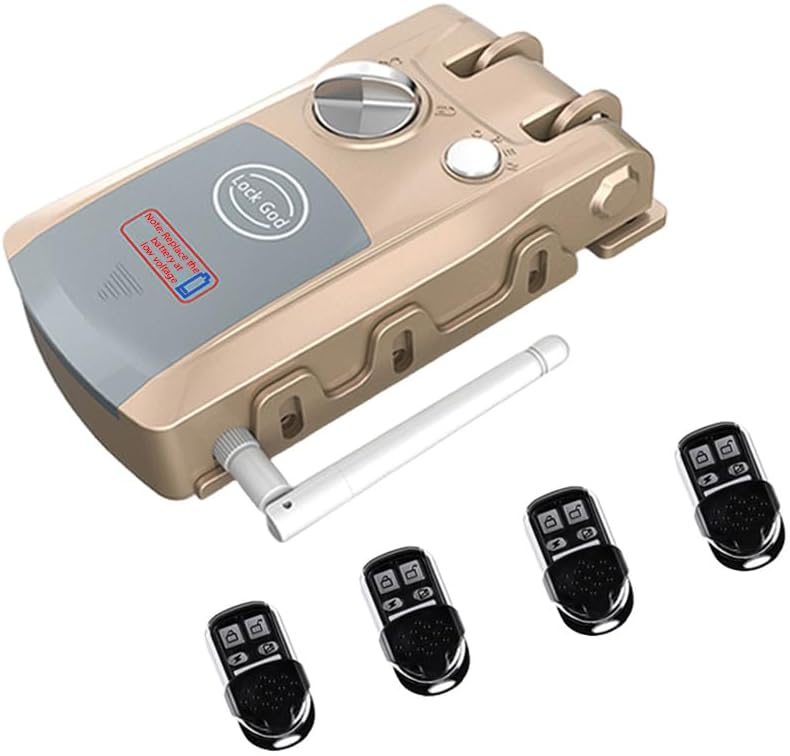
Figure 1: Swokely Smart Door Lock with included remote controls.

Figure 2: Overview of the lock's features including zinc alloy construction, stealth design, Bluetooth connectivity, dual system, double motors, and easy installation, alongside the mobile app interface.

Figure 3: The lock supports diverse unlocking methods including remote control, mobile app, and manual operation.
Setup and Installation
The Swokely TMK2698575975316UI Smart Door Lock is designed for straightforward installation. It is an invisible anti-theft lock, meaning the main locking mechanism is installed on the inside of the door.
Before Installation
- Ensure you have all components listed in the "Package Contents" section.
- Prepare your door for installation. This lock is suitable for various door types.
- Read all instructions carefully before beginning.
Installation Steps
- Positioning: Determine the optimal placement for the lock body on the inside of your door. The lock should be positioned to align with the existing mechanical lock for double security.
- Marking and Drilling: Use the provided positioning rings and drill bit to mark and drill the necessary holes for mounting the lock body and the floor plate.
- Mounting the Lock Body: Secure the lock body to the door using the provided screws. Ensure it is firmly attached and level.
- Installing the Floor Plate: Attach the floor plate to the door frame using the fixing rivets and screws. This plate engages with the lock mechanism when the door is closed.
- Antenna Installation: Connect the enhanced antenna to the designated port on the lock body.
- Battery Installation: Open the battery compartment and insert 3 AA batteries (4.5V) into the lock body. Ensure correct polarity.
- Testing: After installation, test the lock's functionality using the internal button and one of the remote controls.

Figure 4: The invisible anti-theft lock is installed on the inside of the door, working in conjunction with a traditional mechanical lock for double security.
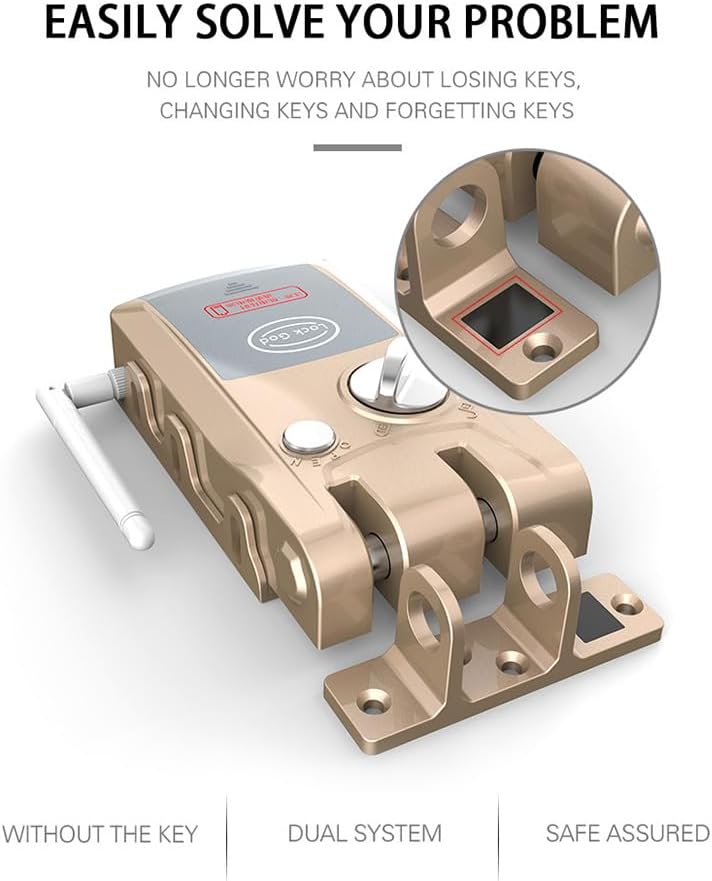
Figure 5: The lock's design emphasizes ease of installation with its integrated mounting bracket.
Operating Instructions
Unlocking and Locking
- Remote Control: Press the unlock/lock button on any of the four provided remote controls. The remote control has an operating range of up to 20 meters in open environments and 10 meters through a door.
- Bluetooth App: Download the dedicated mobile application. Pair your smartphone with the lock via Bluetooth. Use the app interface to unlock or lock the door.
- Manual Rotation: From the inside, rotate the manual knob on the lock body to unlock or lock the door.
- Internal Button: Press the internal button on the lock body to unlock or lock the door from the inside.
- Mechanical Emergency Key: In case of power failure or electronic malfunction, use the mechanical emergency key for the traditional lock component.
Bluetooth App Features
The mobile application provides advanced control and monitoring capabilities:
- Electronic Key Management:
- Creation: Generate electronic keys for guests or tenants.
- Validity Period: Set specific start and end times for each electronic key.
- Remote Distribution: Send electronic keys remotely to authorized users.
- Control: Freeze or unfreeze electronic keys as needed to manage access.
- Unlock Record Monitoring: View a log of all unlocking actions performed via the app. This feature requires the lock to be connected to the network and synchronized.

Figure 6: The mobile application allows convenient Bluetooth unlocking and management of the smart door lock.
Maintenance
Battery Replacement
The Swokely Smart Door Lock features intelligent power management with a standby time of over 365 days. It is equipped with a low voltage alarm to notify you when the batteries need replacement.
- Low Voltage Alarm: When the battery voltage is low, the lock will provide an audible or visual alert.
- Replacement Period: Upon receiving a low voltage alarm, replace the batteries within one month. The lock will continue to function during this period, but its performance may degrade. After one month, the lock may cease to function correctly or lock automatically.
- Battery Type: The lock body requires 3 AA batteries (4.5V). Remote controls use button cell batteries.
- Procedure:
- Locate the battery compartment on the lock body.
- Open the compartment cover.
- Remove the old batteries and dispose of them responsibly.
- Insert new batteries, ensuring correct polarity (+/-).
- Close the battery compartment cover.

Figure 7: The lock features a low voltage indicator to prompt timely battery replacement.
Troubleshooting
This section addresses common issues you might encounter with your Swokely Smart Door Lock.
| Problem | Possible Cause | Solution |
|---|---|---|
| Lock does not respond to remote control or app. | Low batteries in the lock or remote control. Remote control out of range. Bluetooth not enabled or paired. | Replace batteries in the lock and remote controls. Move closer to the lock. Ensure Bluetooth is enabled on your device and the lock is paired correctly in the app. |
| Low voltage alarm sounds. | Lock batteries are low. | Replace the 3 AA batteries in the lock body immediately. Refer to the "Battery Replacement" section. |
| Electronic keys are not working. | Key validity period expired. Key has been frozen by the administrator. Lock not synchronized with the network. | Check the validity period in the app. Unfreeze the key in the administrator app. Ensure the lock is connected to the network and synchronized. |
| Lock is difficult to operate manually. | Mechanical obstruction or misalignment. | Inspect the lock and door frame for any obstructions. Ensure the lock is properly aligned with the floor plate. If issues persist, contact customer support. |
Specifications
| Feature | Detail |
|---|---|
| Model Number | TMK2698575975316UI |
| Remote Control Range | Up to 20m (open environment), 10m (through door) |
| Reception Frequency | 433 MHz |
| Lock Battery | 3 x AA batteries (4.5V) |
| Remote Control Battery | Button cell battery |
| Operating Temperature | -10 °C to 50 °C (without ice or frost) |
| Operating Humidity | 5% – 70% (without frost) |
| Product Material | Zinc Alloy |
| Product Dimensions | 160 x 88 x 51 mm |
| Floor Plate Dimensions | 90 x 25 mm |
| Remote Control Dimensions | 60 x 30 x 12 mm |
| Weight | 1.31 kg |
Warranty and Support
For warranty information and technical support, please refer to the documentation provided at the time of purchase or contact Swokely customer service. Keep your purchase receipt as proof of purchase.
Customer Service: Please visit the official Swokely website or contact your retailer for support.
