
1. Product Overview
The Ausic Portable Misting Clip on Fan, Model P60, is a versatile and rechargeable fan designed for personal cooling in various indoor and outdoor environments. It features a misting function, multiple fan speeds, an LED light, and a robust clip for secure attachment.

Image 1.1: Ausic Portable Misting Clip on Fan, Model P60, showing its compact design and clip base.
2. Package Contents
Please check the package for the following items:
- Ausic Portable Misting Clip on Fan (Model P60)
- USB Charging Cord
- User Manual (this document)
3. Setup
3.1 Charging the Fan
Before first use, fully charge the fan. The fan is equipped with a 5200mAh rechargeable battery.
- Connect the provided USB charging cord to the fan's charging port.
- Connect the other end of the USB cord to a compatible USB power source (e.g., wall adapter, computer, power bank).
- The charging indicator light will illuminate. A full charge typically takes approximately 4 hours.
- Once fully charged, disconnect the fan from the power source.
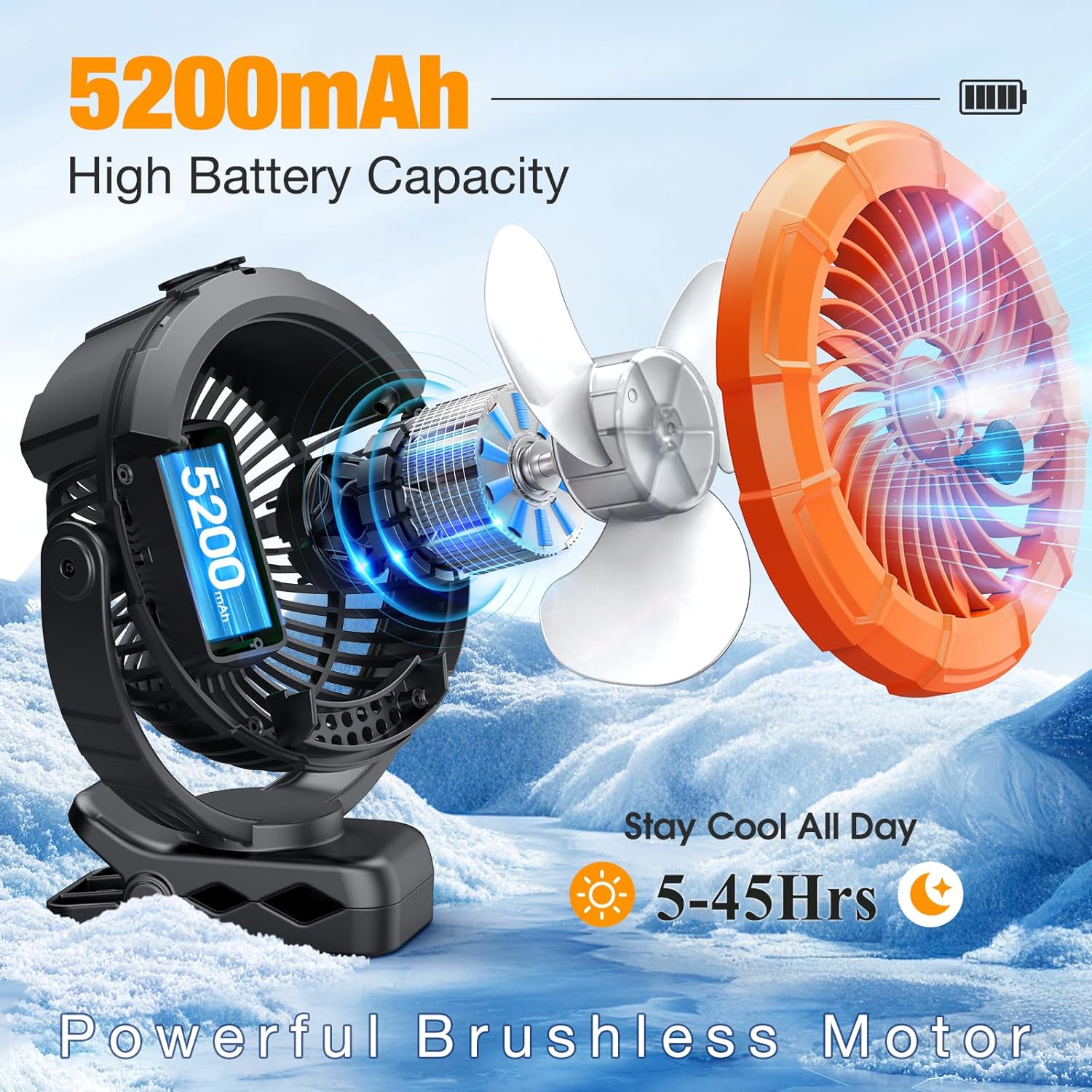
Image 3.1: Illustration of the fan's internal battery and brushless motor, highlighting its 5200mAh capacity.
3.2 Filling the Water Tank for Misting Function
The fan features a 100ml water tank for its misting function. For optimal performance and to prevent mineral buildup, it is recommended to use distilled water.
- Locate the water tank refill hole on the top of the fan.
- Carefully open the cap.
- Fill the tank with up to 100ml of distilled water.
- Securely close the cap after filling.

Image 3.2: Visual representation of the 100ml water tank and the two misting modes (intermittent and continuous).
3.3 Attaching the Fan
The fan can be used in various configurations:
- Clip-on Use: The sturdy non-slip clip can attach to objects up to 2.8 inches thick, such as table edges, strollers, or golf carts. The clip includes a sponge pad to prevent scratches.
- Hanging Use: A built-in foldable hook allows the fan to be hung from cars, branches, or tents. When hanging for misting, ensure the water tank is positioned upwards to maintain spray function.
- Desk Fan Use: The fan can stand independently on a flat surface.

Image 3.3: The fan demonstrating its strong anti-skid clip and 360-degree rotation capability when clipped to a table.
4. Operation
4.1 Power On/Off and Fan Speed Adjustment
The fan features a powerful brushless motor with three adjustable speeds.
- Press the power button (usually located on the front or base) once to turn on the fan at Speed 1.
- Press the power button again to cycle through Speed 2, Speed 3.
- Press the power button a fourth time to turn off the fan.
4.2 Misting Function
The misting function provides additional cooling. Ensure the water tank is filled (refer to Section 3.2).
- With the fan running, press the mist button (separate from the power button, if applicable, or a long press of the power button depending on model).
- The fan offers two spray modes:
- Intermittent Mode: Provides mist for approximately 2 hours on a full tank.
- Continuous Mode: Provides mist for approximately 1 hour on a full tank.
- Press the mist button again to switch between modes or turn off the misting function.
4.3 LED Light Operation
The fan includes an LED light with two brightness settings, useful for outdoor activities at night.
- Press the light button (separate button or a specific combination/long press) once to turn on the LED light at Low brightness.
- Press again for High brightness.
- Press a third time to turn off the LED light.

Image 4.1: The fan in an outdoor camping setting, demonstrating its hanging hook and LED light functionality.
4.4 360° Rotation
The fan head supports 360° horizontal and vertical rotation, allowing you to direct airflow as needed.
- Manually adjust the fan head to your desired angle.
5. Maintenance
Regular maintenance ensures the longevity and optimal performance of your fan.
- Cleaning: Use a soft, dry cloth to wipe the exterior of the fan. Do not use abrasive cleaners or immerse the fan in water.
- Water Tank: If the misting function is not in use, cover the spray cap to prevent dust accumulation. Periodically clean the water tank to prevent mold or mineral buildup, especially if using tap water.
- Storage: When storing the fan for extended periods, ensure it is clean, dry, and fully charged. Store in a cool, dry place.
6. Troubleshooting
If you encounter issues with your Ausic Portable Misting Clip on Fan, please refer to the following common solutions:
| Problem | Possible Cause | Solution |
|---|---|---|
| Fan does not turn on. | Battery is depleted. | Charge the fan fully (refer to Section 3.1). |
| Misting function not working. | Water tank is empty or improperly positioned. | Refill the water tank (Section 3.2). If hanging, ensure the water tank is facing upwards. |
| Weak airflow. | Fan is on a low speed setting or battery is low. | Increase fan speed (Section 4.1) or charge the battery. |
| LED light not working. | Light function is off or battery is low. | Activate the LED light (Section 4.3) or charge the battery. |
If the problem persists after trying these solutions, please contact customer support.
7. Specifications
| Feature | Detail |
|---|---|
| Brand | Ausic |
| Model Name | P60 |
| Product Dimensions | 3.27"D x 7.48"W x 9.06"H |
| Item Weight | 1.61 pounds (0.73 Kilograms) |
| Power Source | Battery Powered |
| Battery Capacity | 5200mAh (Nonstandard Battery, included) |
| Charging Time | Approx. 4 hours |
| Runtime | 5-45 hours (depending on speed/misting use) |
| Water Tank Capacity | 100ml |
| Misting Modes | Intermittent (approx. 2H), Continuous (approx. 1H) |
| Fan Speeds | 3 |
| LED Light Settings | 2 brightness levels |
| Rotation | 360° horizontal and vertical |
| Max Clip Thickness | 2.8 inches |
| Control Method | Touch |
| Indoor/Outdoor Usage | Indoor, Outdoor |
| UPC | 763344543915 |
8. Warranty and Support
Ausic products are designed for reliability and performance. For specific warranty details, please refer to the warranty card included with your purchase or visit the official Ausic website. If you require technical assistance or have questions about your product, please contact Ausic customer support through the contact information provided on the product packaging or the official website.
Please retain your proof of purchase for warranty claims.
9. Important Safety Information
- Do not disassemble or attempt to repair the fan yourself.
- Keep the fan away from water or other liquids, except for filling the water tank as instructed.
- Do not insert fingers or foreign objects into the fan grille.
- Ensure the fan is placed on a stable surface or securely clipped/hung to prevent falling.
- Keep out of reach of small children.
- Use only the provided charging cable or a certified equivalent.
- Do not block the air intake or outlet during operation.
