1. Product Overview
The ODK L-Shaped Gaming Desk is designed to provide a versatile and functional workspace for both gaming and office use. It features an L-shaped configuration, integrated LED lighting, and convenient power outlets to enhance your experience.
This desk includes a CPU stand, two storage compartments, two iron hooks, two power outlets, and two types of light strips. Its reversible design allows for flexible placement in various room layouts, making it an ideal computer desk for optimizing space.

Figure 1: ODK L-Shaped Gaming Desk setup with dual monitors and LED lighting, showcasing its functional design.
2. Safety Information
- Ensure all components are securely fastened during assembly to prevent instability.
- Do not overload the desk or shelves beyond their recommended weight capacity.
- Keep liquids away from electrical components, including power outlets and LED lights.
- Use only the provided power cord and ensure it is connected to a grounded outlet.
- Avoid placing the desk in direct sunlight or near heat sources to prevent material damage.
3. Package Contents
Before assembly, verify that all components listed below are present and undamaged.
- Desk panels (L-shaped sections)
- Frame components (legs, support bars)
- Upper shelf components (panels, supports)
- 1 x CPU stand
- 2 x Storage compartments
- 2 x Iron hooks
- Integrated power strip with 2 AC outlets and 2 USB ports
- LED light strips (2 types: reading light and color-changing LED)
- Assembly hardware (screws, bolts, Allen wrench)
- Instruction manual
4. Setup and Assembly
Detailed instructions and assembly tools are included in the package. Follow the step-by-step guide provided to ensure correct and safe assembly.
4.1 Reversible Design
The L-shaped desk can be assembled with the longer section on either the left or right side, depending on your room layout and preference. Refer to the assembly manual for specific instructions on configuring the desk in your desired orientation.
4.2 Upper Shelf Installation
The two-tier top shelf offers two installation methods:
- Storage Compartment: Use the shelf to store books, pens, photos, and other items.
- Monitor Stand: Position the shelf to elevate your monitor, providing a comfortable viewing angle to help prevent neck and back strain.

Figure 2: Diagram illustrating the adjustable and removable nature of the desk's upper shelves, allowing for customized setup.
5. Operating Instructions
5.1 LED Lighting System
The desk is equipped with three light strips in two versions: one warm yellow reading light and two color-changing LED lights.
- Reading/Working Mode: Activate the warm yellow reading light for eye protection during work or study sessions.
- Gaming Mode: Switch to the color-changing LED lights to create an immersive e-sport atmosphere.
Refer to the included remote control or integrated switch for specific instructions on changing light modes and colors.
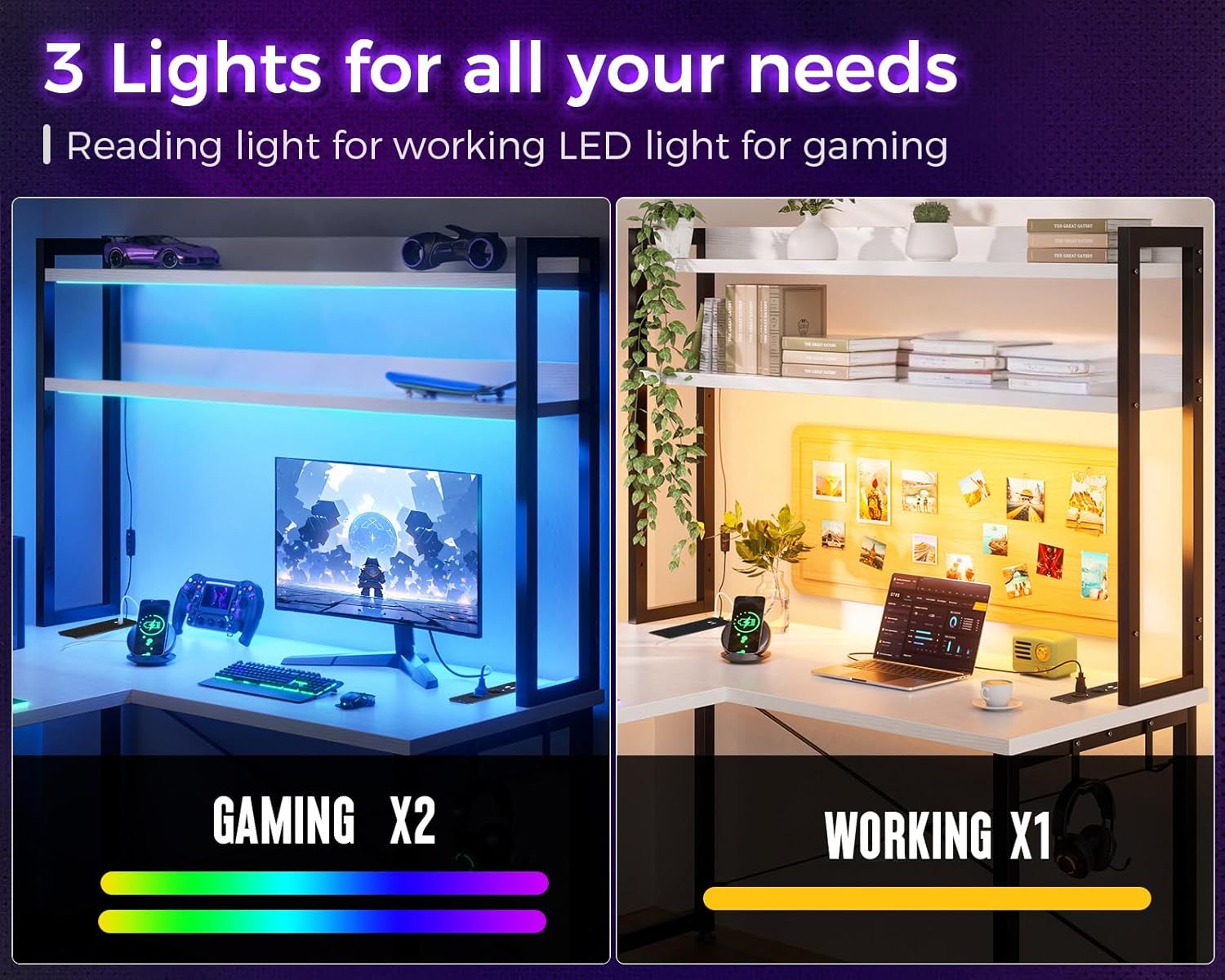
Figure 3: Illustration demonstrating the two primary LED lighting modes: vibrant colors for gaming and a warm yellow light for reading or working.
5.2 Integrated Power Outlets and USB Ports
The corner desk features two charging stations, each providing two AC power outlets and two USB charging ports. These allow for convenient charging of electronic devices such as smartphones, gaming equipment, and Bluetooth devices directly from your workspace.
- Connect the desk's main power cord to a standard wall outlet.
- Plug your devices into the available AC outlets (110V-240V/6A) or USB ports (5V/2A).
- Ensure devices are compatible with the provided power specifications.

Figure 4: Close-up view of the integrated power strip, highlighting the AC outlets and USB charging ports for convenient device connectivity.
6. Maintenance
- Cleaning: Wipe the desk surfaces with a soft, damp cloth. Avoid abrasive cleaners or harsh chemicals that may damage the finish.
- Fasteners: Periodically check all screws and bolts to ensure they remain tight. Retighten as necessary to maintain stability.
- Electrical Components: Keep the power outlets and LED strips free from dust and debris. Do not attempt to repair electrical components yourself.
7. Troubleshooting
7.1 LED Lights Not Working
- Check if the power cord for the desk is securely plugged into a working wall outlet.
- Ensure the LED light strips are properly connected to their power source.
- Verify that the remote control (if applicable) has working batteries and is pointed correctly at the receiver.
7.2 Power Outlets/USB Ports Not Functioning
- Confirm the desk's main power cord is fully inserted into a live electrical outlet.
- Test the outlet with another device to ensure the wall outlet itself is functional.
- Ensure the device you are trying to charge is working correctly and its cable is not damaged.
7.3 Desk Instability
- Check all assembly screws and bolts and tighten any that are loose.
- Ensure the desk is placed on a flat, level surface. Adjust any leveling feet if present.
- Verify that the desk has been assembled according to the instructions.
8. Specifications
| Feature | Specification |
|---|---|
| Brand | ODK |
| Model | B02011301004 |
| Color | White |
| Overall Dimensions (L x W x H) | 168 x 120 x 155 cm (approx. 66.1 x 47.2 x 61 inches) |
| Item Weight | 27.8 kg (approx. 61.3 lbs) |
| Special Features | L-shaped, LED lights, Reversible, Multifunctional |
| Recommended Use | Gaming |
| Power Outlets | 2 x AC (110V-240V/6A) |
| USB Charging Ports | 2 x USB (5V/2A) |
| Assembly Required | Yes |

Figure 5: Detailed product dimensions, including overall length, width, height, and shelf measurements.
9. Warranty and Support
ODK offers a 30-day free return or exchange service for this product. If you encounter any issues or have questions regarding assembly, operation, or maintenance, please do not hesitate to contact our customer support team.
Our professional 24-hour online customer service team is available to resolve your concerns as quickly as possible.
For support, please visit the ODK Store on Amazon or refer to the contact information provided in your purchase documentation.


