
BETOWEY BT-S5
BETOWEY S5 Motorcycle Bluetooth Intercom User Manual
Model: BT-S5
Brand: BETOWEY
Introduction
Thank you for choosing the BETOWEY S5 Motorcycle Bluetooth Intercom. This device is designed to enhance your riding experience by providing clear communication, music playback, and GPS navigation capabilities. Featuring advanced Bluetooth 5.3 technology and multi-person intercom functionality, the S5 ensures stable and high-quality audio for solo rides or group adventures. Please read this manual thoroughly before use to ensure proper operation and maximize the product's lifespan.
Safety Information
Always prioritize safety while riding. Ensure the device is securely installed and does not obstruct your vision or control of the motorcycle. Maintain a moderate volume level to remain aware of your surroundings and avoid distractions. Operating this device at excessive volumes can lead to hearing damage and may impair your ability to hear important traffic sounds.
Warning: Do not attempt to install or operate the device while riding. Always stop in a safe location before making adjustments or troubleshooting.
Package Contents
Verify that all items are present in your package:
- Intercom Device
- Microphone & Headset (includes boom mic and button mic)
- Velcro Clamp
- USB Cable
- Screw Driver
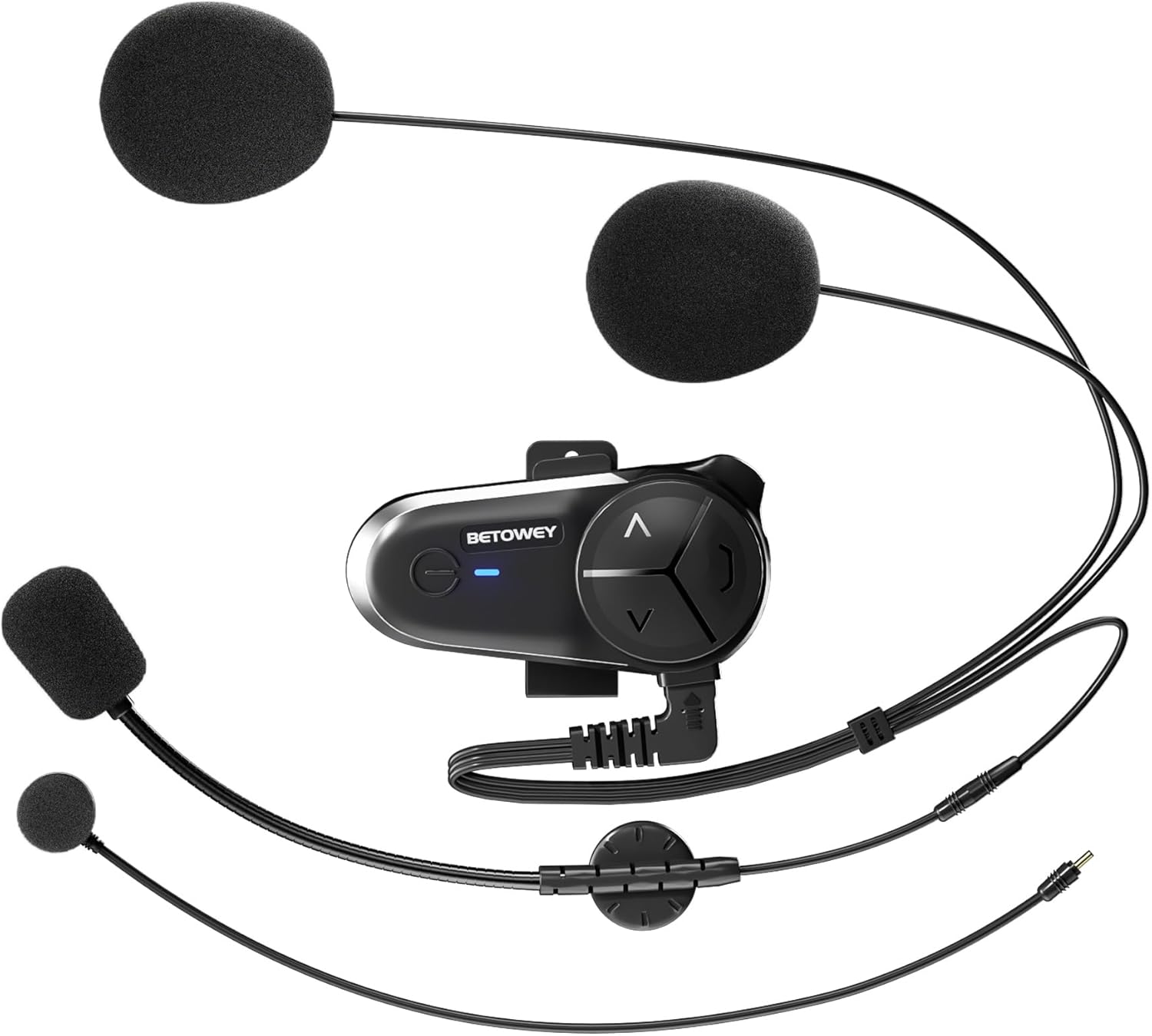
Image: All components included in the BETOWEY S5 package.
Product Features
- Advanced Bluetooth 5.3 Technology: Equipped with dual Bluetooth chips for clear and stable communication, supporting audio multitasking (intercom, music, FM radio, GPS simultaneously).
- Extended Battery Life: 1000mAh battery provides up to 150 hours standby and 16 hours continuous operating time.
- Multi-Person Intercom: Supports 2 to 10 riders with a maximum range of 500m between two units and up to 3000m for a group. Compatible with other brands' intercoms.
- Exceptional Sound Quality: 40mm high-fidelity speakers, DSP and CVC noise reduction technology, and an anti-wind microphone reduce environmental noise by up to 98%.
- Easy Installation & Operation: Designed for simple installation on various helmet types with intuitive controls.

Image: Dual Bluetooth chips enable simultaneous intercom, music, and GPS audio.

Image: High-fidelity speakers with noise reduction for clear sound.

Image: Long-lasting 1000mAh battery for extended use.

Image: Intuitive control design for easy operation.
Installation Guide
The BETOWEY S5 offers two installation methods: a velcro clamp for temporary or easy removal, and a screw clamp for a more secure, permanent attachment.
Method 1: Velcro Clamp Installation
- Attach the velcro clamp base to the intercom unit.
- Clean the desired helmet surface thoroughly where the intercom will be mounted.
- Peel off the protective film from the adhesive side of the velcro clamp.
- Firmly press the clamp onto the helmet surface and hold for a few seconds to ensure adhesion.
Method 2: Screw Clamp Installation
- Attach the screw clamp base to the intercom unit.
- Position the clamp on the edge of the helmet shell.
- Use the provided screwdriver to tighten the screws, securing the clamp firmly to the helmet. Ensure it is tight but do not overtighten.
After mounting the main unit, install the speakers and microphone inside the helmet. The S5 comes with both a boom microphone (for open-face helmets) and a button microphone (for full-face helmets). Choose the appropriate microphone for your helmet type and position it close to your mouth for optimal voice pickup. Route the speaker wires and microphone cable neatly under the helmet padding.

Image: Visual guide for both velcro and screw clamp installation methods.
Operating Instructions
Power On/Off
- Power On: Press and hold the Power button for approximately 3 seconds until the indicator light turns on.
- Power Off: Press and hold the Power button for approximately 3 seconds until the indicator light turns off.
Bluetooth Pairing (First Use)
- Ensure the S5 is powered off.
- Press and hold the Power button for about 5-7 seconds until the indicator light flashes red and blue alternately, indicating pairing mode.
- On your mobile phone or Bluetooth device, search for "BETOWEY S5" in the Bluetooth settings.
- Select "BETOWEY S5" to connect. Once paired, the indicator light will flash blue slowly.
Intercom Functionality
The S5 supports both 2-person and multi-person (up to 10 riders) intercom modes.
- 2-Person Intercom Pairing:
- Ensure both S5 units are powered off.
- On both units, press and hold the Intercom button (usually the large central button) for 5 seconds until the indicator lights flash red and blue alternately.
- Briefly press the Intercom button on one of the units. The units will search and connect. Once connected, the indicator lights will flash blue slowly.
- Multi-Person Intercom (Group Intercom):
- Pair the first two units as described above.
- To add a third unit, put the third unit into pairing mode (red/blue flashing). On one of the already paired units, briefly press the Intercom button to connect to the third unit.
- Repeat the process for additional units, connecting each new unit to an already connected unit.
- Starting/Ending Intercom: Once paired, a short press of the Intercom button will initiate or end an intercom conversation.

Image: The S5 supports group intercom for up to 10 riders over a 3000m range.
Audio Multitasking (Intercom, Music, GPS)
The S5 allows you to mix audio sources seamlessly. You can listen to music or GPS instructions while maintaining an active intercom conversation. The volume of background audio may automatically adjust when intercom is active.

Image: Multitasking audio allows seamless integration of intercom, music, and GPS.
Music Playback
- Play/Pause: Short press the Power button.
- Next Track: Short press the "Next" button (usually the 'V' or down arrow).
- Previous Track: Short press the "Previous" button (usually the '^' or up arrow).
Volume Control
- Increase Volume: Long press the "Volume Up" button (usually the '^' or up arrow).
- Decrease Volume: Long press the "Volume Down" button (usually the 'V' or down arrow).
FM Radio
- Turn On/Off FM Radio: Double-press the Power button.
- Scan Channels: While FM radio is on, long press the "Next" or "Previous" button to scan for stations.

Image: The S5 features a built-in FM radio for entertainment on the go.
Voice Assistant
- Activate Voice Assistant: Triple-press the Power button to activate your phone's voice assistant (e.g., Siri, Google Assistant).
Maintenance
- Cleaning: Use a soft, damp cloth to clean the exterior of the intercom unit. Do not use harsh chemicals or abrasive cleaners.
- Battery Care:
- Charge the device fully before first use.
- Recharge the battery when the low battery indicator is active.
- Avoid extreme temperatures during charging and storage to prolong battery life.
- If storing for an extended period, charge the device every 3-6 months to prevent deep discharge.
- Water Resistance: The BETOWEY S5 is water-resistant (IP67 rated). While it can withstand splashes and light rain, avoid submerging the device in water. Ensure the charging port cover is securely closed when not charging.
Troubleshooting
| Problem | Possible Cause | Solution |
|---|---|---|
| Device won't power on. | Low battery. | Charge the device fully. |
| Cannot pair with phone/intercom. | Device not in pairing mode; too far apart; interference. | Ensure device is in pairing mode (flashing red/blue). Bring devices closer. Restart both devices. |
| Poor audio quality/noise. | Microphone not positioned correctly; excessive wind noise; volume too low/high. | Adjust microphone position. Ensure anti-wind microphone is used. Adjust volume. |
| Intercom disconnects frequently. | Out of range; obstacles; interference. | Stay within effective range. Avoid major obstacles. Re-pair if necessary. |
Specifications
| Feature | Detail |
|---|---|
| Model Name | BETOWEY BT-S5 |
| Connectivity Technology | Wireless (Bluetooth) |
| Bluetooth Version | 5.3 |
| Battery Capacity | 1000mAh |
| Battery Life (Operating) | Up to 16 Hours |
| Battery Life (Standby) | Up to 150 Hours |
| Charging Time | Approx. 2.5 Hours |
| Intercom Range (2-person) | Up to 500 meters |
| Intercom Range (Group) | Up to 3000 meters (for 10 riders) |
| Noise Reduction | DSP and CVC Noise Reduction Technology |
| Speaker Size | 40mm High-Fidelity Speakers |
| Water Resistance Level | IP67 |
| Product Dimensions | 3.6 x 1.85 x 0.54 inches |
| Item Weight | 1.69 ounces (48 Grams) |
| Manufacturer | BETOWEY |

Image: Physical dimensions and weight of the BETOWEY S5 intercom.
Warranty and Support
BETOWEY products are designed for reliability and performance. For any questions, technical support, or warranty inquiries, please contact our customer service team.
Contact Information:
- Email: betowey_help@outlook.com
Please have your product model (BT-S5) and purchase details ready when contacting support.
Ask a question about this manual
Ask about setup, troubleshooting, compatibility, parts, safety, or missing instructions. Manuals+ will review the question and use this page’s manual context to help answer it.