
Introduction
This user manual provides detailed instructions for the operation, maintenance, and troubleshooting of your VIHELM BLE-P-3 Waterproof Digital Portable pH/Temperature Meter. Please read this manual thoroughly before using the device to ensure proper function and accurate measurements. Keep this manual for future reference.
Product Overview
The VIHELM BLE-P-3 is a portable, waterproof pH and temperature meter designed for accurate water quality testing. It features a digital display, Bluetooth connectivity for app integration, and a high-precision probe.
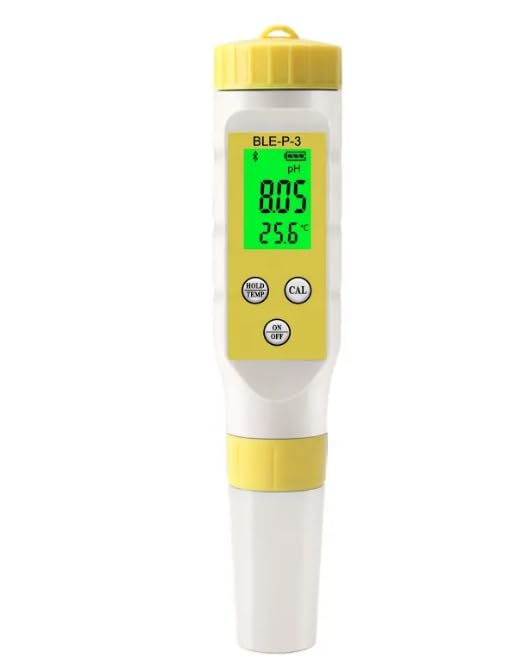
Image: Front view of the VIHELM BLE-P-3 pH/Temperature Meter, displaying pH and temperature readings on its backlit screen.
Components and Controls
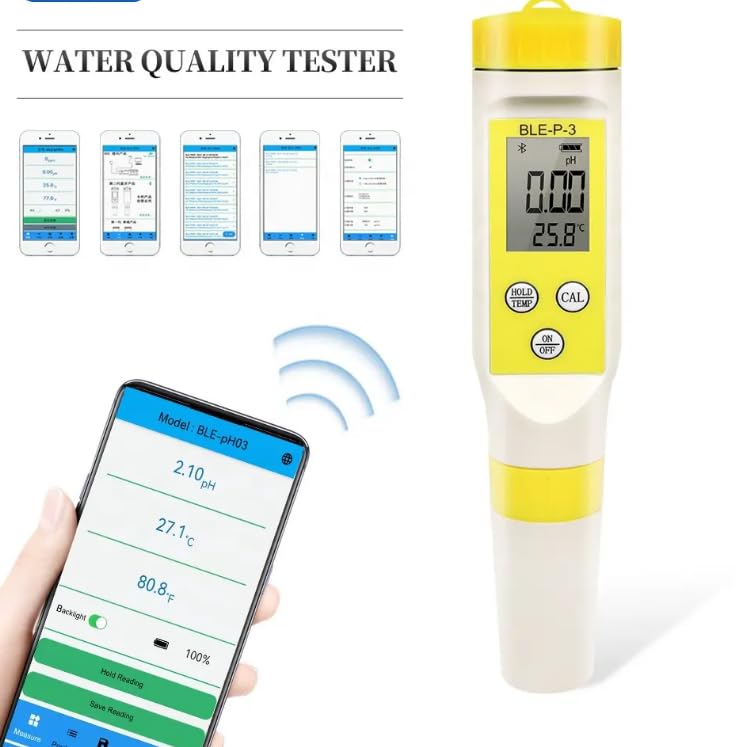
Image: Diagram illustrating the components of the BLE-P-3 pH meter, including the battery compartment, backlit display, data hold/temperature unit conversion key, calibration key, ON/OFF key, and high-precision probe. Dimensions are also shown.
- Backlit Display: Shows pH and temperature readings.
- HOLD/TEMP Key: Used for data hold and temperature unit conversion.
- CAL Key: Initiates the calibration process.
- ON/OFF Key: Powers the device on or off.
- High-precision Probe: The sensor for pH and temperature measurements.
- Battery Compartment: Holds 3*1.5V LR44 button batteries.
Setup
1. Battery Installation
- Unscrew the top cap of the meter.
- Insert three 1.5V LR44 button batteries, ensuring correct polarity.
- Securely replace the top cap.
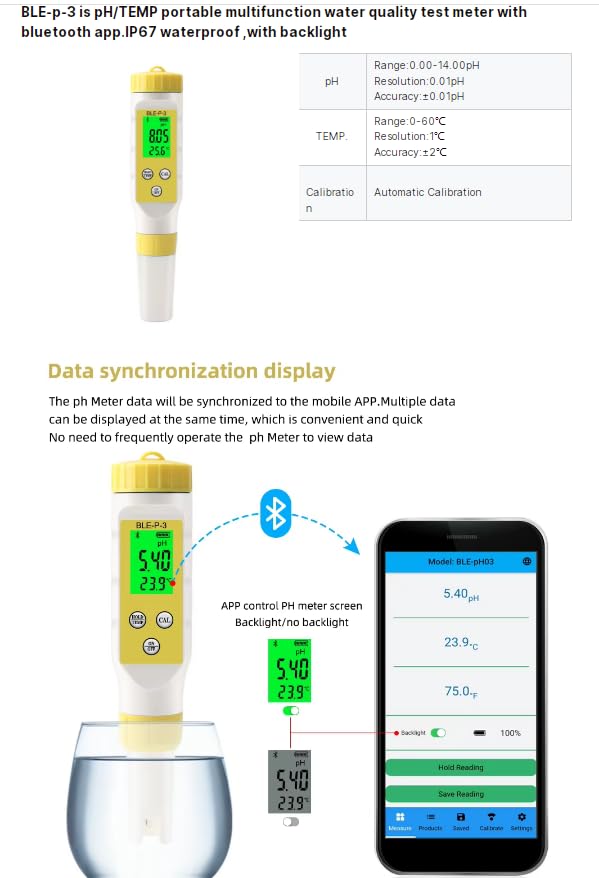
Image: Close-up view of the battery compartment of the BLE-P-3 pH meter, showing the three 1.5V LR44 button batteries installed.
2. Initial Preparation
- Remove the protective cap from the electrode.
- Rinse the electrode with distilled water before first use and after each use.
3. App Download and Connection (Optional)
The BLE-P-3 supports Bluetooth 5.2 for mobile control and data synchronization. Download the compatible mobile application (e.g., "Model: BLE-pH03" as shown in images) from your device's app store.
- Enable Bluetooth on your mobile device.
- Open the app and follow the on-screen instructions to connect to the BLE-P-3 meter.
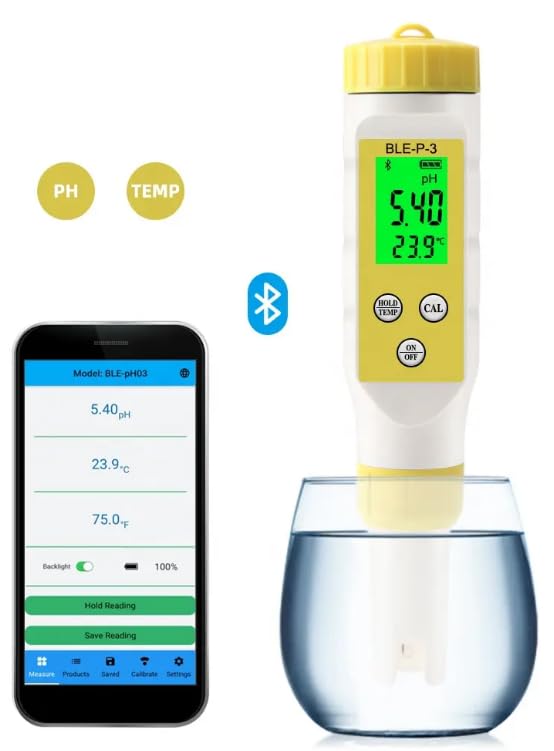
Image: The BLE-P-3 pH meter displaying a pH reading, shown alongside a smartphone screen displaying the connected mobile application with synchronized pH and temperature data. A Bluetooth icon indicates active connection.
Operating Instructions
1. Power On/Off
- Press the ON/OFF key to turn the meter on.
- Press and hold the ON/OFF key to turn the meter off.
2. Taking Measurements
- Ensure the meter is clean and calibrated.
- Immerse the electrode into the sample solution. Ensure the electrode tip is fully submerged.
- Gently stir the meter and wait for the reading to stabilize on the display.
- Record the pH and temperature readings.
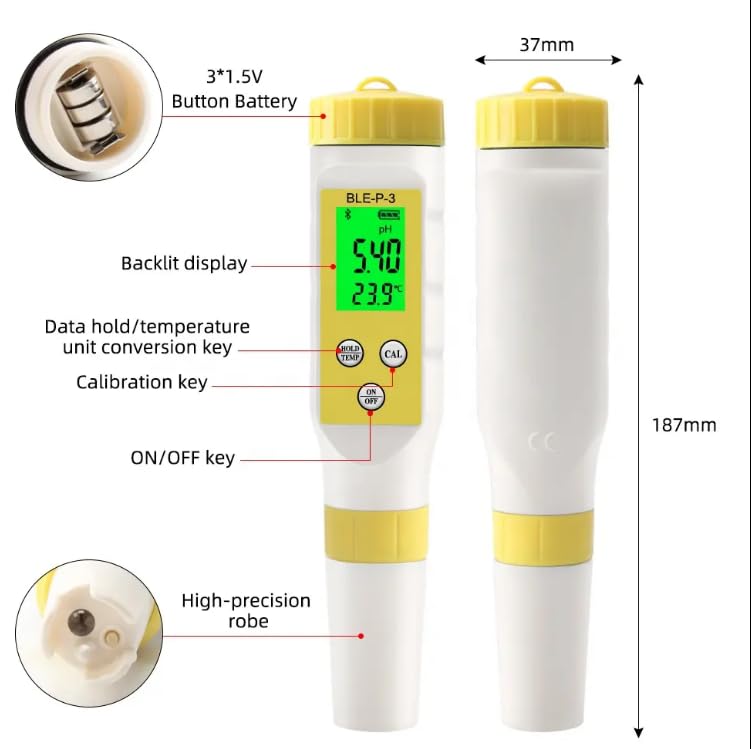
Image: A hand holding the BLE-P-3 pH meter, with its probe submerged in a glass of water, displaying a pH reading of 5.40 and temperature of 23.9°C.
3. Data Hold and Temperature Unit Conversion
- While measuring, press the HOLD/TEMP key once to hold the current reading. Press again to release.
- Press and hold the HOLD/TEMP key to switch between Celsius (°C) and Fahrenheit (°F) temperature units.
4. Calibration
The BLE-P-3 supports automatic 5-point calibration. Regular calibration ensures measurement accuracy. Calibration powders are required (pH 4.00, pH 6.86, pH 9.18 for Asia Standard; pH 4.00, pH 7.00, pH 10.01 for EU Standard).
- Prepare the calibration buffer solutions according to the chosen standard (Asia or EU).
- Rinse the electrode with distilled water and blot dry.
- Immerse the electrode into the first buffer solution (e.g., pH 6.86 or pH 7.00).
- Press the CAL key. The meter will automatically recognize the buffer and calibrate.
- Repeat for the remaining buffer solutions (e.g., pH 4.00 and pH 9.18/10.01).
- The app will display the calibration record.
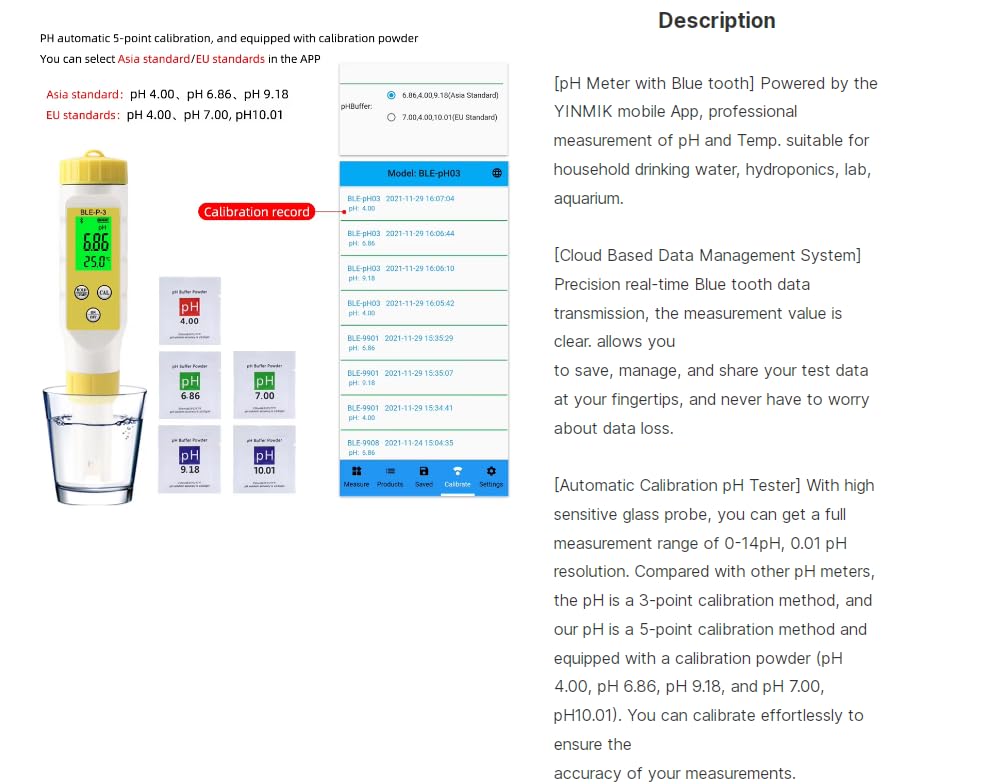
Image: The BLE-P-3 pH meter submerged in a calibration buffer, with a smartphone screen showing the calibration record within the mobile application, indicating successful calibration points.
5. Mobile App Features
When connected via Bluetooth, the mobile app provides enhanced functionality:
- Data Synchronization: Real-time display of pH and temperature data on your mobile device.
- Backlight Control: Toggle the meter's backlight on or off via the app.
- Measurement Limits: Set maximum and minimum pH limits. If readings exceed these, the value will be displayed in red on the app.
- Data Storage and Sharing: Save measurement data automatically or manually. Export data to Excel or share with others.
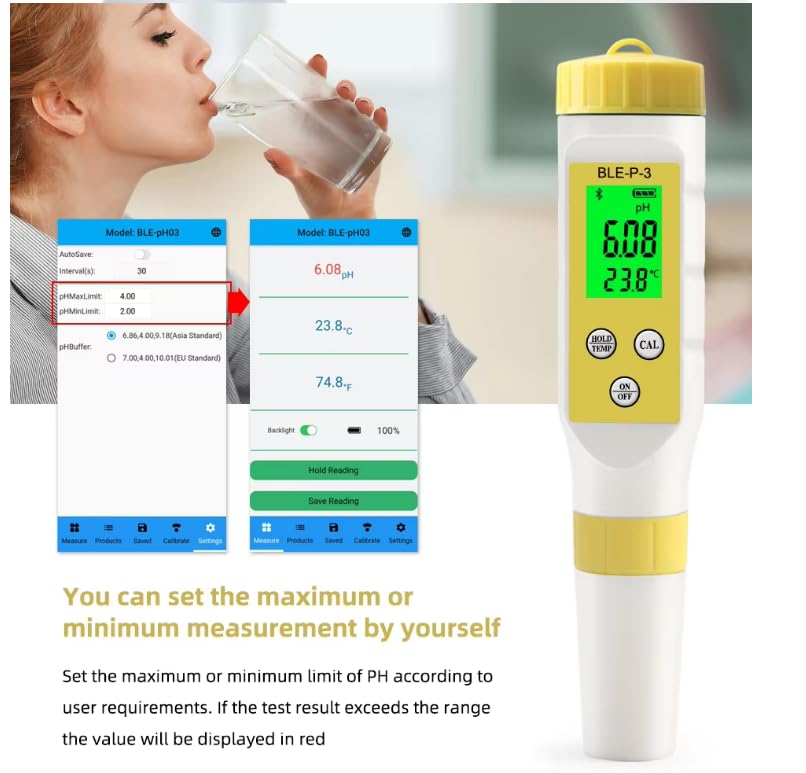
Image: The BLE-P-3 pH meter displaying readings, with a smartphone showing the synchronized data in the mobile app, highlighting real-time data display and app control features like backlight toggle.
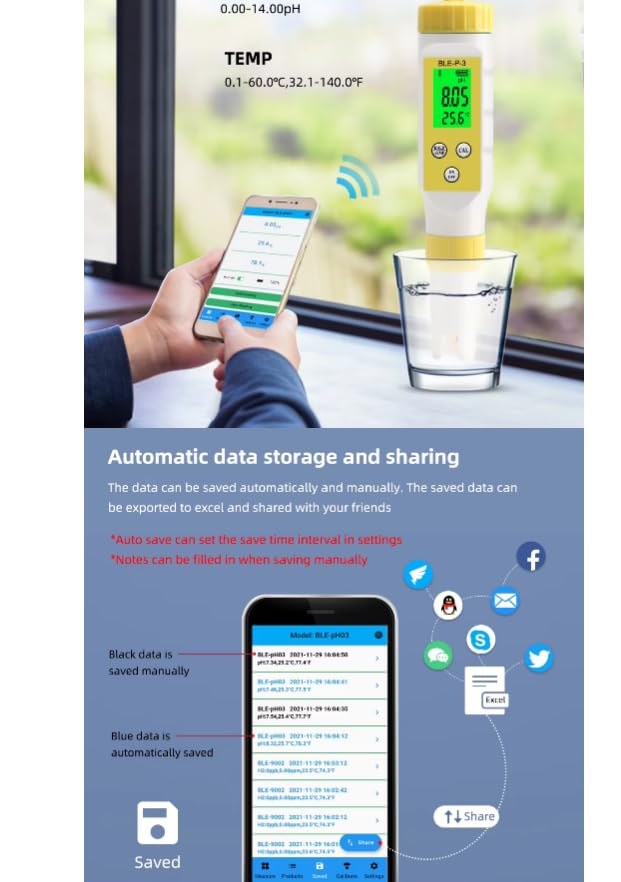
Image: The BLE-P-3 pH meter displaying readings, shown next to a smartphone screen illustrating the mobile app's feature to set maximum and minimum pH limits, with an example of a reading exceeding the limit displayed in red.
Maintenance
1. Electrode Cleaning
- Always rinse the electrode with distilled water before and after each use.
- If the electrode is heavily contaminated, soak it in a cleaning solution (e.g., pH electrode cleaning solution) for a short period, then rinse thoroughly with distilled water.
- Do not scrub the glass bulb of the electrode.
2. Storage
- When not in use, ensure the protective cap is placed back on the electrode.
- Store the electrode in a small amount of electrode storage solution or pH 4.00 buffer solution. Do not store in distilled water as this can shorten electrode life.
- Store the meter in a cool, dry place.
3. Battery Replacement
- When the battery indicator shows low power, replace the three 1.5V LR44 button batteries as described in the Setup section.
Troubleshooting
| Problem | Possible Cause | Solution |
|---|---|---|
| Inaccurate Readings |
|
|
| Meter does not power on |
|
|
| Bluetooth connection fails |
|
|
Specifications
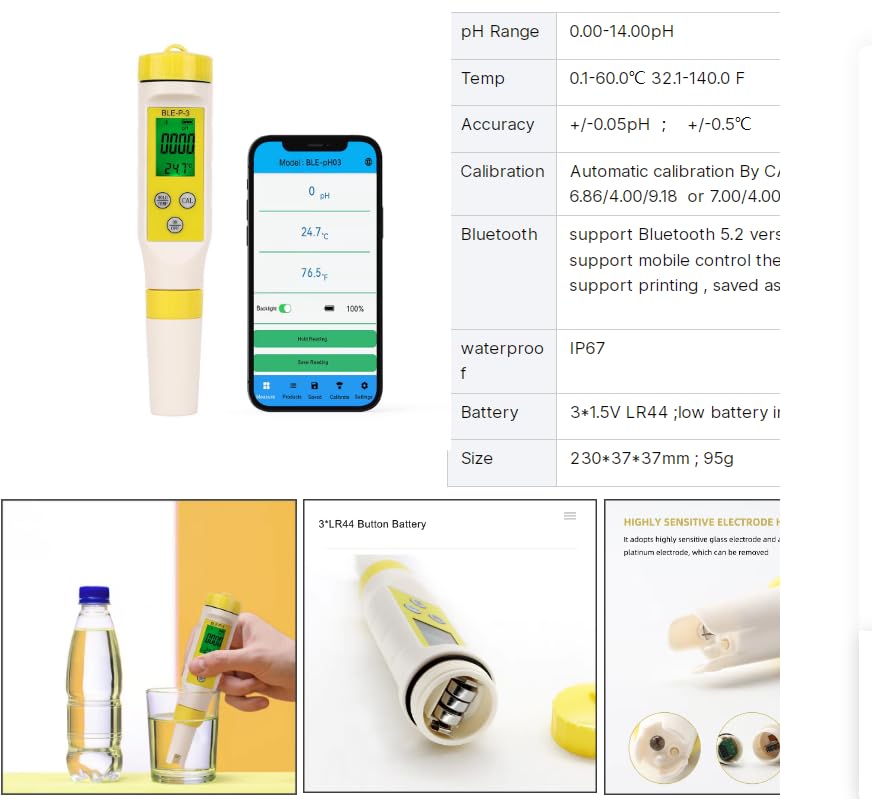
Image: A table detailing the technical specifications of the BLE-P-3 pH meter, including pH range, temperature range, accuracy, calibration method, Bluetooth version, waterproof rating, battery type, and physical size.
| Parameter | Value |
|---|---|
| pH Range | 0.00 - 14.00 pH |
| pH Resolution | 0.01 pH |
| pH Accuracy | ±0.05 pH |
| Temperature Range | 0.1 - 60.0°C (32.1 - 140.0°F) |
| Temperature Accuracy | ±0.5°C |
| Calibration | Automatic 5-point calibration (pH 6.86/4.00/9.18 or 7.00/4.00/10.01) |
| Bluetooth | Bluetooth 5.2 (supports mobile control) |
| Waterproof Rating | IP67 |
| Battery | 3 x 1.5V LR44 Button Battery |
| Dimensions | 230 x 37 x 37 mm |
| Weight | 95g |
Warranty and Support
For warranty information, technical support, or service inquiries, please refer to the product packaging or contact your retailer. Keep your purchase receipt as proof of purchase.